

Tech & Gadgets
The Best 3D Printers: 4 Compared (and One to Skip)
We compared four current consumer 3D printers on setup, print quality, speed, materials, and value to find the ones worth buying in 2026.
The short version
For most people buying a 3D printer in 2026, the Bambu Lab A1 is the easy call: it auto-calibrates, prints cleanly out of the box, and adds multicolor cheaply. If you print functional parts in ABS or ASA, the enclosed Prusa CORE One is worth its higher price for its reliability and material range. The Elegoo Saturn 4 Ultra 16K is a superb resin printer for miniatures, but only if you want that specific, messier workflow. The classic Creality Ender-3 V3 is capable and cheap, yet newer rivals now beat it on setup and polish. Best for: buy the A1 for effortless everyday printing, or the CORE One for serious engineering work.
Our picks at a glance
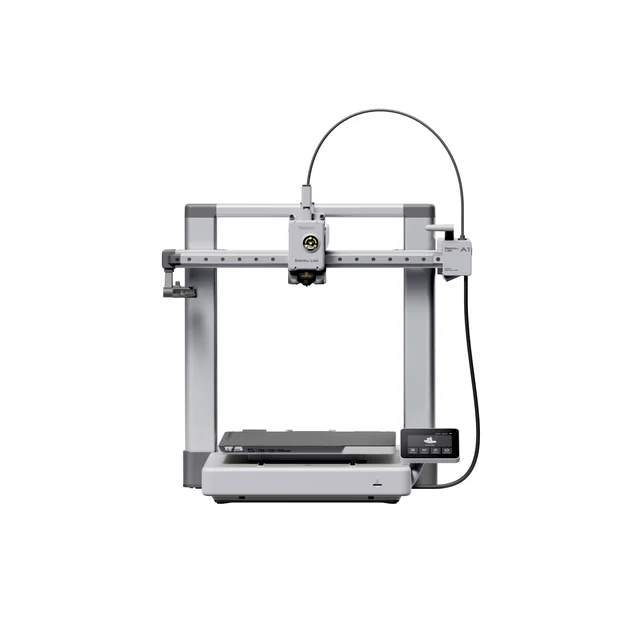
- Bambu Lab A1 - Buy. The printer that turns 3D printing from a hobby-project into an appliance you actually use.
- Prusa Research Prusa CORE One - Buy. An enclosed CoreXY workhorse for people who print functional parts in demanding materials.
- Elegoo Saturn 4 Ultra 16K - It depends. Stunning fine detail for miniatures and models, but a messier, more demanding workflow than filament.
- Creality Ender-3 V3 - Skip. A fast, capable descendant of the printer that defined budget 3D printing, now outclassed on experience.
The verdict in 30 seconds
What mattered most
- Setup & first print
- Out-of-box print quality
- Speed
- Materials & enclosure
- Multicolor
- Best model type
The consumer 3D-printer market changed fast, and 2026 is a good year to buy: machines now auto-calibrate, print cleanly out of the box, and mostly just work. We weighed a friendly all-rounder, an enclosed engineering workhorse, a detail-focused resin printer, and a classic budget bedslinger. Two are easy recommendations, one only makes sense for a specific job, and one has quietly been left behind.
The printer that turns 3D printing from a hobby-project into an appliance you actually use.
Best for: First-time buyers and hobbyists who want great prints with almost no tinkering.
- Genuinely hands-off auto-calibration and excellent print quality straight out of the box
- Fast without visibly sacrificing surface finish, and quiet enough for a living room
- Optional AMS lite adds clean four-color printing without a big price jump
- Open frame struggles with ABS, ASA, and nylon that need a heated enclosure
- You are buying into Bambu's cloud-leaning ecosystem, which not everyone loves
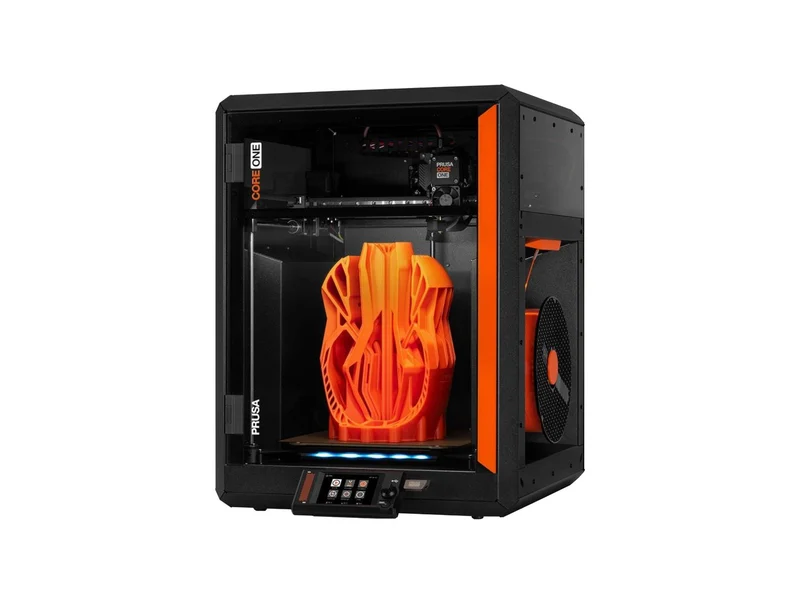
An enclosed CoreXY workhorse for people who print functional parts in demanding materials.
Best for: Engineers, makers, and small shops printing durable parts who value reliability over price.
- Enclosed chamber suited to ABS, ASA, and other engineering materials where open printers struggle
- Reputation for long-term reliability, repairability, and strong documentation and support
- Faster motion system than the older bedslinger Prusas while keeping their tuning polish
- Costs considerably more than a capable beginner machine
- Overkill if you mostly print PLA and PETG decorations and toys
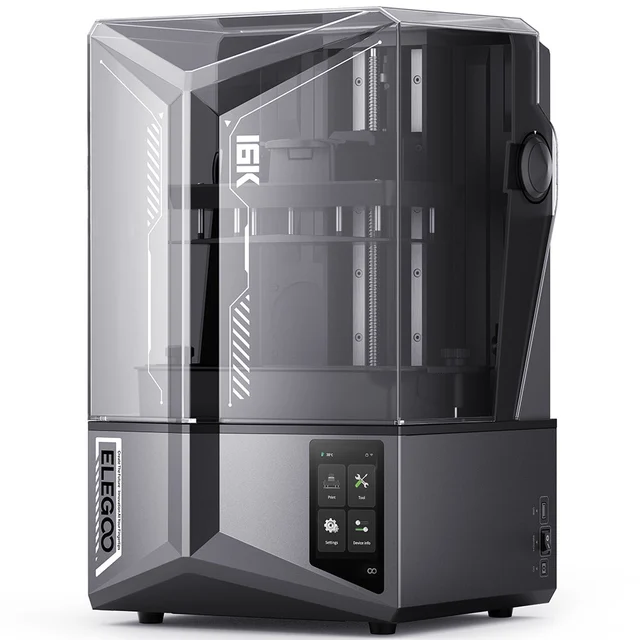
Stunning fine detail for miniatures and models, but a messier, more demanding workflow than filament.
Best for: Tabletop-gaming painters and modelmakers who prioritize detail and accept the resin routine.
- Very high-resolution prints that filament machines generally cannot match on fine detail
- Generous build area for a resin printer, good for batching miniatures and busts
- Resin design aims to reduce failed prints on delicate models
- Liquid resin is messy and needs gloves, ventilation, and careful washing and curing
- It is a specialist detail tool, not a general-purpose printer for brackets or big functional parts
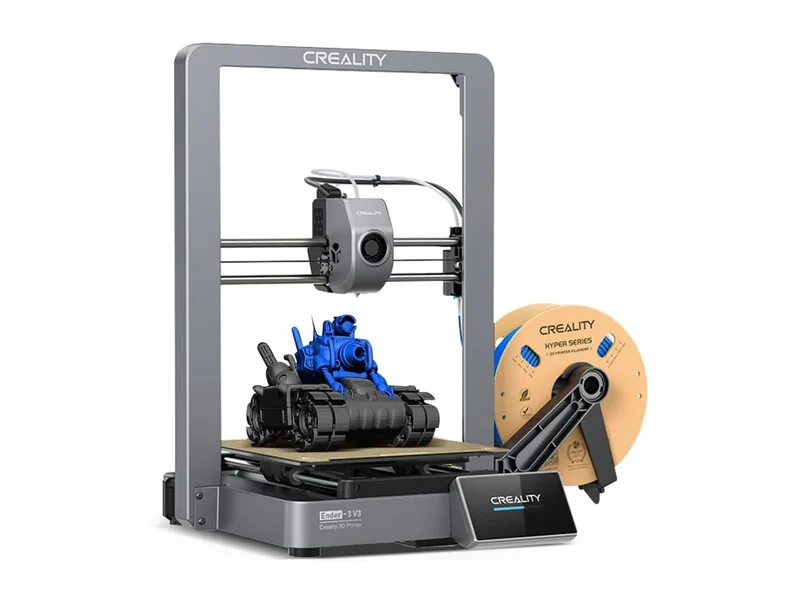
A fast, capable descendant of the printer that defined budget 3D printing, now outclassed on experience.
Best for: Tinkerers on a tight budget who enjoy the machine as much as the prints it makes.
- Genuinely inexpensive with a large, active community and cheap replacement parts
- Faster motion and auto-calibration versus the old Ender 3 it evolved from
- Owners report a fussier setup and more tuning than newer rivals at a similar price
- Support experiences are inconsistent, and the out-of-box polish trails the class leaders
| Criteria | Bambu Lab A1 Top pick | Prusa CORE One | Elegoo Saturn 4 Ultra 16K | Creality Ender-3 V3 |
|---|---|---|---|---|
| Verdict | Buy it | Buy it | It depends | Skip it |
| Best for | First-time buyers and hobbyists who want great prints with almost no tinkering. | Engineers, makers, and small shops printing durable parts who value reliability over price. | Tabletop-gaming painters and modelmakers who prioritize detail and accept the resin routine. | Tinkerers on a tight budget who enjoy the machine as much as the prints it makes. |
| Price tier | $$ · mid-range | $$$$ · flagship | $$$ · premium | $ · budget |
| Setup & first print | Near hands-off, prints in minutes | Plug-and-print setup | Resin prep adds steps | More fiddly, needs some tuning |
| Out-of-box print quality | Excellent | Excellent and consistent | Very fine detail (resin) | Good once dialed in |
| Speed | Fast | Fast | Layer-based resin speed | Fast on paper, less refined |
| Materials & enclosure | Open frame; PLA, PETG, TPU | Enclosed; ABS, ASA, engineering materials | UV resin only | Open frame; PLA, PETG, some ABS |
| Multicolor | Yes, with AMS lite | Single color | Not applicable (resin) | Single color |
| Best model type | Everyday prints and toys | Functional engineering parts | Miniatures and detailed models | Budget general printing |
| Ecosystem & support | Polished app, cloud-leaning | Strong docs, repairable, well supported | Solid app, active hobby community | Huge community, uneven support |
| Price tier | $$ · mid-range | $$$$ · flagship | $$$ · premium | $ · budget |
Which one is right for you?
- First-time buyers and hobbyists who want great prints with almost no tinkering. Buy it Bambu Lab A1
- Engineers, makers, and small shops printing durable parts who value reliability over price. Buy it Prusa Research Prusa CORE One
- Tabletop-gaming painters and modelmakers who prioritize detail and accept the resin routine. It depends Elegoo Saturn 4 Ultra 16K
- Tinkerers on a tight budget who enjoy the machine as much as the prints it makes. Skip it Creality Ender-3 V3
How we judged the field
We do not run our own print lab. Instead we synthesize independent testing, expert reviews, and aggregated owner reports to see where the consensus lands and, just as importantly, where it splits. For 3D printers, a handful of criteria matter more than headline speed numbers.
First is the out-of-box experience: how much fighting stands between unboxing and a clean first print. Second is print quality on everyday jobs, because a fast printer that produces stringy, warped parts is a slow printer in disguise. Third is material range and whether the machine is enclosed, which decides if you can move beyond PLA into tougher engineering plastics. We also weighed multicolor capability, ecosystem and support quality, and honest, qualitative value rather than any single price. Reviewers and owners tend to agree that in 2026 the biggest differences are no longer about who can print fast, but about who removes the most friction.
Bambu Lab A1
Buy itThe A1 is a machine that owner reports often describe as a new default. Auto-calibration that actually works, strong print quality with little tuning, and quiet operation make it approachable for people who want objects, not a project. Its print quality is reported to hold up at speed, and the optional AMS lite brings tidy four-color printing without a painful upcharge. The main limitation is physical: as an open-frame printer it cannot reliably hold the chamber heat that ABS, ASA, and nylon want. For PLA, PETG, and TPU, though, owners rate it the friendliest path to good prints, and that is what most buyers actually need.
Prusa CORE One
Buy itThe CORE One is the enclosed CoreXY machine for people whose prints have to do a job. Its closed chamber lets it run engineering materials that challenge open printers, and its faster motion system brings Prusa into speed territory its older bedslingers did not reach. What earns it a buy is not novelty but track record: reviewers and long-time owners often cite Prusa’s reliability, repairability, and thorough documentation and support. You pay a clear premium for it, and that premium is hard to justify if you only print decorative PLA. But for functional parts, small-shop use, and anyone who values a machine that keeps running, it is a confident recommendation.
Elegoo Saturn 4 Ultra 16K
It dependsResin is a different craft, and the Saturn 4 Ultra 16K is a strong current tool for it. Reviews praise its very high resolution and generous build area. For miniatures, busts, and highly detailed models, filament printers generally cannot match what resin produces. The catch is the workflow: liquid resin is messy and demands gloves, ventilation, and a wash-and-cure routine, and the machine is a specialist rather than a do-everything printer. If detailed models are your goal and the process does not scare you, it is excellent; if you want one printer for general use, it is the wrong tool.
Creality Ender-3 V3
Skip itThe Ender line defined budget 3D printing, and the V3 is a real modernization, with a faster motion system and auto-calibration added to that famously affordable, endlessly upgradable platform. Owners still love the low price, the enormous community, and the cheap spare parts. The reason it lands as a skip is comparative, not absolute: at a similar spend, the Bambu Lab A1 gives a smoother setup and more consistent results with less fuss, and owner reports flag Creality’s support as hit-or-miss. If you enjoy tinkering and want the cheapest entry, it remains defensible. For most first-time buyers, the small step up buys a much calmer experience.
Bambu Lab A1 vs Prusa CORE One: which should you buy?
These are the two we would actually hand money over for, and they answer different questions. The A1 is about ease and value: it is cheaper, it is the simplest way into clean multicolor printing, and it asks almost nothing of a beginner. The CORE One is about capability and longevity: it is enclosed, so it prints tough engineering materials the A1 cannot, and it carries Prusa’s reputation for running reliably over the long term.
Decide by what you print. If your world is PLA and PETG models, gifts, and household fixes, the A1 delivers the better experience for far less money, and the extra spend on the CORE One largely goes to features you would not use. If you print functional parts, work with ABS, ASA, or nylon, or simply want the most dependable long-term machine, the CORE One justifies its flagship price. Most people should start with the A1; buyers with engineering needs should go straight to the CORE One.
What to look for
- Auto-calibration and bed leveling: one of the biggest predictors of a good first-print experience.
- Enclosure: required for ABS, ASA, polycarbonate, and nylon; optional for PLA and PETG.
- Filament vs resin: filament for general use, resin only when fine detail is the priority.
- Multicolor support: worth it if you want it, but it adds cost and complexity.
- Ecosystem and support: documentation, spare-part availability, and community size matter for the long run.
- Honest value: the cheapest printer is not the best value if it costs you hours of tuning.
Our final take
Buying a consumer 3D printer in 2026 is easier than it used to be, and two machines make it genuinely simple. The Bambu Lab A1 is the printer we would recommend to most people first, because it removes the friction that used to make this hobby frustrating. If your prints need to survive real use, the enclosed Prusa CORE One is worth its higher price for its material range and its reliability. The Elegoo Saturn 4 Ultra 16K is a superb pick, but only for the detail-focused resin crowd who want that specific workflow. And the Creality Ender-3 V3, once the obvious starting point, is now the one to skip unless the rock-bottom price and tinkering appeal are exactly what you are after.
Questions, answered
Is resin or filament (FDM) better for a first 3D printer?
For most beginners, a filament (FDM) printer like the Bambu Lab A1 is the friendlier start: no gloves, no liquid resin, and it handles a huge range of everyday objects. Resin printers like the Elegoo Saturn 4 Ultra 16K produce far finer detail for miniatures and models, but they involve messy liquid resin, ventilation, and post-processing. Pick FDM for general use and resin only if fine detail is your main goal.
Do I need an enclosed printer?
Only if you plan to print engineering materials such as ABS, ASA, polycarbonate, or nylon, which need a warm, stable chamber to avoid warping. That is the case for the enclosed Prusa CORE One. If you mostly print PLA, PETG, and TPU, an open-frame machine like the A1 or Ender-3 V3 is perfectly fine and usually cheaper.
Why skip the Creality Ender-3 V3 when it is so cheap?
It is a genuinely capable, affordable printer with a big community, and if the low price is decisive it can still serve you well. We rank it a skip because, at a similar price, the Bambu Lab A1 tends to deliver a smoother setup and more consistent results with less tuning, and owner reports point to more inconsistent support from Creality. For most buyers the small extra spend is worth it.
Is resin printing safe to do at home?
This is general product information, not safety or medical advice. Uncured liquid resin and its fumes can irritate skin and airways, so owners typically use nitrile gloves, work in a well-ventilated space, and wash and UV-cure prints before handling. Follow the manufacturer's safety instructions and local disposal rules, and consult a qualified professional if you have specific health concerns.
Can these printers do multicolor prints?
The Bambu Lab A1 can, using the add-on AMS lite multi-material unit, which is the simplest multicolor setup in this group. The Prusa CORE One and Creality Ender-3 V3 print a single color at a time in their standard form. Resin printers like the Elegoo Saturn 4 Ultra 16K print in one resin color per job.
Deciding between the top two? See our head-to-head: Bambu Lab A1 vs Prusa Research Prusa CORE One.
More Tech & Gadgets reviews
 The Best 4K Streaming Devices in 2026 (and the One to Skip)
  The Best 4K TVs: 4 Compared (and One to Skip)
  The Best Action Cameras: 4 Compared (and One to Skip)
  The Best All-in-One Computers: 4 Compared (and One to Skip)
  The Best Anemometers: 4 Compared (and One to Skip)
  The Best USB Bluetooth Adapters: 4 Compared (and One to Skip)