

Tech & Gadgets
The Best All-in-One Computers: 4 Compared (and One to Skip)
We compared four current all-in-one desktops for home and family use on screen quality, everyday speed, value, and how little clutter they leave on your desk.

The short version
For a home or family desk, the Apple iMac 24-inch (M4) is the all-in-one to beat: a stunning screen, quiet speed, and the least fuss of anything here. Windows families who want a big, premium canvas should look at the HP OmniStudio X 31.5-inch, which pairs a huge 4K display with modern internals. The Lenovo IdeaCentre AIO 27 is a smart-value pick if you can accept a lower-resolution 27-inch panel. The Dell 24 All-in-One is the one to pass on, asking mainstream prices for entry-level specs and a plain screen. Best for: most families the iMac, big-screen Windows households the HP OmniStudio X, and budget-first buyers the Lenovo.
Our picks at a glance
- Apple iMac 24-inch (M4) - Buy. A polished, low-hassle all-in-one for a family desk.
- HP OmniStudio X 31.5-inch All-in-One - Buy. A huge, sharp 4K Windows canvas for families who want the biggest screen in the house.
- Lenovo IdeaCentre AIO 27 - It depends. A well-priced 27-inch touch all-in-one that's held back mainly by a plain-resolution screen.
- Dell 24 All-in-One (EC24250) - Skip. A tidy-looking machine that can ask mainstream money for entry-level specs.
The verdict in 30 seconds
What mattered most
- Screen size
- Screen sharpness
- Operating system
- Everyday speed
- Touchscreen
- Desk footprint & tidiness
An all-in-one desktop hides the whole computer behind the screen, so the whole family gets a real workstation without a tower, a tangle of cables, or a separate monitor. The field in 2026 splits cleanly: Apple's iMac still sets the bar for a calm, polished experience, a couple of big-screen Windows machines make a genuine case, and at least one mainstream option is quietly outclassed. Two of these four are easy recommendations, one is a maybe, and one is the machine we'd steer families away from.
A polished, low-hassle all-in-one for a family desk.
Best for: Families who want a beautiful, reliable, quiet computer and are comfortable in macOS.
- Gorgeous 4.5K Retina screen that looks sharp and color-accurate straight out of the box
- M4 chip stays fast and quiet under normal family workloads
- Genuinely tidy: one thin panel, a colour-matched keyboard and mouse, and a single power cable
- Only a 24-inch screen option
- Memory and storage are fixed at purchase and can't be upgraded later
Own the Apple iMac 24-inch (M4)? Tell us how it held up.
Thanks. Counted, and shown once enough owners have weighed in.
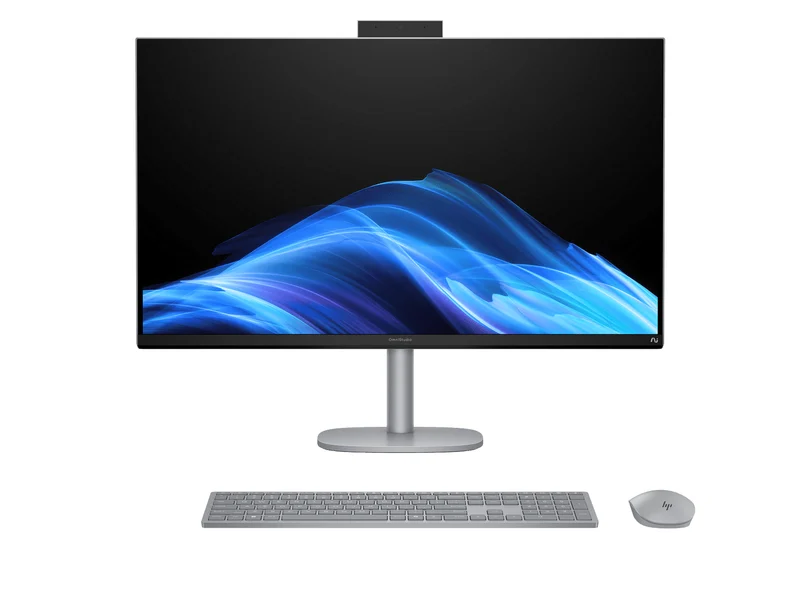
A huge, sharp 4K Windows canvas for families who want the biggest screen in the house.
Best for: Windows households that want a big, premium shared screen for schoolwork, media and multitasking.
- Enormous 31.5-inch 4K display with room for several windows side by side
- Modern Intel Core Ultra internals handle photos, video calls and light creative work
- A height-adjustable stand and a good port selection make it easy to live with (confirm on your configuration)
- Commands a flagship price, and the sheer size dominates a desk
- May run warmer and less quietly than the iMac when pushed
Own the HP OmniStudio X 31.5-inch All-in-One? Tell us how it held up.
Thanks. Counted, and shown once enough owners have weighed in.
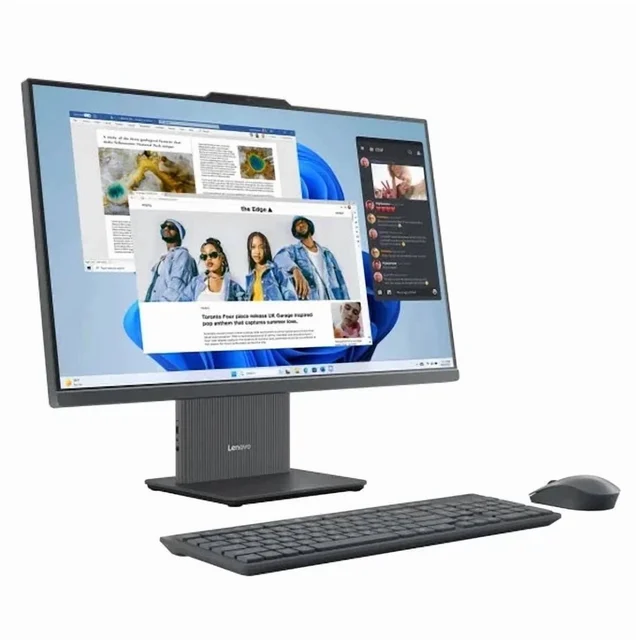
A well-priced 27-inch touch all-in-one that's held back mainly by a plain-resolution screen.
Best for: Value-minded families who want a big touchscreen Windows AIO and can live with a lower-resolution panel.
- Large 27-inch touchscreen with a generous amount of memory and storage for the money
- Current AMD Ryzen AI silicon keeps everyday tasks and browsing snappy
- Keyboard, mouse and a privacy webcam are reportedly included in the box
- The 27-inch panel is Full HD, so it looks softer than the iMac or the OmniStudio X
- Styling and build feel functional rather than premium
Own the Lenovo IdeaCentre AIO 27? Tell us how it held up.
Thanks. Counted, and shown once enough owners have weighed in.
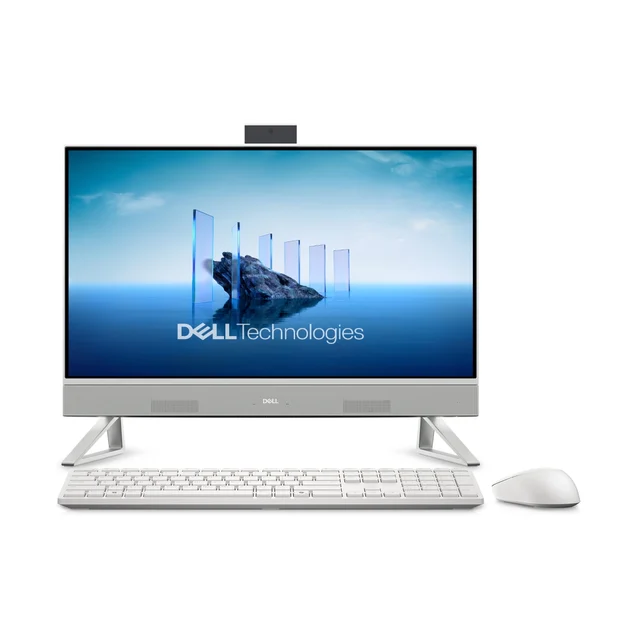
A tidy-looking machine that can ask mainstream money for entry-level specs.
Best for: Few buyers at its usual price; only worth a look if it's deeply discounted and paired with more memory.
- Clean, unobtrusive design with a built-in webcam and a small desk footprint
- Keyboard and mouse are included, so it's ready to go out of the box
- Some configurations ship with just 8GB of memory, which feels tight for Windows 11 family multitasking
- A plain 23.8-inch Full HD panel (touch only on some configurations) for a price that buys sharper, bigger rivals
- Forgettable overall, with little that beats what the other three do for the money
Own the Dell 24 All-in-One (EC24250)? Tell us how it held up.
Thanks. Counted, and shown once enough owners have weighed in.
| Criteria | Apple iMac 24-inch (M4) Top pick Buy it Buy | HP OmniStudio X 31.5-inch All-in-One Buy it Buy | Lenovo IdeaCentre AIO 27 It depends Buy | Dell 24 All-in-One (EC24250) Skip it Buy |
|---|---|---|---|---|
| Best for | Families who want a beautiful, reliable, quiet computer and are comfortable in macOS. | Windows households that want a big, premium shared screen for schoolwork, media and multitasking. | Value-minded families who want a big touchscreen Windows AIO and can live with a lower-resolution panel. | Few buyers at its usual price; only worth a look if it's deeply discounted and paired with more memory. |
| Price tier | $$$ · premium | $$$$ · flagship | $$ · mid-range | $$ · mid-range |
| Screen size | 24-inch | 31.5-inch | 27-inch | 23.8-inch |
| Screen sharpness | Very high (4.5K Retina) | Very high (4K UHD) | Standard (Full HD) | Standard (Full HD) |
| Operating system | macOS | Windows 11 | Windows 11 | Windows 11 |
| Everyday speed | Excellent, quiet | Excellent | Good | Adequate |
| Touchscreen | No | Varies by model | Yes | Varies by model |
| Desk footprint & tidiness | Excellent | Large but clean | Good | Good |
| Value for a family | Strong | Strong if you want the size | Good | Weak |
| Price tier | $$$ · premium | $$$$ · flagship | $$ · mid-range | $$ · mid-range |
Which one is right for you?
- Families who want a beautiful, reliable, quiet computer and are comfortable in macOS. Buy it Apple iMac 24-inch (M4)
- Windows households that want a big, premium shared screen for schoolwork, media and multitasking. Buy it HP OmniStudio X 31.5-inch All-in-One
- Value-minded families who want a big touchscreen Windows AIO and can live with a lower-resolution panel. It depends Lenovo IdeaCentre AIO 27
- Few buyers at its usual price; only worth a look if it's deeply discounted and paired with more memory. Skip it Dell 24 All-in-One (EC24250)
How we judged the field
We don’t run our own lab. Instead, we synthesise independent testing and long-run owner reports, then weigh what actually matters for a computer that lives on a family desk rather than in a spec sheet. Four things carried the most weight.
First, the screen: an all-in-one is its display, so sharpness, brightness and colour matter more here than on almost any other kind of computer. Second, everyday speed and noise: family machines spend their lives juggling browser tabs, video calls, homework and streaming, and the best ones do it quickly and quietly. Third, how tidy and livable the whole package is, from cable clutter to whether a keyboard and mouse are included. Finally, honest value: not the lowest price, but how much useful computer you get for the money, keeping in mind that most all-in-ones can’t be upgraded later. Reviewers and owners broadly agree on where each of these machines lands, and that consensus shapes the verdicts below.
Apple iMac 24-inch (M4)
Buy itThe iMac remains the one to beat. Its 4.5K Retina screen is widely praised as one of the sharpest, most color-accurate panels in any all-in-one, and owners note how good it looks with no calibration. The M4 chip keeps the machine fast and quiet, with no fan roar reported during a video call or a pile of browser tabs. It’s also the tidiest computer here: a single slim panel, a colour-matched keyboard and mouse, and essentially one cable to the wall.
The trade-offs are real but narrow. You’re limited to a 24-inch screen with no larger option, and the memory and storage you choose at checkout are the memory and storage you keep. For most families, neither is a dealbreaker - but it does mean buying a sensible configuration up front rather than the cheapest one.
HP OmniStudio X 31.5-inch All-in-One
Buy itIf you want to stay in Windows, or you simply want the biggest, most impressive screen in the house, the OmniStudio X is the standout. Its 31.5-inch 4K display is enormous and sharp, with genuine room to put documents, a video call and a browser side by side. Modern Intel Core Ultra internals handle everyday tasks, photo work and light creative jobs comfortably, and the stand and ports are reported to make it pleasant to live with.
It asks a flagship price, and that giant panel takes over a desk. It may also run warmer and less hushed than the iMac when you push it. But as a premium Windows all-in-one for a family that wants scale, it delivers.
Lenovo IdeaCentre AIO 27
It dependsThe IdeaCentre is the value play. You get a large 27-inch touchscreen, a healthy amount of memory and storage for the money, current AMD Ryzen AI silicon that keeps browsing and everyday apps snappy, and a keyboard, mouse and privacy camera in the box. For a lot of families, that’s plenty of computer at a friendly price.
The catch is the screen: on a panel this large, the Full HD resolution looks noticeably softer than the iMac or the OmniStudio X, and that’s the first thing sharp-eyed owners tend to mention. Styling is practical rather than premium. Whether it’s the right buy comes down to price and priorities - if a big touchscreen and low cost matter more than pixel sharpness, it’s easy to recommend; if the screen has to look crisp, spend up.
Dell 24 All-in-One (EC24250)
Skip itOn the surface the Dell looks fine: a clean design, a built-in webcam, a small footprint, and a keyboard and mouse included. The problem is what you get for the money. Some configurations carry just 8GB of memory, which feels tight for Windows 11 once a family piles on browser tabs and video calls, and the 23.8-inch panel is a plain Full HD screen (touch on some configurations) at a price that buys sharper and bigger rivals. Dell also lists a newer 24-inch model, so check what is currently sold.
Nothing about it is broken - it’s simply outclassed. For the same outlay you can get the Lenovo’s larger touchscreen, and for a bit more the iMac or OmniStudio X are in a different league. Unless you find it deeply discounted and can pair it with more memory, this is the one to walk past.
Sources
Specs in this review come from these pages.
Apple iMac 24-inch (M4) vs HP OmniStudio X 31.5-inch: which should you buy?
These are the two we’d hand to a family without hesitation, and the choice mostly comes down to ecosystem and size. The iMac wins on refinement: a superb screen, quiet operation, easy setup, and the tidiest desk of anything here. It’s the low-stress choice, especially if you already use iPhones or iPads.
The OmniStudio X wins on scale and familiarity. Its 31.5-inch 4K display is much bigger than the iMac’s 24 inches, which is a real advantage for multitasking, shared viewing and anyone who finds macOS unfamiliar. It costs more and takes more room, but for a Windows household that wants a premium centrepiece, it’s worth it. Put simply: pick the iMac for calm, compact polish; pick the OmniStudio X for a big Windows canvas.
What to look for
- Screen first. On an all-in-one the display is the product - favour a sharp, bright panel, and be wary of Full HD stretched across a 27-inch-or-larger screen.
- At least 16GB of memory. 8GB is where family multitasking starts to drag; 16GB is the comfortable baseline in 2026.
- Fast, roomy storage. Aim for a 512GB or 1TB solid-state drive, and avoid tiny or slow storage on bargain models.
- Remember it’s hard to upgrade. Most all-in-ones seal everything behind the screen, so buy the specs you’ll need up front.
- Check what’s in the box. A keyboard, mouse and a webcam (ideally with a privacy shutter) save money and hassle.
- Match the operating system to your family. Choose the platform and software your household already knows.
Our final take
The all-in-one category is in good shape, and for most families the decision is refreshingly simple. The Apple iMac 24-inch (M4) is our top pick: it looks superb, runs quietly, sets up quickly and leaves the cleanest desk. Windows households, or anyone who wants the largest premium screen available, should buy the HP OmniStudio X 31.5-inch with confidence. If budget leads, the Lenovo IdeaCentre AIO 27 is a sensible big-screen compromise as long as you accept its plainer panel. The Dell 24 All-in-One is the outlier - not bad, just beaten on value at every turn - and it’s the one we’d skip.
Questions, answered
Is an all-in-one better than a laptop or a mini PC for a family?
It depends on how you use it. An all-in-one gives you a big, comfortable screen and a real keyboard at a fixed spot in the home, which suits shared homework, video calls and media far better than a small laptop. It's less portable than a laptop and less flexible than a mini PC (where you pick your own monitor), but for a permanent family desk the tidy, everything-included nature of an AIO is a genuine advantage.
How much memory and storage should a family all-in-one have?
For comfortable Windows 11 or macOS multitasking in 2026, aim for at least 16GB of memory; 8GB is where things start to feel sluggish once you have a browser, video calls and a couple of apps open. For storage, a 512GB or 1TB solid-state drive is a sensible target, and it's worth avoiding tiny or slow storage on very cheap models. On machines like the iMac, memory and storage can't be upgraded later, so buy what you'll need up front.
Do I need a touchscreen on an all-in-one?
Not usually. A touchscreen is nice for kids, quick scrolling and casual browsing, but on a desktop most people rely on the keyboard and mouse. Among these four, the Lenovo offers touch, and the HP and Dell do on some configurations; the iMac does not. Treat touch as a bonus rather than a deciding factor.
Should I choose macOS (iMac) or a Windows all-in-one?
Pick the system your family already knows and the software you rely on. macOS on the iMac is smooth, secure and low-maintenance, and pairs naturally with iPhones and iPads. Windows offers the widest app and game compatibility and more choice in screen sizes and prices. Neither is 'better' outright; the right call is whichever fits your existing devices and habits.
Can I upgrade an all-in-one later?
Far less than a traditional tower. Most all-in-ones seal the components behind the screen, so memory and storage are difficult or impossible to change after purchase; the iMac in particular is fixed at the configuration you buy. That makes it important to buy enough memory and storage now, and it's a big reason we favour models that offer sensible specs at a fair price rather than the cheapest sticker.
Deciding between the top two? See our head-to-head: Apple iMac 24-inch (M4) vs HP OmniStudio X 31.5-inch All-in-One.
More in Tech & Gadgets
All-in-One Computers, Explained Plain-English guide → Apple iMac 24-inch (M4) vs HP OmniStudio X 31.5-inch All-in-One Head-to-head →  The Best Anemometers: 4 Compared (and One to Skip)
  The Best USB Bluetooth Adapters: 4 Compared (and One to Skip)
  The Best Bluetooth Item Trackers (2026): AirTag-Style Finders, Honestly Compared
  The Best Book Lights: 4 Compared (and One to Skip)