Explained
USB Bluetooth Adapters, Explained
After reading, you'll know exactly which Bluetooth dongle specs matter for your PC and which ones are marketing noise.
In this guide
A USB Bluetooth adapter (or 'dongle') is a small stick that plugs into a spare USB port and gives a desktop or older laptop the wireless Bluetooth it was missing, so it can talk to mice, keyboards, controllers, headphones, and speakers. The listings look nearly identical, but they hide real differences in Bluetooth version, audio quality, and how painful setup is on Windows. The biggest trap is assuming every dongle does everything, or that a fancier audio codec on the box will actually reach your ears.
The 30-second version
- A current 5.x dongle is the default. For adding Bluetooth to a PC, a modern Bluetooth 5.x nano adapter is all most people need, and it usually costs no more than an older 4.0 one.
- Audio codecs only work if both ends match. A transmitter can only use aptX or LDAC if your headphones support the same codec, and on Windows most standard dongles fall back to plain SBC regardless of the sticker.
- General-purpose and audio-only are different tools. A normal dongle connects mice, keyboards, controllers, and headsets together; a dedicated audio transmitter handles only sound but adds low-latency codecs and better range.
- Setup hassle is the hidden spec. The best modern dongles are plug-and-play on Windows 10 and 11, while cheaper or older ones can force a manual driver install and a fight with the built-in Windows driver.
The products this guide is about
Our verdict on each, with the full reasoning on the companion review.
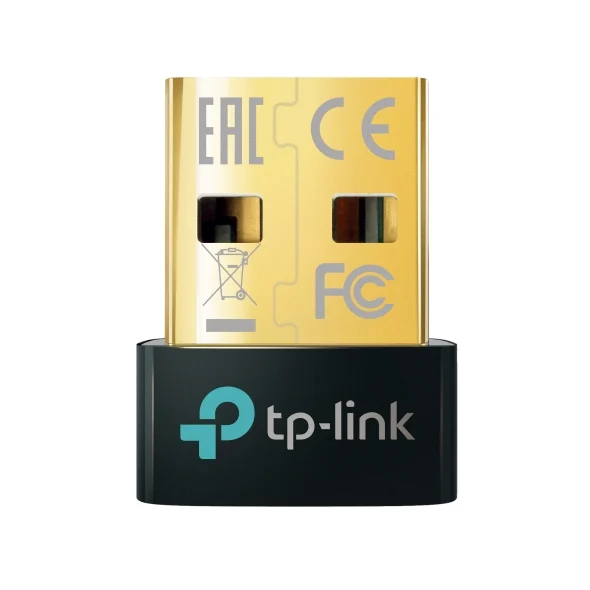
- Buy TP-Link UB500 The default answer for most people: tiny, plug-and-play on Windows 10/11, and cheap enough to be an impulse buy. Amazon
- Buy ASUS USB-BT500 A rock-solid, ultra-compact Bluetooth 5.0 alternative with a strong driver track record for finicky desktop builds.
- It depends Avantree DG80 Not a general-purpose dongle at all, but a dedicated low-latency audio transmitter for wireless headphones on PC and consoles. Amazon
- Skip TP-Link UB400 A dated Bluetooth 4.0 dongle that is often priced close to a 5.x model while offering an older Bluetooth generation. Amazon
What actually matters
- Bluetooth version — a current 5.x adapter gives better range, faster reconnection, and smoother handling of several devices at once than an older 4.0 part, usually for the same money.
- Setup and driver behavior — 'plug-and-play on Windows 10/11' means the dongle just works; anything needing a manual driver install is a chore, and older Windows such as Windows 7 can need one.
- What you actually want to connect — peripherals and everyday audio call for a standard dongle, while lag-free wireless-headphone gaming calls for a dedicated audio transmitter, and the two aren't interchangeable.
- Audio expectations — for music and calls any dongle over SBC is fine, but low-latency, high-quality wireless sound depends on both the adapter and the headphones supporting the same premium codec.
- Chipset behind the label — the real driver experience is decided by the internal chip (from makers like Realtek, CSR/Qualcomm, or Broadcom), not by the brand printed on the case.
- Form factor vs. range — a tiny 'nano' dongle is convenient and near-flush but trades away range; a longer body or external antenna holds a connection better across a room.
- Latency — the delay between action and sound matters for gaming and video; ordinary Bluetooth audio can lag noticeably, and only low-latency codecs meaningfully fix lip-sync.
The specs, in plain English
Green flags vs red flags
Green flags
- Explicitly listed as Bluetooth 5.0 or newer.
- Described as plug-and-play on Windows 10 and 11, with no driver disc required.
- A named, well-known chipset maker rather than an unbranded 'Bluetooth chip'.
- Clear about what it's for: either a general dongle for peripherals and audio, or a dedicated low-latency audio transmitter, without pretending to be both.
- For an audio transmitter: names the exact codecs it supports (for example aptX Low Latency) so you can match them to your headphones.
- Honest about range and form factor, noting that a nano body is best at desk distance.
Red flags
- Still Bluetooth 4.0 while priced like a current 5.x model.
- Requires a manual driver install for basic everyday use on modern Windows, buried in the fine print.
- Advertises premium codecs like aptX or LDAC without saying your headphones must also support them.
- Vague, brand-free spec sheet that never names a version, chipset, or supported codecs.
- Promises to be an all-in-one when it's actually an audio-only transmitter (or vice versa).
- Leans on a big 'up to' range number with no mention of walls, interference, or its tiny antenna.
Who's who: the brands
- TP-Link - Networking mainstay whose nano dongles are common plug-and-play defaults on modern Windows.
- ASUS - PC hardware brand valued for ongoing driver support, handy on desktop builds where a generic dongle misbehaves.
- Avantree - Specializes in Bluetooth audio gear, including dedicated low-latency transmitters for PCs and consoles rather than general dongles.
- UGREEN - Widely stocked accessory maker offering inexpensive, current-generation nano adapters.
- Plugable - Focuses on plug-and-play connectivity accessories with an emphasis on documented Windows compatibility.
How to read a listing without getting fooled
Start with the Bluetooth version: if it doesn't clearly say 5.0 or newer, assume it's an older 4.0 part and move on. Next, decide what you're connecting; a listing that talks about mice, keyboards, controllers, and headsets is a general dongle, while one that talks only about headphones, consoles, and low-latency audio is a specialized transmitter, and buying the wrong category is the most common mistake. Read the setup notes carefully: 'plug-and-play on Windows 10/11' is what you want, and any mention of a driver install tells you there's manual work ahead, more so on Windows 7. Treat codec badges with healthy skepticism: aptX or LDAC on the box means nothing unless your headphones list the same codec, and on Windows a general dongle often streams plain SBC anyway. Finally, weigh the form factor against range; a nano is perfect at your desk, but if you roam across a room, look for a longer body or an external antenna, and read any 'up to' distance as a lab-best figure, not what you'll get through walls.
How much should you spend?
These dongles cluster so tightly in price that value is about what you get for roughly the same outlay, not headline cost. Because a current Bluetooth 5.x nano typically costs about the same as a dated 4.0 one, the cheapest listing is often the worst deal; paying essentially the same for the older version means taking a downgrade in range, multi-device handling, and setup ease for no real saving. For everyday needs, mice, keyboards, controllers, and casual headsets, a mainstream 5.x nano sits right in the value sweet spot, and spending more buys you little because Windows tends to level audio to SBC anyway. The one time stepping up is justified is a specific problem: if you genuinely want low-latency wireless-headphone audio for gaming or video, a dedicated audio transmitter with a low-latency codec is worth the premium, provided your headphones support that codec. Outside that case, extra money rarely buys a better everyday experience.
Questions, answered
Do USB Bluetooth adapters need drivers?
The best modern ones don't for everyday use. On Windows 10 and 11, plug-and-play adapters are recognized automatically, so you insert and go. Older-generation dongles, and some that rely on a specific chipset, still need a manual driver install, and occasionally you must disable the generic Windows Bluetooth driver first so the two don't conflict. On Windows 7, expect to install a driver regardless of model.
Will a USB Bluetooth adapter give me aptX or LDAC audio on Windows?
Usually not with a standard dongle. Windows generally streams over the basic SBC codec no matter which everyday adapter you use, so a cheap nano and a pricier one often sound identical for music. To get low-latency, higher-quality wireless audio you typically need a dedicated audio transmitter that supports the codec, plus headphones that support the same one. LDAC in particular is effectively an Android/Sony feature and isn't something these PC dongles reliably deliver.
Can one adapter connect a controller, mouse, and headphones at the same time?
A standard dongle can pair with several peripherals at once; a mouse, keyboard, and headset together is normal. The exception is a dedicated audio transmitter, which is audio-only and will connect headphones or speakers and nothing else. So match the tool to the job: buy a general dongle if you want to run peripherals and sound together, and an audio transmitter only if lag-free headphone audio is the goal.
Why not just buy the absolute cheapest dongle I can find?
Because price barely separates a current Bluetooth 5.x nano from an old 4.0 one, the cheapest listing is often the worst value. A 5.x adapter gives you better range, smoother multi-device handling, and, on modern Windows, no driver hassle. Paying essentially the same for a Bluetooth 4.0 part means accepting a downgrade for no saving.
Does a nano dongle have worse range than a stick with an antenna?
In practice, yes, a little. Nano adapters are optimized for size and are ideal at desk distance for peripherals and headsets. If you move further from the PC, for example wearing wireless headphones across a room, a design with a longer body or an external antenna holds the connection better. For a mouse and keyboard right at the machine, the difference rarely matters.
Or jump to the head-to-head: TP-Link UB500 vs ASUS USB-BT500.