Explained
Budget Tablets, Explained
After reading this you will understand every spec on a budget tablet listing and know which ones actually change how the device feels to live with.
In this guide
A budget tablet is easy to buy badly, because the spec sheet rewards the wrong things: big numbers for storage and megapixels, silence on the things you notice daily. What really decides whether a cheap tablet feels good is the screen, the chip, the speakers and, quietly, how many years it will keep getting software updates. This guide decodes each of those so you can read past the marketing.
The 30-second version
- Software support is the hidden spec. a tablet that stops getting updates in two years is a worse buy than a slightly slower one that keeps them for five, because it stops feeling current far sooner.
- The operating system decides everything else. iPadOS versus Android is not just taste; it shapes which apps are properly built for a tablet screen and how long the device stays supported.
- Screen size and refresh rate matter more than resolution. an 11-inch 90Hz panel feels far nicer for video and scrolling than a cramped 8.7-inch 60Hz one, regardless of the pixel count.
- Accessories are part of the price. a keyboard, stylus or case is usually sold separately and can quietly add a large chunk to the true cost, especially on the cheapest-looking pick.
- A cheap chip is fine until you ask too much of it. media, browsing and notes are comfortable on almost anything here; demanding games and heavy multitasking are where the budget silicon strains.
The products this guide is about
Our verdict on each, with the full reasoning on the companion review.
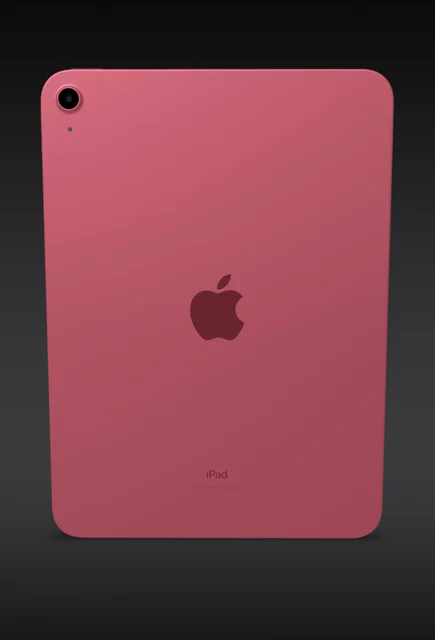
- Buy Apple iPad (A16) The priciest pick here, and still the safest for most people thanks to its apps and long update life. Amazon
- Buy Samsung Galaxy Tab A9+ The Android value pick: big sound and expandable storage for noticeably less money. Amazon
- It depends OnePlus Pad Lite A battery-first media slab that usually undercuts the field, if you can accept a modest chip. Amazon
- Skip Samsung Galaxy Tab A9 (8.7-inch) The cheapest way into a name-brand tablet, but the larger A9+ is worth the small step up. Amazon
What actually matters
- Operating system and ecosystem - iPadOS or Android sets which apps exist in proper tablet layouts and how the device fits with the phone you already own.
- Software-update lifespan - the number of years the maker promises security and feature updates; this is what keeps the tablet feeling current instead of abandoned.
- Screen size and refresh rate - a larger panel and a higher refresh rate (90Hz over 60Hz) do more for everyday comfort than any single resolution number.
- Processor (chip) - determines how smoothly apps, split-screen and games run; budget chips handle media easily but slow under heavy load.
- Speakers - quad speakers make a small tablet a genuinely enjoyable video device; stereo-only sound feels thin by comparison.
- Battery and charging speed - a large battery matters for long unplugged viewing, and faster charging (measured in watts) decides how long top-ups take.
- Expandable storage - a microSD slot lets you add cheap storage later, which some brands include and others deliberately omit.
The specs, in plain English
Green flags vs red flags
Green flags
- A clearly stated multi-year update commitment from the maker
- An 11-inch or larger screen running at 90Hz
- Quad speakers, ideally with Dolby Atmos tuning, for video and music
- A microSD slot and a headphone jack if you value flexibility and cheap storage
- A chip with visible headroom for split-screen and light gaming, not just browsing
Red flags
- No stated update policy, or a support window of only a year or two
- A cramped screen under 9 inches paired with a plain 60Hz refresh rate
- Stereo-only or tinny speakers on a device sold for entertainment
- A dim panel that will be hard to read outdoors or in bright rooms
- A very low headline price that balloons once you add the case, keyboard or stylus you actually need
- A model already discontinued or nearing the end of its update life
Who's who: the brands
- Apple - Makes the standard iPad; known for the longest update support and the deepest library of properly tablet-built apps, at a higher price.
- Samsung - Its Galaxy Tab A line is the mainstream Android value choice, offering strong speakers, expandable storage and a respectable stretch of updates.
- OnePlus - Its Pad Lite leans on a large battery and fast charging for media use, but commits to fewer years of updates than the leaders.
- Lenovo - A long-running maker of affordable Android tablets, often bundling entertainment features and stands, with a strong presence at the low end.
- Amazon - Its Fire tablets are among the cheapest available but run a locked-down version of Android built around Amazon's own store and services.
How to read a listing without getting fooled
Start at the bottom of the listing, not the top: find the operating system and the stated software-support window, because those decide how long the tablet stays useful more than any headline number. Next read the screen line carefully, since sellers love to quote resolution while staying quiet about size, refresh rate and whether the panel is laminated or bright enough for daylight. Treat the chip name as a rough class rather than a score; if the listing does not say the model, that silence is itself a warning. Check whether the speakers are stereo or quad, and whether a microSD slot and headphone jack are present. Finally, scan the fine print for what is not included, because a keyboard, stylus or even a charger sold separately can change the real price considerably.
How much should you spend?
Spending is really about matching the tablet to how long you plan to keep it and how hard you will push it. The cheapest models are tempting, but the value sweet spot usually sits a small step above the entry price, where you gain a larger, smoother screen, better speakers and a longer update commitment for a modest increase. Paying more is worth it when longevity and app quality lead your priorities, because a well-supported tablet stays useful for years while the very cheapest feel dated fast. Paying more is not worth it when the tablet is purely a couch-and-travel video device, where a big battery and decent speakers matter more than raw speed. Whatever tier you choose, budget for accessories separately, since a case, keyboard or stylus can quietly rival the cost of the tablet itself.
Questions, answered
How much should software support really weigh in my decision?
Heavily. A tablet that stops receiving updates becomes less secure and gradually incompatible with new apps, so a model with a longer support window stays useful for years after a cheaper rival feels abandoned. If two tablets are close, the one promising more years of updates is usually the smarter long-term buy.
Is an iPad or an Android tablet the better budget choice?
It depends on what you already use and how long you keep devices. An iPad offers the longest support and the best tablet-optimized apps, but costs more and charges extra for accessories. Android tablets from makers like Samsung often add expandable storage, louder speakers and a headphone jack for less money, with a shorter but still reasonable update life.
Can a budget tablet replace a laptop?
Not fully. These tablets are excellent for browsing, streaming, notes and video calls, but their modest chips and limited storage make heavy multitasking a strain. Adding a keyboard gets you closer, though by then the total cost often approaches better-value laptop territory.
Why does screen size and refresh rate matter more than resolution?
Because you feel size and smoothness constantly. A larger 11-inch panel is far more comfortable for video, reading and split-screen than a cramped sub-9-inch one, and a 90Hz refresh rate makes scrolling and motion look noticeably smoother than 60Hz. A high resolution number cannot rescue a screen that is too small or that stutters.
Do I need quad speakers, or is stereo fine?
If you mainly read or work, stereo is fine. If you watch video or listen to music on the tablet itself rather than headphones, quad speakers make a real difference in fullness and volume, and they are one of the easiest ways a budget Android tablet outperforms its price.
Or jump to the head-to-head: Apple iPad (A16) vs Samsung Galaxy Tab A9+.