Explained
Chromebooks, Explained
After reading this, you'll know which Chromebook specs actually change your daily experience and which are just marketing.
In this guide
A Chromebook is a laptop built around Google's Chrome OS, which lives mostly in the browser and in web and Android apps rather than installed desktop software. That makes them fast, cheap, and low-maintenance, but it also means the specs that matter are different from a Windows laptop. The single thing that trips people up most is buying on price and screen size, then discovering that too little memory makes the whole machine feel slow within months.
The 30-second version
- Memory is the make-or-break spec. 8GB of RAM is the line between a Chromebook that stays smooth for years and one that stalls the moment you open a handful of tabs.
- "Chromebook Plus" is a useful shortcut. it's a certification that guarantees higher minimum specs plus on-device AI features, so it quietly rules out the underpowered models.
- Updates can now last up to a decade. but the clock starts at the chip's launch, not your purchase date, so a specific model's update-expiration date is worth checking.
- Arm and Intel are both good now. Arm chips tend to be fanless and last longer on battery; Intel is slightly more compatible with demanding apps. For web use the gap is small.
- The cheapest option is rarely the best value. budget models with 4GB of RAM and slow storage feel dated fast, so a modest step up usually pays for itself.
The products this guide is about
Our verdict on each, with the full reasoning on the companion review.
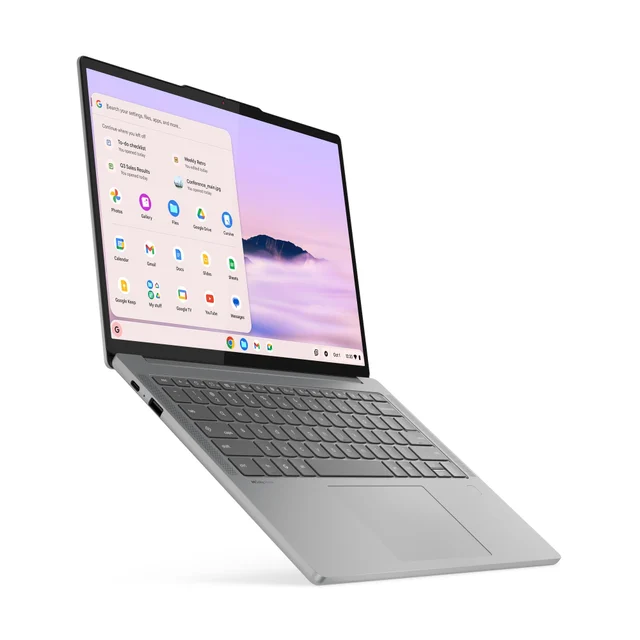
- Buy Lenovo Chromebook Plus 14 A fanless, OLED-screen Chromebook built for long battery life that feels genuinely premium.
- Buy Acer Chromebook Plus 515 (CB515-2H) The sensible big-screen value pick with real Intel Core muscle for the money.
- It depends Lenovo Chromebook Duet 11 (Gen 9) A tiny detachable that is brilliant for the couch and travel, limiting for real work. Amazon
- Skip Asus Chromebook CX1 (CX1500) A cheap 15-inch Chromebook whose 4GB of RAM and slow storage you will outgrow fast. Amazon
What actually matters
- RAM (memory) decides how many tabs, apps, and documents you can juggle before things slow down. This is the biggest single factor in whether a Chromebook stays pleasant; 8GB is the sensible floor.
- Storage type matters more than raw capacity for everyday feel. Faster storage keeps the machine responsive, while a large-but-slow drive can make even simple tasks feel sluggish.
- Chromebook Plus certification is a reliable signal that a model has enough memory and horsepower, and it unlocks extra on-device AI and productivity features.
- Update-expiration date determines how long the machine keeps getting security and feature updates. A long runway is what makes a good Chromebook a genuine multi-year buy.
- Display quality ranges from dim, washed-out panels to bright, sharp, even OLED screens. You look at it constantly, so it's worth prioritizing over a bigger-but-worse screen.
- Size and portability is a real trade-off: a big 15-inch panel is great at a desk but heavy to carry, while an 11-to-14-inch model is far nicer on the go.
- Keyboard and build matter if you type a lot. A full-size keyboard beats a cramped detachable folio for long writing sessions.
The specs, in plain English
Green flags vs red flags
Green flags
- 8GB or more of RAM listed in the specs
- Carries Chromebook Plus certification
- A clearly stated, far-off update-expiration date
- A bright display with a specified resolution rather than a vague "HD" claim
- Fanless, so it stays cool and quiet
- A full-size keyboard if you plan to type a lot
Red flags
- Only 4GB of RAM, no matter how cheap the price
- Slow eMMC storage paired with an entry-level processor
- A dim or "washed-out" display
- No mention of the update-expiration date at all
- An older model being cleared out with a short remaining update window
- A cramped detachable keyboard marketed for "productivity"
Who's who: the brands
- Lenovo - Sells Chromebooks from OLED clamshells to detachable 2-in-1s.
- Acer - Known for practical, big-screen value models that deliver a lot of Chromebook for the money.
- Asus - Ranges from solid mid-tier models to bare-bones budget machines, so the specs matter more than the badge.
- HP - A mainstream maker with a broad lineup spanning everyday budget picks to nicer Chromebook Plus models.
- Samsung - Focuses on the higher end, often pairing sharp displays with sleek, portable designs.
How to read a listing without getting fooled
Start with the memory line: if it says 4GB, mentally move on unless your needs are truly single-task. Next, look for the Chromebook Plus badge, which does a lot of vetting for you. Then find the update-expiration (or Auto Update) date and confirm it leaves you years of runway, remembering that the countdown began when the chip launched, not when you buy. Treat vague words like "HD," "fast storage," or "all-day battery" with mild suspicion until you see an actual resolution and storage type; marketing language is where the corners get cut. Finally, weigh screen size against how often you'll carry it, and don't let a big panel talk you into a machine that's dim or heavy.
How much should you spend?
Chromebooks are one of the categories where spending a little more than the rock-bottom price is usually worth it. The cheapest models save money up front but cut exactly the specs that age worst: too little memory and slow storage, which is why they tend to feel dated quickly. The value sweet spot is a model with 8GB of RAM and Chromebook Plus certification, which buys years of comfortable use rather than months. Beyond that, you're mostly paying for nicer screens (OLED), lighter builds, and premium finishes, which are real upgrades but optional. The point of diminishing returns arrives when a Chromebook's price starts brushing up against an entry-level Windows laptop, at which point the choice becomes about which operating system suits you rather than which is cheaper.
Questions, answered
How much RAM do I actually need in a Chromebook?
For most people, 8GB is the target. It keeps many browser tabs, documents, and apps responsive at once. 4GB can feel fine with a single tab or two but stalls quickly under a real workload, which is the most common regret with budget models.
What does "Chromebook Plus" mean and is it worth it?
It's a certification for models that meet higher minimum specs and unlock extra on-device AI and productivity features. It's worth seeking out mainly because it reliably rules out underpowered machines; think of it as a shortcut to "this one has enough power."
How long will a Chromebook keep working and getting updates?
Newer Chromebooks receive automatic updates for up to ten years, covering both security and features. The important catch is that the clock starts at the chip's launch, not your purchase, so check a specific model's update-expiration date before buying, especially on discounted older stock.
Should I choose an Arm or an Intel Chromebook?
Both are excellent for everyday use. Arm-based models tend to be fanless, cooler, and outstanding on battery, with strong on-device AI. Intel models can be slightly more compatible with the occasional demanding app. For web life the difference is small, so pick based on screen, size, and battery instead.
Can a Chromebook replace my Windows laptop or handle schoolwork?
For web-based work, documents, research, video calls, and streaming, yes, and a mid-range or better Chromebook handles it smoothly. Where they fall short is specialized desktop software like full creative suites or advanced engineering tools, which usually need Windows or macOS.
Is a detachable 2-in-1 Chromebook a good main computer?
It's a wonderful companion for travel, browsing, and media, but the cramped keyboard and small screen make it limiting as your only machine. Buy one as a delightful second device or for genuinely light needs, not as a primary work laptop.
Or jump to the head-to-head: Lenovo Chromebook Plus 14 vs Acer Chromebook Plus 515 (CB515-2H).