

Tech & Gadgets
The Best Chromebooks: 4 Compared (and One to Skip)
We compared four current Chromebooks for students and everyday use on display, performance, battery, keyboard, and long-term software support.
The short version
For most students and everyday users, the Lenovo Chromebook Plus 14 is the smartest buy: an OLED display, silent Arm performance, and battery life built for a full school day. The Acer Chromebook Plus 515 is the value runner-up, trading portability for a big screen and Intel Core speed at a mid-range price. The Lenovo Chromebook Duet 11 is a genuine 'it depends' pick, wonderful as a light travel companion but cramped as a primary machine. Skip the Asus Chromebook CX1: its 4GB of RAM and slow storage make it feel dated fast, and spending a little more pays off quickly. Best for: buyers who want a Chromebook that stays pleasant to use for years, not just cheap on day one.
Our picks at a glance
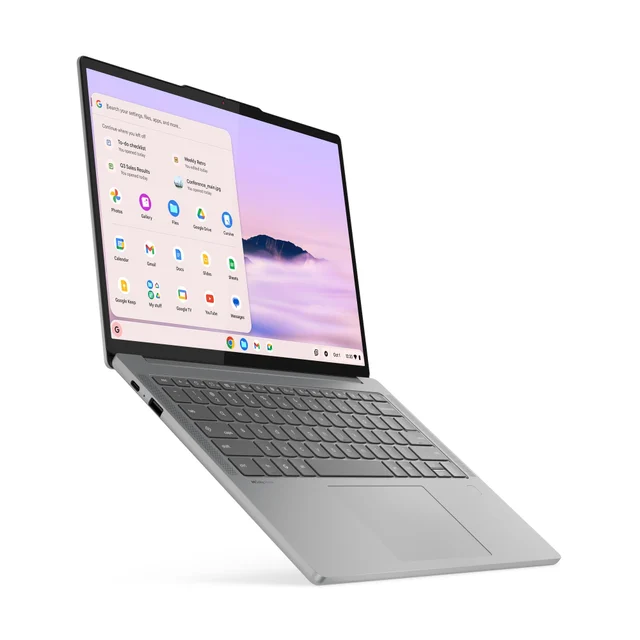
- Lenovo Chromebook Plus 14 - Buy. A fanless, OLED-screen Chromebook built for long battery life that feels genuinely premium.
- Acer Chromebook Plus 515 (CB515-2H) - Buy. The sensible big-screen value pick with real Intel Core muscle for the money.
- Lenovo Chromebook Duet 11 (Gen 9) - It depends. A tiny detachable that is brilliant for the couch and travel, limiting for real work.
- Asus Chromebook CX1 (CX1500) - Skip. A cheap 15-inch Chromebook whose 4GB of RAM and slow storage you will outgrow fast.
The verdict in 30 seconds
What mattered most
- Display
- Performance
- Battery life
- Portability
- Keyboard & typing
- Software & AI support
Chromebooks have grown up: the best ones now run a long time on a charge, get years of automatic updates, and handle school and everyday web life without fuss. But the gap between a great one and a frustrating one is wider than the price tags suggest. We lined up four you can actually buy right now, spanning a premium daily driver, a big-screen value pick, a tiny detachable, and one budget model most people should walk past.
A fanless, OLED-screen Chromebook built for long battery life that feels genuinely premium.
Best for: Students and everyday users who want one polished, long-lasting daily driver and will keep it for years.
- Gorgeous 14-inch OLED touchscreen that punches well above its class
- Long battery life aimed at getting through a full day and more of light use
- Silent, fanless MediaTek Arm chip with a strong on-device AI engine
- Chromebook Plus certification means AI features and years of guaranteed updates
- Premium pricing that overlaps with entry-level Windows laptops
- Arm architecture means a few Android and legacy apps are less optimized
Amazon had no buyable listing for this when we last checked. The link still works if it returns.
Find it on Amazon Read our detailed assessmentOwn the Lenovo Chromebook Plus 14? Tell us how it held up.
Thanks. Counted, and shown once enough owners have weighed in.
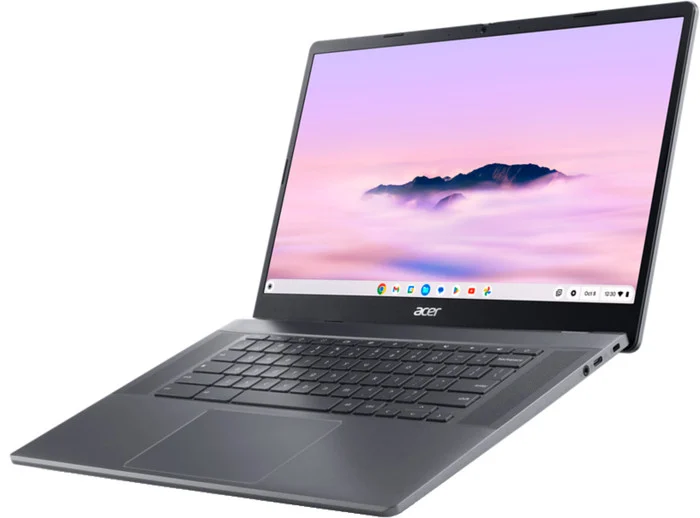
The sensible big-screen value pick with real Intel Core muscle for the money.
Best for: Home and dorm-desk use where a large screen and comfortable typing matter more than portability.
- Roomy 15.6-inch Full HD screen and a full-size keyboard with number pad
- Capable Intel Core performance that handles dozens of tabs comfortably
- Chromebook Plus features and a generous port selection including USB-C
- Strong value for a Chromebook Plus with a large screen
- Big and heavy, so it is more of a desk machine than a carry-everywhere laptop
- Base model skips a touchscreen and the webcam is only average
Amazon had no buyable listing for this when we last checked. The link still works if it returns.
Find it on Amazon Read our detailed assessmentOwn the Acer Chromebook Plus 515 (CB515-2H)? Tell us how it held up.
Thanks. Counted, and shown once enough owners have weighed in.
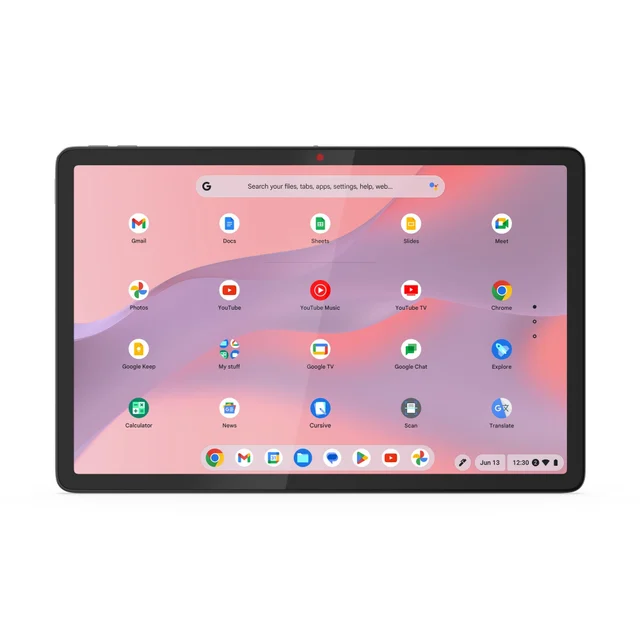
A tiny detachable that is brilliant for the couch and travel, limiting for real work.
Best for: People who want a light, grab-and-go device for browsing, media and notes, as a companion rather than a main machine.
- Ultraportable 2-in-1 that splits into a tablet and a laptop in seconds
- Detachable keyboard folio and kickstand cover are included in the box
- Bright, sharp 11-inch touchscreen with all-day battery for its size
- Ideal travel and second-screen companion you can toss in any bag
- Cramped keyboard makes long typing sessions a chore
- Modest performance and a small screen limit serious multitasking
- Kickstand design is awkward on an actual lap
Own the Lenovo Chromebook Duet 11 (Gen 9)? Tell us how it held up.
Thanks. Counted, and shown once enough owners have weighed in.
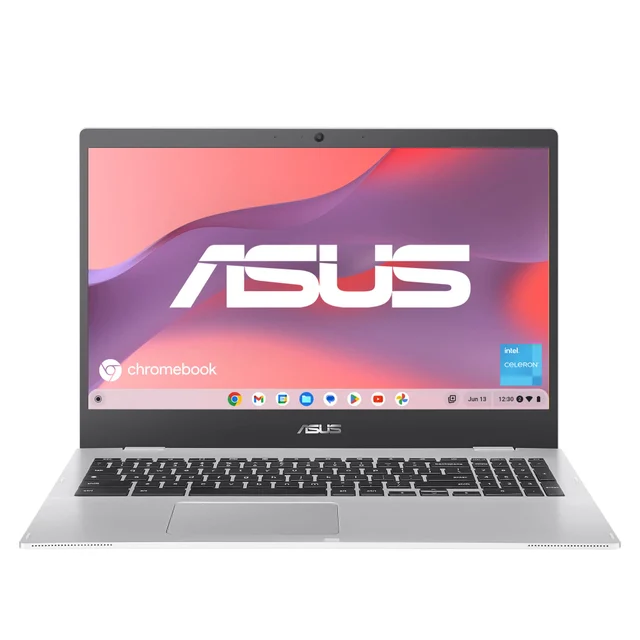
A cheap 15-inch Chromebook whose 4GB of RAM and slow storage you will outgrow fast.
Best for: Only the most basic single-task use on the tightest possible budget; most buyers should stretch a little further.
- Very low price and a big 15.6-inch screen
- Light Chrome OS keeps a single tab or two feeling okay
- Reasonable battery life for undemanding tasks
- Only 4GB of RAM, so it stalls once you open several tabs
- Slow eMMC storage and a sluggish entry-level processor
- Dim, washed-out display and no Chromebook Plus AI features
- Entry-level specs that are likely to feel dated quickly
Own the Asus Chromebook CX1 (CX1500)? Tell us how it held up.
Thanks. Counted, and shown once enough owners have weighed in.
| Criteria | Lenovo Chromebook Plus 14 Top pick Buy it | Acer Chromebook Plus 515 (CB515-2H) Buy it | Lenovo Chromebook Duet 11 (Gen 9) It depends Buy | Asus Chromebook CX1 (CX1500) Skip it Buy |
|---|---|---|---|---|
| Best for | Students and everyday users who want one polished, long-lasting daily driver and will keep it for years. | Home and dorm-desk use where a large screen and comfortable typing matter more than portability. | People who want a light, grab-and-go device for browsing, media and notes, as a companion rather than a main machine. | Only the most basic single-task use on the tightest possible budget; most buyers should stretch a little further. |
| Price tier | $$$ · premium | $$ · mid-range | $$ · mid-range | $ · budget |
| Display | 14" OLED touchscreen, excellent | 15.6" Full HD IPS, good | 11" IPS touchscreen, sharp for its size | 15.6" Full HD, dim and flat |
| Performance | Fast fanless Arm chip | Capable Intel Core | Modest, fine for basics | Sluggish, chokes when multitasking |
| Battery life | Long, built for light-use stretches | All-day | All-day for its size | Decent for light tasks |
| Portability | Light 14" clamshell | Large and heavy | Tiny detachable 2-in-1 | Bulky 15.6" clamshell |
| Keyboard & typing | Comfortable full-size | Full-size with number pad | Cramped folio keyboard | Full-size but mushy |
| Software & AI support | Chromebook Plus, long updates | Chromebook Plus, long updates | Standard Chromebook, long updates | Standard Chromebook, no Plus AI |
| Price tier | $$$ · premium | $$ · mid-range | $$ · mid-range | $ · budget |
Which one is right for you?
- Students and everyday users who want one polished, long-lasting daily driver and will keep it for years. Buy it Lenovo Chromebook Plus 14
- Home and dorm-desk use where a large screen and comfortable typing matter more than portability. Buy it Acer Chromebook Plus 515 (CB515-2H)
- People who want a light, grab-and-go device for browsing, media and notes, as a companion rather than a main machine. It depends Lenovo Chromebook Duet 11 (Gen 9)
- Only the most basic single-task use on the tightest possible budget; most buyers should stretch a little further. Skip it Asus Chromebook CX1 (CX1500)
How we judged the field
We don’t run our own lab. Maker pages for several of these models could not be loaded when this review was last checked, so specifics are kept general. For everyday and student use, five things decided the ranking: display quality, real-world performance with a realistic pile of browser tabs, battery life you can trust through a full day, keyboard comfort, and how long the machine will keep getting updates. We also weighed portability and whether a model carries Chromebook Plus certification, which signals that it has the memory and horsepower to stay pleasant over time.
Price mattered too, but only in context: the cheapest option is not a bargain if you outgrow it in a year. With that lens, four current models sorted themselves into two clear buys, one genuine ‘it depends,’ and one to avoid.
Lenovo Chromebook Plus 14
Buy itThis is the Chromebook that finally feels like a premium laptop rather than a compromise. The 14-inch OLED touchscreen is the standout feature, and the fanless MediaTek Arm chip is designed to stay silent while handling everyday multitasking. The other draw is battery life, which is built to stretch light use a long way. Chromebook Plus certification adds on-device AI features and locks in years of updates. The catch is simply the price, which brushes up against entry-level Windows machines, and the occasional Android or legacy app that isn’t fully tuned for Arm. For most people who want one device to rely on for years, those are easy trade-offs.
Acer Chromebook Plus 515 (CB515-2H)
Buy itWhen the Lenovo’s price is a stretch, this is the pragmatic answer. You give up the OLED panel and the featherweight build, but you get a big, comfortable 15.6-inch Full HD screen, a full-size keyboard with a number pad, and Intel Core performance suited to heavy tab loads. It keeps Chromebook Plus features and a healthy set of ports. The downsides are the flip side of the size: it is heavy and less something you toss in a bag all day, and the base configuration skips a touchscreen while the webcam is merely fine. As a desk-first machine for home or a dorm, it is one of the best value Chromebooks you can buy.
Lenovo Chromebook Duet 11
It dependsThe Duet is the most charming machine here and also the easiest to buy for the wrong reasons. It is a tiny detachable that becomes a tablet or a laptop in seconds, with the keyboard folio and kickstand cover included. It suits travel and couch use, and its battery is sized for light use. But that charm has limits: the keyboard is cramped for long writing, performance is modest, and an 11-inch screen is tight for serious work. The kickstand also makes actual lap use fiddly. Buy it as a delightful second device or an ultraportable for someone with light needs; do not expect it to be your only computer.
Asus Chromebook CX1 (CX1500)
Skip itThe CX1 is the model that gives budget Chromebooks their mixed reputation. On paper it is appealing: a big 15.6-inch screen for very little money. In practice, the base configuration’s 4GB of RAM stalls the moment you open a handful of tabs, the eMMC storage is slow, and the display is dim and washed out. It also misses out on Chromebook Plus AI features. Entry-level specs like these tend to feel dated quickly, which is the opposite of what makes a Chromebook a smart long-term buy. Unless your needs are genuinely single-task and your budget is immovable, the small step up to an 8GB Chromebook Plus model is one of the best upgrades your money can make.
Sources
Specs in this review come from these pages.
Lenovo Chromebook Plus 14 vs Acer Chromebook Plus 515: which should you buy?
These two are the strongest of the group and answer different questions. The Lenovo Chromebook Plus 14 is about refinement and endurance: a stunning OLED screen, a silent chip, and battery life built for long stretches of light use, all in a light 14-inch body you will happily carry everywhere. The Acer Chromebook Plus 515 is about space and value: a big 15.6-inch screen, a full keyboard with number pad, and quick Intel Core performance for meaningfully less money.
Choose the Lenovo if portability, battery and screen quality are your priorities and you want a device that still feels great years from now. Choose the Acer if you mostly work at a desk, want the largest comfortable screen, and would rather put the savings elsewhere. Neither is a wrong answer; they simply suit different lives.
What to look for
- 8GB of RAM, minimum. This is the single biggest factor in whether a Chromebook stays smooth. 4GB is the classic budget trap.
- Chromebook Plus certification. A reliable shortcut to ‘this one has enough power,’ plus on-device AI features.
- Update expiration date. Newer models get up to ten years of updates, but the clock starts at the chipset’s launch, so check the specific model.
- Screen size vs portability. A 15.6-inch panel is great at a desk; an 11-to-14-inch model is far nicer to carry.
- Storage type. Faster storage beats a bigger-but-slower eMMC drive for everyday responsiveness.
- Keyboard and build. If you type a lot, prioritize a full-size keyboard over a compact detachable.
Our final take
The best Chromebook for most students and everyday users is the Lenovo Chromebook Plus 14: it looks and feels premium, runs silently, and is built for long battery life, which is exactly what you want from a device you will keep for years. If its price is a stretch, the Acer Chromebook Plus 515 gives you most of the useful experience on a bigger screen for less. The Lenovo Chromebook Duet 11 is a joy in the right hands but only as a companion. And the Asus Chromebook CX1 is the reminder that the cheapest option often costs more in frustration than it saves upfront. Spend a little more than the bare minimum, insist on 8GB of RAM, and a good Chromebook will quietly serve you for a very long time.
Questions, answered
Are Chromebooks powerful enough for schoolwork?
For the vast majority of coursework, yes. Web apps, Google Docs and Sheets, research, video calls and streaming all run smoothly on a mid-range or better Chromebook. The key is enough memory: aim for 8GB of RAM so many browser tabs and documents stay responsive. Where Chromebooks fall short is specialized desktop software like full Adobe suites or advanced engineering tools, which often need Windows or macOS.
What is a 'Chromebook Plus' and does it matter?
Chromebook Plus is a certification for models that meet higher minimum specs (such as more RAM and storage) and unlock extra on-device AI and productivity features. In practice it is a useful shortcut for 'this one won't feel underpowered.' Three of our four picks are Chromebook Plus models; the budget Asus is not, which is part of why it lags.
How long will a Chromebook keep getting updates?
Newer Chromebooks receive automatic updates for up to ten years from the platform's release, covering security and features, according to Google's policy. That is a big improvement over older models. It is worth checking a specific model's update expiration date before purchase, since the clock starts from the chipset's launch, not your purchase date.
Should I get an Arm or an Intel Chromebook?
Both are excellent now. Arm-based models like the Lenovo Chromebook Plus 14 tend to be fanless, cooler and outstanding on battery, with strong on-device AI. Intel models like the Acer 515 can be a touch more compatible with the occasional demanding Android or legacy app. For everyday web use the difference is small, so pick based on screen, size and battery rather than the chip alone.
Is it worth paying more than the cheapest Chromebook?
Usually, yes. The biggest budget traps are 4GB of RAM and slow eMMC storage, which is exactly why we flag the Asus CX1. Stepping up to 8GB of RAM and a Chromebook Plus model buys years of comfortable use rather than a device that feels sluggish within a year. A modest increase in budget is one of the highest-value upgrades you can make.
Deciding between the top two? See our head-to-head: Lenovo Chromebook Plus 14 vs Acer Chromebook Plus 515 (CB515-2H).
More in Tech & Gadgets
Chromebooks, Explained Plain-English guide → Lenovo Chromebook Plus 14 vs Acer Chromebook Plus 515 (CB515-2H) Head-to-head →  The Best Coding Robots: 4 Compared (and One to Skip)
  The Best Laptops for College Students: 4 Compared (and One to Skip)
  The Best Compact Cameras: 4 Compared (and One to Skip)
  The Best CPL Filters: 4 Compared (and One to Skip)