

Tech & Gadgets
The Best Laptops for College Students: 4 Compared (and One to Skip)
We compared four college laptops on four-year durability, repairability, battery, display, and OS fit for real coursework.
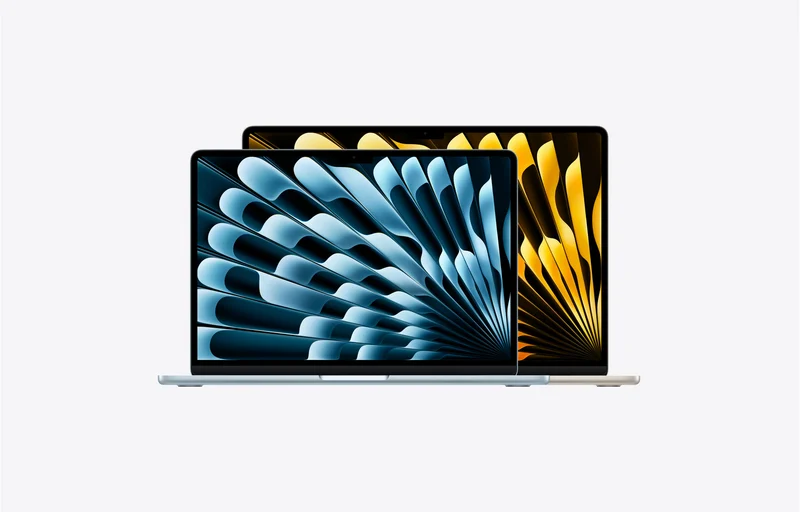
The short version
The best college laptop is the one still working at graduation, so we weighed four-year durability, repairability, battery, and OS fit over first-week specs. The Apple MacBook Air (M5) is the effortless all-rounder for most students — just buy enough RAM and storage up front, since nothing is upgradeable, and remember Windows-only tools like Power BI need a VM. The Dell Pro 14 Premium is the co-winner for Windows users and anyone who wants a rugged, spill-resistant, self-serviceable machine (with Lenovo's ThinkPad T14 and HP's EliteBook as close business-class alternatives). The ASUS Zenbook 14 OLED is a lovely maybe for screen-and-weight lovers, while the consumer Dell 14 is the false economy we'd skip for a laptop meant to last four years. Best for: students who want one machine that survives the whole degree — MacBook Air (M5) on macOS, or the Dell Pro 14 Premium if you need Windows and upgradeability.
Our picks at a glance
- Dell Pro 14 Premium - Buy. A rugged, serviceable business 14-incher — the durability-first pick that still feels solid in senior year.
- Apple MacBook Air 13-inch (M5) - Buy. The effortless all-rounder — superb battery, display, and longevity, if your coursework lives on macOS.
- ASUS Zenbook 14 OLED - It depends. A gorgeous, light OLED ultrabook — great if you value the screen more than long-term upgradeability.
- Dell 14 (DB14250) - Skip. A fine budget machine that becomes a false economy — the consumer 'student special' we'd pass on for a four-year laptop.
The verdict in 30 seconds
What mattered most
- Build & durability
- Repairability / upgradeable RAM & SSD
- Keyboard & spill resistance
- Battery life (all-day classes)
- Display for long reading
- Weight & portability
The best college laptop is the one still working at graduation, so we judged these on durability, repairability, and everyday fit rather than first-week specs. Two earn a clear buy — a rugged, upgradeable business machine and the effortless MacBook Air — one is a lovely-but-limited maybe, and one popular consumer pick is a false economy we'd skip.
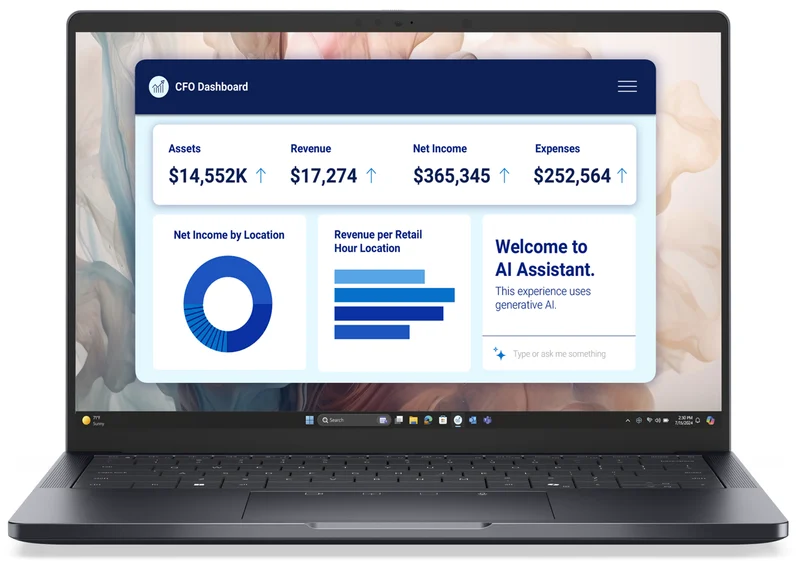
A rugged, serviceable business 14-incher — the durability-first pick that still feels solid in senior year.
Best for: Students who want one durable, upgradeable Windows laptop to survive all four years, especially in data, analytics, or engineering.
- Sturdy business-class chassis with a spill-resistant keyboard built for daily abuse
- User-replaceable SSD plus long parts availability and business-grade service
- Native Windows fit for Power BI and Windows-only engineering/stats software
- Heavier and pricier than thin consumer ultrabooks
- Not the flashiest design, and premium configs cost like premium business gear
Own the Dell Pro 14 Premium? Tell us how it held up.
Thanks. Counted, and shown once enough owners have weighed in.
The effortless all-rounder — superb battery, display, and longevity, if your coursework lives on macOS.
Best for: Most students comfortable on macOS who want the easiest, longest-lasting everyday laptop.
- Excellent battery life and a great display for long reading, silent and fanless
- M-series longevity keeps it fast for years, with strong resale value
- Light, polished, and low-maintenance for writing, coding, and everyday study
- RAM and storage are soldered — you must buy 16GB/512GB up front, no upgrades later
- macOS can't natively run Windows-only tools like Power BI without a VM or remote lab
Own the Apple MacBook Air 13-inch (M5)? Tell us how it held up.
Thanks. Counted, and shown once enough owners have weighed in.
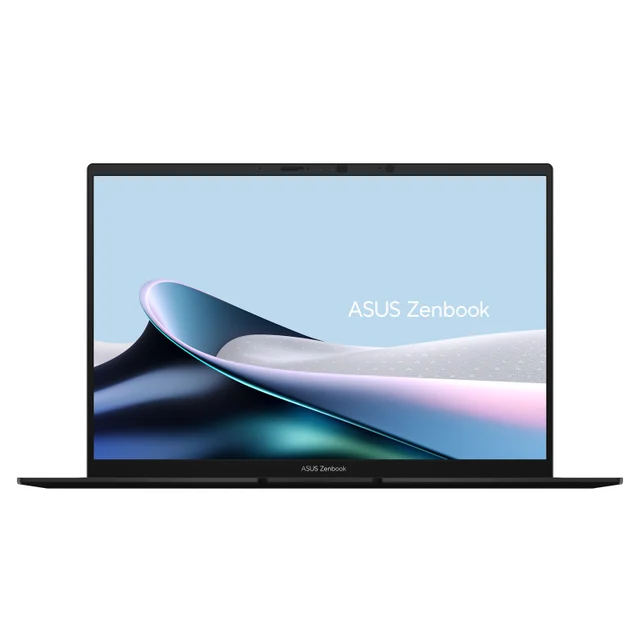
A gorgeous, light OLED ultrabook — great if you value the screen more than long-term upgradeability.
Best for: Portability-and-display lovers who'll order 16GB/512GB up front and don't need to self-upgrade.
- Beautiful OLED display and a genuinely light metal chassis
- Strong battery life at a mid-range price
- Very portable for all-day carry between classes
- RAM is typically soldered — no adding memory later, so spec it right on day one
- Thin consumer build and consumer-grade support trail business-class durability
Amazon had no buyable listing for this when we last checked. The link still works if it returns.
Find it on Amazon Read our detailed assessmentOwn the ASUS Zenbook 14 OLED? Tell us how it held up.
Thanks. Counted, and shown once enough owners have weighed in.
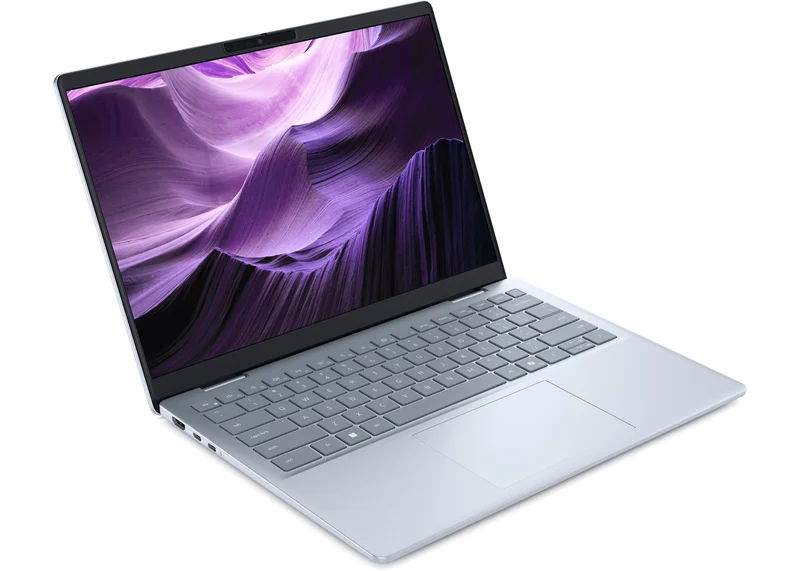
A fine budget machine that becomes a false economy — the consumer 'student special' we'd pass on for a four-year laptop.
Best for: Tight budgets that accept replacing the laptop sooner rather than keeping it four years.
- Inexpensive and perfectly capable for notes, essays, and browsing
- Light everyday use is handled without fuss
- Plastic palmrest and bezel (aluminium lid and base) and consumer-grade support
- Dimmer everyday display and shorter practical longevity than the business-class Dell Pro
Amazon had no buyable listing for this when we last checked. The link still works if it returns.
See our pick instead Find it on Amazon anyway Read our detailed assessmentOwn the Dell 14 (DB14250)? Tell us how it held up.
Thanks. Counted, and shown once enough owners have weighed in.
| Criteria | Dell Pro 14 Premium Buy it Buy | Apple MacBook Air 13-inch (M5) Top pick Buy it Buy | ASUS Zenbook 14 OLED It depends | Dell 14 (DB14250) Skip it |
|---|---|---|---|---|
| Best for | Students who want one durable, upgradeable Windows laptop to survive all four years, especially in data, analytics, or engineering. | Most students comfortable on macOS who want the easiest, longest-lasting everyday laptop. | Portability-and-display lovers who'll order 16GB/512GB up front and don't need to self-upgrade. | Tight budgets that accept replacing the laptop sooner rather than keeping it four years. |
| Price tier | $$$ · premium | $$$ · premium | $$ · mid-range | $ · budget |
| Build & durability | Business-class, rugged | Premium metal, sturdy | Thin metal, consumer-grade | Aluminium lid and base, plastic palmrest |
| Repairability / upgradeable RAM & SSD | SSD user-replaceable; serviceable | None — RAM & SSD soldered | Limited — RAM usually soldered | Limited; config-dependent |
| Keyboard & spill resistance | Spill-resistant business keyboard | Excellent, not spill-rated | Good, not spill-rated | Basic, not spill-rated |
| Battery life (all-day classes) | Strong | Excellent | Strong | Average |
| Display for long reading | Good business panel | Excellent | Excellent OLED | Basic |
| Weight & portability | Moderate | Very light | Very light | Moderate |
| OS & software fit | Windows — runs Power BI natively | macOS — Windows apps need a VM | Windows — runs Power BI natively | Windows — runs Power BI natively |
| Price tier | $$$ · premium | $$$ · premium | $$ · mid-range | $ · budget |
Which one is right for you?
- Students who want one durable, upgradeable Windows laptop to survive all four years, especially in data, analytics, or engineering. Buy it Dell Pro 14 Premium
- Most students comfortable on macOS who want the easiest, longest-lasting everyday laptop. Buy it Apple MacBook Air 13-inch (M5)
- Portability-and-display lovers who'll order 16GB/512GB up front and don't need to self-upgrade. It depends ASUS Zenbook 14 OLED
- Tight budgets that accept replacing the laptop sooner rather than keeping it four years. Skip it Dell 14 (DB14250)
How we judged the field
We don’t run a lab. What we do is read across independent testing, teardown/repairability analyses, manufacturer service documentation, and a wide pool of owner reports, then weigh what actually survives four years of backpack commutes, coffee-shop spills, and daily open-and-close cycles. For a college machine specifically, that means we care less about which laptop wins a benchmark this semester and more about which one still works in your senior year.
The criteria that mattered most: build quality and chassis rigidity, repairability and upgradeability (can you add RAM or swap the SSD, or is everything soldered?), keyboard quality and spill resistance, all-day battery life for back-to-back classes, display comfort for long reading, weight, port selection, and operating-system fit for coursework — Windows still matters for tools like Power BI and much engineering/statistics software, while macOS is superb for writing, coding, and general use. We also weighed parts availability and service and real-world 4-year longevity and resale, because a laptop you can keep alive (and later sell) is cheaper over four years than a sealed machine you replace.
The honest through-line: business-class laptops — the spill-resistant, sturdier-chassis, user-serviceable machines that companies buy by the thousand — genuinely tend to outlast thin consumer ultrabooks. A lot of “student” marketing sells thin-and-shiny over durable-and-upgradeable. We set a sensible spec floor for a four-year machine — 16GB of RAM and a 512GB SSD — and rewarded designs that let you upgrade later.
Dell Pro 14 Premium
Buy itThis is the clearest expression of the durability-first thesis in the roundup. The Dell Pro line is the direct successor to Dell’s Latitude business laptops (Dell renamed the family in its 2025 reshuffle), and it carries the traits that make business machines last: a rigid chassis built to survive knocks, a spill-resistant keyboard, a straightforward bottom panel, and — crucially — a user-replaceable SSD so you can add storage or swap a failed drive years down the line without buying a whole new laptop. Business-class support and long parts availability mean a broken hinge or dead battery is a repair, not a write-off.
For coursework it’s a natural Windows fit: Power BI, Stata/SPSS-style analytics tools, and Windows-only engineering software all run natively, no workarounds. It isn’t the flashiest or the lightest 14-incher, and premium business configs are priced like premium business gear, but if you want one laptop that still feels solid at graduation, this is the one to beat. Configure it with at least 16GB RAM and a 512GB SSD and you’re set for the full degree.
Honorable mentions in the same category are worth naming: Lenovo’s ThinkPad T14 (AMD) is the archetypal upgradeable business workhorse and a superb alternative, and HP’s EliteBook 800 series competes closely — if you find a better deal on either, they belong in the same conversation as the Dell Pro.
Apple MacBook Air (M5)
Buy itFor a huge share of students, the MacBook Air is the most sensible “best college laptop” you can buy, and owner reports back up why: strong battery life, a genuinely excellent display for long reading, a fanless silent design, and M-series longevity that keeps these machines feeling fast for years — with strong resale value at the end. It’s the easy recommendation for writing-heavy majors, coding, and general everyday use.
The caveats are two. First, nothing is upgradeable: RAM and storage are fixed at purchase, so make sure you buy enough up front; Apple’s base configuration already starts at 16GB / 512GB, and you cannot add more later. Second, it runs macOS, which means Windows-only coursework tools (Power BI is the classic example, along with some engineering and statistics packages) won’t run natively. You can handle most of that with a virtual machine or your school’s remote-desktop lab, but if your program lives in Windows-only software, factor that in before you fall for the battery life. For everyone else, this is a four-year machine that ages gracefully.
ASUS Zenbook 14 OLED
It dependsThe Zenbook 14 OLED is a lovely laptop and, on paper, an obvious student pick: a gorgeous OLED screen, a genuinely light metal chassis, and strong battery life at a mid-range price. If your priority is portability and a beautiful display for reading and media, reviewers and owners generally have a good time with it, and we’d happily see one in a lecture hall.
Why “it depends” rather than a straight buy: it’s a thin consumer ultrabook, and that shows up in the things that decide four-year longevity. RAM is typically soldered, so whatever you buy is what you’re stuck with — there’s no adding memory in year three. The slim chassis and consumer-grade support don’t inspire the same confidence as a business machine when a laptop is being crammed into a full backpack every day. Buy it if you value the screen and the weight and you’re disciplined about ordering enough RAM (16GB) and storage (512GB) on day one. If repairability and worry-free durability top your list, the business-class picks are the smarter long-term money.
Dell 14 (DB14250)
Skip itWe’re not calling this a bad laptop. As a cheap, do-the-basics machine it’s fine, and that’s exactly the trap. The Dell 14 is the mainstream consumer line (the rebranded Inspiron-class model), and it’s the kind of budget “student special” that looks like a bargain in August and feels like a false economy by sophomore year: a plastic palmrest and bezel over its aluminium lid and base, consumer-grade support, a dimmer everyday display, and shorter practical longevity than its business-class Dell Pro sibling. Put the two side by side and the gap in chassis feel, keyboard, and serviceability is the whole argument of this roundup in one brand.
If budget is genuinely the hard constraint, buy it with clear eyes, add RAM if the model allows it, and plan to replace it sooner. But for a laptop meant to survive four years, spending a little more on a business-class machine — or a well-specced MacBook Air — is the better value over the life of the degree. That’s why this one is the skip.
Sources
Specs in this review come from these pages.
Apple MacBook Air (M5) vs Dell Pro 14 Premium: which should you buy?
These are the two machines most students should actually be choosing between, and the deciding factor is refreshingly simple: which operating system does your coursework require, and do you want to upgrade the laptop yourself?
Pick the MacBook Air (M5) if you’re happy on macOS. It’s lighter, its battery and display are excellent, it’s silent, and it holds its value best — the lowest-friction four-year laptop for writing, coding, and general study. Just commit to 16GB / 512GB at checkout, because you can never add more.
Pick the Dell Pro 14 Premium if your program leans on Windows-only tools (Power BI, much engineering/stats software), if you want a spill-resistant business keyboard and a chassis built for abuse, or if the ability to swap the SSD and lean on real business-class service matters to you. It’s the durability-and-flexibility choice.
Both are genuine “buy” recommendations; there’s no wrong answer, only a fit. If you’re truly undecided and your software runs on both, the MacBook Air is the easier day-to-day companion — but the Dell Pro is the one you can keep tinkering with and keep alive longest.
What to look for
- Set a spec floor: 16GB RAM and a 512GB SSD. This is the single most important call for a four-year machine. 8GB ages badly; 512GB saves you fighting for space by junior year.
- Favor upgradeable RAM/SSD where you can. A socketed SSD (and ideally RAM) means a cheap upgrade or repair later instead of a full replacement. Soldered-everything designs (most thin ultrabooks, all MacBooks) force you to buy the right config up front.
- Prioritize the keyboard and spill resistance. You’ll type thousands of pages on it, and a spill-resistant business keyboard is cheap insurance in a dorm.
- Demand all-day battery. Enough to get through back-to-back classes without hunting for an outlet.
- Match the OS to your coursework. Windows for Power BI and much engineering/statistics software; macOS is excellent for everything else. If you go Mac and need a Windows app, plan for a virtual machine or your school’s remote lab.
- Weigh weight and ports. You carry it all day; USB-C is standard, but a machine that also has USB-A or HDMI saves dongles.
- Think about repairability and resale. A laptop you can service (or a Mac with strong resale) is cheaper across four years. If maximum repairability is your goal, a Framework laptop — designed to be opened, upgraded, and repaired part-by-part — is worth a serious look as well.
Our final take
Buy for the four-year finish line, not the first-week price tag. The most sensible pick for most students is the Apple MacBook Air (M5) — light, long-lasting, and effortless — provided you’re comfortable on macOS and buy enough RAM and storage up front. If your coursework needs Windows, or you want a rugged, serviceable machine you can upgrade yourself, the Dell Pro 14 Premium is the durability champion and an equally confident buy (with the Lenovo ThinkPad T14 and HP EliteBook as close business-class alternatives). The ASUS Zenbook 14 OLED is a lovely “it depends” for students who prize a beautiful screen and low weight over long-term upgradeability. And the Dell 14 is the reminder baked into this whole roundup: the cheapest consumer “student” laptop usually costs more over four years than a sturdier machine bought once.
Questions, answered
How much RAM and storage should a college laptop have?
Treat 16GB of RAM and a 512GB SSD as the floor for a machine meant to last four years. 8GB feels cramped fast with browser tabs, video calls, and coursework apps open together, and 256GB fills up quickly once projects and media pile on. On laptops with soldered memory — every MacBook and most thin ultrabooks — you can't add this later, so buy the right configuration at checkout rather than the cheapest base model.
Are business-class laptops really more durable than consumer ultrabooks?
As a general pattern, yes. Business lines like Dell Pro (formerly Latitude), Lenovo ThinkPad, and HP EliteBook are designed for fleets that must survive years of daily handling, so they tend to use sturdier chassis, spill-resistant keyboards, easier-to-service internals, and longer parts availability. Owner reports suggest they're often easier to repair and keep running than thin consumer machines. It's a tendency, not a guarantee — but it's why the durability-first pick here is a business-class laptop.
Can I run Power BI or other Windows-only software on a MacBook?
Not natively — Power BI Desktop and various engineering and statistics packages are Windows-only. On a MacBook you'd run them through a Windows virtual machine, a cloud/remote-desktop service, or your school's computer lab. That's workable for occasional use, but if your program lives in Windows-only software day to day, a Windows laptop like the Dell Pro 14 is the less frustrating choice.
Is upgradeable RAM or SSD actually worth it?
It's one of the biggest levers on how long a laptop stays useful and how cheaply you can fix it. A socketed SSD means you can add storage or replace a failed drive for the price of a part instead of a whole new laptop, and upgradeable RAM lets you extend a machine's life years later. Soldered-everything designs remove that option, which is why we push you to buy enough memory and storage up front on those models — and favor serviceable machines when durability is the goal.
Should I just buy the cheapest 'student' laptop I can find?
Usually not. The cheapest consumer 'student special' often looks like a bargain in August and turns into a false economy by sophomore year — flimsier build, dimmer display, weaker support, and shorter practical life. Across four years, a sturdier business-class machine or a well-specced MacBook Air bought once tends to cost less than a cheap laptop replaced early. If budget is a hard limit, buy with clear eyes and plan to replace sooner. This is general product guidance, not financial advice — weigh it against your own situation.
Deciding between the top two? See our head-to-head: Apple MacBook Air 13-inch (M5) vs Dell Pro 14 Premium.
More in Tech & Gadgets
College Laptops, Explained Plain-English guide → Apple MacBook Air 13-inch (M5) vs Dell Pro 14 Premium Head-to-head →  The Best Compact Cameras: 4 Compared (and One to Skip)
  The Best CPL Filters: 4 Compared (and One to Skip)
  The Best CPU Coolers: 4 Compared (and One to Skip)
  The Best Digital Photo Frames: 4 Compared (and One to Skip)