

Tech & Gadgets
The Best Digital Photo Frames: 4 Compared (and One to Skip)
We compared four WiFi, app-connected photo frames on display quality, sharing, subscription traps, and how gift-friendly they really are.
The short version
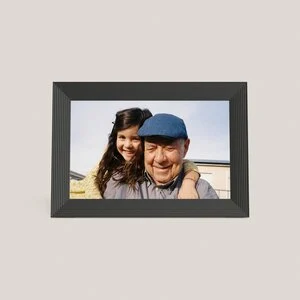
For most people the Aura Carver 10.1" is the frame to buy: a slick app with easy contributor invites, a built-in speaker, and free unlimited cloud storage with no subscription fees. If you're gifting to a less techy relative, the Skylight Frame 2 is even simpler to use, though video and captions require a paid Plus subscription. The Aura Aspen 12" is lovely but only worth it if you specifically want a large premium centerpiece. Skip the Dragon Touch Classic 10 Elite - its 1280x800 panel and basic app undercut the low price. Best for: sending photos straight to family's shelf with the least fuss.
Our picks at a glance
- Aura Carver 10.1" - Buy. The frame to buy for most people - dead-simple app sharing, a built-in speaker for video, and no subscription fees.
- Skylight Frame 2 (10-inch) - Buy. The easiest frame to gift a non-techy relative - if you can live with the optional subscription for the good extras.
- Aura Aspen 12" - It depends. A stunning big-screen statement frame - but most people don't need 12 inches or the premium price.
- Dragon Touch Classic 10 Elite - Skip. A low-cost frame that looks like a bargain until you live with the 1280x800 panel and a basic app.
The verdict in 30 seconds
What mattered most
- Display & resolution
- Sharing method
- Subscription needed?
- Video playback
- Storage model
- Ease of setup
A good WiFi photo frame lets far-flung family push photos straight to Grandma's shelf from a phone app, no cables or SD cards involved. But the category hides real traps: subscription paywalls for basic features, cloud lock-in, and cheap panels that look dim in a bright room. We lined up four current 2026 frames - two we'd happily buy, one that only makes sense for a specific buyer, and one budget model we'd steer you away from.
The frame to buy for most people - dead-simple app sharing, a built-in speaker for video, and no subscription fees.
Best for: Almost anyone who wants a set-and-forget gift frame with no subscription fees.
- 10.1-inch 1280x800 HD display with a built-in speaker for short video clips
- Free unlimited cloud storage and no subscription fees, per Aura
- Auto-brightness and auto-on/off, plus easy multi-person contributor invites
- Fully cloud-based - it leans on WiFi and an Aura account rather than local storage
- WiFi is required, and photos arrive through Aura's cloud
Own the Aura Carver 10.1"? Tell us how it held up.
Thanks. Counted, and shown once enough owners have weighed in.
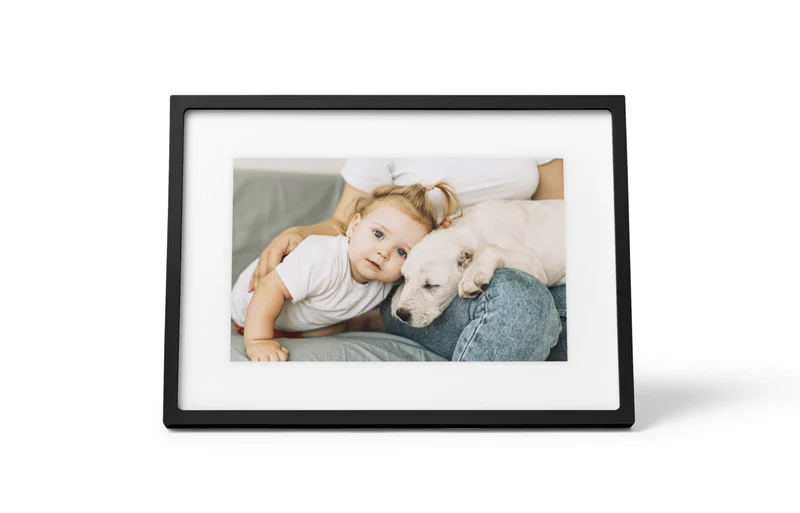
The easiest frame to gift a non-techy relative - if you can live with the optional subscription for the good extras.
Best for: Gifting to someone who wants zero fuss and will mostly just receive photos.
- Simple setup, with WiFi connected on the touchscreen and a unique email address picked for the frame
- 1920x1200 display with auto brightness, per Skylight's own comparison
- Every frame gets its own email address, so anyone can send a photo in seconds
- Touchscreen with a friendly, uncluttered menu
- Video playback and captions on Frame 2 require an active Skylight Plus subscription
- Setup means connecting to WiFi and creating a Skylight email address on the frame
Own the Skylight Frame 2 (10-inch)? Tell us how it held up.
Thanks. Counted, and shown once enough owners have weighed in.

A stunning big-screen statement frame - but most people don't need 12 inches or the premium price.
Best for: Buyers who specifically want a large centerpiece frame and have the budget for it.
- Large 12-inch 1600x1200 anti-glare 4:3 display, with portrait or landscape orientation
- Same free unlimited cloud storage and no subscription fees as the Carver
- Paper-like matting and a slim 1.1-inch profile that reads like framed art
- Priced well above the 10-inch frames for a size upgrade many rooms don't need
- Cloud-based like all Aura frames, and its footprint is a lot for a small shelf
Amazon had no buyable listing for this when we last checked. The link still works if it returns.
Find it on Amazon Read our detailed assessmentOwn the Aura Aspen 12"? Tell us how it held up.
Thanks. Counted, and shown once enough owners have weighed in.
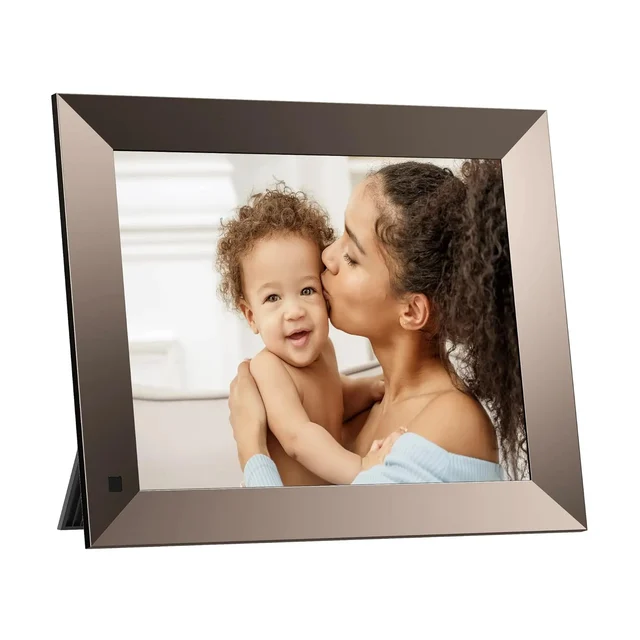
A low-cost frame that looks like a bargain until you live with the 1280x800 panel and a basic app.
Best for: Only the most budget-driven buyer who won't mind the compromises - most should spend a little more.
- Built-in 16GB of storage and a magnetic stand that switches between landscape and portrait
- Photos can be sent by the OurPhoto app, email or FTP, per the maker
- 1280x800 panel that owners report can look dim and washed out in bright rooms
- Photos live in the frame's 16GB internal memory, with no USB or SD slot to load or back them up
- Some owner reports mention firmware glitches, flicker and touch quirks in this class of frame
Amazon had no buyable listing for this when we last checked. The link still works if it returns.
See our pick instead Find it on Amazon anyway Read our detailed assessmentOwn the Dragon Touch Classic 10 Elite? Tell us how it held up.
Thanks. Counted, and shown once enough owners have weighed in.
| Criteria | Aura Carver 10.1" Top pick Buy it Buy | Skylight Frame 2 (10-inch) Buy it Buy | Aura Aspen 12" It depends | Dragon Touch Classic 10 Elite Skip it |
|---|---|---|---|---|
| Best for | Almost anyone who wants a set-and-forget gift frame with no subscription fees. | Gifting to someone who wants zero fuss and will mostly just receive photos. | Buyers who specifically want a large centerpiece frame and have the budget for it. | Only the most budget-driven buyer who won't mind the compromises - most should spend a little more. |
| Price tier | $$ · mid-range | $$ · mid-range | $$$ · premium | $ · budget |
| Display & resolution | 10.1" 1280x800 | 10" 1920x1200 touchscreen | 12" 1600x1200 (4:3) | 10" 1280x800, can look dim |
| Sharing method | Aura app + contributor invites | Unique email address + app | Aura app + contributor invites | OurPhoto app, email or FTP |
| Subscription needed? | No subscription fees | Only for Plus extras (video, captions) | No subscription fees | None stated |
| Video playback | Yes, with sound | Yes, on paid Plus tier | Yes, with sound | Not stated on the product page |
| Storage model | Cloud, unlimited | 16GB on-frame | Cloud, unlimited | 16GB on-device |
| Ease of setup | About a minute in the app | Plug in, WiFi, pick an email address | About a minute in the app | App-based setup |
| Build & finish | Premium, minimalist | Clean, art-frame look | Premium matted, large | Basic |
| Price tier | $$ · mid-range | $$ · mid-range | $$$ · premium | $ · budget |
Which one is right for you?
- Almost anyone who wants a set-and-forget gift frame with no subscription fees. Buy it Aura Carver 10.1"
- Gifting to someone who wants zero fuss and will mostly just receive photos. Buy it Skylight Frame 2 (10-inch)
- Buyers who specifically want a large centerpiece frame and have the budget for it. It depends Aura Aspen 12"
- Only the most budget-driven buyer who won't mind the compromises - most should spend a little more. Skip it Dragon Touch Classic 10 Elite
How we judged the field
We don’t run our own lab. Instead we read each maker’s own product pages and weigh them against aggregated owner reports to find where the marketing and the lived experience diverge. For WiFi photo frames, a handful of things reliably separate a frame people love from one that ends up in a drawer.
First is the panel: resolution and brightness decide whether photos look like memories or like a cheap tablet. Second is the sharing flow - how easily a far-away relative can actually get a photo onto the screen. Third, and the sneakiest, is the business model: several frames dangle a low price, then paywall video or captions behind a subscription. We also weighed setup friction (crucial when the recipient is a grandparent), storage approach, and build quality. Prices shift constantly, so we describe them only as qualitative tiers.
Aura Carver 10.1”
Buy itThe Carver is the frame we’d hand to almost anyone. Its 10.1-inch display is 1280x800 on Aura’s spec sheet, with automatic brightness and a built-in speaker for short video clips. Aura says setup takes about a minute, and the Aura app makes it painless to invite several family members to contribute to one frame. The clincher is the business model: free unlimited cloud storage with no subscription fees. The trade-off is that it’s a cloud-first device, so it needs WiFi and the Aura app for setup. For most buyers, that’s a fair deal for the least hassle.
Skylight Frame 2 (10-inch)
Buy itSkylight’s whole pitch is simplicity, and it delivers: Skylight’s setup is just plugging in, connecting to WiFi on the touchscreen and creating a unique email address. Every frame gets a dedicated email address, so sending a photo is as easy as emailing it - no app required at the other end. The catch is that video playback and captions on Frame 2 require an active Skylight Plus subscription. The panel itself is 1920x1200 on Skylight’s comparison page. If you value effortless gifting and don’t mind the paywall, it’s an easy buy; if you want video included, look at the Carver.
Aura Aspen 12”
It dependsThe Aspen takes everything good about Aura - the app and the free cloud storage - and stretches it to a large 12-inch 4:3 display (1600x1200, anti-glare) with paper-like matting. It sits a clear tier above the 10-inch frames in price, and the extra size is only an advantage if you actually want a mantel centerpiece; on a crowded shelf it’s a lot of frame. It’s cloud-based like the rest of the Aura line. Buy it if the large statement format is the point - otherwise the Carver gives you the same experience for less.
Dragon Touch Classic 10 Elite
Skip itOn paper the Dragon Touch looks like a steal: 16GB of built-in storage, a motion sensor, a rotating magnetic stand, and photo sharing by app, email or FTP. In practice it’s where the compromises pile up. The 1280x800 panel is the one some owners describe as dim or washed out in bright rooms, the OurPhoto app is a generic add-on next to Aura’s or Skylight’s apps, and your photos live in the frame’s internal memory with no USB or SD slot to load them. Frames in this class also draw some complaints about firmware glitches, flicker and touch quirks. It’s not that it can’t work; it’s that spending a little more buys a better daily experience.
Sources
Specs in this review come from these pages.
Aura Carver 10.1” vs Skylight Frame 2: which should you buy?
These are the two most people will weigh, and they optimize for different things. The Aura Carver wins on the fundamentals: a more refined app, a built-in speaker, and no subscription fees for any feature. The Skylight Frame 2 wins on approachability - the email-a-photo model is an easy way to get images onto a frame for someone who avoids apps.
Decide by the recipient. Buying for yourself or a reasonably capable relative? The Carver is the better all-round device and has no subscription fees. Buying for a grandparent who just wants photos to appear with zero effort, and you’re fine paying for Plus to unlock video and captions? The Skylight earns its keep. For the broadest audience, though, the Carver’s mix of quality and no-strings pricing makes it our pick.
What to look for
- No-surprise pricing: check whether video and captions are included or locked behind a subscription.
- Panel quality: favor higher resolution (1920x1200 over 1280x800) and auto-brightness.
- Sharing flow: app invites are flexible; a per-frame email address is the simplest for non-technical recipients.
- Storage model: cloud frames back up automatically but need an account; local-only frames keep data on-device but offer no safety net.
- Setup friction: if it’s a gift, the frame the recipient can set up alone beats the one with the best spec sheet.
- Size and placement: a 10-inch frame suits most shelves; only go 12-inch or larger for a deliberate centerpiece.
Our final take
The Aura Carver 10.1” is the frame to buy for almost everyone - it is a pleasure to use and Aura lists no subscription fees. The Skylight Frame 2 is the smart runner-up when frictionless gifting is the goal, as long as you accept the paid Plus tier for video. The Aura Aspen 12” is a lovely splurge for anyone who specifically wants a large premium frame. And the Dragon Touch Classic 10 Elite is the one to skip: a low price can’t offset a 1280x800 panel, a basic app and no way to load photos except over WiFi. Spend a little more and you’ll enjoy it for years instead of tolerating it.
Questions, answered
Do WiFi photo frames require a monthly subscription?
Not always. Aura frames like the Carver and Aspen include free unlimited cloud storage with no subscription fees. Skylight's frame works for free but video playback and captions on Frame 2 require an active Skylight Plus subscription. The Dragon Touch stores photos in its 16GB internal memory and its page mentions no subscription.
How do relatives send photos to the frame?
It depends on the frame. Aura and most app-based frames let anyone you invite push photos from a phone app, and they appear on the frame over WiFi within moments. Skylight gives each frame its own email address, so family can simply email photos in - the least technical option going. Dragon Touch lists the OurPhoto app, email or FTP.
Does resolution really matter on a 10-inch frame?
Yes, more than you'd think at arm's length. The Skylight Frame 2 lists 1920x1200 and the Aura Aspen 1600x1200, while the Aura Carver and Dragon Touch are both 1280x800 and will look softer up close. Just as important is brightness: budget panels can look dim in a sunlit room, which is a complaint some owners raise about cheaper frames.
Are cloud-based frames a privacy risk?
Cloud frames such as Aura's stream your photos from the company's servers, which means convenient backup and remote access but also trusting that provider with your images. If you'd rather keep photos only on the device, a frame with local storage is the alternative - though you then lose automatic backup if the frame fails. This is general product information to help you weigh the trade-off, not a security guarantee for any specific service.
Can these frames display videos, not just photos?
Most can. Aura frames play photos and short video clips with sound. Skylight Frame 2 plays video only with an active paid Plus subscription. If sending short clips of the grandkids matters to you, confirm it's included rather than an upsell before buying.
Deciding between the top two? See our head-to-head: Aura Carver 10.1" vs Skylight Frame 2 (10-inch).
More in Tech & Gadgets
Digital Photo Frames, Explained Plain-English guide → Aura Carver 10.1" vs Skylight Frame 2 (10-inch) Head-to-head →  The Best Smart Glasses With Displays: 4 Compared (and One to Skip)
  The Best DisplayPort Cables: 4 Compared (and One to Skip)
  The Best DIY Home Security Systems: 4 Compared (and One to Skip)
  The Best Laptop Docking Stations: 4 Compared (and One to Skip)