

Baby & Family
The Best Coding Robots: 4 Compared (and One to Skip)
We compared the Sphero BOLT, Learning Resources' Botley 2.0, the Sphero Mini and a dart-blasting "programmable" robot on real coding depth, screen requirements and lasting interest.
The short version
The Sphero BOLT is the coding robot to buy for kids 8+: real sensors, an LED matrix and a ladder from Scratch to Swift for $179. Botley 2.0 is the screen-free pick for ages 5-8 at $97. The Sphero Mini is the $50 it-depends entry for kids with a device. Skip the YCOO Robo Blast - 20 steps of direction recording is an RC toy, not coding.
Our picks at a glance
- Sphero BOLT - Buy. The real coding robot: a programmable 8x8 LED matrix, light and motion sensors, and a path from Scratch blocks to Swift.
- Learning Resources Botley 2.0 Coding Robot Activity Set - Buy. Screen-free coding for ages 5+: program sequences of up to 150 steps by remote, no tablet or phone needed.
- Sphero Mini - It depends. A ping-pong-ball-sized app robot with real sensors and three coding modes - Sphero tech at $50, if you have a device.
- YCOO Robo Blast - Skip. A 34cm dart-blasting robot that records 20 movement steps - an RC toy marketed next to real coding robots.
The verdict in 30 seconds
What mattered most
- Coding type
- Screen needed
- Coding depth
- Sensors / outputs
- Age range
- Price class
A coding robot is the gift that teaches programming without feeling like homework - if it actually teaches coding. Half the "coding robots" on the shelf are remote-control toys that record 20 direction steps and call it programming. We compared two genuine coding platforms, an app-controlled entry point, and a blaster toy wearing a programmer's hat.
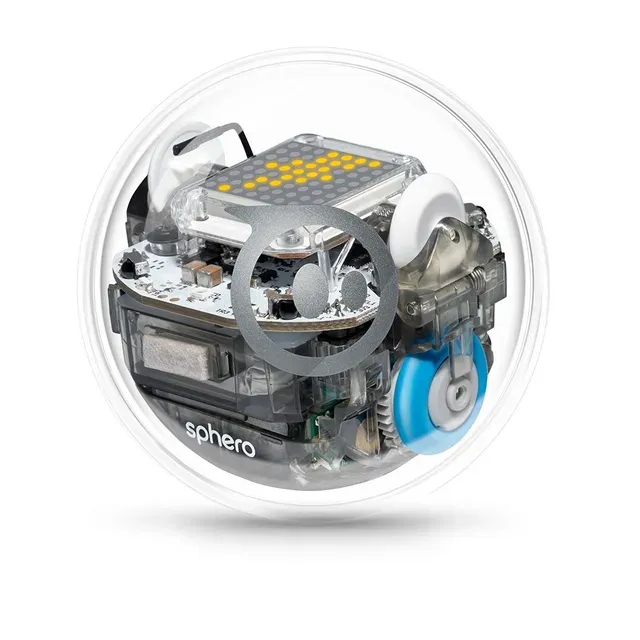
The real coding robot: a programmable 8x8 LED matrix, light and motion sensors, and a path from Scratch blocks to Swift.
Best for: Kids 8 and up who are ready to write actual code - the gift that scales from driving to JavaScript.
- Genuine programming: drive it, then program it with Scratch blocks, JavaScript or Swift through the Sphero Edu app - a real skill ladder.
- An 8x8 programmable LED matrix plus light, accelerometer, gyroscope, compass and infrared sensors - the hardware that makes programs feel physical.
- Waterproof and durable polycarbonate shell built for classroom abuse; it survives the living room easily.
- Grows from remote-control driving to real code - the same device a 6-year-old pilots is the one a 12-year-old programs.
- $179 is the premium price here - a serious gift, not a stocking stuffer.
- It needs a phone or tablet - a screen-dependent robot, which defeats the "screen-free coding" goal some parents want.
- The programming depth is app-gated - no standalone onboard coding without the device.
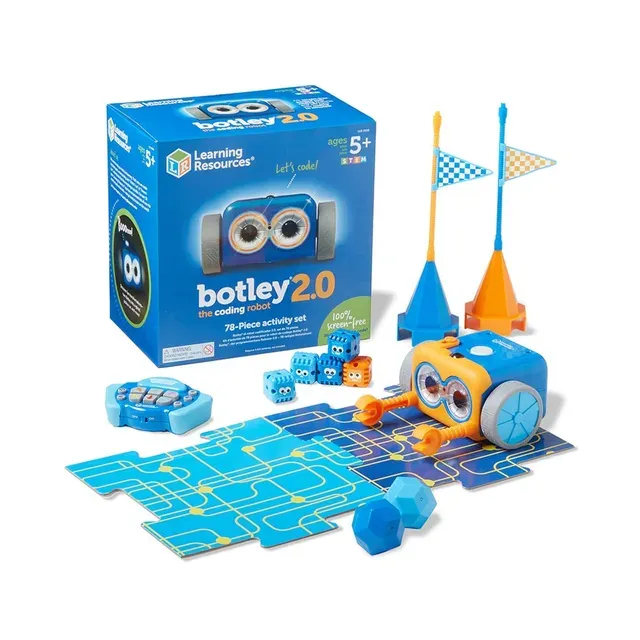
Screen-free coding for ages 5+: program sequences of up to 150 steps by remote, no tablet or phone needed.
Best for: Kids 5 to 8 whose parents want screen-free coding - the rare robot that teaches real sequencing with zero app.
- Truly screen-free - a remote programmer keys in sequences so kids code without a tablet or app.
- Sequences of up to 150 steps across six directions, lights, sounds and character transformations - real sequencing logic at age 5.
- 78-piece activity set with obstacle courses, "Botley Says" memory games and a dark-activated sensor.
- $97 for a complete kit - the youngest real coding experience here by years.
- The remote is how you code - lose it and the robot is a very cute paperweight.
- Tops out around age 8 - older kids want the text-based coding the Sphero offers.
- It teaches sequences and logic, not loops or conditionals the way real code does.
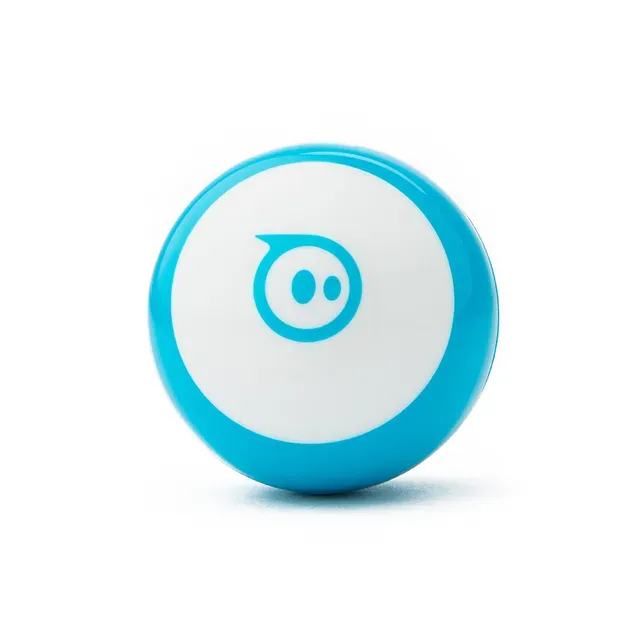
A ping-pong-ball-sized app robot with real sensors and three coding modes - Sphero tech at $50, if you have a device.
Best for: A first taste of coding for a kid with a tablet - test the interest at $50 before committing to BOLT.
- Gyroscope, accelerometer and LED lights in a ball the size of a ping-pong ball - real Sphero hardware at $50.
- Three programming canvases from drive-mode to blocks to JavaScript - the same coding ladder as the BOLT.
- Interchangeable shells in blue, green and red - cheap personalization.
- The cheapest way into real robot programming - a tester gift before the $179 BOLT.
- Completely device-dependent - no phone or tablet, no robot. Zero screen-free play.
- Smaller and simpler than BOLT - no LED matrix, fewer sensors, shorter legs as a coder's tool.
- Kids burn through the drive-mode novelty fast; the coding content is the lasting value.
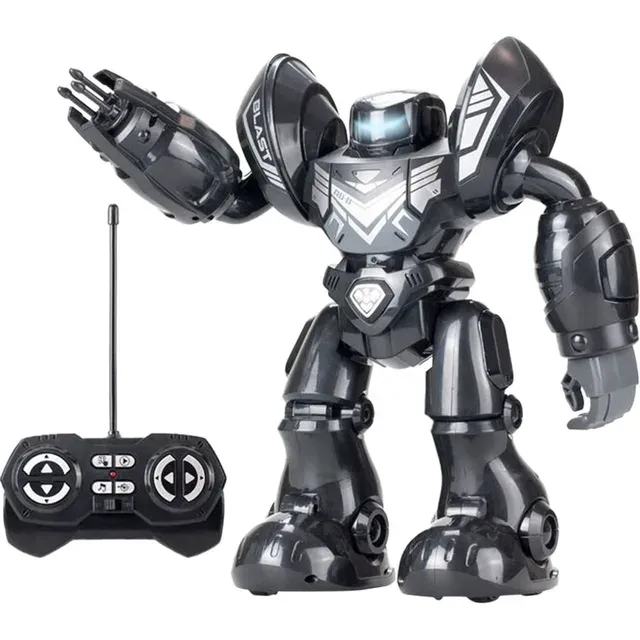
A 34cm dart-blasting robot that records 20 movement steps - an RC toy marketed next to real coding robots.
Best for: Nobody shopping for a coding robot - it's a fun RC toy, not a programmer. Buy the Botley or Mini for the same money if coding is the goal.
- Blasts foam darts (3 per reload, 6 included) and dances - kids will genuinely enjoy it.
- Records up to 20 direction steps - a taster of programmed sequences.
- Tall, dramatic and giftable-looking box.
- "20 programming steps" is recording directions, not coding - no loops, no conditionals, no logic, no sensors output.
- $60 buys an RC dart toy; the same money is most of the way to a Botley that teaches real sequencing.
- It's a blaster first and a robot second - the coding claim is packaging, not product.
- No lasting educational path - the novelty is the dart.
| Criteria | Sphero BOLT Top pick | Botley 2.0 Coding Robot Activity Set | Sphero Mini | YCOO Robo Blast |
|---|---|---|---|---|
| Verdict | Buy it | Buy it | It depends | Skip it |
| Best for | Kids 8 and up who are ready to write actual code - the gift that scales from driving to JavaScript. | Kids 5 to 8 whose parents want screen-free coding - the rare robot that teaches real sequencing with zero app. | A first taste of coding for a kid with a tablet - test the interest at $50 before committing to BOLT. | Nobody shopping for a coding robot - it's a fun RC toy, not a programmer. Buy the Botley or Mini for the same money if coding is the goal. |
| Price tier | $$$ · premium | $$ · mid-range | $ · budget | $$ · mid-range |
| Coding type | Blocks to JavaScript/Swift | Screen-free remote sequences | App-based blocks | 20-step record, not coding |
| Screen needed | Yes, phone/tablet | No - fully screen-free | Yes, phone/tablet | No (RC remote) |
| Coding depth | Loops, sensors, real code | 150-step sequences | Same ladder as BOLT, smaller | Direction recording only |
| Sensors / outputs | 8x8 matrix, accel, gyro, IR | Dark sensor, lights, sounds | Gyro, accel, LED | Darts, lights, sounds |
| Age range | 8 to teen | 5 to 8 | 6 to 12 | 6+ (toy) |
| Price class | $179 | $97 | $50 | $60 |
| Teaches real code | Yes | Sequencing logic | Yes | No |
Which one is right for you?
- Kids 8 and up who are ready to write actual code - the gift that scales from driving to JavaScript. Buy it Sphero BOLT
- Kids 5 to 8 whose parents want screen-free coding - the rare robot that teaches real sequencing with zero app. Buy it Learning Resources Botley 2.0 Coding Robot Activity Set
- A first taste of coding for a kid with a tablet - test the interest at $50 before committing to BOLT. It depends Sphero Mini
- Nobody shopping for a coding robot - it's a fun RC toy, not a programmer. Buy the Botley or Mini for the same money if coding is the goal. Skip it YCOO Robo Blast
How we judged the field
A coding robot earns the name by teaching programming - sequences, loops, conditionals, sensor input. Half the category is remote-control toys that record a few direction steps and get called “coding robots” on the box. We compared a real programming platform, a screen-free sequencer, an app-controlled entry point and a dart toy wearing a coder’s hat, on actual coding depth and whether the gift lasts past the first week.
The BOLT is the real coding platform: a ball you drive first, then program with Scratch blocks, JavaScript or Swift through the Sphero Edu app. The hardware justifies the software - an 8x8 programmable LED matrix plus light, accelerometer, gyroscope, compass and infrared sensors - so a program produces something physical: a rolling, lighting, sensing machine.
At $179 it’s the premium pick, and it earns it: the same device a 6-year-old pilots in drive mode is the one a 12-year-old writes JavaScript for. The waterproof polycarbonate shell survives classroom abuse. The caveat is honest - it needs a phone or tablet, so it’s not the screen-free answer. For a kid ready to write actual code, this is the robot.
Botley 2.0 does what no other robot here does: teaches coding with zero screen. A remote programmer keys in sequences - up to 150 steps across six directions, lights, sounds and character transformations - so a 5-year-old learns real sequencing logic without a tablet. The 78-piece activity set adds obstacle courses, “Botley Says” memory games and a dark-activated sensor.
At $97 it’s the youngest real coding experience in the lineup, and the screen-free design is the whole point for many parents. The limits are honest: the remote is the coder (lose it and Botley is a cute paperweight), it teaches sequences rather than loops, and kids outgrow it around 8. For ages 5 to 8, nothing here teaches more without a screen.
The Mini packs Sphero’s real tech into a ping-pong-ball-sized robot for $50: gyroscope, accelerometer, LED lights, and the same three-mode coding ladder (drive, blocks, JavaScript) as the BOLT. Interchangeable shells add cheap personalization.
Whether it’s right depends on the device. With no tablet or phone, the Mini is a paperweight - it’s completely app-dependent, with none of Botley’s screen-free play. For a kid who has a device and you want to test the interest before the $179 BOLT, it’s the right entry point. Without one, it isn’t.
The Robo Blast is a 34cm robot that shoots foam darts, dances, lights up and - this is the part on the box - “programs” 20 recorded movement steps. Kids will enjoy the blasting; the problem is the coding claim.
Twenty direction steps recorded on a remote is not programming - it’s playback. No loops, no conditionals, no sensor-driven logic, nothing that builds toward code. At $60 it costs most of a Botley, which teaches real sequencing. As a gift for a kid who asked for a coding robot, it delivers the wrong product: the dart is the point, the “coding” is packaging.
Sphero BOLT vs Botley 2.0: which should you buy?
The split is age and screens. Botley is for 5-to-8-year-olds and screen-limited homes: real sequencing, no device, $97. BOLT is for 8-and-up kids ready for actual code: sensors, an LED matrix and a path to JavaScript, $179.
For a young kid or a no-screen house, Botley is the answer. For an older kid who’s outgrown block toys, the BOLT is the robot that keeps teaching.
What to look for
- Real programming vs recording: loops, conditionals and sensor logic is coding; recording 20 direction steps is a remote-control toy’s playback feature.
- Screen-free is a feature: for under-8s and screen-limited homes, a remote-programmed robot (Botley) beats an app-dependent one.
- Sensor depth: more sensors (light, accelerometer, IR) means more interesting programs to write.
- The coding ladder: the best robots scale from driving to blocks to text code - buy the one that grows.
- Age match: under 8 needs screen-free simplicity; 8+ wants real programming depth.
- Beware the blaster: if the box leads with darts and dancing, it’s a toy.
Our final take
The Sphero BOLT is the coding robot for kids 8 and up - real sensors, real code, $179. Botley 2.0 is the screen-free answer for ages 5-8 at $97. The Sphero Mini is the $50 entry for a kid with a tablet. Skip the Robo Blast - it blasts darts, and “20 steps” isn’t programming. Buy the robot that teaches code, not the one that shoots foam.
Questions, answered
What age is a coding robot for?
Screen-free sequencing robots like Botley suit ages 5 to 8; real programming robots like the Sphero BOLT suit 8 and up, scaling to teens with JavaScript and Swift. The rough rule: if the kid can't read, pick a button/remote-based robot; if they can, an app-based one with a real code editor.
Do coding robots need a tablet or phone?
Most do - Sphero robots are programmed entirely through the app. The exception is screen-free robots like Botley, which code via a remote programmer with no device at all. For parents limiting screens, screen-free is the feature that matters most.
Robot kit or robot toy - what's the difference?
A coding robot teaches programming - sequences, loops, logic, sensor input. A robot toy is remote-controlled entertainment that may "record" a handful of direction steps. The giveaway is the box: if it advertises dart-blasting and dancing before it mentions coding, it's a toy.
Screen-free coding vs app-based coding?
Screen-free (Botley) teaches sequencing and logic to the youngest kids with zero device - ideal for ages 5-7 and screen-limited homes. App-based (Sphero) opens real programming languages and sensor data but requires the device. Younger and screen-free is Botley; older and deeper is Sphero.
Is a $50 coding robot enough?
The Sphero Mini at $50 is genuinely enough to learn on - same programming modes as the $179 BOLT in a smaller, simpler package. What you lose is the LED matrix, some sensors and classroom durability. As a test of interest before a bigger spend, it's the right call.
Deciding between the top two? See our head-to-head: Sphero BOLT vs Learning Resources Botley 2.0 Coding Robot Activity Set.
More Baby & Family reviews
 The Best Crib Mattresses: 4 Compared (and One to Skip)
  The Best Crib Mobiles: 4 Compared (and One to Skip)
  The Best Cribs: 4 Compared (and One to Skip)
  The Best Diaper Bags: 4 Compared (and One to Skip)
  The Best Diaper Caddies: 4 Compared (and One to Skip)
  The Best Diaper Pails: 4 Compared (and One to Skip)