Explained
Display Smart Glasses, Explained
After reading, you'll know which of the two kinds you actually want, and how to read a spec sheet that only makes sense in context.
In this guide
The phrase smart glasses with a display covers two devices that look similar and do unrelated things. One is a wearable monitor, tethered by USB-C, showing you a big virtual screen from a phone or a console. The other is a standalone computer with a camera and a battery, projecting a small window of text into the corner of your vision. Almost every specification, including field of view, resolution and brightness, means something different depending on which you are holding.
The 30-second version
- Two products share the name, a tethered screen with no computer, and a standalone computer with a tiny screen.
- Field of view splits them, with viewers around 46 to 57 degrees and HUDs around 30.
- Resolution runs the opposite way, since a viewer carries millions of pixels and a HUD carries a couple of hundred thousand.
- Brightness is context, not quality, because a viewer hides behind tinted lenses and a HUD competes with daylight.
- Weight decides whether you wear them, and in this category it ranges from about 40 grams to nearly 90.
The products this guide is about
Our verdict on each, with the full reasoning on the companion review.
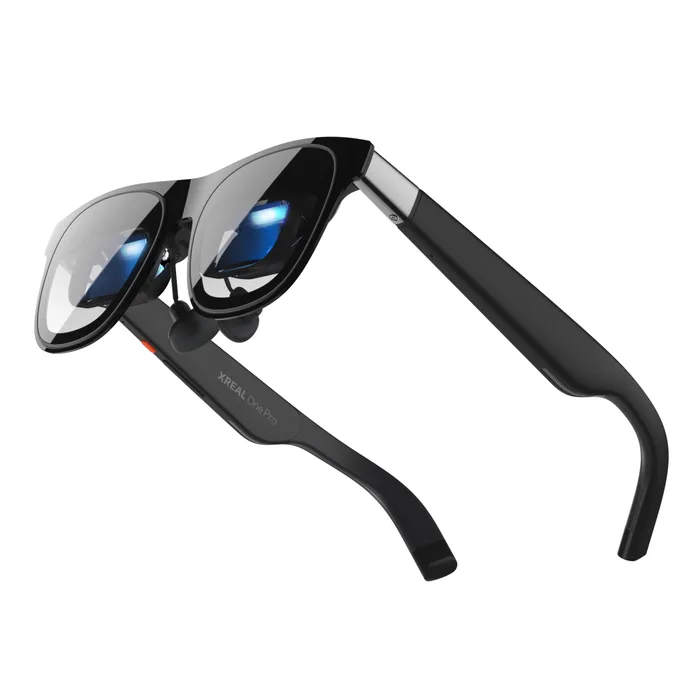
- Buy Xreal One Pro The widest field of view here by a distance, with spatial tracking done on board by the X1 chip. Amazon
- Buy Rokid Glasses (With Display) 49 grams, a standalone computer with a camera, and the most complete spec sheet in this comparison. Amazon
- It depends RayNeo X3 Pro AI+AR Glasses The same HUD idea in full colour and far brighter, for 27 grams more than the Rokid.
- Skip Brilliant Labs Halo Publishes a weight of just over 40 grams and all-day battery, and almost nothing else.
What actually matters
- Device type - tethered viewer or standalone HUD. This determines whether the glasses need a host device, whether they have a camera, and what every other number means.
- Field of view - how wide the virtual image appears, in degrees. Viewers sit around 46 to 57 degrees to fill your vision; HUDs sit around 30 because they only need to hold a line of text.
- Optical design - birdbath optics fold light through a combiner and suit wide bright viewers; diffractive waveguides pipe light through a thin lens and suit small, transparent, all-day HUDs.
- Resolution - pixels in the display. Viewers reach 1080p per eye; HUDs commonly sit at 480 by 400 or 640 by 480, which is enough for captions and nothing more.
- Brightness - measured in nits. A viewer behind tinted lenses needs only a few hundred; a HUD competing with sunlight needs thousands.
- Weight - the specification that decides whether they get worn. Anything under about 50 grams is easy to forget; anything approaching 80 makes itself known.
- Host requirement - whether the glasses need a USB-C DisplayPort source. A viewer without a compatible device is inert, and not every phone or laptop outputs video over USB-C.
The specs, in plain English
Green flags vs red flags
Green flags
- A field of view in degrees, stated plainly.
- Resolution given as pixels rather than as a virtual screen size.
- A weight in grams for the model you are buying.
- The processor, battery capacity and camera sensor named on a standalone product.
- IPD sizes or an adjustment range on a tethered viewer.
Red flags
- A virtual screen size in inches with no field of view to go with it.
- No resolution, brightness or field of view published anywhere.
- All-day battery claimed with no capacity and no runtime figure.
- A brightness figure compared across the two device types as though it meant the same thing.
- Marketing that describes the category as AR without saying whether the glasses have their own computer.
Who's who: the brands
- Xreal - The established name in tethered viewers, with its own X1 spatial computing chip and a 57 degree field of view on the One Pro.
- Rokid - Sells both types and labels them plainly as with display and non-display, and publishes unusually complete specifications.
- RayNeo - Covers viewers and standalone HUDs, and is pushing full-colour micro-LED waveguides at very high brightness.
- Brilliant Labs - An open, developer-facing project rather than a closed consumer platform, with correspondingly thin published specifications.
- Even Realities - Focused on minimal monochrome HUDs designed to look like ordinary glasses, trading capability for everyday wearability.
How to read a listing without getting fooled
Work out which device you are looking at before you read a single number. If the page mentions USB-C DisplayPort, a host device or a console, it is a viewer, and it will have no camera and no battery. If it names a Snapdragon part, a battery capacity or a camera sensor, it is a standalone HUD. Then read field of view, and only compare it against products of the same type. Read resolution as pixels rather than as a virtual screen size in inches, because inches depend on an assumed viewing distance the manufacturer chooses. Read brightness against what the display has to overcome. And find a weight in grams, because it is the number that decides whether the glasses stay on your face.
How much should you spend?
The two types overlap heavily in price, which is part of why they get confused. Tethered viewers span a wide range, with the cheaper ones cutting field of view and refresh rate and the premium ones adding on-board tracking chips and adjustable dimming. Standalone HUDs are often priced at the premium end, because they contain a phone-class processor, a camera and a battery. The advice that saves the most money is to identify the job first: buying a viewer when you wanted translation, or a HUD when you wanted a big screen, is an expensive mistake that no amount of shopping around fixes.
Questions, answered
Will these work with my phone?
For a tethered viewer, only if the phone outputs video over USB-C, which means DisplayPort Alternate Mode. Many Android phones do and many budget models do not, and on iPhones it depends on the model. For a standalone HUD the question is different: the glasses run on their own, and the phone is used for setup and for pairing an app. Check the specific requirement before buying, because a viewer plugged into a phone that only does data will simply not display anything.
Can I wear them with prescription glasses?
Not over the top, in most cases. Both types are designed to sit where your glasses sit. The usual answer is a prescription insert that clips behind the lenses, which some manufacturers in this category sell or partner on, and some HUDs are designed around prescription lenses from the start. If you wear a strong prescription, check that the insert range covers it before committing.
Is the display visible to other people?
Generally no, though there is often a faint glow from the front on brighter models. Viewers are heavily tinted so the wearer's screen is not visible from outside, and waveguide HUDs can leak a small amount of light forward, which is more noticeable in the dark. What is far more visible is the camera on standalone models, which is why most of them have a recording indicator light.
Do HUD glasses record everything you see?
No. The cameras on standalone models take photos and video when you ask them to, by voice or a button, and most have an indicator light that shows when they are active. Always-on capture would empty a battery of a couple of hundred milliamp-hours very quickly. The privacy question worth asking is not whether they are always recording, but whether the people around you can tell when they are.
Or jump to the head-to-head: Xreal One Pro vs Rokid Glasses (With Display).