Explained
CPU Coolers, Explained
After reading this, you'll know whether you need an air tower or a liquid AIO, and how to confirm one will fit your case, clear your RAM, and match your CPU.
In this guide
A CPU cooler sits on top of your processor and carries heat away so the chip can run fast without throttling or overheating. The category splits into two families — air coolers with metal fins and fans, and all-in-one (AIO) liquid coolers that pipe heat to a radiator — and most buying mistakes come from picking a cooler that doesn't physically fit the case or clashes with tall memory. Get the size and socket right and the rest is easier than it looks.
The 30-second version
- Air handles almost everyone. A good dual-tower air cooler quietly tames mainstream and even most high-end chips, with no pump to fail.
- Liquid earns its keep on hot flagship CPUs. A larger radiator sheds more heat under heavy sustained load, so it's worth the extra parts only when your chip runs genuinely hot.
- Fit is the real gatekeeper. Check the cooler's height against your case's clearance, confirm a radiator will mount, and make sure the tower won't block your RAM.
- Match the cooler to the chip, not the hype. Cooling capacity should comfortably exceed your CPU's heat output; buying far more than you need mostly buys quiet, not speed.
- Confirm the socket before anything else. A cooler that doesn't list your exact CPU socket won't mount, no matter how good it is.
The products this guide is about
Our verdict on each, with the full reasoning on the companion review.
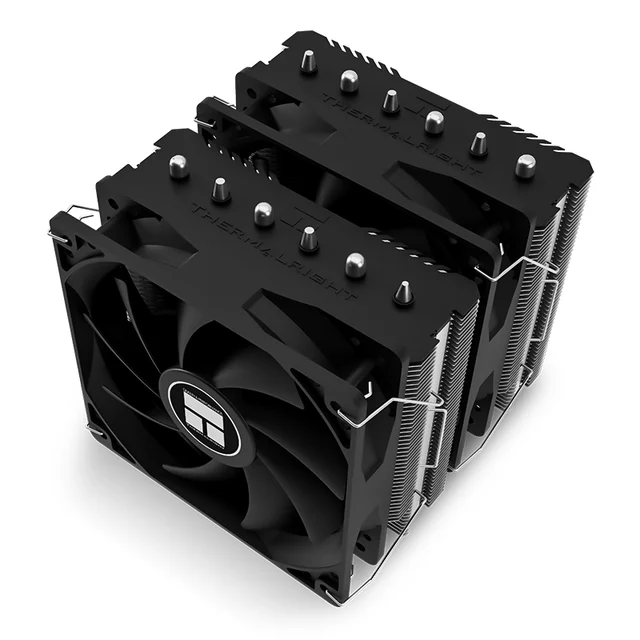
- Buy Thermalright Peerless Assassin 120 SE A dual-tower air cooler that cools like units costing several times more, for pocket change. Amazon
- Buy Arctic Liquid Freezer III 360 A 360mm AIO with a VRM fan on the pump and a six-year warranty thrown in.
- It depends DeepCool AK620 A superb, solidly built premium air tower — but the budget kings undercut it hard.
- Skip Cooler Master Hyper 212 Black Edition A classic that earned its reputation years ago and has since been lapped by cheaper, better coolers. Amazon
What actually matters
- Cooling capacity vs your CPU — the cooler must be able to shed more heat than your processor produces under load; undersized cooling means the chip slows itself down to stay safe.
- Physical fit (tower height and radiator space) — an air tower has to clear your case side panel, and an AIO's radiator has to bolt into a supported spot; this is the single most common reason a cooler gets returned.
- RAM clearance — tall air towers can overhang the nearest memory slot, so memory with big heat spreaders may not fit unless you can raise the front fan.
- Socket compatibility — the cooler must include mounting hardware for your CPU's socket (the current Intel and AMD platforms), or it simply won't attach.
- Noise under real load — how loud the fans and, on liquid coolers, the pump get when the system is working hard, which you can tune with fan curves.
- Reliability and simplicity — air coolers have fewer parts to wear out, while liquid coolers add a pump and the small long-term possibility of a leak.
- Value — cooling performance per dollar, since a modest cooler that's 'good enough' frees money for the rest of the build.
The specs, in plain English
Green flags vs red flags
Green flags
- The listing clearly states your exact CPU socket in the supported list.
- A dual-tower design with several heatpipes if you want strong air cooling.
- A stated cooler height (air) or radiator size (liquid) you've matched against your case's clearance.
- A generous manufacturer warranty, especially on liquid coolers where the pump is the wear item.
- Included, pre-applied, or bundled thermal paste and a free mounting kit for newer sockets.
- Owner reports describing straightforward mounting hardware and clear instructions.
Red flags
- No mention of your socket, or a vague 'universal' claim with no specifics.
- A tall tower with no note on RAM clearance when you're running memory with big heat spreaders.
- An AIO chosen without checking that your case actually supports that radiator length.
- A pump or unit with a very short warranty or a pattern of early-failure complaints.
- Marketing that leans entirely on lighting and looks with little said about heatpipes, fins, or radiator size.
- Cooling capacity that barely meets — or falls short of — a hot, high-core-count CPU's heat output.
Who's who: the brands
- Thermalright - Known for budget dual-tower air coolers that punch far above their price on cooling and quiet.
- Arctic - Makes value-focused AIO liquid coolers, with a six-year warranty on the Liquid Freezer III.
- Noctua - Premium air coolers with a reputation for exceptional quiet, quality, and long-term socket support.
- DeepCool - Offers both premium all-metal air towers and liquid coolers with a polished, understated look.
- Cooler Master - A long-established brand whose single-tower classics defined the budget category before dual-towers took over.
- be quiet! - German brand focused, as the name suggests, on low-noise air and liquid cooling.
How to read a listing without getting fooled
Start at the compatibility line, not the marketing: find your exact CPU socket in the supported list, because everything else is moot if the cooler won't mount. Next, translate the size numbers into fit — for an air cooler, compare its height in millimeters to your case's stated maximum cooler clearance; for a liquid AIO, check that your case lists support for that radiator length (240mm, 360mm, and so on). Read the cooling design honestly: 'dual-tower' and a higher heatpipe count usually beat 'single-tower,' and a longer radiator beats a shorter one, so treat those structural facts as more meaningful than a big watt number in bold. Note whether the fans are quiet under load and whether thermal paste and a current-socket mounting kit are included. Treat lighting, color, and 'gamer' styling as tie-breakers only, never as evidence of cooling ability.
How much should you spend?
Cooling is one of the few PC categories where the value pick is usually also the right pick. Spending goes up with cooling capacity, radiator size, build materials, quiet-optimized fans, and brand reputation — not with some magic performance unlock. For a mainstream or even high-end build, an inexpensive dual-tower air cooler gets you most of the way to the top, and the money you save is better spent on a faster processor, GPU, or drive. Stepping up in price makes sense when you're running a genuinely hot flagship chip that sustains heavy load, when you specifically want the lowest possible noise, or when you value the cleaner look and extra headroom of a large radiator. Paying for a premium air tower over a budget one buys refinement and aesthetics more than raw cooling, so spend there only if those things matter to you.
Questions, answered
Air cooler or liquid AIO — which should I get?
For most people a good dual-tower air cooler is the smart default: it's quiet, has no pump to wear out, and handles mainstream and most high-end chips easily. A liquid AIO makes sense when you're running a flagship CPU that runs hot under sustained load, want the lowest possible temperatures, or prefer the look of a radiator and a low-profile pump over a large tower.
Will a big air cooler block my RAM?
It can. Tall towers position a front fan low over the memory slots, so memory with tall heat spreaders may not fit unless the fan can slide upward (which slightly raises total height). Many towers allow this; single-tower coolers and AIOs generally leave RAM clearance untouched. Always check your cooler's listed height against your case and your RAM height against the cooler.
How do I know a cooler will fit my case?
Two numbers settle it. For an air cooler, compare its height in millimeters to your case's maximum CPU-cooler clearance — both are usually published. For a liquid cooler, check that your case's spec sheet lists support for that radiator size (for example 240mm or 360mm) in a mounting location you can use. When in doubt, measure twice before buying.
Do I need to worry about an AIO liquid cooler leaking?
Modern sealed AIO units are reliable, and leaks are uncommon, but the risk is not zero and the pump is a moving part that can eventually fail — which is why a long warranty matters more on liquid than on air. If you want the simplest, most maintenance-free option with nothing to wear out, a quality air cooler avoids the question entirely.
Do I need to buy thermal paste separately?
Usually not. Most coolers either come with paste in the box or have a thin layer pre-applied on the base. If you're reusing an old cooler or reseating one, a fresh application helps — and a pea-sized amount in the center is plenty; spreading on too much doesn't improve cooling.
Does a more expensive cooler make my CPU faster?
Only indirectly, and only up to a point. A cooler that keeps your CPU below its throttling temperature lets it hold its rated speeds; once you're comfortably there, spending more mostly buys lower noise and extra headroom rather than more performance. Match the cooler's capacity to your chip with some margin, and don't overpay chasing numbers you'll never use.
Or jump to the head-to-head: Thermalright Peerless Assassin 120 SE vs Arctic Liquid Freezer III 360.