Explained
Smart Christmas Lights, Explained
After reading, you'll understand how to compare LED density, control, white quality, weather ratings and smart home support on any smart Christmas light listing.
In this guide
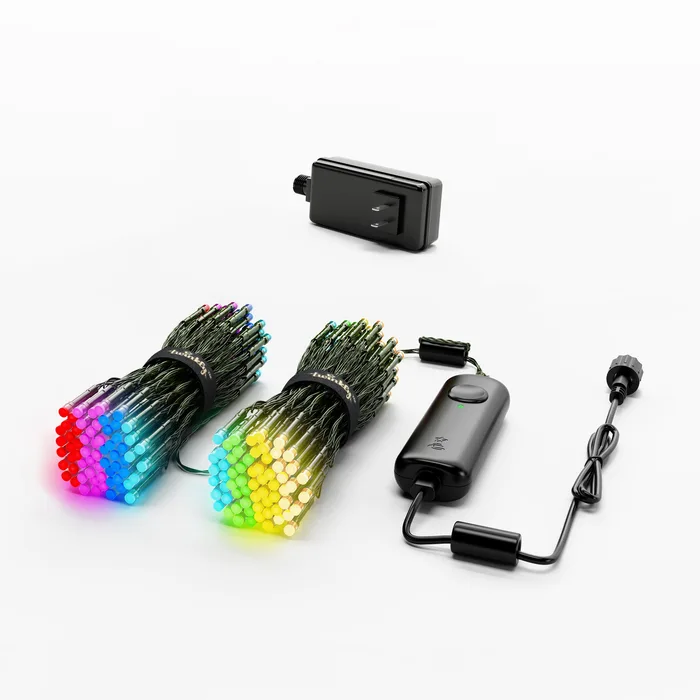
First-time buyers tend to compare smart Christmas lights on length and price, then find the tree looks sparse or the effects look random. The specs that really matter are how many LEDs you get per foot, whether each one can be set on its own, and whether the app knows where each bulb sits on the tree. Weather ratings and smart home support also vary more than the boxes suggest.
The 30-second version
- Count LEDs, not feet, because two strings of the same length can carry very different numbers of bulbs.
- Per-LED control is the point, since strings that only set a few gradient points cannot run detailed animations.
- Mapping changes the look, letting effects follow the shape of the tree instead of the order of the wire.
- Check two IP ratings, one for the string and one for the power supply, before leaving lights outside.
- Matter support is per product, so confirm it on the specific listing rather than assuming the whole brand has it.
The products this guide is about
Our verdict on each, with the full reasoning on the companion review.
- Buy Twinkly Strings Multicolor + White 250 LED The densest, most controllable tree string here, with camera mapping that lets you paint effects across the actual shape of your tree.
- Buy Govee Christmas String Lights 2 (66 ft, H70C4) The value pick, with a dedicated warm white LED in each bead, shape mapping, Matter and the best weather rating on any string here.
- It depends Nanoleaf Smart Holiday String Lights (Matter Wi-Fi) A Matter-native string that slots neatly into Apple Home or Google Home, at the cost of RGB-only LEDs and a modest weather rating.
- Skip Philips Hue Festavia String Lights 65.6 ft, 250 LEDs The most expensive string here, and the only one whose maker says you cannot control each LED individually.
What actually matters
- LED count - This decides how full the string looks. Compare count per length, because a longer string with fewer LEDs can look sparser than a shorter dense one.
- Addressable LEDs - Each bulb can show its own color at the same time. This is what makes flowing, sparkling and shaped effects possible.
- LED mapping - The app works out where every bulb sits after you hang the lights. Effects then move across the tree as a picture instead of along the cord.
- White quality - Many smart LEDs mix white from red, green and blue. A dedicated white chip or a stated warm to cool white range usually looks cleaner.
- Weather rating - The IP code tells you how well the string resists dust and water. Outdoor use calls for a higher rating, and the power supply needs checking too.
- Smart home platform - The maker should list your assistant or Matter for that product. Otherwise you may be stuck with the brand's app alone.
- Expandability - Some strings can be joined or grouped and some cannot. If you plan to grow the display, check whether sets connect physically or only in the app.
The specs, in plain English
Green flags vs red flags
Green flags
- LED count and length both stated, so you can work out density
- Individually addressable LEDs stated on the product page
- Camera or video mapping in the app
- Separate IP ratings given for the string and the power supply
- A dedicated white LED or a stated warm to cool white range
Red flags
- Only length given, with no LED count
- Vague claims like weather resistant with no IP code
- Effects described as gradients or zones rather than per-LED control
- Smart home logos on the box that are not on the specific product page
- No statement on whether sets can be joined or extended
Who's who: the brands
- Twinkly - An Italian brand focused on app-controlled decorative lighting, known for camera-based LED mapping.
- Govee - Known for affordable app-controlled lighting with lots of preset scenes and frequent new holiday models.
- Nanoleaf - A smart lighting brand built around Matter and Thread support and its own app ecosystem.
- Philips Hue - The large smart lighting ecosystem from Signify, centered on the Hue Bridge and Hue app.
How to read a listing without getting fooled
Start with the LED count and the lighted length together, then look for the words individually addressable or per-LED control; if the listing talks about gradients or points instead, effects will be simpler. Find the IP code and check whether it applies to the string, the controller and the power supply, since they are often different. Look at the white spec: a separate warm white LED or a stated kelvin range is a good sign. Finally, read the integrations list on that exact product page rather than the brand homepage, and note the lead cable length so you know how far the first bulb sits from the plug.
How much should you spend?
Budget smart strings now offer per-LED effects, mapping and Matter, so the low tier is where most people should start, especially for outdoor use. The mid-range buys density and more developed effects tools, which shows most on an indoor showpiece tree. The premium tier is mostly paying for an ecosystem; it makes sense only if you already own that brand's hub and want everything in one app, and even then check that the string offers per-LED control before paying more.
Questions, answered
Are smart Christmas lights worth it over plain LED strings?
If you only ever run steady warm white, plain LED strings are simpler and cheaper. Smart strings earn their keep when you want schedules, voice control, color changes for other holidays, or animated effects. Many people also use them year round as accent lighting. The extra cost buys flexibility rather than brightness.
Can I mix smart lights from different brands on one tree?
You can hang them together, but each brand's effects run in its own app, so animations will not line up across brands. Matter can put them in one home app for on, off, color and brightness, but not for synchronized effects. For one coordinated display, stay within a single brand.
Do smart Christmas lights work without Wi-Fi?
Some do. Hue Festavia states it works without Wi-Fi over Bluetooth, and Twinkly and Nanoleaf list Bluetooth among their connections. Remote control from outside the house and voice assistants generally need your home network. Check the connectivity list on the product page.
How do I store smart lights so they keep working?
Coil the string loosely rather than wrapping it tightly, and keep the controller and power supply dry. Avoid yanking on the cord where it meets the controller, since that joint takes the most strain. A reel or the original packaging helps, and labeling each string's controller saves time next season.
Or jump to the head-to-head: Twinkly Strings Multicolor + White 250 LED vs Govee Christmas String Lights 2 (66 ft, H70C4).