Explained
Cable Modems, Explained
After reading, you'll know exactly which specs matter, how to confirm a modem works with your provider, and how buying your own ends the rental fee.
In this guide
A cable modem is the box that turns the coaxial cable line coming into your home into an internet connection your router can use. Most people never think about it because they rent one from their cable company, quietly paying a fee on every bill. Buying your own is one of the few tech purchases that pays for itself, but the retail shelf is full of near-identical black boxes, some of them quietly outdated, and the one detail that trips buyers up isn't a spec at all: whether your specific provider will actually activate the model you bought.
The 30-second version
- Renting is a slow leak. your cable company charges a recurring equipment fee, and a modem can pay for itself within a year or two depending on your provider's fee, then saves money every month after.
- DOCSIS 3.1 is the standard to buy. it handles today's gigabit and multi-gig plans and stays on ISP approved lists longer than older DOCSIS 3.0 gear.
- The Ethernet port sets your ceiling. a 2.5 Gbps port keeps up with faster-than-gigabit plans, while a 1 Gbps-only modem will bottleneck you if you ever upgrade.
- Approval beats specs. the best modem is useless if your provider won't activate it, so always confirm your exact model is on their approved-device list first.
- A modem is not a router. standalone modems have no Wi-Fi, so budget for your own router or a combo unit if you want a single box.
The products this guide is about
Our verdict on each, with the full reasoning on the companion review.
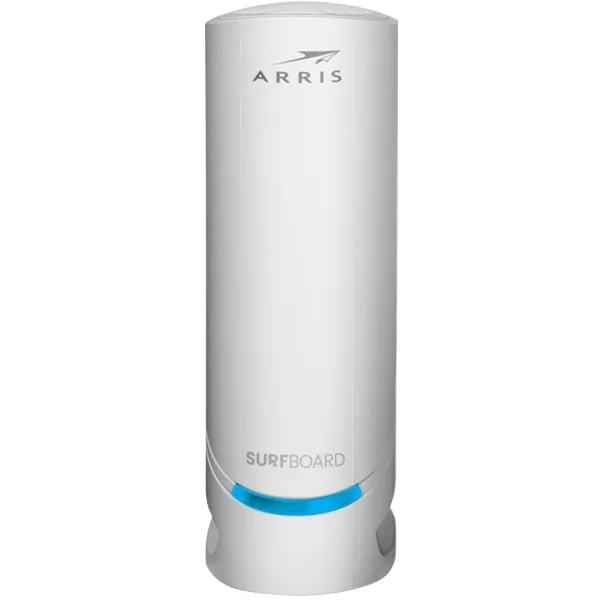
- Buy ARRIS SURFboard S34 The S33's 2.5 Gbps hardware with a switchable upstream filter for faster next generation upload tiers, plus a 2 year warranty. Amazon
- Buy NETGEAR Nighthawk CM3000 A mid-split and high-split DOCSIS 3.1 modem with a 2.5 Gbps port the only high-split modem here, at a higher price tier. Amazon
- It depends ARRIS SURFboard S33 The proven 2.5 Gbps SURFboard, still a smart, cheaper buy if your plan has no next generation upload tier. Amazon
- It depends Hitron CODA56 A retail DOCSIS 3.1 modem with switchable mid-split upstream and a 2.5 Gbps port, but only one Ethernet jack. Amazon
- Skip ARRIS SURFboard SB8200 A reliable but aging DOCSIS 3.1 modem that ARRIS rates for plans up to 1 Gbps, too often priced near the faster SURFboards. Amazon
What actually matters
- DOCSIS version determines whether the modem can handle modern plans and stay compatible as speeds climb; 3.1 is the safe choice and 3.0 is fading off approved lists.
- Speed headroom is about the fastest Ethernet port and DOCSIS profile keeping pace with your plan; a 2.5 Gbps port matters the moment you go above gigabit.
- ISP compatibility decides whether you can even use the modem, since providers only activate models on their approved list and approvals vary by plan speed.
- Reliability shows up in long-run owner reports as dropped connections, overheating, and firmware stability, which a fancy spec sheet won't reveal.
- Standalone vs combo is the choice between a modem-only unit plus your own router, or an all-in-one box that's simpler but harder to upgrade piece by piece.
- Real value means comparing a modem against its closest rival, since a gigabit-capped unit priced like a multi-gig one is a poor deal even if it works fine.
- Ventilation and heat matter because these modems run warm and want open air, so a cramped cabinet can shorten their life or cause instability.
The specs, in plain English
Green flags vs red flags
Green flags
- The exact model appears on your cable provider's approved-device list for your plan speed
- DOCSIS 3.1 with a 2.5 Gbps Ethernet port for headroom above gigabit
- A large owner base and long track record with stable-connection and mature-firmware reports
- Clear, simple self-activation that owners describe as quick and drama-free
- Priced sensibly against its closest rival rather than matching a faster modem's cost
Red flags
- A modem capped at 1 Gbps ports sold at nearly the same price as a 2.5 Gbps model
- DOCSIS 3.0 or an unclear DOCSIS version, which points to aging, soon-to-be-unsupported hardware
- Your provider doesn't list the model, or only lists it for slower plans than yours
- Thin or mixed owner reports on support responsiveness and firmware updates
- Marketing that leans on link aggregation instead of a genuine multi-gig port
- Runs hot with poor ventilation guidance, a common cause of drops and early failure
Who's who: the brands
- ARRIS SURFboard - The default retail cable-modem line, with a 2 year warranty on its current modems. The S34 adds a switchable 42/85 MHz upstream filter for faster upload tiers and is on Xfinity's Next Gen list; the S33 has the same ports and a long owner record but is not on that list.
- Hitron - Sells to cable operators and also sells the retail CODA56, a single-port 2.5 Gbps DOCSIS 3.1 modem with switchable 42/85 MHz upstream that is on Xfinity's Next Gen list. The product page does not state its warranty.
- Netgear - A familiar networking brand offering standalone modems and modem-router combos; its Nighthawk CM3000 adds mid-split and high-split DOCSIS 3.1, which NETGEAR rates for up to 1 Gbps upload, with a 1 year warranty. Check that your specific model is approved for your provider and plan.
- Motorola / MotoNetworks - A long-standing name in home modems, often positioned as a value alternative to ARRIS; approval breadth varies by model, so verify before buying.
How to read a listing without getting fooled
Read a modem listing from the connection inward. First confirm the DOCSIS version is 3.1, not 3.0, so it stays supported. Next find the fastest Ethernet port: a 2.5 Gbps (2.5 GbE) port means real multi-gig headroom, while a spec that only mentions 1 Gbps ports or leans on link aggregation quietly caps you near gigabit. Ignore inflated headline speed claims and match the modem to your actual plan. Then leave the listing entirely and check your cable provider's approved-device list for your exact model and plan speed, because a modem that isn't approved simply won't activate. Finally, skim long-run owner reports for the boring details specs hide: dropped connections, overheating, and how quickly firmware issues get fixed.
How much should you spend?
Think of the purchase against your rental fee rather than in absolute terms. A DOCSIS 3.1 modem with a 2.5 Gbps port can take a year or two of equipment fees to pay back, and after that break-even everything is savings. The value sweet spot sits with a broadly approved 2.5 Gbps model that supports your ISP's faster upload tiers, such as the ARRIS S34, rather than the priciest one. Spending up to a high-split modem like the NETGEAR CM3000 is worth it only if you want hardware ready for high-split tiers your ISP has not launched yet. On Xfinity, no customer-owned modem currently gets X-Class speeds. Spending up is not worth it to gain a gigabit-capped modem priced like a faster one, and it's rarely worth it to chase speeds your plan can't yet use.
Questions, answered
Will buying my own modem really save money versus renting?
In most cases, yes. Cable providers charge a recurring monthly equipment fee, and a DOCSIS 3.1 modem can take a year or two of those fees to pay back. After that break-even point every month is savings, and you keep the modem across plan changes.
How do I know a modem will work with my provider?
Check your provider's approved-device list for your exact model before buying, and confirm it's approved for your plan speed, not just for the provider in general. Approvals vary by ISP and by tier, so a model that works for a neighbor on a slower plan may not be listed for yours.
Is DOCSIS 3.1 worth it over an older DOCSIS 3.0 modem?
For almost everyone, yes. DOCSIS 3.1 handles today's gigabit and multi-gig plans and gives you headroom as speeds climb, while older DOCSIS 3.0 modems are increasingly being phased off ISP approved lists. Buying 3.1 now is the safer long-term choice.
Do I still need a router if I buy a standalone modem?
Yes. A standalone modem has no built-in Wi-Fi (a gateway does), so you connect your own router or mesh system to it. If you'd rather have one box, look at a modem-router combo, though separate units are usually easier to upgrade and troubleshoot.
Do cable modems work with any internet provider?
No. Cable modems only work on cable internet providers that run over coaxial lines. They will not work on fiber, DSL, or fixed-wireless service, so confirm you have cable service and that your exact model is on that provider's approved list.
Why does my modem run so hot, and does it matter?
These modems generate real heat under load, and poor airflow can cause dropped connections or shorten their life. Give the modem open space rather than burying it in a closed cabinet, and it will run more reliably.
Or jump to the head-to-head: ARRIS SURFboard S34 vs NETGEAR Nighthawk CM3000.