Explained
2-in-1 Convertible Laptops, Explained
After reading this you'll know what makes a laptop a true convertible, which specs matter for the way you'll actually use it, and how to avoid paying premium prices for last-generation hardware.
In this guide
A 2-in-1 convertible is a laptop with a touchscreen on a hinge that folds all the way around, so one machine works as a laptop, a tablet, and a propped-up screen for video. The hard part is that a great convertible has to do two jobs well at once, and most are good at one and clumsy at the other. The specs that get advertised loudest, screen size and processor names, aren't always the ones that decide whether you'll actually enjoy using it.
The 30-second version
- The hinge is the whole point. a real convertible rotates a full 360 degrees so it becomes a tablet and a tent; a touchscreen that only opens partway is not the same thing.
- Match the screen size to how you'll hold it, 14 inches is comfortable in your hand, while 16 inches is a gorgeous desk-and-tent canvas that's awkward to hold like a tablet.
- A current-generation chip matters more than raw speed, because newer processors bring better battery life and the Copilot+ AI features that older U-series chips lack.
- OLED earns its keep on a convertible, since you stare at the screen in multiple modes where contrast and color are front and center, more than on a laptop you only ever type on.
- Check whether the pen is in the box, because a bundled pen versus a separate purchase is a real hidden cost difference between otherwise similar models.
The products this guide is about
Our verdict on each, with the full reasoning on the companion review.
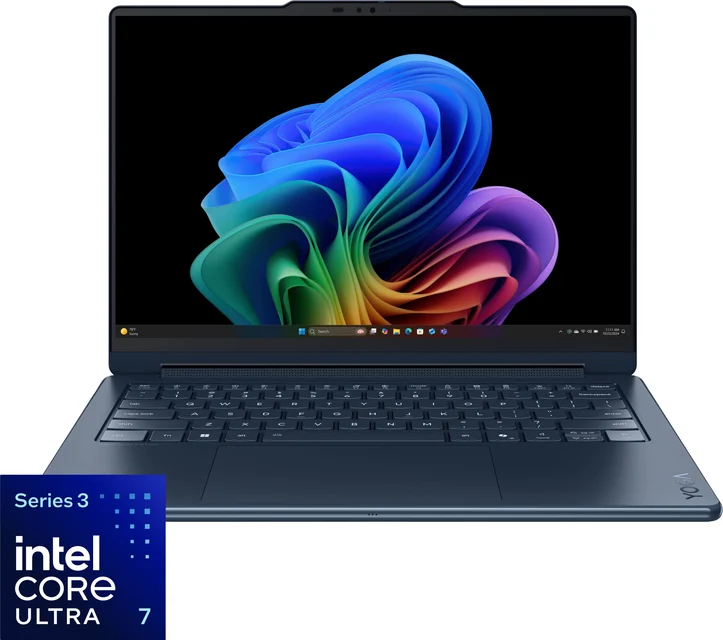
- Buy Lenovo Yoga 9i 2-in-1 Aura Edition (Gen 10) The most polished 14-inch convertible you can buy, with a rotating soundbar hinge and a stunning OLED screen. Amazon
- Buy HP OmniBook X Flip 14 The successor to HP's Spectre convertibles, and the smartest all-rounder for most people. Amazon
- It depends Samsung Galaxy Book5 Pro 360 A huge, gorgeous 16-inch AMOLED convertible that's shockingly light but awkward to actually use as a tablet. Amazon
- Skip HP OmniBook 5 Flip 14 Priced like a modern premium convertible, but built around a last-generation processor. Amazon
What actually matters
- A true 360-degree hinge is what separates a convertible from a plain touchscreen laptop; it's what makes tablet mode and tent mode possible, and a stiff, confident hinge that doesn't wobble is a sign of good build quality.
- Screen size versus in-hand comfort decides how you'll really use it: a 14-inch model is light enough to hold like a notepad, while a 16-inch one is spectacular flat on a desk but heavy and unwieldy held one-handed.
- Display technology (OLED versus IPS) shapes every mode you view the screen in; OLED gives deeper contrast and richer color that stands out more on a device you look at from many angles, at the cost of more glare and a bit more battery drain.
- A modern processor with Copilot+ support drives both longevity and battery life; an older chip at a premium price is the single biggest red flag in this category.
- Chassis weight and edge comfort matter uniquely here, because a convertible you dread lifting into tablet mode is just a heavy laptop; rounded edges and low weight make folded use pleasant.
- Pen support and whether it's included is central if you plan to draw or take handwritten notes; some models bundle a pen, others sell it separately.
- Battery life carries extra weight on a device meant to be picked up and moved between modes all day, so all-day endurance is worth prioritizing over small performance gains.
The specs, in plain English
Green flags vs red flags
Green flags
- A genuine 360-degree hinge that feels stiff and confident, with no wobble when you tap the screen
- A current-generation processor described as Copilot+ ready, signaling recent hardware and good battery efficiency
- An OLED or AMOLED display option, especially if you'll use tablet and tent modes often
- Rounded or 'comfort' edges and a light chassis that make it pleasant to hold folded
- A pen included in the box, or at least clearly supported, if inking matters to you
- All-day battery life confirmed across independent testing and owner reports
Red flags
- An older U-series processor sold at a premium price, lacking the newer AI acceleration and efficiency
- A screen that only opens partway rather than folding a full 360 degrees (that's a touchscreen laptop, not a convertible)
- A heavy 16-inch model marketed for handheld tablet use, which is awkward in practice
- A base configuration quietly shipping a basic IPS panel while the OLED shown in ads costs extra
- A pen pictured everywhere but sold separately, hiding real cost
- A dense, chunky chassis that owners describe as uncomfortable to hold in tablet mode
Who's who: the brands
- Lenovo - Its Yoga line is a benchmark for premium convertibles, known for polished hinges, strong OLED screens, and comfortable-to-hold designs.
- HP - The OmniBook range (successor to the well-loved Spectre x360) covers mainstream-premium convertibles with confident hinges and good value, plus lower-tier models to watch closely.
- Samsung - Its Galaxy Book Pro 360 machines pair spectacular large AMOLED screens with unusually thin, light bodies and an included S Pen.
- Dell - A longtime maker of well-built convertibles across price tiers, generally emphasizing solid construction and business-friendly options.
- Asus - Offers a wide range of convertibles from mainstream to creator-focused, often with vivid OLED displays and competitive pricing.
- Microsoft - Best known for the detachable Surface Pro rather than fold-around convertibles, but the default comparison point people mean when they say 'tablet laptop'.
How to read a listing without getting fooled
When you scan a convertible's spec sheet, start by confirming it's actually a 360-degree convertible and not a partial-opening touchscreen, then read the processor name carefully: a current-generation chip with Copilot+ support signals recent hardware and good battery life, while an older U-series part at a premium price is the biggest trap. Next, check whether the OLED panel shown in the marketing is standard or an upgrade, because the base configuration often ships a plain IPS screen. Look at weight and screen size together (a big screen is a desk canvas, not a couch tablet), and confirm whether the pen is included or sold separately, since that's a real cost the listing may bury. Treat vivid marketing photos of someone drawing on a giant screen as a hint about intended use, not proof it's comfortable in your hands.
How much should you spend?
The biggest cost driver in convertibles is the screen and build: OLED panels, refined hinges, and thin light chassis push a machine toward the flagship tier. The value sweet spot usually sits one step below the flagships, where you get a current-generation Copilot+ processor, an OLED option, a confident hinge, and strong battery life for meaningfully less money, giving up only the last increment of screen and hinge polish. Spending up to the flagship level makes sense if you'll genuinely notice and enjoy the best display, sound, and in-hand feel every day. What rarely pays off is a mid-tier price attached to a last-generation processor, so if you're choosing between a cheaper model with an older chip and a slightly pricier one with current hardware, the newer chip is worth the stretch. If your budget is tight, it's better to step down to an honestly-priced budget convertible than to overpay for aging premium-looking hardware.
Questions, answered
What actually makes a laptop a '2-in-1 convertible'?
The hinge. A convertible has a touchscreen that rotates a full 360 degrees, so the same machine works as a laptop, folds into a tent or stand for video, and lays flat as a tablet. That's different from a detachable, where the screen pops off entirely, and from a plain touchscreen laptop that only opens partway.
Is OLED worth it on a 2-in-1, or is it just marketing?
On a convertible it matters more than on a regular laptop, because you look at the screen in tablet and tent modes where color and contrast are front and center. OLED gives deeper blacks and richer color than a typical IPS panel. The trade-offs owners note are more glare and reflections and slightly more battery drain on bright, white-heavy screens, but for media and drawing most people find it worth it if the budget allows.
Do these come with a pen, or is that extra?
It varies, and it's a real cost difference. Some models include a pen in the box; others support an active pen but sell it separately, and many budget models leave it as an add-on. If handwriting or drawing is a big reason you want a convertible, factor a pen purchase into the price of any model that doesn't include one.
Is a 16-inch convertible too big to use as a tablet?
For handheld use, largely yes. A 16-inch screen is a fantastic canvas when it's flat on a desk or propped in tent mode, but it's heavy and awkward to hold one-handed like a book or notepad. If you picture curling up with your convertible as a tablet, a 14-inch model is far more comfortable; choose a big-screen machine for desk-flat drawing and media instead.
Why is the processor generation such a big deal?
A current-generation chip brings better battery efficiency and the Copilot+ AI features newer Windows laptops advertise, thanks to a dedicated AI chip called an NPU. Older U-series processors lack that and trail on both speed and battery life. The trap is that an older chip can sit inside a modern-looking convertible at a near-premium price, so read the processor name and prefer current-generation hardware.
Convertible or detachable, which should I get?
Choose a convertible if you mostly want a normal laptop that can occasionally flip into a tablet or tent; the keyboard stays attached and it feels like a real laptop on your lap. Choose a detachable if you want something that's primarily a tablet with an optional keyboard. Convertibles tend to be sturdier for typing; detachables are lighter in pure tablet form.
Or jump to the head-to-head: Lenovo Yoga 9i 2-in-1 Aura Edition (Gen 10) vs HP OmniBook X Flip 14.