Explained
Wireless Mice, Explained
After reading this, you will understand every spec on a wireless mouse box and know which ones actually matter for your hands and your desk.
In this guide
A wireless mouse looks simple until you read the box and hit a wall of terms like DPI, polling rate, Darkfield and MagSpeed. Most of those numbers were written for gamers, not for someone who scrolls documents all day. This guide translates the jargon into plain English and shows you which few things genuinely change how a mouse feels over a full working day.
The 30-second version
- Shape beats specs. the way a mouse fits your hand and supports your palm matters far more for all-day comfort than any number on the box.
- Ignore gaming figures. sky-high DPI and polling rates do nothing for office work; they are marketing aimed at competitive gamers.
- The scroll wheel is the hidden upgrade. a wheel that switches between clicky precision and free-spinning glide changes how fast you move through long documents and wide spreadsheets.
- Connection type decides convenience. Bluetooth versus a tiny USB receiver, and how many devices a mouse remembers, shapes your daily setup more than you expect.
- Battery style is a lifestyle choice. rechargeable means an occasional cable; a replaceable AA can run for years but is one more thing to buy.
The products this guide is about
Our verdict on each, with the full reasoning on the companion review.
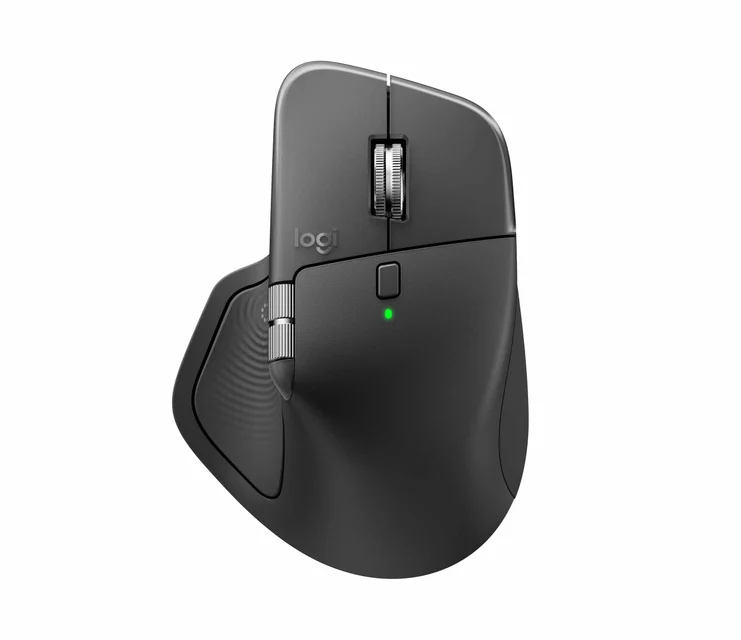
- Buy Logitech MX Master 4 The default full-size productivity mouse: sculpted comfort, an electromagnetic scroll wheel and quiet clicks. Amazon
- Buy Logitech MX Anywhere 3S A compact version of the Master formula for people who work from a bag as much as a desk. Amazon
- It depends Logitech Lift Vertical Ergonomic Mouse A vertical mouse that puts the wrist in a handshake posture, sized for smaller hands. Amazon
- Skip Apple Magic Mouse (USB-C) A tidy touch-surface mouse held back by a flat shape and a charging port on its underside. Amazon
What actually matters
- Hand fit and grip style - a mouse sized and sculpted for your hand (and your grip, whether palm, claw or fingertip) is the single biggest factor in whether your hand feels fine or sore at 5 p.m.
- Scroll wheel behavior - a wheel that can lock into notched, row-by-row control and also spin freely to coast down long pages saves real time if you live in documents and spreadsheets.
- Click noise - near-silent switches matter in shared offices, open-plan rooms and on video calls, where constant clicking is distracting.
- Multi-device switching - the ability to pair to two or three machines and jump between them, ideally moving the cursor straight from one screen to another, is a genuine daily convenience for anyone with a laptop and a desktop.
- Sensor and surface tolerance - a good sensor tracks reliably on glass, glossy desks and uneven surfaces so you are not hunting for a mousepad.
- Battery and upkeep - how long it lasts and how you top it up (rechargeable versus replaceable) determines how often the mouse interrupts your work.
- Operating-system support - some features and companion software work fully on Windows but only partly on macOS, so check that the extras you want are supported on your machine.
The specs, in plain English
Green flags vs red flags
Green flags
- A sculpted shape that matches your hand size, with support for the palm rather than a flat slab you pinch with fingertips
- A scroll wheel that switches between notched precision and free-spinning glide
- Near-silent or quiet click switches, especially if you share a room or take calls
- Pairs to two or three devices and switches between them easily
- Rechargeable over USB-C, or a replaceable battery rated for a year or more
- A sensor that tracks on your actual desk surface, glass and gloss included
Red flags
- Marketing that leads with huge DPI or polling-rate numbers for an office mouse
- A low, flat body that forces a fingertip grip over long sessions
- A charging port placed where you cannot use the mouse while it charges
- Only one device pairing when you use both a laptop and a desktop
- Loud side buttons or clicks in a mouse sold as quiet
- Key features locked behind software that only works fully on the other operating system
Who's who: the brands
- Logitech - The dominant name in productivity mice, known for the MX Master and MX Anywhere lines and their standout electromagnetic scroll wheels.
- Apple - Makes the Magic Mouse, a sleek touch-surface mouse tuned for Mac desks but limited in shape and ergonomics.
- Microsoft - Long-running maker of comfortable, sensibly priced office and ergonomic mice that pair easily with Windows.
- Razer - Best known for gaming mice, but also makes productivity models; watch that you are not paying for gaming specs you will not use.
- Anker - A value brand offering simple, inexpensive wireless mice that cover the basics without premium scrolling or software.
How to read a listing without getting fooled
When you read a wireless mouse listing, start by mentally skipping the gaming numbers: DPI, CPI and polling rate rarely matter for office use, and a headline like '8000 DPI' tells you nothing about comfort. Instead, look for the shape and intended hand size, the scroll-wheel description (does it free-spin or only notch?), the click-noise claim, how many devices it pairs to, the sensor type if your desk is glass or glossy, and the battery arrangement. Treat 'ergonomic' and 'vertical' as clues about posture, not guarantees your hand will fit, so check the stated hand-size range. Finally, note which features depend on companion software and whether that software fully supports your operating system, because a feature that shines on Windows may be partial on a Mac.
How much should you spend?
Wireless mice span a wide range, and spending more mostly buys comfort, a better scroll wheel, quiet clicks and multi-device switching rather than raw performance. The value sweet spot for office work sits in the mid-range, where you get a comfortable shape, reliable connection and a decent battery without paying for gaming extras. Stepping up to premium is worth it if you scroll long documents all day, share a quiet office, or move constantly between machines, since the electromagnetic wheel, near-silent switches and cursor hand-off genuinely change the experience. It is not worth paying premium prices for high DPI or polling-rate figures, and the cheapest mice are a false economy if a flat shape leaves your hand sore. Buy the shape and scrolling you will use every day, and let the price follow that, not the spec sheet.
Questions, answered
Does a higher DPI make a mouse better for office work?
No. DPI only sets how far the cursor travels for a given hand movement. Every modern mouse offers far more than office work needs, so a bigger DPI number is a gaming selling point, not a reason to buy. Comfort, scrolling and click noise matter far more.
Should I choose Bluetooth or a USB receiver?
Both work well. A USB receiver (dongle) tends to connect instantly and reliably, which suits a fixed desk, but it uses up a port. Bluetooth keeps your ports free and is ideal for laptops and tablets, though pairing can occasionally be fussier. Many good mice offer both, letting you keep one connection on the receiver and another over Bluetooth.
Are vertical or ergonomic mice worth it?
They can genuinely help if you have wrist or forearm discomfort, because the handshake posture reduces the twisting a flat mouse causes. Expect a short adjustment period of a few days, and check the stated hand-size range first, since a vertical mouse that is too small for your hand loses much of its benefit.
How long should a wireless mouse battery last?
It depends on the type. Rechargeable mice typically run for several weeks per USB-C charge, while a mouse on a replaceable AA can last a year or more. Neither is strictly better: rechargeable means an occasional cable, and a replaceable battery means an occasional trip to buy one. Choose the routine that annoys you least.
Do quiet clicks really matter?
In shared offices, open-plan rooms and on video calls, yes. Near-silent switches remove the constant clatter without changing how the click feels under your finger. If you always work alone, it matters less, but it is a feature most people appreciate once they have it.
Will a Windows mouse work on a Mac (and vice versa)?
The basic pointing and scrolling work on either system. The difference is the companion software and extra buttons or gestures, which are often more complete on Windows than on macOS. If a specific feature matters to you, confirm the maker supports it on your operating system before buying.
Or jump to the head-to-head: Logitech MX Master 4 vs Logitech MX Anywhere 3S.