Explained
VR Headsets, Explained
After reading, you'll understand how VR headsets differ, what the specs actually mean, and which type fits how you plan to use one.
In this guide
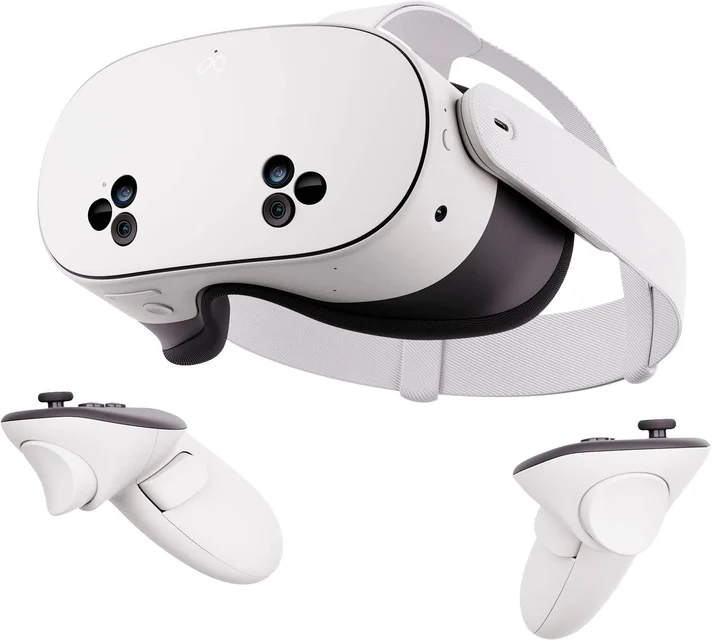
A VR headset straps a pair of tiny screens and lenses to your face and tracks your movement so a virtual world responds as you look and reach around. The biggest thing that trips up first-time buyers is assuming all headsets are interchangeable, when the real fork in the road is whether a headset runs on its own or has to be plugged into a gaming PC or console. Get that decision right and everything else, from price to comfort to which games you can play, falls into place.
The 30-second version
- Decide standalone versus tethered first. a self-contained headset you pick up and use anywhere is a fundamentally different product from one that must stay wired to a powerful PC or console.
- The spec sheet is not the experience. lens quality, comfort and how the tracking feels matter as much as raw resolution numbers, and they rarely show up on the box.
- Budget for the whole kit, not just the headset. some headsets need separately purchased base stations, controllers or adapters that can cost as much as the headset itself.
- Match the library to what you want to play. a headset is only as good as the games and apps it can run, so check that your must-haves are supported before you buy.
- Watch the product lifecycle. buying hardware that has been discontinued or is about to be replaced usually means paying a premium for yesterday's technology.
The products this guide is about
Our verdict on each, with the full reasoning on the companion review.
- Buy Meta Quest 3S The standalone headset that makes VR effortless, affordable and genuinely fun for almost everyone. Amazon
- Buy Bigscreen Beyond 2 The lightest, sharpest window into PC VR, if you already own the PC and trackers to feed it.
- It depends Sony PlayStation VR2 A gorgeous OLED headset that shines on a PS5 but loses much of its magic the moment you take it elsewhere. Amazon
- Skip Valve Index A once-pioneering PC VR kit now outclassed, with a successor headset announced by Valve. Amazon
What actually matters
- How it runs (standalone vs PC VR vs console) is the single most important choice, because it decides your cost, convenience and which headsets are even on your list.
- Display quality covers the panel type and clarity you actually see; OLED and micro-OLED deliver deeper blacks and richer contrast, while LCD tends to be bright, sharp and cheaper.
- Comfort and weight decide whether you'll wear it for an hour or take it off in ten minutes, especially the balance on your face and whether it fits your head.
- Setup friction ranges from open-the-box-and-play to installing external sensors around your room, which matters if you don't want a project every time you play.
- Content library is the size and health of the game and app catalog, including whether older titles still work (backward compatibility).
- Controllers and tracking determine how naturally your hands and movement translate into the game, from simple handsets to finger-sensing controllers.
- Total cost of ownership is the real price once you add any required base stations, controllers, adapters or a capable PC.
The specs, in plain English
Green flags vs red flags
Green flags
- The headset runs the way you actually live: standalone if you want grab-and-go, tethered if you already own the gaming PC to feed it.
- IPD adjustment and a comfortable, well-balanced fit are called out consistently in owner reports.
- A large, healthy content library that includes the specific games or apps you want, ideally with backward compatibility.
- Everything you need to play is included, or the extra costs are clearly spelled out up front.
- It's a current model that is still being sold and supported, not end-of-life stock.
Red flags
- The listing hides that you also need base stations, controllers or an adapter sold separately to make it work.
- No IPD adjustment or a reputation for being front-heavy and uncomfortable in longer sessions.
- The model has been discontinued or a successor is imminent, so you'd be paying full price for aging hardware.
- A small or shrinking library that's missing the titles you actually care about.
- Marketing leans entirely on a big resolution number while owners complain about soft lenses or a narrow field of view.
Who's who: the brands
- Meta - Makes the mainstream, standalone Quest headsets that dominate VR by library size and ease of use.
- Sony - Makes the PlayStation VR2, a premium OLED headset built primarily around the PS5 console.
- Valve - A PC VR pioneer known for the Index and its finger-tracking controllers, with hardware now aging toward a successor.
- Bigscreen - A boutique maker of ultralight, micro-OLED PC VR headsets aimed at fidelity-focused enthusiasts.
- HTC - A long-running VR brand whose Vive line targets both enthusiast and business/professional users.
How to read a listing without getting fooled
When you scan a VR headset listing, find the one fact that reframes everything else: does it run on its own, or does it require a gaming PC or a specific console? That tells you the true price and effort. Next, look past the headline resolution number, because a big pixel count paired with mediocre lenses can look worse than a lower number done well; owner reports on real-world sharpness and text clarity are more trustworthy than the spec. Check the panel type (OLED and micro-OLED for contrast, LCD for brightness and value), confirm the headset offers IPD adjustment so it can fit your eyes, and read the fine print under the tracking section, since phrases like base stations or sensors sold separately signal extra hardware you'll need to buy. Finally, confirm the games and apps you want are actually supported, and check whether the model is current or quietly nearing the end of its life.
How much should you spend?
How much to spend comes down to which category you're buying into, not chasing the biggest spec. A standalone headset is the most affordable way in because there's nothing else to buy, and for most people the value sweet spot is a current mainstream standalone that covers the vast majority of the experience without the extras. Console-tied headsets make sense only if you already own the console; otherwise their cost balloons with adapters and lost features. The real budgeting trap is enthusiast PC VR, where the headset price is only the starting point once you add base stations, controllers and a capable gaming PC, so those headsets are worth it only if you're genuinely committed and already own most of that gear. Spending more buys lighter weight and a sharper, higher-contrast image, but that upgrade pays off only for people who will use it often and can tell the difference; casual and first-time buyers rarely need it. Whatever tier you choose, factor in the whole kit rather than the sticker on the headset alone, and avoid overpaying for discontinued hardware right before a replacement lands.
Questions, answered
Do I need a gaming PC or a console to use VR?
Not necessarily. Standalone headsets have the computer built in and work on their own with no PC or console. Other headsets are just displays and must be tethered to a powerful gaming PC or a specific console to function at all. Deciding which type you want is the first and most important step.
What's the difference between standalone VR and PC VR?
A standalone headset runs everything on hardware inside the headset, so it's wireless and simple but limited by mobile-class power. PC VR sends the work to a desktop graphics card, unlocking higher fidelity and a much larger catalog, at the cost of a cable, more setup and an expensive computer. Many standalone headsets can also stream PC VR when you want the best of both.
Is a higher-resolution headset always better?
No. Resolution is only part of the picture. The quality of the lenses, the field of view, the refresh rate and how well the headset fits your eyes all shape how sharp and comfortable it actually looks. A headset with a lower resolution but better lenses and fit can easily beat a higher-number rival, so weigh real-world impressions over the spec on the box.
Will VR make me feel sick?
Some people feel motion discomfort in VR, especially early on and in games with lots of artificial movement. A higher refresh rate, good tracking and a headset that fits your IPD all help. Most people find that comfort improves as they get used to it and start with gentler, room-scale experiences before fast-motion games.
How much extra gear do these headsets need?
It varies a lot. Standalone headsets typically include everything to start playing. Enthusiast PC VR headsets often require separately purchased base stations and controllers, and some console headsets need an adapter to work on a PC. Always add up the full kit before comparing prices, because the headset alone can be misleading.
Should I wait for a newer headset or buy now?
If a model has been discontinued or a successor is clearly imminent, it's usually worth waiting rather than paying full price for aging hardware. But there's always something newer on the horizon in VR. If a current headset meets your needs and budget today, it's reasonable to buy now rather than wait indefinitely for an unreleased product with unknown price and timing.
Or jump to the head-to-head: Meta Quest 3S vs Bigscreen Beyond 2.