Explained
Video Doorbells, Explained
After reading this you will understand what actually separates video doorbells, so the specs on the box stop being noise and start being a decision.
In this guide
A video doorbell looks simple: it films your porch and pings your phone. The trap is that the box tells you about resolution and field of view, while the things that shape years of cost and privacy live in the fine print. First-time buyers almost always overpay on specs they will never notice and underweigh the subscription and storage questions that decide whether they actually own their footage.
The 30-second version
- The subscription is the real price. Some doorbells record for free, others record nothing until you pay a monthly fee, so the sticker price can hide years of billing.
- Storage location is a privacy decision. Footage kept locally in your home is exposed to fewer people than footage streamed to a company's cloud servers.
- Package coverage needs a downward view. A camera aimed at faces frames visitors well but often cannot see a box left at your feet, so the doormat is a blind spot.
- Ecosystem fit matters more than raw specs. A doorbell that argues with the phone, speakers, and app you already use becomes a daily irritation regardless of its resolution.
- Power source changes your maintenance. Wired doorbells run continuously, while battery models trade easy installation for recharging or swapping cells during busy seasons.
The products this guide is about
Our verdict on each, with the full reasoning on the companion review.
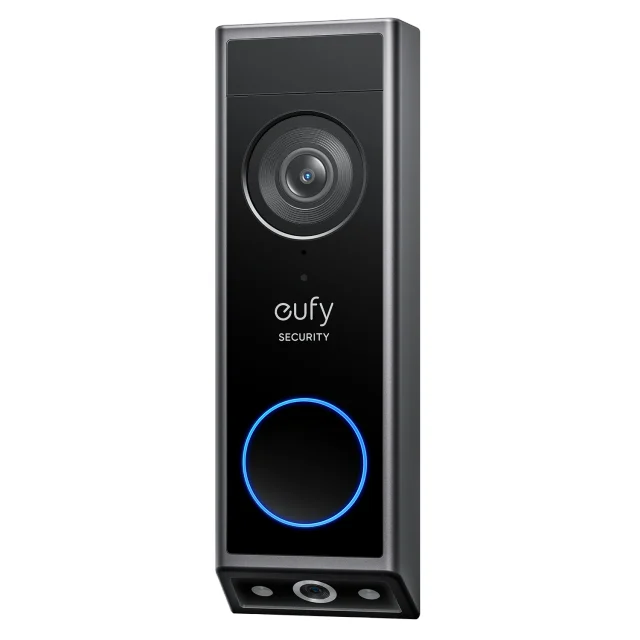
- Buy eufy Video Doorbell E340 A dual-camera doorbell that records locally with no monthly fee and actually watches the doormat. Amazon
- Buy Google Nest Doorbell (Battery) On-device smart alerts that work out of the box, with the paywall reserved for extras rather than the basics. Amazon
- It depends Aqara Video Doorbell G4 The rare HomeKit Secure Video doorbell that records to Apple's ecosystem without a dedicated camera plan. Amazon
- Skip Ring Battery Doorbell Pro Polished hardware wrapped around a cloud-only model that records nothing until you start paying. Amazon
What actually matters
- Cost of ownership, meaning the subscription plus the hardware, because a cheap doorbell that withholds recordings behind a monthly plan is expensive over its life.
- Storage type (local vs. cloud), because it determines both who can reach your footage and whether an internet outage or a lapsed plan leaves you with nothing.
- Package and doorstep coverage, because most porch anxiety is about deliveries, and only a downward angle or a second camera actually watches where boxes sit.
- Free vs. paywalled smart alerts, because on-device detection that sorts people from cars and animals without a fee is far more useful than motion pings that cry wolf.
- Ecosystem compatibility with Alexa, Google Home, or Apple HomeKit, because a doorbell that lives inside the system you already run is one you will actually use.
- Power and installation, because wired setups need existing doorbell wiring while battery units need recharging, and the right choice depends on your entryway and tolerance for upkeep.
- Weather resilience, because an exposed porch in harsh climates demands a higher ingress-protection rating than a covered one.
The specs, in plain English
Green flags vs red flags
Green flags
- Records useful video on its free tier, whether to local storage or through free on-device alerts.
- Offers local storage (memory card or hub) so footage can stay in your home.
- Has a downward angle or a second camera that actually watches the doorstep for packages.
- Works cleanly with the smart-home ecosystem you already use.
- States its weather rating plainly and matches your porch's exposure.
- Encrypts recordings and is transparent about where data is stored.
Red flags
- Records nothing at all until you subscribe, turning an unpaid camera into a mere live-view intercom.
- Stores biometric face data in the cloud with little control offered to you.
- A maker with a documented history of mishandling footage or sharing it without a warrant.
- Marketing that leans on a big resolution number while staying vague about storage and fees.
- No local fallback, so an internet outage or a lapsed plan leaves you with no footage.
- Ships with disposable batteries or a weak weather rating dressed up as a premium product.
Who's who: the brands
- eufy - Known for subscription-free doorbells with local storage; rebuilding trust after a 2022 lapse where its parent uploaded data it had marketed as local-only.
- Google Nest - Strong free on-device detection and tight Google Home integration, with extras like saved history reserved for its Nest Aware plan.
- Aqara - Budget-friendly and one of the few makers supporting Apple's HomeKit Secure Video with local recording and no dedicated camera plan.
- Ring - Polished Amazon-owned hardware and a slick Alexa experience, but a cloud-only recording model and a checkered privacy record.
- Arlo - Feature-rich cameras and doorbells that lean heavily on cloud subscriptions for their smart features.
How to read a listing without getting fooled
Read a doorbell listing back to front. Start at the subscription and storage lines, not the headline resolution, because that is where the years of cost and the privacy trade-offs hide. If the page trumpets 2K or a wide field of view but goes quiet on whether recording is free and where footage lives, treat that silence as an answer. Check whether the advertised smart alerts (person, package, vehicle) work on the free tier or require a plan, and whether "local storage" means real onboard recording or just a temporary buffer. Match the ecosystem badges (Alexa, Google Home, HomeKit) to what you already own, confirm the weather rating fits your porch, and note whether a hub or a paid plan is quietly required to get the experience the photos are selling.
How much should you spend?
Think in terms of total cost over years, not the price on the shelf. The value sweet spot is a mid-range doorbell that records to local storage with no recurring fee, because a bargain unit that withholds footage behind a monthly plan quietly becomes the most expensive option you can buy. Spending more is worth it when it buys genuine package coverage, honest local storage, or the ecosystem you actually use; it is not worth it when the premium goes to a marginally higher resolution while the recordings still live behind a paywall. Budget picks can be excellent if they record locally and fit your home, but scrutinize their weather rating and battery type before assuming the low price is a bargain rather than a compromise.
Questions, answered
Do I really need a monthly subscription for a video doorbell?
No. Several doorbells record locally with no fee, and some offer free on-device smart alerts. Only certain models withhold saved recordings entirely until you pay, so a subscription is a choice you make by picking that brand, not an unavoidable cost of the category.
Is local storage safer than cloud storage?
Local storage keeps footage in your home rather than on a company's servers, which reduces exposure to data breaches, employee access, and third-party sharing. The trade-off is that you are responsible for the device, so favor one that encrypts recordings and offers a backup or hub option.
Which doorbell is best for catching package thieves?
One that can actually see the doormat. Most single-camera doorbells frame a visitor's face well but see the doorstep poorly, so look for a downward angle or a dedicated second camera aimed at where boxes are set down.
Should I choose a wired or battery-powered doorbell?
Wired models draw continuous power and never need recharging, but require existing doorbell wiring. Battery models install almost anywhere in minutes, at the cost of periodic recharging or swapping cells, with life that shrinks sharply on a busy, frequently triggered door.
Does higher resolution mean a better doorbell?
Not by itself. Once you are at 1080p or 2K, a good lens, reliable night vision, and the right camera angle matter more than extra pixels. Do not let a large resolution number distract you from the storage, subscription, and coverage questions that actually shape the experience.
Or jump to the head-to-head: eufy Video Doorbell E340 vs Google Nest Doorbell (Battery).