Explained
Soldering Irons and Stations, Explained
After reading, you'll understand why wattage is close to meaningless, what thermal recovery actually is, and how to read a soldering station spec sheet without being sold a number.
In this guide
First-time buyers get tripped up by one number. Listings shout wattage because it is the only figure that is easy to compare, and buyers reasonably assume more is better. But an iron with no temperature sensor cannot know it has gone cold, so it is either overheating while idle or undershooting on a joint, and neither is fixed by adding watts. The specs that matter are quieter and further down the page: where the sensor sits, what the closed-loop stability is, whether the tip contains its own heater, and what a replacement tip costs.
The 30-second version
- Wattage is a supply rating, not a measure of how the tip performs when it meets a joint.
- Thermal recovery is the real spec, meaning how fast the tip climbs back to its setpoint after heat drains into copper.
- Cartridge tips carry the heater and sensor inside the tip, which is why they recover faster than a separate heater with a slip-on tip.
- Lower is usually better on the dial, with JBC saying 90 percent of joints work at 350 C or less and advising against exceeding 370 C.
- Tips are consumables, and heat plus a dry, un-tinned tip is what destroys them fastest.
The products this guide is about
Our verdict on each, with the full reasoning on the companion review.
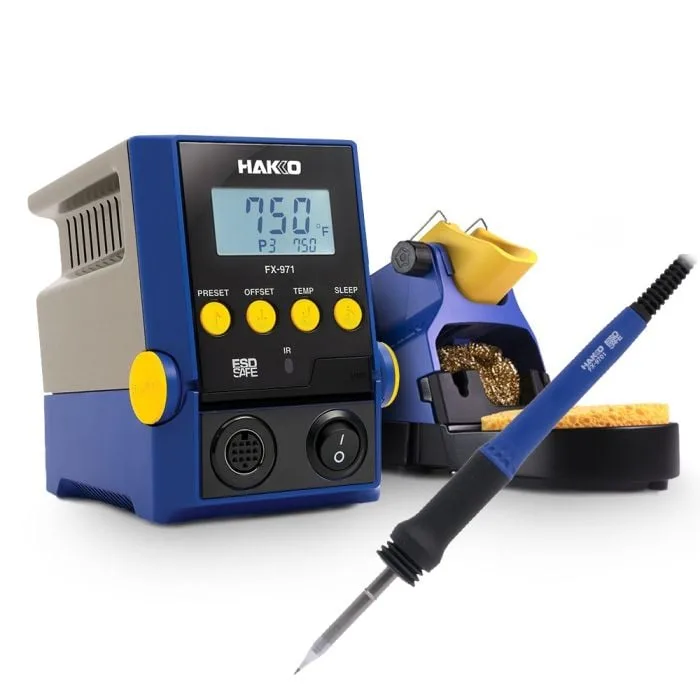
- Buy Hakko FX-971 Soldering Station A 100 W bench station whose composite T39 tips carry the heater and the sensor inside the tip, which is what lets it recover fast enough to solder heavy copper at a sane temperature. Amazon
- Buy Hakko FX-888DX Digital Soldering Station The default hobby bench station: real closed-loop control, ESD safety, cheap tips, and a heater that lives in the handpiece instead of the tip. Amazon
- It depends PINE64 Pinecil V2 Smart Mini Portable Soldering Iron A pocket-sized iron that heats through the tip and runs off a USB-C PD charger, which makes it excellent away from a bench and compromised on one. Amazon
- Skip Weller WLIR6012A 60W Soldering Iron A well-made 60 W pencil iron with a ring light and no temperature control, marketed for the PCB work it is least suited to. Amazon
What actually matters
- Thermal recovery - the speed at which the tip regains its set temperature after transferring heat to a joint. JBC's description of the failure mode is exact: if thermal response is slow the tip cannot recover between joints, which is why operators end up selecting a higher temperature and paying for it in tip life and board damage.
- Closed-loop control - a sensor reads tip temperature and the station modulates power to hold a setpoint. Without it, an iron simply heats until losses balance input, which is why unregulated irons idle far hotter than any joint needs.
- Sensor position - the closer the sensor is to the working face of the tip, the sooner the loop sees a temperature drop. A sensor in the handpiece is measuring the heater, not the joint.
- ESD safety - static from an ungrounded tip can damage sensitive parts. Real ESD-safe irons publish tip-to-ground resistance and tip-to-ground potential figures, typically under 2 ohms and under 2 mV.
- Tip mass and shape - a bigger tip stores and delivers more heat, so switching from a fine conical to a chisel usually fixes a stubborn joint faster than turning up the temperature.
- Sleep and auto-shutoff - dropping the tip temperature when the iron is stood down cuts oxidation. On irons with the sensor in the tip, this can work from tip motion rather than needing a wired stand.
- Consumable cost - the tip is the part you replace. A station with cheap, widely stocked tips will cost less over five years than a cheaper station with rare, expensive ones.
The specs, in plain English
Green flags vs red flags
Green flags
- The listing quotes a temperature range and a stability figure, which means there is a sensor and a control loop.
- The manufacturer describes the tip as a cartridge or composite tip with the heater and sensor integrated.
- Tip-to-ground resistance and potential are published as numbers, not just an ESD SAFE badge.
- A large catalogue of replacement tips exists in stock, in several shapes, from the manufacturer.
- There is a sleep or standby function that drops the temperature when the iron is set down.
Red flags
- Wattage is the headline spec and no temperature range appears anywhere on the page.
- The control is described as variable wattage or variable power rather than variable temperature.
- The only temperature figure is a single high number like a maximum heating range, with no setpoint.
- ESD safe is claimed with no tip-to-ground figures behind it, on a tool recommended for PCB work.
- Replacement tips are hard to find, unbranded, or offered only as a mixed kit of unlabelled shapes.
Who's who: the brands
- Hakko - A Japanese soldering specialist founded in 1952 whose FX-888DX and cartridge-tip FX-971 are the reference points for hobby and professional benches respectively.
- JBC - A Spanish maker that built its reputation on cartridge technology, publishing the low-temperature soldering argument and the tip-life data that underpins it.
- Weller - The best-known name in soldering, spanning genuine professional stations and consumer pencil irons that share the badge but not the control loop.
- PINE64 - An open-hardware community brand whose Pinecil runs open-source IronOS firmware and pioneered the cheap USB-C PD portable iron.
- Miniware - The maker of the TS-series portable irons, including the TS101, that established the pocket-sized cartridge-tip format Pinecil later joined.
How to read a listing without getting fooled
Start at the bottom of the spec table, not the top. Find the temperature range: if there isn't one, the tool has no sensor and everything above it is marketing. Next find the stability figure and note that it is measured at idle, so treat it as evidence a loop exists rather than as a performance ranking. Then look for how the heat is made. Words like composite tip, cartridge, or heating element and sensor integrated mean the sensor is at the sharp end; a line reading heating element: ceramic alongside a separate tip series means the heater is in the handpiece and the tip slides over it. Check for tip-to-ground resistance and potential if you touch anything with a semiconductor in it. Finally, open the replacement tip listing and look at the range and the per-tip price, because that is the number you will keep paying. Read the wattage last, and read it as two numbers where possible: what the station consumes and what the iron itself draws, which are often very different.
How much should you spend?
At the budget end you are choosing between a portable that heats through its tip and an unregulated corded pencil iron, and they are not comparable tools even though they cost about the same. The portable gives you a setpoint and asks you to supply the power; the pencil iron gives you neither. Mid-range is where the mainstream bench station lives, and it is the best value in the whole category: closed-loop control, published ESD numbers, and cheap, widely stocked tips. Premium buys you cartridge tips with the sensor inside them, faster recovery, and usually calibration and logging features aimed at production benches, and its running cost is higher because cartridge tips cost several times what slip-on tips do. The honest advice is that most people should spend mid-range on the station and put the difference into a few good tip shapes, a brass wool cleaner and some fume extraction.
Questions, answered
Do I need a soldering station, or will a plug-in iron do?
If you are soldering wires, terminals or anything chunky, a plug-in iron is fine. If there is a circuit board involved, a station is worth it, because the setpoint is what stops you cooking pads and lifting traces. The dividing line is not price, it is whether there is a temperature sensor. An iron without one runs hot when idle and sags exactly when you need heat.
Should I use leaded or lead-free solder?
For hobby work, leaded solder is easier: Kester lists Sn63Pb37 melting at 183 C against 217-220 C for lead-free SAC305, so it flows at a lower tip temperature and wets more readily. Lead-free is required for most commercial products and is harder on tips, since silver, extra flux and higher temperatures leave deposits behind. If you are repairing a lead-free board, be aware that mixing alloys changes the melting behaviour of the joint. Whichever you use, the flux fume is the thing to extract.
What tips should I buy first?
A medium chisel does most jobs and is the one to buy first, because a flat face contacts more of the joint and delivers heat faster than a point. Add a fine conical for tight pitch work and a larger chisel or a bevel for wire, connectors and anything that touches a ground plane. Resist the instinct to solve a slow joint by raising the temperature when the real answer is a tip with more mass and more contact area.
How do I keep a tip alive?
Keep it tinned and keep it cooler. Add fresh solder before you put the iron back in the stand so the working face is never sitting hot and bare, and clean on damp sponge or brass wool rather than reaching for tip re-tinner unless the tip has actually stopped wetting. Use the sleep function so the tip is not sitting at working temperature all afternoon. Tips are consumables and will eventually go regardless, but the difference between careful and careless habits is measured in months.
Or jump to the head-to-head: Hakko FX-971 Soldering Station vs Hakko FX-888DX Digital Soldering Station.