Explained
Thermal Cameras, Explained
After reading this you'll know exactly which thermal camera specs are real, which are marketing, and what to buy for the way you'll actually use it.
In this guide
A thermal camera turns invisible heat into a picture, so you can spot a draft, a hot wire, a water leak or a warm animal in total darkness. The category looks intimidating because of jargon like 'NETD', '256x192', 'super-resolution' and '9Hz', and because some of the biggest numbers on the box are the least honest ones. Once you know which specs describe the actual sensor and which describe software tricks, choosing gets simple.
The 30-second version
- Native resolution is the number that counts. A real sensor of 256x192 or 320x240 pixels tells you how much detail you get, no matter how big the 'enhanced' figure on the box looks.
- Most people should buy a phone-attach camera. Clipping a tiny module onto the phone in your pocket gives you a bigger screen, better software and a sharper sensor for the money than a standalone unit at the same price.
- Sensitivity and frame rate decide how usable it feels. A camera that resolves tiny temperature differences and refreshes smoothly is far nicer to aim than one that reads loosely and lags.
- Match the temperature range and connector to your job. Check the highest and lowest targets you care about, and make sure the plug fits your actual phone before you buy.
- Treat readings as a guide, not a lab instrument. Distance, angle and especially surface type (emissivity) shift the numbers, so confirm anything critical another way.
The products this guide is about
Our verdict on each, with the full reasoning on the companion review.
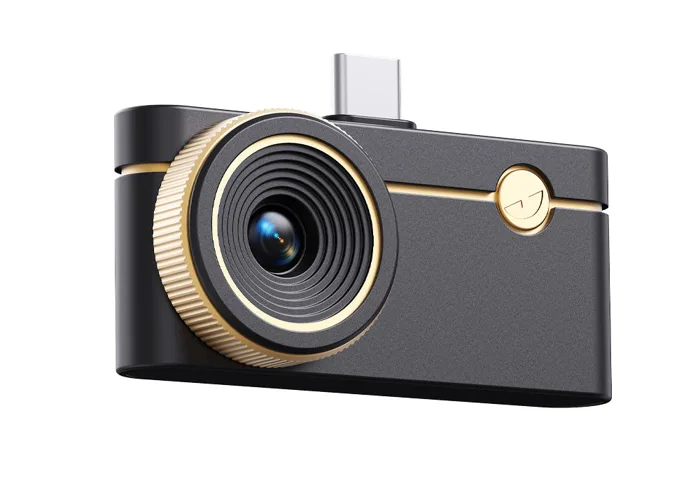
- Buy Thermal Master P3 A pocket 256 x 192 phone camera with a built-in 8 mm macro and manual focus lens for close-up electronics work. Amazon
- Buy Seek Thermal Nano 300 The highest native resolution of the group, with a wide field of view for scanning whole rooms and buildings.
- It depends Topdon TC002C Duo A capable 256x192 camera at the lowest price here - great value if your phone has USB-C. Amazon
- Skip Hti-Xintai HT-A1 A standalone camera with its own screen, but the sensor and software feel a generation behind for the money.
What actually matters
- Native sensor resolution - the real pixel count of the detector (like 256x192 or 320x240) decides how much genuine detail you can see. Everything else is secondary to this.
- Thermal sensitivity (NETD) - how small a temperature difference the camera can pick out. Better sensitivity is what lets you actually see a faint draft or a slightly warm stud behind drywall.
- Frame rate (refresh) - how many times per second the image updates. A smooth image is easy to aim; a laggy one is genuinely frustrating and makes it hard to trust what you see.
- Temperature range - the span of hot and cold the camera can measure. Electronics and HVAC need modest ranges; very hot industrial targets need a camera rated for them.
- Form factor (phone-attach vs standalone) - whether it plugs into your phone or works on its own. This shapes screen size, software quality, price-to-performance and how you carry it.
- Field of view and lenses - a wide view takes in a whole wall at once, while an add-on macro lens lets you resolve individual components on a circuit board.
- Build and connector fit - a solid body and the right USB-C or Lightning plug for your phone matter more day-to-day than any single spec-sheet brag.
The specs, in plain English
Green flags vs red flags
Green flags
- The listing states a clear native sensor resolution (like 256x192 or 320x240) up front, not just a big 'enhanced' number.
- A specific NETD figure in mK is quoted - quoting it at all signals a maker confident in the sensor.
- The refresh rate is stated plainly (9Hz or 25Hz) rather than hidden or described only as 'fast'.
- The connector clearly matches your phone (USB-C or Lightning), or both versions are offered.
- The app is mature, with adjustable emissivity, multiple palettes and on-image temperature spot tools.
- Where relevant, a genuinely useful extra like a macro lens or wide field of view.
Red flags
- A giant headline resolution with the real native sensor buried or missing - that's upscaling dressed up as detail.
- No NETD or sensitivity figure anywhere, paired with vague 'crystal clear' claims.
- Refresh rate omitted, or an image that visibly lags when you pan.
- A standalone unit priced like sharper phone-attach cameras but with a lower native sensor and dated software.
- Charges over old micro-USB, or needs an adapter your phone doesn't come with.
- Accuracy claims that ignore emissivity or promise lab-grade precision from a pocket device.
Who's who: the brands
- Thermal Master - Makes tiny phone-attach modules, including the P3 with a built-in macro and manual focus lens for electronics work.
- Seek Thermal - Known for higher native resolutions and wide fields of view, favored for home, HVAC and building-envelope scanning.
- Topdon - Value-focused phone-attach cameras with broad USB-C compatibility, aimed at first-time buyers who don't want to overspend.
- FLIR - A long-established thermal name spanning phone-attach clip-ons and standalone units, widely recognized in the trades.
- Hti-Xintai - Makes standalone cameras with their own screen and battery, appealing to buyers who refuse to tie a camera to a phone.
How to read a listing without getting fooled
Start with the native sensor resolution and treat it as the headline spec - if a listing leads with a huge 'super-resolution' or 'enhanced' number, scroll down and find the true detector size, because that's the honest one. Next look for a NETD figure in mK (lower is better) and a stated refresh rate; a maker that quotes both is usually proud of the sensor, while one that hides them behind adjectives like 'ultra-clear' is often hiding a modest panel. Confirm the temperature range covers your real targets and that the connector physically matches your phone. Finally, check how the app behaves in practice - emissivity control, spot measurements and palette choice matter more day-to-day than any single number, and choppy refresh or a clunky interface are exactly the things spec sheets won't tell you.
How much should you spend?
The value sweet spot sits with phone-attach cameras using a real 256x192 sensor: they clip onto a phone you already own, lean on its screen and processing, and deliver most of what a casual or DIY user needs without paying professional-tool money. Stepping up to a higher native resolution (like 320x240), better sensitivity or a wider field of view is worth it if you regularly scan large surfaces or want to resolve fine detail across a whole scene. Paying more for a standalone unit with its own screen can get you a weaker sensor and older software for the same outlay, so it only makes sense if you genuinely refuse to involve a phone. Be wary of cheap cameras whose main selling point is an inflated 'enhanced' pixel count - you're paying for a marketing number, not real detail. In short, spend where the native sensor and software are strong, and don't overpay for resolution figures that only exist in software.
Questions, answered
What's the difference between native and 'enhanced' or 'super-resolution' pixels?
Native resolution is the true number of heat-sensing pixels on the detector, like 256x192 or 320x240. 'Enhanced' or 'super-resolution' figures are software upscaling: the camera invents in-between pixels to make the image look bigger, but it adds no real detail the sensor didn't capture. Always compare cameras on native resolution and treat the bigger enhanced number as marketing.
How much resolution do I actually need?
For most home, electrical, plumbing and HVAC tasks a 256x192 native sensor is plenty. Step up to 320x240 if you scan large surfaces like whole walls or ceilings and want to resolve finer detail across the entire scene. Beyond that, better sensitivity and a good app often improve real-world results more than chasing raw pixel count.
Why are some cameras only 9Hz, and does it matter?
Cameras faster than a certain threshold can fall under stricter export rules in some regions, so many affordable models are capped at 9Hz to ship freely worldwide. A 9Hz image updates a little less smoothly than a 25Hz one, which you'll notice while panning, but it's perfectly usable for inspections. If you want the smoothest experience and it's available to you, 25Hz is nicer to aim.
Should I get a phone-attach camera or a standalone one?
For most people, phone-attach. Clipping a small module onto your phone gives you a bigger, brighter screen, far more capable software and usually a sharper sensor for the money. A standalone unit with its own screen is handy when you don't want to involve a phone, but at the same price it tends to pack a weaker sensor and older software. Choose standalone only if a phone-free workflow really matters to you.
How accurate are the temperature readings?
Useful and repeatable, but treat them as a guide rather than a lab instrument. Readings are affected by distance, angle and especially emissivity - shiny or bare-metal surfaces reflect surrounding heat and can fool a thermal camera. Set emissivity in the app where you can, or put a strip of matte tape over a shiny spot, and confirm anything critical with a contact thermometer.
Or jump to the head-to-head: Thermal Master P3 vs Seek Thermal Nano 300.