Explained
Budget 1440p Gaming Monitors, Explained
After reading this you will be able to read a 1440p monitor spec sheet, tell a real feature from a marketing badge, and pick the panel that matches how you actually play.
In this guide
A 27-inch 1440p monitor at a high refresh rate is the sweet spot for most gamers today, and you no longer need to spend big to get a good one. The trouble is that these monitors are sold on the numbers that look most impressive on a box, refresh rate and HDR logos, rather than the ones you notice every day, like panel type, real response time and stand quality. This guide decodes those terms so you buy for how the screen behaves, not for the sticker.
The 30-second version
- Panel type decides the trade-off. IPS gives cleaner motion, accurate color and wide viewing angles, while VA gives deeper contrast but can smear on dark, fast movement.
- An HDR badge without local dimming means little. Only a monitor with dimming zones, ideally mini-LED, delivers HDR that looks noticeably better than standard picture.
- Refresh rate matters, but you rarely need the very top number. Anything in the 144Hz to 180Hz range already feels smooth, and your graphics card, not the panel, is usually the limit at 1440p.
- The stand is a daily-use feature people forget. A tilt-only stand often forces you to buy a separate mount, so height and pivot adjustment is worth real money.
- Read response-time claims skeptically. A '1ms' figure can be a marketing measurement (MPRT) rather than the true pixel response (GtG) that governs smearing.
The products this guide is about
Our verdict on each, with the full reasoning on the companion review.
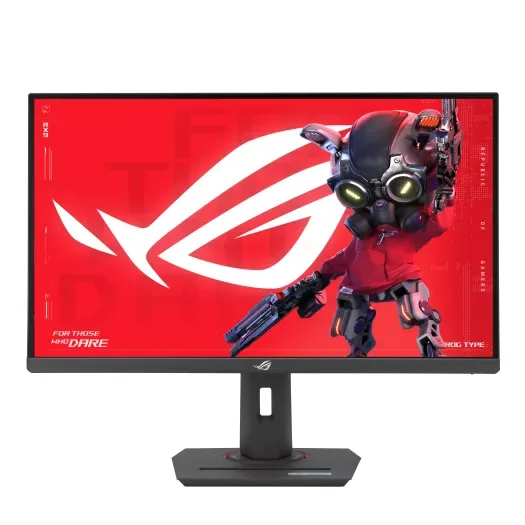
- Buy ASUS ROG Strix XG27ACS The best all-rounder here: fast IPS, accurate color out of the box, and a proper adjustable stand. Amazon
- Buy AOC Q27G3XMN The cheapest way to get HDR that actually does something, thanks to a 336-zone mini-LED backlight. Amazon
- It depends LG UltraGear 27GP850-B A color-accurate Nano IPS classic that's still excellent - if you can still find one, since LG has discontinued it. Amazon
- Skip Samsung Odyssey G5 (G55C) A familiar name that asks flagship-budget money for a basic curved VA panel the rivals beat on every front. Amazon
What actually matters
- Panel type (IPS vs VA) because it sets the core trade-off between motion clarity and viewing angles (IPS) versus contrast and black depth (VA); this affects every game you play.
- Refresh rate because a higher number means smoother, more responsive motion, though the benefit tapers off and depends on your graphics card keeping up at 1440p.
- Real response time (GtG) because slow pixel transitions cause smearing and blur behind moving objects, which no refresh-rate number can fix.
- HDR with local dimming because true HDR needs dimming zones to make highlights pop against dark areas; without them, an HDR badge is cosmetic.
- Color accuracy and gamut because accurate, wide color matters for both games and any creative or everyday work you do on the same screen.
- Stand and ergonomics because height, tilt, swivel and pivot adjustment determine daily comfort, and a poor stand is a hidden cost.
- Adaptive sync (G-Sync/FreeSync) because it matches the monitor's refresh to your graphics card to eliminate screen tearing without adding lag.
The specs, in plain English
Green flags vs red flags
Green flags
- Panel type is clearly stated as IPS or VA, and matches how you play (IPS for fast/mixed use, VA for dark-room single-player).
- HDR is backed by local dimming zones or a mini-LED backlight, not just a DisplayHDR logo.
- A true GtG response time is quoted, and independent testing or owner reports confirm clean motion.
- The stand adjusts for height and tilt at minimum, ideally with swivel and pivot.
- Adaptive sync (G-Sync Compatible or FreeSync) is listed for tear-free play.
- Wide color coverage (a high DCI-P3 percentage) is stated and verified by independent testing.
Red flags
- Only an MPRT response time is given, or a bare '1ms' with no GtG figure.
- An HDR badge appears with no mention of local dimming or dimming zones.
- The stand is tilt-only, with no height or pivot adjustment.
- The listing leans entirely on a huge refresh-rate number and little else.
- A well-known brand name is priced against rivals that outperform it on panel, motion or stand.
- Contrast, color gamut and response are absent from the spec sheet, replaced by vague marketing language.
Who's who: the brands
- ASUS (ROG / TUF) - Broad gaming lineup with strong, well-rounded IPS panels, good factory calibration and fuller ergonomic stands.
- AOC - Aggressive value pricing, often first to bring features like mini-LED HDR down to the budget tier.
- LG (UltraGear) - Known for fast Nano IPS panels with excellent color and class-leading response times.
- Samsung (Odyssey) - Recognizable name with punchy curved VA panels, though budget models can skimp on dimming and stand quality.
- Gigabyte - Enthusiast-leaning gaming monitors that often include tactical extras and competitive feature sets for the money.
- MSI - Wide gaming range with frequent sales and solid all-round IPS and VA options at budget prices.
How to read a listing without getting fooled
Start with the panel type, because IPS versus VA tells you the core trade-off before any other number. Then check the response time: if you only see '1ms' with no GtG label, or the letters MPRT, treat the motion claim as marketing and look for independent testing or owner reports. Next, ignore the HDR logo on its own and hunt for the words 'local dimming,' 'dimming zones' or 'mini-LED'; if none appear, assume HDR is decorative. Refresh rate is real but subject to diminishing returns, and remember your graphics card sets the practical ceiling at 1440p. Finally, read the stand specs closely: 'tilt' alone is a warning sign, because a monitor that cannot raise or pivot may cost you extra for a mount.
How much should you spend?
Spending is mostly about which one strength you refuse to compromise on. The value sweet spot sits with a fast IPS panel that delivers clean motion, accurate color and a proper adjustable stand, which covers gaming, work and everything in between. Paying a little more is worth it when you specifically want genuine HDR, since a mini-LED backlight with real dimming zones is the single feature that justifies a step up on a budget. Paying up purely for a higher refresh-rate number or a familiar brand name is rarely worth it, because motion already looks smooth in the common range and a recognizable badge does not guarantee a better panel or stand. The worst value is a monitor that charges a premium yet omits dimming, quotes a marketing response time and ships a tilt-only stand.
Questions, answered
Is 1440p really the best resolution for budget gaming?
For a 27-inch screen, yes. It is noticeably sharper than 1080p while remaining far easier on your graphics card than 4K, so you can run high refresh rates without needing a top-tier GPU. It is widely considered the current sweet spot for price, sharpness and performance.
Should I choose IPS or VA?
Choose IPS for cleaner motion, accurate color and wide viewing angles, which suits fast or mixed use in any lit room. Choose VA for deeper contrast and richer blacks if you mostly play single-player in a dark room and can accept some smearing on dark, fast scenes and narrower viewing angles.
Does HDR actually matter on a budget monitor?
Only when the monitor has local dimming. A mini-LED backlight with dimming zones delivers highlights that genuinely pop, but an edge-lit panel carrying only a DisplayHDR 400 badge looks barely different from standard picture. Buy for dimming zones, not for the HDR number.
How much refresh rate do I need?
Anything in the roughly 144Hz to 180Hz range feels smooth for the vast majority of players, and competitive esports players are the main audience for the very highest numbers. At 1440p your graphics card is usually the limiting factor, so a modest refresh rate paired with a capable GPU beats chasing the top spec.
Why do people warn about the stand?
A tilt-only stand cannot raise, lower or pivot the screen, which often forces buyers to purchase a separate VESA mount to sit comfortably. Because that is a real added cost and a daily annoyance, a stand with at least height and tilt adjustment is worth prioritizing.
Will a budget 1440p monitor still hold up in a few years?
Panel quality ages well, and today's high-refresh IPS and mini-LED VA panels should feel current for years. The bigger obsolescence risk is your graphics card keeping pace with 1440p at high refresh rates. Backlights dim slowly over time, but a good monitor should not visibly degrade within a normal ownership span.
Or jump to the head-to-head: ASUS ROG Strix XG27ACS vs AOC Q27G3XMN.