

Tech & Gadgets
The Best Thunderbolt Docks: 4 Compared (and One to Skip)
We compared four current Thunderbolt 5 docks on what the single host cable can actually carry, how much of the power supply reaches your laptop, and how honestly each maker documents the limits.
The short version
The CalDigit TS5 Plus is the best overall because it widens the internal bottlenecks other docks leave narrow, with 10 Gigabit Ethernet, two separate 10Gb/s USB hubs instead of one shared hub, and a 330W supply behind its 140W host charging. The OWC 11-Port Thunderbolt 5 Dock is the value pick, with three downstream Thunderbolt 5 ports, UHS-II readers in both card sizes, and a display section that says outright that your computer sets the limit. The Sonnet Echo 21 Thunderbolt 5 SuperDock suits studio and AV desks that need 10 Gigabit Ethernet, an internal NVMe slot and RCA outputs, and Sonnet states the SSD slot runs at PCIe 4.0 x2 rather than hiding it. The Anker Prime TB5 Docking Station is the one to skip: it is well built, but the headline 120Gbps and 8K figures describe the interface and the host, while Anker's own spec sheet lists maximum data transfer at 10Gbps and card readers at UHS-I. Before any of this, check whether your laptop has a Thunderbolt 5 port at all, because a Thunderbolt 5 dock on a Thunderbolt 4 host runs at Thunderbolt 4 speed. Best for: anyone who wants one cable to their desk and wants to know what gets starved when everything is plugged in at once.
Our picks at a glance
- CalDigit TS5 Plus Thunderbolt 5 Dock - Buy. Twenty ports with the internal bottlenecks widened rather than papered over.
- OWC 11-Port Thunderbolt 5 Dock (OWCTB5DOCK11P) - Buy. The sane amount of dock for most desks, and unusually straight about the fact that your laptop sets the display limit.
- Sonnet Echo 21 Thunderbolt 5 SuperDock - It depends. A studio dock that tells you exactly how it divided the bandwidth up, which almost nobody else does.
- Anker Prime TB5 Docking Station (14-in-1) - Skip. A genuinely well made dock sold on numbers that belong to the cable and the laptop rather than to the dock.
The verdict in 30 seconds
What mattered most
- Host link
- Connections
- Ethernet
- Host charging
- Best accessory port power
- Card readers
A dock's job is to split one cable into a desk full of connections, and every one of them is competing for the same link. Add up the advertised ports on almost any dock and the total far exceeds what Thunderbolt can move, which means the interesting question is not how many ports you get but which ones quietly slow down when you use them together. The same is true of power: the wattage on the box is usually the power supply's total, not what reaches your laptop. We looked at four docks that are on sale now and read their datasheets against Intel's own Thunderbolt 5 specification.
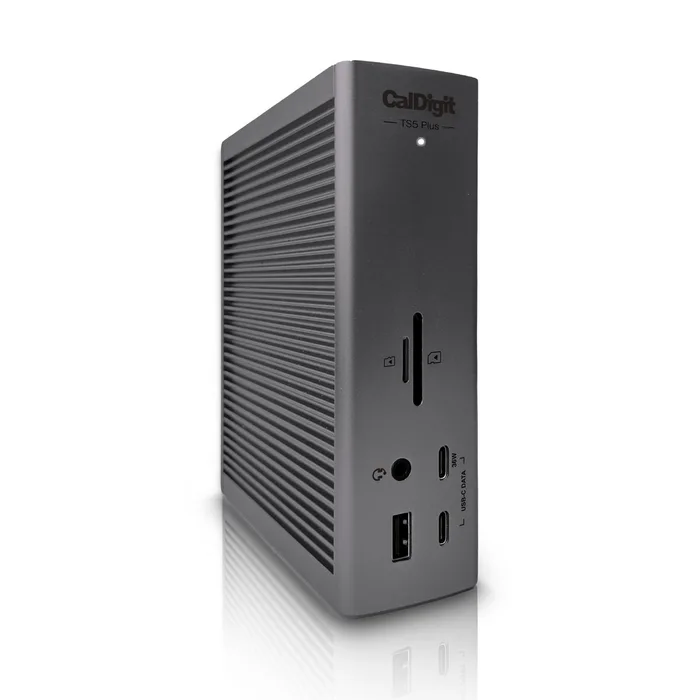
Twenty ports with the internal bottlenecks widened rather than papered over.
Best for: Someone building a permanent single-cable desk who wants Ethernet, storage and charging to all work at once without visibly slowing each other.
- Two separate USB 3.2 10G hubs instead of one shared hub, so heavy USB devices are less likely to fight each other.
- 10 Gigabit Ethernet with NBASE-T and AVB support, which is uncommon on docks.
- Three 36W fast-charge ports on top of up to 140W for the host, backed by a 330W supply.
- It is the most expensive way to solve the problem, and the 330W brick is large.
- The dual 8K 60Hz and triple 4K 144Hz claims depend entirely on what your computer can drive, not on the dock.
- The dual USB hub advantage depends on how your host handles the link, so check CalDigit's host compatibility notes.
- CalDigit lists macOS 15 or above and Windows 11 or above, so older machines are outside the supported list.
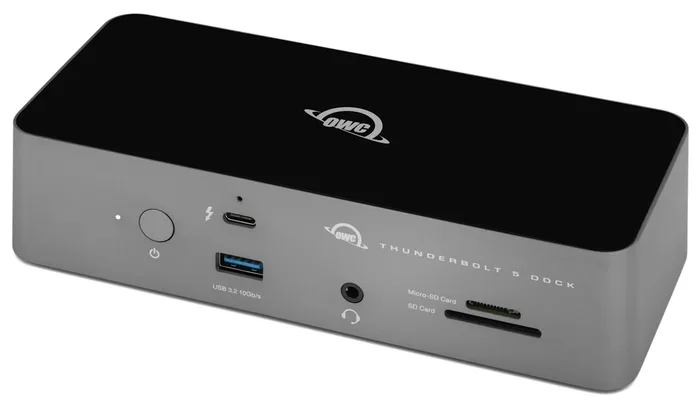
The sane amount of dock for most desks, and unusually straight about the fact that your laptop sets the display limit.
Best for: The person who wants three real Thunderbolt 5 ports and a proper card reader without paying for 10 Gigabit Ethernet they have nowhere to plug in.
- Three downstream Thunderbolt 5 ports at 15W each, so you can run three separate daisy chains and unplug one without disturbing the others.
- SD 4.0 and microSD 4.0 slots are both UHS-II, which OWC rates at up to 156MB/s full duplex or 312MB/s half duplex.
- OWC states the display limits plainly, including that Apple currently enables two native displays per Mac Thunderbolt host port and that DSC is required for 6K and 8K.
- 2.5GbE Ethernet rather than 10 Gigabit.
- Only three USB-A ports, and one of them runs at 5Gb/s rather than 10Gb/s.
- No on-board HDMI or DisplayPort, so monitors connect through the Thunderbolt ports or an adapter.
- OWC lists the supply's wattage as 140W, the same figure as its host charging, so the three 15W ports and the USB-A ports cannot all draw their maximum while the laptop takes everything.
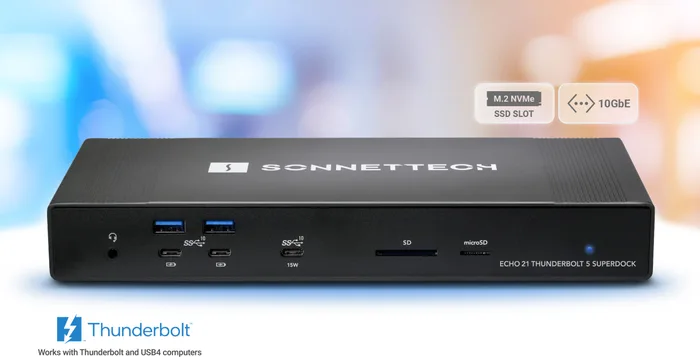
A studio dock that tells you exactly how it divided the bandwidth up, which almost nobody else does.
Best for: Video, audio and photo desks that want 10 Gigabit networking, scratch storage and analogue outputs consolidated into one box.
- Sonnet states the internal M.2 NVMe slot is connected at PCIe 4.0 x2, so you know what it gave up to feed the other ports.
- 10GBASE-T Ethernet with the controller chip named on the spec sheet.
- Twenty one connections including HDMI, DisplayPort, a dedicated mic input and stereo RCA line outputs.
- Large, expensive and aimed at a desk that genuinely needs audio outputs and on-board storage.
- The internal SSD is user supplied and adds cost on top of an already premium dock.
- That PCIe 4.0 x2 SSD link is deliberately narrower than a dedicated Thunderbolt 5 drive would be.
- Most of the USB-C accessory ports supply 7.5W, with only one front port at 15W.
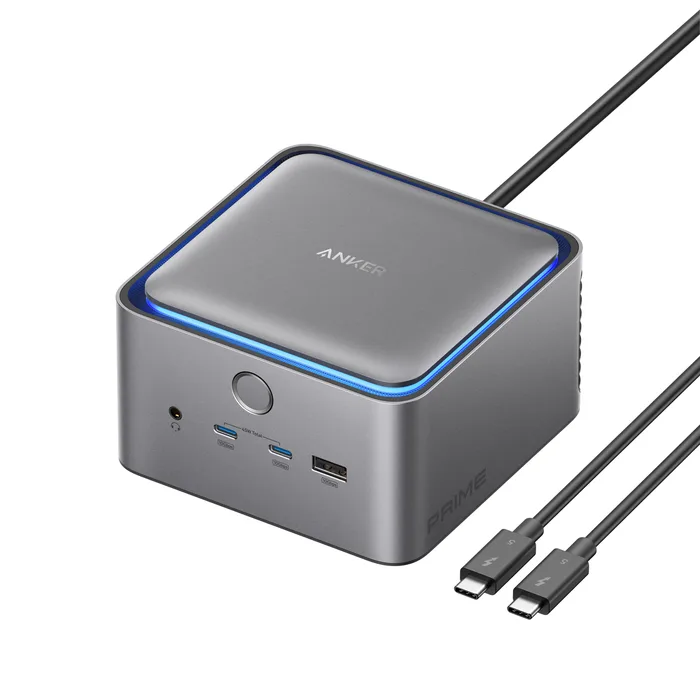
A genuinely well made dock sold on numbers that belong to the cable and the laptop rather than to the dock.
Best for: Someone who specifically wants a compact dock with a fan and does not care about card reader speed or Ethernet headroom.
- Compact, solidly built and delivers a real 140W to the host over the upstream Thunderbolt 5 port.
- Two downstream Thunderbolt 5 ports plus HDMI 2.1 and DisplayPort 2.1 connectors.
- Front-facing ports and a cooling system suit the compact enclosure.
- Anker's own spec sheet lists maximum data transfer as 10Gbps, while the retail listing leads with 120Gbps.
- SD and microSD readers are UHS-I at 104MB/s, slower than the UHS-II readers on cheaper docks.
- The HDMI 2.1 and DisplayPort 2.1 outputs cannot be used at the same time, so it is a two-monitor dock, not three.
- The two front USB-C ports share 45W between them, and Ethernet is 2.5Gbps at a premium price.
| Criteria | TS5 Plus Thunderbolt 5 Dock Top pick | 11-Port Thunderbolt 5 Dock (OWCTB5DOCK11P) | Echo 21 Thunderbolt 5 SuperDock | Prime TB5 Docking Station (14-in-1) |
|---|---|---|---|---|
| Verdict | Buy it | Buy it | It depends | Skip it |
| Best for | Someone building a permanent single-cable desk who wants Ethernet, storage and charging to all work at once without visibly slowing each other. | The person who wants three real Thunderbolt 5 ports and a proper card reader without paying for 10 Gigabit Ethernet they have nowhere to plug in. | Video, audio and photo desks that want 10 Gigabit networking, scratch storage and analogue outputs consolidated into one box. | Someone who specifically wants a compact dock with a fan and does not care about card reader speed or Ethernet headroom. |
| Price tier | $$$ · premium | $$ · mid-range | $$$ · premium | $$$ · premium |
| Host link | Thunderbolt 5, up to 120Gb/s | Thunderbolt 5, up to 120Gb/s | Thunderbolt 5, up to 120Gb/s | Thunderbolt 5, up to 120Gb/s |
| Connections | 20 | 11 | 21 | 14 |
| Ethernet | 10 Gigabit (NBASE-T, AVB) | 2.5GbE | 10GBASE-T | 2.5Gbps |
| Host charging | Up to 140W | Up to 140W | 140W | 140W max |
| Best accessory port power | 36W on three ports | 15W per Thunderbolt port | 15W on one front USB-C | 45W shared by two USB-C |
| Card readers | SD 4.0 and microSD 4.0 UHS-II | SD 4.0 and microSD 4.0 UHS-II | SD and microSD UHS-II | SD and microSD UHS-I |
| On-board video outputs | DisplayPort 2.1 | None, use Thunderbolt ports | HDMI plus DisplayPort 2.0 | HDMI 2.1 or DisplayPort 2.1, one at a time |
| Bundled power supply | 330W | Listed as 140W (21V, 8.58A) | 240W | Not published |
Which one is right for you?
- Someone building a permanent single-cable desk who wants Ethernet, storage and charging to all work at once without visibly slowing each other. Buy it CalDigit TS5 Plus Thunderbolt 5 Dock
- The person who wants three real Thunderbolt 5 ports and a proper card reader without paying for 10 Gigabit Ethernet they have nowhere to plug in. Buy it OWC 11-Port Thunderbolt 5 Dock (OWCTB5DOCK11P)
- Video, audio and photo desks that want 10 Gigabit networking, scratch storage and analogue outputs consolidated into one box. It depends Sonnet Echo 21 Thunderbolt 5 SuperDock
- Someone who specifically wants a compact dock with a fan and does not care about card reader speed or Ethernet headroom. Skip it Anker Prime TB5 Docking Station (14-in-1)
How we judged the field
Five things decide whether a dock is good. First, what the host link can carry, because every port shares it: Intel requires 80 Gbps bidirectional for Thunderbolt 5, with 64 Gbps of that available to PCIe and 10 Gbps to USB 3. Second, how the maker spent that budget internally, which shows up as Ethernet speed, card reader class and whether the USB ports sit behind one hub or two. Third, power, where the honest reading is host charging versus the total supply, since the dock has to feed itself and every accessory from the same brick. Fourth, display support, which is set by your computer and by whether it supports Display Stream Compression, not by the dock’s connectors. Fifth, documentation, because a maker who publishes per-host display charts and PCIe lane counts is telling you something a maker who publishes only a port list is not.
CalDigit TS5 Plus Thunderbolt 5 Dock
Buy itThe CalDigit TS5 Plus is the dock that treats internal bandwidth as a design problem rather than a marketing one. Its datasheet lists 10 Gigabit Ethernet with NBASE-T and AVB support, twenty connections, and dual USB 3.2 10G hubs rather than the single shared hub most docks use, which means a busy drive on one hub is less likely to starve a capture device on the other. Power is handled the same way: up to 140W to the host, three 36W fast charge ports, and a 330W supply behind them so those figures do not have to compete. Video output is a DisplayPort 2.1 connector plus the two downstream Thunderbolt 5 ports, and CalDigit lists triple 4K 144Hz or dual 8K 60Hz, which as always is a statement about capable hosts rather than a promise for every laptop. It is expensive and the brick is bulky. It is for the person building a desk they will not rethink for five years.
OWC 11-Port Thunderbolt 5 Dock (OWCTB5DOCK11P)
Buy itThe OWC 11-Port Thunderbolt 5 Dock is the one we would buy without a specific reason to spend more. Eleven connections cover three downstream Thunderbolt 5 ports at 15W each, 140W to the host, two USB-A ports at 10Gb/s and a third at 5Gb/s, 2.5GbE Ethernet, a 3.5mm combo audio jack, and SD 4.0 and microSD 4.0 slots that OWC rates at up to 312MB/s in half duplex. Those three Thunderbolt ports are the practical win, because they let you build three separate daisy chains and pull one apart without disturbing the others, and the aluminium enclosure is fanless. What sets it apart is the documentation. OWC writes down that display support depends on the host, that Apple currently enables two native displays per Mac Thunderbolt host port, and that DSC is required for 6K and 8K. The trade-offs are real: no on-board HDMI or DisplayPort, Thunderbolt 3 support listed for Macs and not Thunderbolt 3 PCs, and a supply labelled with the same 140W it sends to the laptop. For most desks, that is the right set of compromises.
Sonnet Echo 21 Thunderbolt 5 SuperDock
It dependsThe Sonnet Echo 21 Thunderbolt 5 SuperDock is built for a specific desk and is unusually honest about how it got there. Twenty one connections include 10GBASE-T Ethernet, two downstream Thunderbolt 5 ports, four USB-A and five USB-C ports at 10 Gbps, HDMI, DisplayPort, a combo audio jack, a dedicated mic input, stereo RCA outputs, UHS-II card readers and an internal M.2 NVMe slot. The interesting line in the tech specs is that Sonnet states the NVMe slot is connected at PCIe 4.0 x2. That is the whole starvation problem written down: to keep 10 Gigabit Ethernet and nine 10Gbps USB ports fed, the internal SSD gets a narrower link than a dedicated external drive would. Sonnet also names the Ethernet controller. Most accessory USB-C ports supply 7.5W with one front port at 15W, and the dock is big and expensive. If your desk needs audio outputs, fast networking and scratch storage in one box, nothing else here comes close.
Anker Prime TB5 Docking Station (14-in-1)
Skip itThe Anker Prime TB5 Docking Station is well made and is not a bad product, which is exactly why it needs a careful look. It delivers a genuine 140W to the host, has two downstream Thunderbolt 5 ports at 15W, three 10Gbps USB-A ports, two front USB-C ports sharing 45W, and a cooling system in a compact body. The problem is the gap between the headline and the spec sheet. Retail listings lead with 120Gbps, while Anker’s own specification table gives maximum data transfer as 10Gbps, because that is what the dock’s own USB ports run at. The card readers are UHS-I at 104MB/s where cheaper docks fit UHS-II. Ethernet is 2.5Gbps. The HDMI 2.1 and DisplayPort 2.1 connectors cannot be used at the same time, so despite the port count it is a two-monitor dock. At this price you are paying for the interface rather than the implementation.
Sources
Specs in this review come from these pages.
- Intel, Thunderbolt 5 Technology Brief (thunderbolttechnology.net)
- USB Implementers Forum, USB4 System Overview (usb.org)
- CalDigit, TS5 Plus datasheet (downloads.caldigit.com)
- Sonnet, Echo 21 Thunderbolt 5 SuperDock technical specifications (sonnettech.com)
- OWC, 11-Port Thunderbolt 5 Dock support manual and specifications (eshop.macsales.com)
- Anker, Prime TB5 Docking Station product page (anker.com)
CalDigit TS5 Plus Thunderbolt 5 Dock vs OWC 11-Port Thunderbolt 5 Dock (OWCTB5DOCK11P): which should you buy?
The CalDigit TS5 Plus and the OWC 11-Port Thunderbolt 5 Dock sit either side of one question: do you need the dock’s own subsystems to be fast, or just present? Both give you a Thunderbolt 5 host link and 140W of host charging, so on paper the headline numbers match. Where they diverge is inside. CalDigit fits 10 Gigabit Ethernet, splits the USB ports across two 10Gb/s hubs, and ships a 330W supply so 140W to the laptop and three 36W accessory ports do not have to be traded against each other. OWC fits 2.5GbE Ethernet, one 5Gb/s USB-A port among three, and lists a supply whose wattage matches the host charging figure, which makes its 15W port ratings ceilings rather than simultaneous guarantees.
Choose the CalDigit if you move large files over the network, run bus-powered drives while charging a phone and a tablet, or want the dock to be the last thing that limits you. Choose the OWC if your network is gigabit anyway, you mostly plug in a keyboard, a mouse, a monitor and a card reader, and you would rather put the difference toward the monitor. One more thing tips it for a lot of people: OWC’s display section is the most useful thing either company publishes, because it says plainly that the host decides, down to Apple’s limit of two native displays per Thunderbolt port and the need for DSC at 6K and 8K.
What to look for
- Read the power supply, not the charging figure: host charging is what reaches your laptop, while the brick wattage is the dock’s entire budget for the host, every accessory port and its own electronics.
- Find the per-host display chart: the number of screens and the resolutions are decided by your computer’s chip and by whether it supports Display Stream Compression, so a maker who publishes a chip-by-chip table is doing you a real favour.
- Check the Ethernet speed against the price: 10 Gigabit costs meaningfully more to implement than 2.5Gbps, and it is one of the clearest signals of how a maker spent the internal bandwidth budget.
- Look for UHS-II on the card readers: UHS-I readers cap out far lower, and swapping them for UHS-II is one of the cheapest ways a maker can quietly cut cost on an expensive dock.
- Prefer makers who publish lane counts and controller chips: Sonnet lists its NVMe slot as PCIe 4.0 x2 and names the Ethernet controller, which tells you more about real performance than any port count.
- Confirm your laptop actually has Thunderbolt 5: a Thunderbolt 5 dock connected to a Thunderbolt 4 or USB4 host runs at that host’s speed, so the extra headroom is a purchase for a future machine, not this one.
Our final take
Buy the dock that matches your computer and your desk, not the one with the longest port list. The CalDigit TS5 Plus wins because it spends its bandwidth and power budget where the real bottlenecks are, and its 330W supply means the numbers on the box survive contact with a busy desk. The OWC is the sensible default, with three usable downstream Thunderbolt ports and a display section that admits your laptop is the limit. The Sonnet is right for studios and wrong for everyone else, and it deserves credit for printing the PCIe lane count that other makers leave out. Skip the Anker Prime TB5 not because it is badly built but because its headline figures describe the standard and your laptop rather than the dock, and the parts that are actually the dock’s responsibility came in slower.
Questions, answered
Does a Thunderbolt 5 dock actually give me 80Gb/s to every port?
No, and no dock does. The 80Gb/s figure is the bidirectional capacity of the single link between the dock and your computer, and everything on the dock shares it. Intel's specification splits that budget further: Thunderbolt 5 requires 64 Gbps of PCIe throughput and 10 Gbps of USB 3 as its baseline, with 20 Gbps USB 3 available. So the Ethernet controller, the card readers, the USB hubs and any attached drives are all drawing from the same pool, and when you saturate one the others get less. This is why a dock's internal design matters more than its port count.
What does Thunderbolt 5 really change compared with Thunderbolt 4?
Intel's own comparison table is the clearest source. Thunderbolt 4 requires 40 Gbps, Thunderbolt 5 requires 80 Gbps with a 120 Gbps mode. PCIe throughput doubles from 32 Gbps to 64 Gbps, Thunderbolt networking doubles from 32 Gbps to 64 Gbps, and required host charging rises from up to 100W to up to 140W. The video requirement goes from dual 4K to dual 6K, not to dual 8K, so any dual 8K claim is above Intel's baseline and depends on your computer. The 120 Gbps Bandwidth Boost is also asymmetric: it gives 120 Gbps transmit and 40 Gbps receive, not 120 in both directions.
Is a USB4 dock as good as a Thunderbolt certified one?
Not guaranteed, and this is not just marketing. The USB Implementers Forum's own USB4 material states that a USB4 host supports 20 Gbps operation and optionally 40 Gbps, and that a USB4 host only optionally supports PCIe tunnelling. Thunderbolt 4 and Thunderbolt 5 make 40 Gbps and PCIe mandatory, along with certification, cable testing and DMA protection. The practical effect shows up in the fine print: CalDigit notes the Ethernet port on some of its docks needs a PCIe capable host. A well built USB4 dock from a serious brand can be excellent, but the label alone promises less.
Will this dock run two 4K monitors from my laptop?
That depends on your computer far more than on the dock. Base Apple silicon chips have historically driven fewer external displays than the Pro and Max versions, and the better dock makers say so on the product page. OWC, for instance, states that display support depends on the host's capability and drivers, that Apple currently enables a maximum of two native displays per connected Mac Thunderbolt host port, and that Display Stream Compression is required for 6K and 8K resolutions. Find the maker's host compatibility notes and look up your own chip's display limit before you buy.
The dock charges at 140W, so what is the brick wattage for?
They are answering different questions. Host charging is what the upstream Thunderbolt port can push into your laptop. The power supply figure is the dock's whole budget, covering the host, every accessory port and the dock's own electronics. OWC's manual lists its supply's wattage as 140W, the same number it sends to the host, while the dock also has three 15W Thunderbolt ports, three USB-A ports and an Ethernet controller to feed, so those labelled ratings are maximums rather than simultaneous guarantees. The CalDigit TS5 Plus ships a 330W supply for 140W of host charging plus three 36W ports, which is why it can hold its numbers under load.
Deciding between the top two? See our head-to-head: CalDigit TS5 Plus Thunderbolt 5 Dock vs OWC 11-Port Thunderbolt 5 Dock (OWCTB5DOCK11P).
More Tech & Gadgets reviews
 The Best Travel Adapters: 4 Compared (and One to Skip)
  The Best Ultrawide Monitors: 4 Compared (and One to Skip)
  The Best UPS Battery Backups: 4 Compared (and One to Skip)
  The Best USB-C Cables: 4 Compared (and One to Skip)
  The Best USB-C Hubs and Docks for Laptops in 2026
  The Best USB Flash Drives: 4 Compared (and One to Skip)