

Tech & Gadgets
The Best USB-C Cables: 4 Compared (and One to Skip)
We compared four USB-C cables on real charging wattage, actual data speed, certification you can verify, and long-term durability.
The short version
Charging wattage and data speed are separate specs, and most buyers get both wrong in opposite directions. Buy 240W and stop worrying, because the price gap over 100W can be small and it covers every laptop sold. Buy USB 2.0 data unless you specifically own an external SSD, a dock, or a monitor running over USB-C, in which case buy exactly one 40Gbps cable and leave it there. The Anker 765 (240W, 6ft) is the best default cable, the Cable Matters 240W is the certified value pick to buy in threes, the Anker USB4 cable earns its price only with a data device on the far end, and the Apple Thunderbolt 5 Pro Cable is a flagship-priced no-op without Thunderbolt 5 hardware at both ends. Best for: anyone who wants one cable that charges everything fast and is tired of guessing which drawer cable is the slow one.
Our picks at a glance
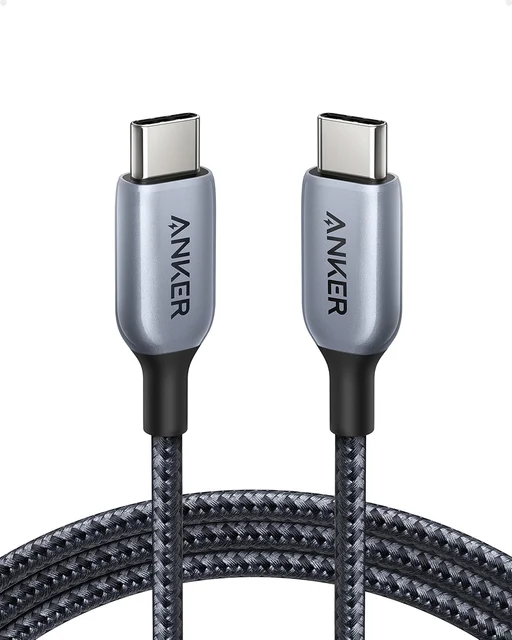
- Anker 765 USB-C to USB-C Cable (240W, 6ft Nylon) - Buy. The full 240W charging ceiling wrapped in a braided jacket that survives daily abuse, with no data speed you are paying for and will not use.
- Cable Matters 240W USB-C Charging Cable (USB-IF Certified) - Buy. Same 240W electrical job as pricier cables, marketed as USB-IF certified, with a plain jacket to match the price.
- Anker USB4 Cable (40Gbps, 240W) - It depends. The right cable if you own an external SSD or a dock, and a waste of money if the other end is a phone.
- Apple Thunderbolt 5 (USB-C) Pro Cable (1m) - Skip. Excellent engineering aimed at a tiny audience, and a flagship-priced no-op unless there is Thunderbolt 5 hardware on both ends.
The verdict in 30 seconds
What mattered most
- Data speed
- Max charging power
- Video output
- Certification claim
- Jacket and strain relief
- Length
Every USB-C cable looks the same and almost none of them are. The two specs that matter, charging wattage and data speed, are completely independent, and most listings only shout about one of them. We looked at four cables that cover the useful range, from a certified budget charging cable to a Thunderbolt 5 cable that nearly nobody needs, and the pattern is consistent: buyers overpay for data throughput they will never observe while underbuying the wattage they use every single day.
The full 240W charging ceiling wrapped in a braided jacket that survives daily abuse, with no data speed you are paying for and will not use.
Best for: The one cable you handle every day, if you want a single answer that charges everything you own without thinking about it.
- Delivers the complete 240W USB PD 3.1 Extended Power Range ladder, so it charges any laptop currently sold at full speed
- Braided nylon jacket over molded strain relief for daily handling
- The 6ft length actually reaches a sofa or nightstand, which most premium cables do not
- A braided jacket tends to hide wear better than a plain PVC one
- USB 2.0 data only at 480Mbps, so it will not drive a monitor or move files off an external SSD at speed
- Anker sells several cables under the 765 name at different wattages, and the 140W version looks nearly identical on the shelf
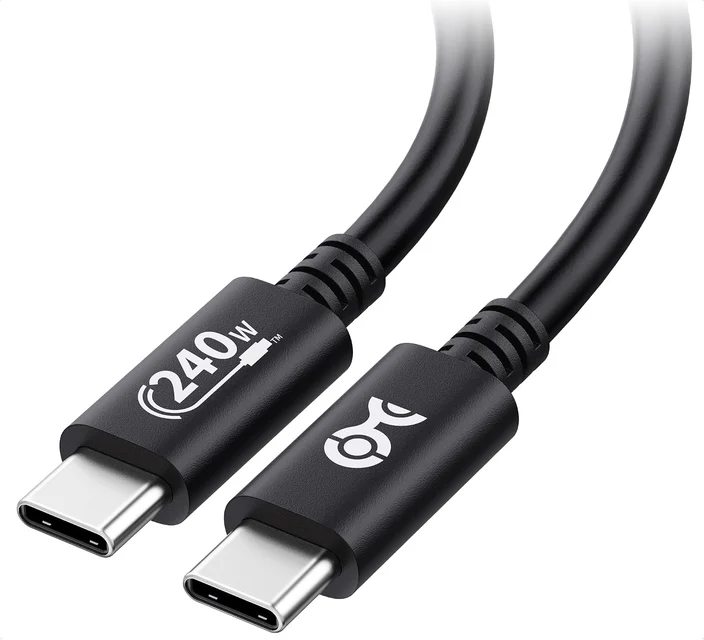
Same 240W electrical job as pricier cables, marketed as USB-IF certified, with a plain jacket to match the price.
Best for: Buying in threes to leave permanently plugged in at the car, the office, and the guest room where nobody handles them.
- Marketed as USB-IF certified, so look for the certification ID on the listing and check it in the public USB-IF list
- 240W EPR support across the 28V, 36V, and 48V profiles, the same electrical ladder as the premium charging cables
- Listing states there is no video support, which is more forthcoming than many cables
- Backed by a warranty from the maker, so check the current terms on the listing
- Plain PVC jacket, not braided, with strain relief that is adequate rather than reassuring under daily coiling
- USB 2.0 data only at 480Mbps and no display output whatsoever
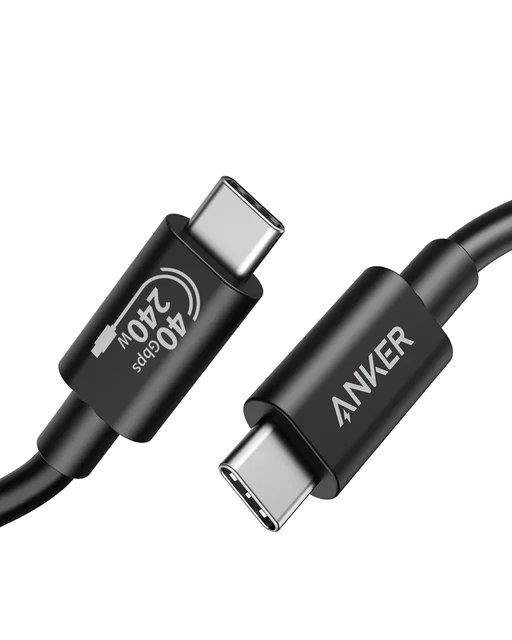
The right cable if you own an external SSD or a dock, and a waste of money if the other end is a phone.
Best for: People who move large files off external drives or run a single-cable dock, and who know why they need 40Gbps.
- 40Gbps USB4 data with Thunderbolt 4 and Thunderbolt 3 compatibility, which is the speed tier that external NVMe drives and docks actually need
- Carries DisplayPort alt mode video, so one cable can run a monitor
- Still delivers the full 240W charging profile, so it does not force a tradeoff between data and power
- Designed for the 40Gbps tier, a category where docks and cables must negotiate speed correctly
- Short, around 3ft, as high-speed passive cables tend to be, so it cannot be your general-purpose cable
- Stiffer than a charging cable, with a jacket that is less pleasant to coil
- Any 40Gbps cable can negotiate a lower speed with some docks, so test it with your own hardware
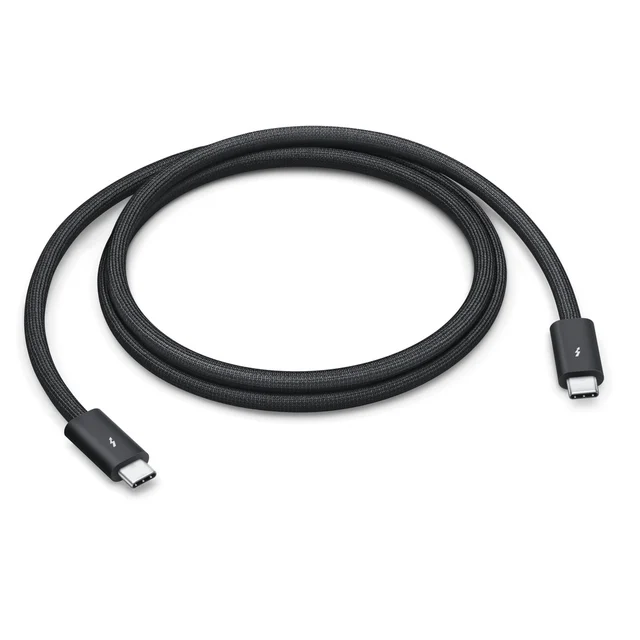
Excellent engineering aimed at a tiny audience, and a flagship-priced no-op unless there is Thunderbolt 5 hardware on both ends.
Best for: Owners of Thunderbolt 5 docks or storage arrays who already know exactly why they need the bandwidth.
- Up to 120Gb/s of Thunderbolt 5 bandwidth plus DisplayPort 2.1, per Apple, a very high ceiling for a USB-C cable
- Backward compatible down through Thunderbolt 4, Thunderbolt 3, and USB 3, and still carries 240W of charging
- Black braided design that Apple says coils without tangling
- Needs Thunderbolt 5 ports at both ends to do anything a much cheaper 40Gbps cable would not, and that hardware remains rare and expensive
- Only 1m long, so it can never serve as a general-purpose charging cable
- Flagship price for a speed tier most buyers will never observe in use
| Criteria | Anker 765 USB-C to USB-C Cable (240W, 6ft Nylon) Top pick | Cable Matters 240W USB-C Charging Cable (USB-IF Certified) | Anker USB4 Cable (40Gbps, 240W) | Apple Thunderbolt 5 (USB-C) Pro Cable (1m) |
|---|---|---|---|---|
| Verdict | Buy it | Buy it | It depends | Skip it |
| Best for | The one cable you handle every day, if you want a single answer that charges everything you own without thinking about it. | Buying in threes to leave permanently plugged in at the car, the office, and the guest room where nobody handles them. | People who move large files off external drives or run a single-cable dock, and who know why they need 40Gbps. | Owners of Thunderbolt 5 docks or storage arrays who already know exactly why they need the bandwidth. |
| Price tier | $ · mid-range | $ · budget | $$ · premium | $$ · flagship |
| Data speed | 480Mbps (USB 2.0) | 480Mbps (USB 2.0) | 40Gbps (USB4 / Thunderbolt 4) | Up to 120Gbps (Thunderbolt 5) |
| Max charging power | 240W (USB PD 3.1 EPR) | 240W (USB PD 3.1 EPR) | 240W (USB PD 3.1 EPR) | 240W (USB PD 3.1 EPR) |
| Video output | None | None | DisplayPort alt mode | DisplayPort 2.1, multiple high-resolution displays |
| Certification claim | E-marker chip, rated to USB PD 3.1 | Marketed as USB-IF certified | USB4 40Gbps, Thunderbolt 4 compatible | Thunderbolt 5 certified |
| Jacket and strain relief | Double-braided nylon, molded strain relief | Plain PVC jacket, basic strain relief | Smoother jacket, stiffer | Braided jacket, coils without tangling |
| Length | 3ft or 6ft | 3.3ft or 6.6ft | About 3ft | 1m |
| Best use | Everyday laptop and phone charging | Spare charging cables around the house | External SSDs, docks, single-cable monitors | Thunderbolt 5 docks and pro storage |
| Price tier | $ · mid-range | $ · budget | $$ · premium | $$ · flagship |
Which one is right for you?
- The one cable you handle every day, if you want a single answer that charges everything you own without thinking about it. Buy it Anker 765 USB-C to USB-C Cable (240W, 6ft Nylon)
- Buying in threes to leave permanently plugged in at the car, the office, and the guest room where nobody handles them. Buy it Cable Matters 240W USB-C Charging Cable (USB-IF Certified)
- People who move large files off external drives or run a single-cable dock, and who know why they need 40Gbps. It depends Anker USB4 Cable (40Gbps, 240W)
- Owners of Thunderbolt 5 docks or storage arrays who already know exactly why they need the bandwidth. Skip it Apple Thunderbolt 5 (USB-C) Pro Cable (1m)
How we judged the field
USB-C cables look interchangeable and are not. Two cables with identical connectors can differ by a factor of 250 in data speed and by a factor of four in charging power, and nothing on the outside tells you which one you grabbed. We did not run our own lab. We compared maker specifications and the public USB-IF certification list.
Four things separated the good cables from the rest.
Power rating and e-marker behavior. Any cable carrying more than 60W needs an e-marker chip that tells the charger what it can safely handle. Cables that claim high wattage without a properly programmed e-marker either fall back to 60W or, worse, pass current they were not built for.
Data spec, stated plainly. USB 2.0 tops out at 480Mbps. USB 3.2 Gen 2 reaches 10Gbps. USB4 and Thunderbolt 4 reach 40Gbps, and Thunderbolt 5 reaches 120Gbps in one direction. These are separate from wattage. A 240W cable can still be USB 2.0, and most are.
Certification you can verify. USB-IF publishes certified product listings with an ID. Marketing text that says “certified” with no ID and no logo is not the same thing.
Durability at the strain point. Cable wear often shows up at the neck where the cable meets the connector. Braided jackets help, but molded strain relief matters more, and bend-cycle ratings give a rough ranking.
The pattern that emerged is simple. Most buyers pay for data speed they will never use, then underbuy on wattage and wonder why the laptop charges slowly.
This is the cable to buy if you want one answer and want to stop thinking about it. It carries the full 240W under USB PD 3.1 Extended Power Range, which covers every laptop currently sold, including the heaviest-drawing 16-inch models, and it does so with headroom rather than at its limit.
The data side is USB 2.0 at 480Mbps, and that is deliberate. If the cable’s job is to live behind a desk or in a bag and refill a laptop, a phone, and a tablet, 40Gbps buys nothing. It costs money and adds stiffness.
Build quality is where it earns the mid-range price. The braided nylon jacket sits over a molded strain relief at both ends.
Two caveats. Anker sells several cables under the 765 name at different wattages, and the 140W version looks nearly identical, so check the listing wattage before you buy. And the 6ft length is the one worth getting. The 3ft version is fine at a desk and short everywhere else.
The value pick, and the one to buy in quantity. It is marketed as USB-IF certified (check the certification ID on the listing against the public USB-IF list), and it is listed with the same 240W EPR profile as the Anker: 28V at 5A, 36V at 5A, and 48V at 5A.
Data is USB 2.0 at 480Mbps and there is no video output at all, which the listing states outright. That straightforward labeling is worth something in a category full of cables that imply display support they do not have.
What you give up is jacket quality. This is a plain PVC-jacketed cable, not braided, and it feels like it. It coils fine and it lives in a drawer or a car happily, but it does not have the desk presence of a braided cable, and the strain relief is adequate rather than reassuring. Cable Matters backs it with a warranty, which is worth checking on the current listing.
Buy these for the car, the office bag, the guest room, and the kitchen counter. Buy the braided one for the cable you handle every day.
This is the cable most people should not buy, and a small group absolutely should. It runs USB4 at 40Gbps, is compatible with Thunderbolt 4 and Thunderbolt 3 devices, carries DisplayPort alt mode for single-display output up to 8K, and still delivers 240W of charging. On paper it does everything.
The question is whether you do any of the things it enables. If you plug an external NVMe enclosure into a laptop and move large video files, 40Gbps versus 480Mbps is the difference between minutes and most of an afternoon. If you run a dock that drives a display, ethernet, and peripherals over one cable, you need this class of cable and a USB 2.0 cable will simply fail to light the monitor. If you do neither, you are paying a premium multiple for a number you will never observe.
The practical downsides: it is short, around 3ft, as high-speed passive cables tend to be. It is stiffer than a charging cable, and the jacket is less pleasant to handle than braided nylon. As with any 40Gbps cable, it can negotiate a lower speed with some docks, so test it with your own hardware.
Buy it if you own an external SSD or a dock. Otherwise skip past it.
Not because it is bad. It is arguably the best-engineered cable in this comparison. Thunderbolt 5 at up to 120Gb/s, DisplayPort 2.1, backward compatibility down through Thunderbolt 3 and USB 3, charging up to 240W, and a braided design Apple says coils without tangling. If you are moving into a Thunderbolt 5 dock and a Thunderbolt 5 storage array, this is the correct cable and there are few alternatives.
The problem is who is actually buying it. Thunderbolt 5 requires a Thunderbolt 5 port on both ends to do anything a 40Gbps cable would not. That means a recent high-end Mac or a very recent Windows laptop, plus a Thunderbolt 5 peripheral, which remains a small and expensive category. Plug this cable between a Thunderbolt 4 laptop and a Thunderbolt 4 dock and you get exactly Thunderbolt 4 performance, at a flagship price.
It is also 1m long, which means this cable cannot be the one that reaches your nightstand.
For nearly everyone, this is a cable bought for a spec sheet. If you do not already know why you need Thunderbolt 5, you do not need Thunderbolt 5.
Anker 765 USB-C to USB-C Cable vs Cable Matters 240W USB-C Charging Cable: which should you buy?
These two do the identical electrical job. Both deliver the full 240W EPR ladder, both are USB 2.0 for data, neither carries video. On a meter you would struggle to tell them apart.
The difference is entirely physical and entirely about how you will use the cable. The Anker is braided, thicker, better strain-relieved, and available in a genuinely useful 6ft length. It is better suited to being wound around a laptop brick and living in a backpack. It costs more per cable.
The Cable Matters is a plain jacketed cable with a USB-IF certification claim and a maker warranty. It is the better buy per unit and the better buy if the cable will sit in one place. It is the worse buy if the cable will be coiled, uncoiled, and stuffed into a bag daily.
The sensible answer for most households is both. One braided cable for the one you touch every day, and a handful of certified cheap ones scattered wherever a charger lives. Buying four braided premium cables to leave plugged into wall outlets is money spent on a jacket nobody will handle.
If you can only buy one, buy the Anker. A braided cable with molded strain relief is better suited to daily handling.
What to look for
- Match the wattage to the heaviest device you own, not the lightest. A 240W cable charges a phone perfectly. A 60W cable does not charge a large laptop at full speed. Overbuying wattage costs almost nothing; underbuying costs you charge time every day.
- Assume USB 2.0 unless the listing states a data speed in Gbps. “Fast charging” is not a data claim. If the page does not say 10Gbps, 40Gbps, or 120Gbps, the cable moves data at 480Mbps.
- Buy a data cable only if you own a data device. External SSDs, docks, and monitors driven over USB-C need 10Gbps or better. Phones, tablets, laptops being charged, and wired earbuds do not.
- Look for a USB-IF certification ID, not the word “certified”. The certified products list is public. A vendor that has done the work usually says so with a number.
- Confirm an e-marker chip on anything above 60W. It is mandatory in the spec, and its absence is the most common defect in cables that claim high wattage cheaply.
- Video output is a separate feature. Many 240W cables explicitly carry no video. If you want to drive a monitor over one cable, you need DisplayPort alt mode or Thunderbolt, stated on the listing.
- High-speed cables are short for a reason. Intel specifies universal Thunderbolt cables up to 2 meters, so expect short lengths at high speed, and expect longer high-speed runs to cost more.
- Length matters more than people expect. A 6ft cable makes a nightstand or sofa usable. A 3ft cable is a desk accessory.
Our final take
The USB-C cable market punishes two mistakes in opposite directions. Buyers who read spec sheets overpay for 40Gbps and Thunderbolt 5 on cables that will only ever charge a phone. Buyers who shop on price grab a 60W cable and then wonder why their laptop charges slowly.
The fix is to separate the two questions. Wattage: buy 240W and stop worrying, because the price difference between 100W and 240W is usually small and the ceiling is the whole point. Data: buy USB 2.0 unless you own a specific device that needs more, in which case buy exactly one 40Gbps cable for that device and keep it there.
The Anker 765 USB-C to USB-C Cable in its 240W, 6ft form is the cable to make your default. The Cable Matters 240W USB-C Charging Cable is what you buy in threes to leave plugged in around the house. The Anker USB4 Cable earns its price only if there is a dock or an external drive at the other end. And the Apple Thunderbolt 5 Pro Cable is a superb cable for the small number of people who own Thunderbolt 5 hardware, and a spec-sheet purchase for everyone else.
Questions, answered
Does a higher-wattage cable charge my phone faster?
No. The cable sets a ceiling, not a floor. A 240W cable and a 60W cable charge a phone at exactly the same speed, because the phone and charger negotiate a much lower figure than either cable's limit. Wattage only matters when the device wants more than the cable can carry, which in practice means large laptops. Buying 240W is worth it because it removes the ceiling entirely for a small price difference, not because it speeds up small devices.
How do I tell if a cable is USB 2.0 or a fast data cable just by looking at it?
You mostly cannot, which is the core problem with this category. A few makers mold the speed onto the connector housing, and high-speed cables tend to be thicker and shorter. Otherwise the only reliable method is the listing: if it does not state a figure in Gbps, assume 480Mbps USB 2.0. It is worth labeling your fast cables with tape once they are out of the box, because they are indistinguishable in a drawer.
What is an e-marker chip and why does it matter?
It is a small chip inside the connector that tells the charger what the cable can safely handle. The USB spec makes it mandatory for anything carrying more than 60W. Without one, a good charger falls back to 60W and refuses to push more. The risk with cheap uncertified cables is an e-marker programmed to claim a wattage the actual conductors were not built for, which is where overheating reports come from. A published USB-IF certification ID is the practical defense.
Is 240W overkill? My laptop only asks for 100W.
Overkill costs almost nothing here, and the ceiling is the whole point. A 240W cable draws exactly what the device requests, so a 100W laptop pulls 100W and nothing changes. What you buy is the ability to plug that same cable into a bigger laptop later without a slow-charging surprise. The upgrade from 100W to 240W is a small price step, unlike the step from USB 2.0 to 40Gbps data, which is a genuine premium.
Do I need Thunderbolt, or is USB4 enough?
For most people USB4 at 40Gbps is enough, and for most people even that is more than they need. Thunderbolt 4 and USB4 both run at 40Gbps and a good USB4 cable handles Thunderbolt 4 docks and drives. Thunderbolt 5 raises the ceiling to 120Gbps but requires Thunderbolt 5 ports on both the computer and the peripheral to do anything at all beyond Thunderbolt 4 speeds. If you are asking the question, the answer is that you do not need Thunderbolt 5 yet.
Deciding between the top two? See our head-to-head: Anker 765 USB-C to USB-C Cable (240W, 6ft Nylon) vs Cable Matters 240W USB-C Charging Cable (USB-IF Certified).
More Tech & Gadgets reviews
 The Best USB-C Hubs and Docks for Laptops in 2026
  The Best USB Flash Drives: 4 Compared (and One to Skip)
  The Best USB Power Meters: 4 Compared (and One to Skip)
  The Best Video Doorbells in 2026 (and the One to Skip)
  The Best VR Headsets: 4 Compared (and One to Skip)
  The Best Webcam Lights: 4 Compared (and One to Skip)