

Tech & Gadgets
The Best USB-C Hubs and Docks for Laptops in 2026
We weighed real USB-C hubs and Thunderbolt docks for laptops on charging, display output, Ethernet and heat to sort which models earn a spot on your desk.
The short version
For a Thunderbolt or USB4 laptop that anchors a busy desk, the CalDigit TS4 does the most: 98W charging, 2.5G Ethernet, native dual displays and a wall of ports, though it costs the most and ships with a large brick. If you need one monitor and a sensible port mix for less, the UGREEN Revodok Pro 109 is the practical choice, and the Satechi OntheGo 7-in-1 is the hub to travel with. Avoid the Wavlink DisplayLink dock unless compressed video and a separate charger are acceptable trade-offs.
Our picks at a glance
- CalDigit TS4 - Buy. A do-everything Thunderbolt 4 dock that earns its high price only if your laptop and workload actually need it.
- UGREEN Revodok Pro 109 - Buy. A well-rounded 9-in-1 hub with an unusually sensible port mix for the money, if a single monitor is enough.
- Satechi OntheGo 7-in-1 Multiport Adapter - Buy. A pocket hub that trades desk-grade power and dual displays for genuine portability and a tidy magnetic design.
- Wavlink WL-UG69DK13 DisplayLink Dock - Skip. A port-stuffed DisplayLink dock whose extra monitors come with software compression, driver hassle and no laptop charging.
The verdict in 30 seconds
What mattered most
- Connection
- External displays
- Charges the laptop
- Ethernet
- Form factor
- Verdict
A USB-C hub is only as good as its weakest port, and the gap between a dock that quietly runs your whole desk and one that drops your monitor mid-call is wide. We synthesized independent expert testing and long-term owner reports to compare three hubs and docks worth using, plus one we would pass on. The goal is a clear-eyed read on charging, video output, wired networking and the heat these devices generate under load.
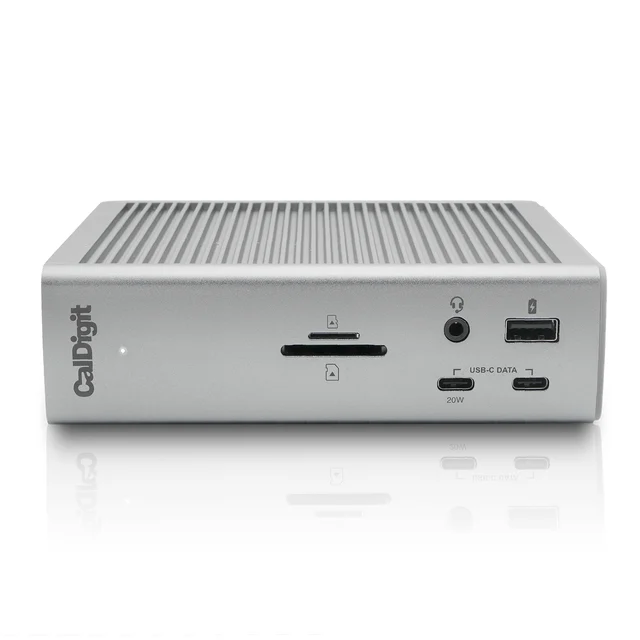
A do-everything Thunderbolt 4 dock that earns its high price only if your laptop and workload actually need it.
Best for: Power users and multi-monitor desks on a Thunderbolt or USB4 laptop who want one cable to run everything.
- 98W host charging over a single cable, plus a 2.5 Gigabit Ethernet jack that outpaces the usual Gigabit port
- 18 ports including a UHS-II SD reader and both front and rear Thunderbolt 4 downstream connections
- Ships with a bulky external power brick and sits at the top of the price range
- Needs a Thunderbolt or USB4 host for full function, and some macOS setups have historically seen sleep/wake dropouts that firmware has since reduced
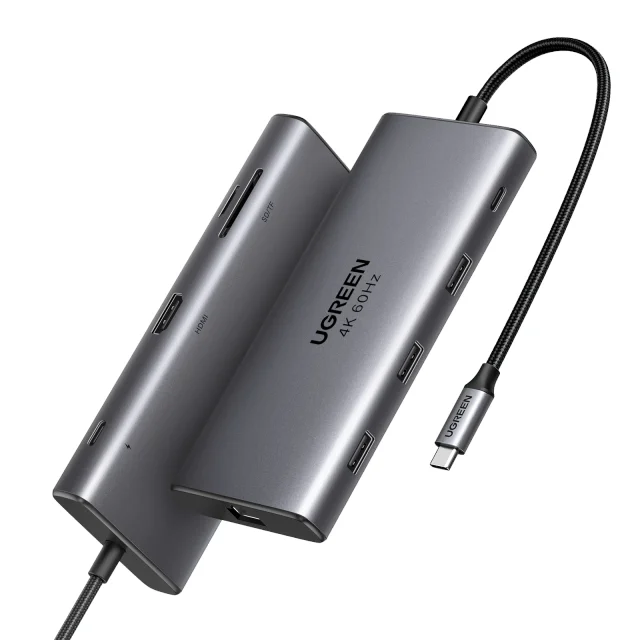
A well-rounded 9-in-1 hub with an unusually sensible port mix for the money, if a single monitor is enough.
Best for: Home and hybrid workers who want a compact single-monitor hub with a full spread of ports.
- 10Gbps USB-C and USB-A data alongside a 4K60 HDMI output, which many hubs still cap at 30Hz
- 100W PD input passes a strong charge through to the laptop, with Gigabit Ethernet and an SD/TF reader
- Drives only one external display, and the Ethernet jack tops out at Gigabit rather than 2.5G
- The card reader is UHS-I and the metal shell runs warm during sustained transfers
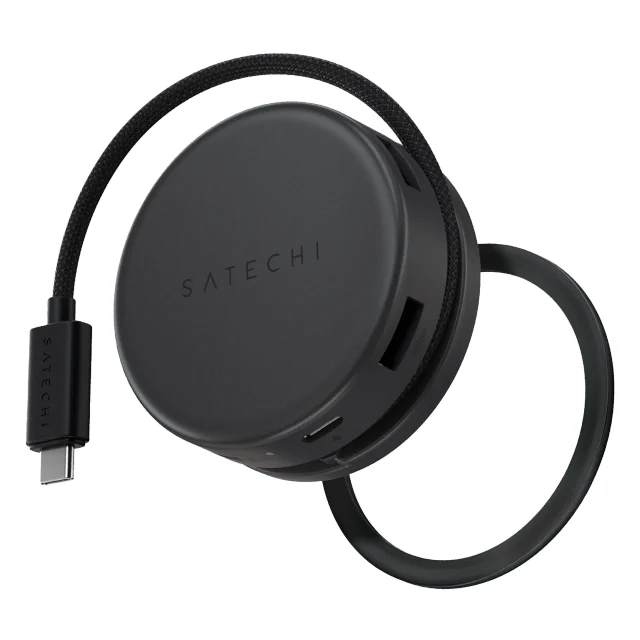
A pocket hub that trades desk-grade power and dual displays for genuine portability and a tidy magnetic design.
Best for: Travelers and hot-deskers who need HDMI, wired network and card readers in the smallest possible package.
- Magnetic puck body with a coiled braided cable, a 4K60 HDMI output and a Gigabit Ethernet jack
- Dual USB-A ports plus SD and microSD readers in a shell small enough for a jacket pocket
- Supports a single external display, and the compact body warms noticeably when every port is in use
- The coiled cable can tug the hub around a slim laptop, and pass-through charging is modest for power-hungry machines
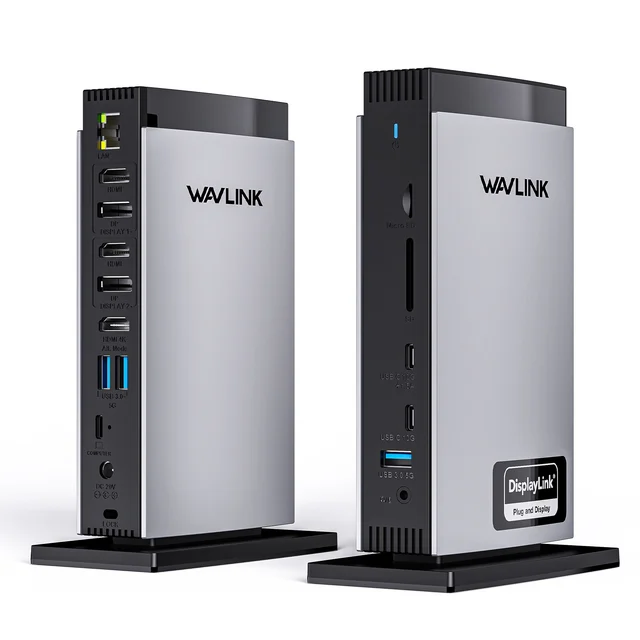
A port-stuffed DisplayLink dock whose extra monitors come with software compression, driver hassle and no laptop charging.
Best for: A narrow case: multi-monitor users on a display-limited laptop who accept compression and a separate charger.
- DisplayLink lets Macs that normally cap at one external monitor run two or three screens
- Fifteen connections including triple video out, five USB ports and a Gigabit Ethernet jack
- DisplayLink compresses video in software, adding CPU load and latency and blocking some protected content and smooth motion
- Requires a driver install, plus a Screen Recording permission on Mac, and does not charge the host laptop at all
| Criteria | CalDigit TS4 Top pick | UGREEN Revodok Pro 109 | Satechi OntheGo 7-in-1 Multiport Adapter | Wavlink WL-UG69DK13 DisplayLink Dock |
|---|---|---|---|---|
| Verdict | Buy it | Buy it | Buy it | Skip it |
| Best for | Power users and multi-monitor desks on a Thunderbolt or USB4 laptop who want one cable to run everything. | Home and hybrid workers who want a compact single-monitor hub with a full spread of ports. | Travelers and hot-deskers who need HDMI, wired network and card readers in the smallest possible package. | A narrow case: multi-monitor users on a display-limited laptop who accept compression and a separate charger. |
| Price tier | $$$$ · flagship | $$ · mid-range | $$ · mid-range | $$ · mid-range |
| Connection | Thunderbolt 4 / USB4 | USB-C 3.2 (10Gbps) | USB-C 3.2 portable | DisplayLink over USB 3.0 |
| External displays | Dual 4K+ (native) | Single 4K60 | Single 4K60 | Dual/triple (compressed) |
| Charges the laptop | Yes, up to 98W | Yes, strong PD pass-through | Yes, modest PD | No |
| Ethernet | 2.5 Gigabit | Gigabit | Gigabit | Gigabit |
| Form factor | Large desktop dock | Compact desktop hub | Pocket travel hub | Desktop dock |
| Verdict | Buy | Buy | Buy | Skip |
Which one is right for you?
- Power users and multi-monitor desks on a Thunderbolt or USB4 laptop who want one cable to run everything. Buy it CalDigit TS4
- Home and hybrid workers who want a compact single-monitor hub with a full spread of ports. Buy it UGREEN Revodok Pro 109
- Travelers and hot-deskers who need HDMI, wired network and card readers in the smallest possible package. Buy it Satechi OntheGo 7-in-1 Multiport Adapter
- A narrow case: multi-monitor users on a display-limited laptop who accept compression and a separate charger. Skip it Wavlink WL-UG69DK13 DisplayLink Dock
How we judged the field
We do not run these devices through a lab. Instead we read across independent expert testing and long-term owner reports, then weigh the points where they agree and, more usefully, where they disagree. For USB-C hubs and docks, four things decide whether a unit is worth keeping: how much power it delivers back to the laptop, how many displays it can drive and at what refresh rate, the quality of its wired networking, and how it behaves under sustained heat.
We deliberately included both ends of the market. A pocket hub and a full Thunderbolt dock solve different problems, so comparing them head to head only makes sense once you know which job you are hiring the device for. We also kept one poor option in the lineup, because the failure modes of a weak dock are as instructive as the strengths of a good one.
We favored hubs with aluminum bodies, honest port labeling, and a track record of firmware support. We were skeptical of units that advertise long port counts without explaining the compromises, since a fifteen-in-one spec sheet often hides a catch.
CalDigit TS4
Buy itThe TS4 is the closest thing here to a single-cable command center. Over one Thunderbolt 4 connection it delivers up to 98W to the laptop, drives dual native displays, and exposes 18 ports, including a UHS-II SD reader and a 2.5 Gigabit Ethernet jack that leaves the usual Gigabit ports behind. Owners consistently note that it works across Mac and Windows without drivers, and the aluminum enclosure sheds heat well rather than concentrating it.
The reservations are real and worth stating. It commands a premium price and ships with a large external power brick that takes up as much room as the dock. It also assumes a Thunderbolt or USB4 host; plug it into a plain USB-C laptop and you lose much of what you paid for. Some macOS users have reported ports going unresponsive after sleep, an issue firmware updates have reduced but not erased for every configuration. For a busy, monitor-heavy desk, though, it remains the most dependable option in this group.
UGREEN Revodok Pro 109
Buy itThe Revodok Pro 109 is the sensible middle. Its nine ports are chosen with restraint rather than padded for a bigger number: 10Gbps USB-C and USB-A data, a 4K60 HDMI output that many cheaper hubs still cannot manage, Gigabit Ethernet, and an SD/TF reader. Its 100W power-delivery input passes a strong charge through to the laptop, so a single cable covers charging and peripherals for most machines.
What you give up is headroom. It drives only one external display, its Ethernet stops at Gigabit rather than 2.5G, and the card reader is UHS-I rather than the faster UHS-II. The metal shell also runs warm during long transfers, which is normal but worth noting if you tuck it into a tight space. For a one-monitor desk, none of this is disqualifying, and the value on offer is hard to argue with.
Satechi OntheGo 7-in-1
Buy itThis is the hub to throw in a bag. The puck-shaped body magnetically clings to the back of a laptop and uses a short coiled cable, so it disappears when you travel. Despite the size it still offers a 4K60 HDMI output, Gigabit Ethernet, two USB-A ports, and SD plus microSD readers.
Portability is bought with compromise. It supports a single display, and packing that much into a small shell means it warms up quickly when every port is working. The coiled cable, handy as it is, can tug the hub around a thin laptop, and pass-through charging is modest for the most power-hungry machines. As a travel companion rather than a permanent desk fixture, it does its job well.
Wavlink WL-UG69DK13 DisplayLink Dock
Skip itOn paper this dock looks generous: fifteen connections, triple video output, five USB ports, and Gigabit Ethernet. The catch is how it produces those extra screens. It relies on DisplayLink, which compresses video in software before sending it over USB. That approach adds CPU load and latency, struggles with fast motion, and can refuse to play some protected content. It also demands a driver install and, on a Mac, a screen-recording permission before the monitors will light up.
The deeper problem is that it does not charge the host laptop at all, so you still need a separate charger occupying another cable. For a genuinely display-limited laptop that must run several monitors, DisplayLink is a workaround that exists for a reason. For nearly everyone else, the compression, the setup friction, and the missing charging make this the option to walk past.
CalDigit TS4 vs UGREEN Revodok Pro 109: which should you buy?
This is a question of ambition and hardware. The TS4 makes sense when your laptop supports Thunderbolt or USB4 and your desk has two monitors, fast storage, wired networking, and a pile of peripherals that all need to connect through one cable. Its 98W charging and 2.5G Ethernet are things the Revodok simply cannot match, and that capability is what the higher price buys.
The Revodok Pro 109 wins on proportion. If you run a single monitor and want a clean set of fast ports without a large brick or a premium outlay, it covers the essentials and charges your laptop competently. Buying the TS4 for a one-screen setup means paying for headroom you will not use. Match the dock to the desk, not to the spec sheet.
What to look for
Start with your laptop. Confirm whether its USB-C port supports Thunderbolt or USB4, because that single fact decides whether a full dock will reach its potential or quietly run at half speed. Next, count your displays and check the refresh rate you need; a 4K screen at 30Hz feels sluggish for a cursor, so look for 4K60 support explicitly.
Then think about power. If you want one cable to charge and connect, you need power delivery pass-through, and the wattage should comfortably exceed what your laptop draws. Finally, weigh where the device will live. A metal-bodied hub with airflow will stay reliable under load, while a plastic unit crammed into a drawer is the classic recipe for dropped connections. Treat a long port count with suspicion until you understand what each port actually delivers.
Our final take
There is no single right hub, only the right hub for your laptop and your desk. The CalDigit TS4 is the most capable and the most dependable, provided you have the Thunderbolt or USB4 host to justify it. The UGREEN Revodok Pro 109 is the practical pick for a single-monitor setup that still wants real speed, and the Satechi OntheGo 7-in-1 is the one to carry. The Wavlink DisplayLink dock is the cautionary example: more ports on the box do not guarantee a better experience, and compression plus setup friction are a poor trade for a couple of extra screens.
Questions, answered
What is the difference between a USB-C hub and a Thunderbolt dock?
A USB-C hub is a compact, lower-cost adapter that splits one port into several, usually for a single display. A Thunderbolt dock is larger and pricier, with far more bandwidth for dual monitors, faster storage and high-wattage laptop charging over one cable.
Will a USB-C hub charge my laptop?
Only if it has power delivery pass-through and you plug your charger into it. The hub then powers your laptop and peripherals through one cable. Check the wattage: some pass-through drops power for internal ports, so a demanding laptop may still charge slowly.
Why does my USB-C hub get hot?
Heat is normal. A hub pushing high wattage and 10Gbps data generates warmth, and aluminum shells spread it deliberately. Concern is warranted only if ports drop out or transfers slow, which can signal thermal throttling. Give the hub airflow rather than burying it on a shelf.
Can I run two external monitors from a USB-C hub?
Usually not natively. Most single-cable USB-C hubs drive one display through HDMI or DisplayPort. Native dual-monitor output typically needs a Thunderbolt or USB4 dock. DisplayLink docks can add screens on limited laptops, but they compress the video in software, which adds lag.
Do USB-C hubs need drivers?
Most do not. Standard USB-C and Thunderbolt hubs are plug-and-play on Windows and macOS. The exception is DisplayLink docks, which require a driver install and, on Mac, a screen-recording permission before extra monitors will work. That extra setup is a real drawback.
Deciding between the top two? See our head-to-head: CalDigit TS4 vs UGREEN Revodok Pro 109.
More Tech & Gadgets reviews
 The Best USB Flash Drives: 4 Compared (and One to Skip)
  The Best USB Power Meters: 4 Compared (and One to Skip)
  The Best Video Doorbells in 2026 (and the One to Skip)
  The Best VR Headsets: 4 Compared (and One to Skip)
  The Best Webcam Lights: 4 Compared (and One to Skip)
  The Best WiFi Extenders: 4 Compared (and One to Skip)