Explained
USB-C Cables, Explained
After reading this you will be able to look at any USB-C cable listing and know, in about ten seconds, whether it charges fast, moves data fast, or neither.
In this guide
USB-C is a connector shape, not a capability. Two cables with the identical plug on each end can differ by a factor of 250 in data speed and a factor of four in charging power, and nothing on the outside tells you which one you just pulled out of the drawer. The confusion is not your fault: the standard bundles several unrelated features behind one port, and most listings shout about whichever one the cable happens to be good at while staying silent on the rest.
The 30-second version
- Charging power and data speed are separate specs. A cable can carry the maximum 240W and still move data at the slowest speed the standard allows, and most charging cables do exactly that. Reading one number tells you nothing about the other.
- Wattage is a ceiling, not a boost. A high-wattage cable does not charge your phone faster. It only matters when a device asks for more power than the cable can carry, which in practice means larger laptops.
- Assume the slowest data speed unless the listing says otherwise. If a page does not print a figure in Gbps, the cable is almost certainly USB 2.0 at 480Mbps, no matter how loudly it advertises fast charging.
- Video is a third, separate feature. Plenty of high-power cables carry no display signal at all, so a cable that charges your laptop beautifully may refuse to light a monitor.
- Cables die at the neck, not in the middle. Wear often shows up where the cord meets the connector, which is why molded strain relief and a braided jacket matter more than anything printed on the spec sheet.
The products this guide is about
Our verdict on each, with the full reasoning on the companion review.
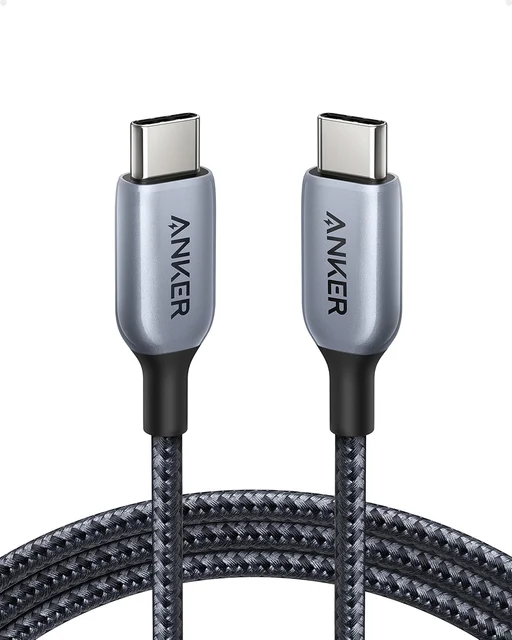
- Buy Anker 765 USB-C to USB-C Cable (240W, 6ft Nylon) The full 240W charging ceiling wrapped in a braided jacket that survives daily abuse, with no data speed you are paying for and will not use. Amazon
- Buy Cable Matters 240W USB-C Charging Cable (USB-IF Certified) Same 240W electrical job as pricier cables, marketed as USB-IF certified, with a plain jacket to match the price. Amazon
- It depends Anker USB4 Cable (40Gbps, 240W) The right cable if you own an external SSD or a dock, and a waste of money if the other end is a phone. Amazon
- Skip Apple Thunderbolt 5 (USB-C) Pro Cable (1m) Excellent engineering aimed at a tiny audience, and a flagship-priced no-op unless there is Thunderbolt 5 hardware on both ends. Amazon
What actually matters
- Power rating (watts). Match it to the hungriest thing you own rather than the smallest. A cable rated for the top of the standard charges a phone exactly as fast as a modest one does, but a low-rated cable will slow-charge a big laptop every single day. The price step up to the top rating is usually small, so most people should just take it and stop thinking about it.
- Data speed (Gbps or Mbps). This is the number people overpay for. It only pays off if something at the far end actually moves data: an external SSD, a dock, or a monitor. For charging a phone, a tablet, or a laptop, the slowest data tier is genuinely fine and costs much less.
- Verifiable certification. The USB standards body publishes a searchable list of certified products with an ID number. A listing that quotes a certification ID has done real work; one that just says the word "certified" in marketing copy has not. This is the single best proxy for whether the cable's internal claims match its actual construction.
- E-marker chip. Any cable carrying more than the base 60W is required to have a small chip in the connector that tells the charger what the cable can handle. Cables missing one fall back to 60W at best. Cables with a chip programmed to overstate what the wires can carry are where the alarming overheating stories come from.
- Length, and the tradeoff it forces. Very fast data cables are physically short, because signal integrity gets harder as length grows without active electronics. A longer cable that reaches your sofa or nightstand is a charging cable by definition.
- Build quality at the strain point. Braided jackets look good and resist abrasion, but molded strain relief where the cord enters the plug is what actually prevents failure. Bend-cycle ratings give a rough ranking between cables that publish them.
- Video support, stated explicitly. If you want one cable to charge a laptop and drive a display, the listing has to say DisplayPort Alt Mode or Thunderbolt. Silence means no video, and that is the most common unpleasant surprise in this category.
The specs, in plain English
Green flags vs red flags
Green flags
- The listing states a wattage AND a data speed as separate numbers, rather than leaving one of them out
- A laser-etched certification logo on the connector, or a scannable code on the packaging that leads back to the standards body's own certification database
- A certification ID is published, not just the word "certified" in the marketing copy
- The page says outright what the cable does not do, such as "no video output" - honesty about limitations is a strong quality signal in this category
- Molded strain relief is visible in the product photos where the cord meets the plug, and the maker publishes a bend-cycle rating
- The maker states clear warranty terms
Red flags
- Big claims about "fast charging" or "super speed" with no watts and no Gbps figure anywhere on the page
- A high wattage claim on a suspiciously cheap unbranded cable with no mention of an e-marker chip
- Product photos or titles that imply monitor support while the specification list never mentions DisplayPort or Thunderbolt
- A very long cable advertising the top data speed without saying it is active
- Model names reused across several different wattages, so the listing photo may not match the cable you receive
- Owner reports mentioning connectors running hot, intermittent disconnects, or the cable dying at the plug within a year
Who's who: the brands
- Anker - A major charging accessory brand with braided cables in several lengths; check the wattage carefully because similar model names cover very different cables.
- Cable Matters - A value-focused maker; check each listing for a certification ID and for plain statements of what the cable does not do.
- Apple - Expensive, with a braided Thunderbolt 5 Pro Cable that Apple says supports 120Gb/s and up to 240W, aimed at people who already own matching hardware.
- Belkin - A long-standing accessory brand with wide retail availability, priced above budget options.
- UGREEN - Broad range covering everything from basic charging cables to 40Gbps data cables; check each model's listed wattage and data speed.
- Unbranded marketplace sellers - Where certification and e-marker claims are hardest to verify; check for a certification ID and a clear warranty.
How to read a listing without getting fooled
Work through a listing looking for three separate numbers, and treat each missing one as a bad sign. First, watts: a figure like 60W, 100W, or 240W, ideally paired with the words Power Delivery or EPR. Second, data: a figure in Gbps or Mbps. If the page never prints one, assume the slowest tier, because a manufacturer with a fast cable always says so. Third, video: the phrase DisplayPort Alt Mode or Thunderbolt, spelled out. "USB-C to USB-C" tells you only about the plug shape, and "supports fast charging" is marketing, not a specification. Be alert to phrases that borrow authority without earning it, such as "certified quality" with no ID number, or "compatible with Thunderbolt" on a cable that is nothing of the sort. Cross-check the specification table against the bullet points, since they frequently disagree, and check that the length you are adding to your cart matches the length in the photo. It also helps to know that the standards body has been tightening how cables must be labeled, so newer certified cables increasingly print both numbers together in a fixed format, something like "USB 40Gbps" alongside "240W", sometimes etched onto the connector itself with a scannable code that leads back to the certification database. A cable that follows that convention is telling you it has been through compliance testing; one that avoids the format usually has a reason. One last habit worth having: makers often sell several cables under one product name at different wattages and speeds, so confirm the variant in the dropdown, not just the headline.
How much should you spend?
Think of this as two independent spending decisions rather than one. On charging power, the jump from a mid-tier rating to the top of the standard is a small step in price and removes a ceiling you might otherwise bump into for years, so it is usually worth taking even if nothing you own needs it today. On data speed, the opposite is true: the step from the slowest tier to the fastest is a genuine premium, often a multiple rather than a nudge, and it buys you nothing unless there is a drive, a dock, or a display on the far end. The practical approach for most households is a mix. Spend a bit more on the one cable you physically handle every day, where a braided jacket and proper strain relief pay for themselves in not replacing it, and buy plainer certified cables in quantity for the spots where a cable gets plugged in once and never touched again. Then buy exactly one high-speed data cable, if and only if you own the device that needs it, and keep it with that device. The one place not to economize is certification on high-wattage cables, because the cheapest way a manufacturer saves money is on the wires that carry the current.
Questions, answered
Will a higher-wattage cable charge my phone faster?
No. The cable sets a ceiling, not a floor. Your phone and charger negotiate a figure far below what any modern cable can carry, so a top-rated cable and a modest one charge a phone at identical speed. Wattage only becomes visible when a device asks for more than the cable allows, which in practice means larger laptops. The reason to buy the higher rating anyway is that it costs little and means you never have to think about it again.
Can I tell a fast data cable from a slow one just by looking?
Mostly not, which is the core problem with this category. A few makers mold the speed onto the connector housing, and high-speed cables tend to be thicker and noticeably shorter, since passive cables at the top speeds are kept short. Beyond that the listing is your only reliable source. Once your fast cable is out of the box, put a piece of tape on it, because in a drawer it is indistinguishable from the slow ones.
What is an e-marker chip, and do I need to care?
It is a small chip in the connector that tells the charger what the cable can safely carry, and the standard makes it mandatory for anything above the base 60W. If it is missing, a good charger simply refuses to push more power, which is the safe failure. The genuine hazard is a chip programmed to claim more than the wires inside can handle, which is where overheating reports come from. Buying cables with a published certification ID is the practical defense.
Do I need Thunderbolt, or is USB4 enough?
For almost everyone USB4 is more than enough, and for most people even that is more than they need. USB4 and Thunderbolt 4 both top out at 40Gbps, and a good USB4 cable handles Thunderbolt 4 docks and drives. Thunderbolt 5 goes higher, but it requires Thunderbolt 5 ports on both the computer and the peripheral to do anything beyond what a much cheaper cable already does. If you are asking the question, the answer is that you do not need it yet.
Why won't my USB-C cable drive my monitor?
Because video is a separate feature that most charging cables simply do not include. Driving a display over USB-C requires DisplayPort Alt Mode or Thunderbolt support in the cable, and a cable can carry the maximum charging power while carrying no video signal at all. If the listing never mentions DisplayPort or Thunderbolt, it will not light a monitor no matter how expensive it was.
Is it worth buying long high-speed cables?
Usually not, and often it is hard to find. Passive cables at the top data speeds are kept short (Intel specifies universal Thunderbolt cables up to 2 meters), so a long cable claiming 40Gbps is either an active cable with electronics inside, at a higher price, or is overstating what it does. The cleaner solution is to keep a short high-speed cable with the device that needs it, and use longer, cheaper charging cables everywhere else.
Or jump to the head-to-head: Anker 765 USB-C to USB-C Cable (240W, 6ft Nylon) vs Cable Matters 240W USB-C Charging Cable (USB-IF Certified).