

Tech & Gadgets
The Best USB Flash Drives: 4 Compared (and One to Skip)
We compared four current USB-C and USB-A flash drives for everyday file transfer on speed, build, connectors and real-world value.
The short version
For raw speed, the Kingston DataTraveler Max is the best true flash drive you can buy, with the fastest read rates of the four - though it may run warm and costs a premium. Most people are better served by the Samsung Type-C drive: tiny, USB-C native and fairly priced, with only moderate write speed as a trade-off. The SanDisk Ultra Dual Drive Luxe is worth the extra outlay only if you genuinely need both USB-C and USB-A on one metal drive. The popular Kingston DataTraveler Exodia Onyx is the one to skip - its writes are slow enough to test your patience, and it is USB-A only. Best for: buy the Samsung Type-C for everyday transfers and step up to the DataTraveler Max only if you move large files often.
Our picks at a glance
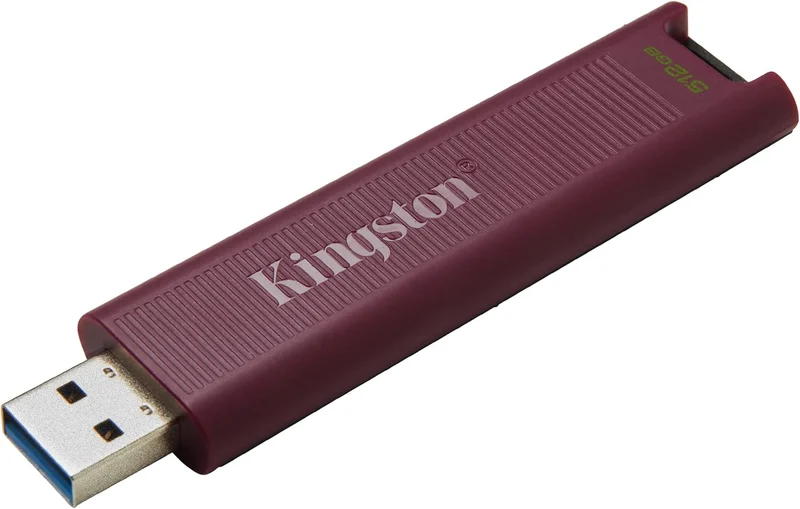
- Kingston DataTraveler Max (USB-A) - Buy. A pocketable flash drive aimed at portable-SSD-like speed.
- Samsung Type-C USB Flash Drive - Buy. A tiny USB-C drive that handles everyday transfers for the money.
- SanDisk Ultra Dual Drive Luxe USB Type-C - It depends. A handsome all-metal drive with both plugs - convenience first, speed second.
- Kingston DataTraveler Exodia Onyx - Skip. Cheap and widely stocked, but the slow writes show why it's cheap.
The verdict in 30 seconds
What mattered most
- Real-world read speed
- Real-world write speed
- Connector(s)
- Build & durability
- Everyday carry
- Best use case
A good flash drive should just work: plug in, drag files, walk away. But the gap between the fastest and the cheapest drives is now enormous, and the connector on the end matters as much as the capacity on the label. We weighed four current, easy-to-buy drives across USB-C and USB-A. The result is two easy recommendations, one that only makes sense for specific people, and one popular budget pick we'd steer most shoppers away from.
A pocketable flash drive aimed at portable-SSD-like speed.
Best for: Power users who regularly move large files and want the fastest real flash drive.
- Positioned by Kingston as a high-speed drive, with read speeds well above ordinary thumb drives
- Cap-less slider design means there is nothing to lose
- Roomy capacities suit large video files and quick backups
- May run warm and slow down during very long sustained writes, as high-speed flash drives often do
- Longer and chunkier than a typical thumb drive, so it may block neighbouring ports
- Priced well above ordinary flash drives
Own the Kingston DataTraveler Max (USB-A)? Tell us how it held up.
Thanks. Counted, and shown once enough owners have weighed in.
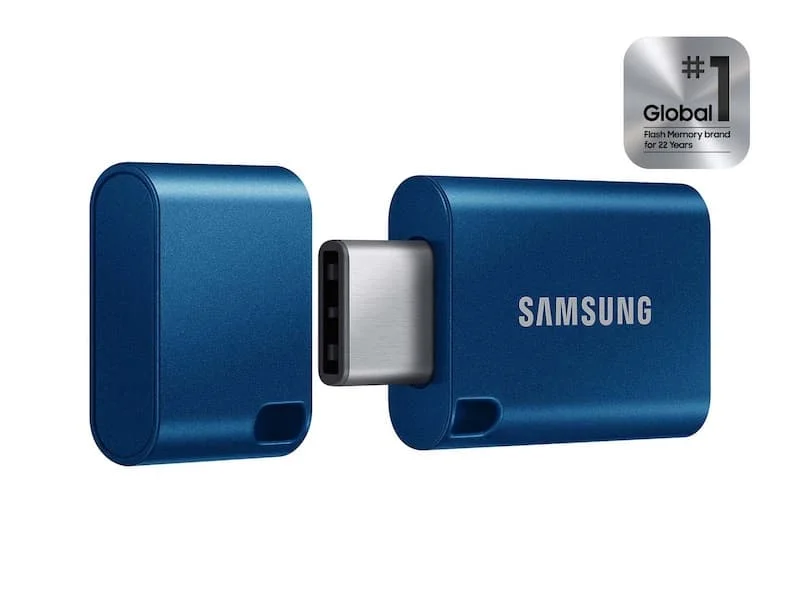
A tiny USB-C drive that handles everyday transfers for the money.
Best for: Anyone on USB-C devices who wants a dependable, affordable everyday drive.
- Very small and light, so it disappears on a keyring or in a laptop bag
- Read speeds suited to everyday transfers
- Plugs straight into modern phones, tablets and laptops over USB-C
- Write speeds are only moderate, so big folder copies take longer than the read rating suggests
- USB-C only - you will need an adapter for older USB-A ports
- Small enough that it is easy to misplace
Own the Samsung Type-C USB Flash Drive? Tell us how it held up.
Thanks. Counted, and shown once enough owners have weighed in.
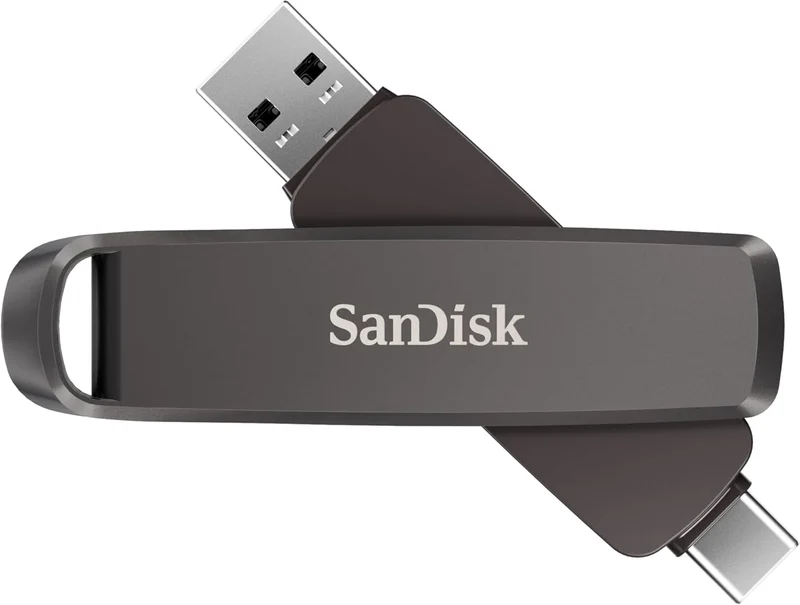
A handsome all-metal drive with both plugs - convenience first, speed second.
Best for: People who constantly shuttle files between USB-C and USB-A devices.
- Swivel design puts USB-C and USB-A on one drive, ideal for phone-to-laptop moves
- Solid metal body feels premium and shields both connectors
- Read speeds are perfectly fine for photos, documents and everyday media
- Write speeds are ordinary, so it trails the speed-focused picks on large copies
- The swivel and keyring loop add a little bulk
- You pay a small premium for the dual connector and metal shell
Own the SanDisk Ultra Dual Drive Luxe USB Type-C? Tell us how it held up.
Thanks. Counted, and shown once enough owners have weighed in.
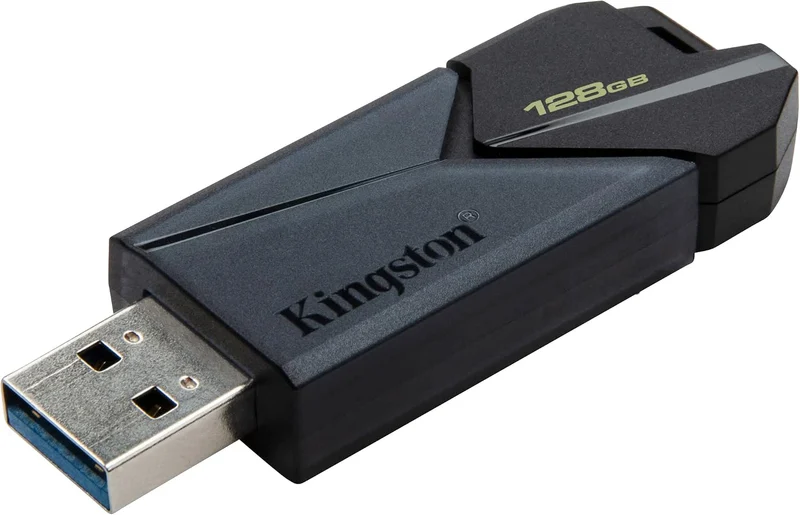
Cheap and widely stocked, but the slow writes show why it's cheap.
Best for: Only truly casual use where the lowest price is the only priority - most people should spend a little more.
- Inexpensive and widely stocked
- Simple design with a handy keyring loop
- Fine for read-mostly tasks like carrying a few documents
- Write speeds are slow enough that copying large folders is tedious
- USB-A only, with no USB-C option
- Plastic build feels basic
Own the Kingston DataTraveler Exodia Onyx? Tell us how it held up.
Thanks. Counted, and shown once enough owners have weighed in.
| Criteria | Kingston DataTraveler Max (USB-A) Top pick Buy it Buy | Samsung Type-C USB Flash Drive Buy it Buy | SanDisk Ultra Dual Drive Luxe USB Type-C It depends Buy | Kingston DataTraveler Exodia Onyx Skip it Buy |
|---|---|---|---|---|
| Best for | Power users who regularly move large files and want the fastest real flash drive. | Anyone on USB-C devices who wants a dependable, affordable everyday drive. | People who constantly shuttle files between USB-C and USB-A devices. | Only truly casual use where the lowest price is the only priority - most people should spend a little more. |
| Price tier | $$$ · premium | $$ · mid-range | $$ · mid-range | $ · budget |
| Real-world read speed | Fastest of the group | Fast | Moderate to fast | Modest |
| Real-world write speed | Fastest of the group; may dip on huge sustained copies | Moderate | Ordinary | Slow |
| Connector(s) | USB-A (USB-C version sold separately) | USB-C | USB-C + USB-A | USB-A |
| Build & durability | Ribbed plastic, cap-less slider | Compact metal, cap-less | All-metal swivel | Light plastic, sliding cap |
| Everyday carry | Long and chunky | Tiny | Small keyfob | Small but plain |
| Best use case | Moving large files fast | Everyday USB-C phone/laptop use | Shuttling files across USB-C and USB-A | Occasional light carry |
| Price tier | $$$ · premium | $$ · mid-range | $$ · mid-range | $ · budget |
Which one is right for you?
- Power users who regularly move large files and want the fastest real flash drive. Buy it Kingston DataTraveler Max (USB-A)
- Anyone on USB-C devices who wants a dependable, affordable everyday drive. Buy it Samsung Type-C USB Flash Drive
- People who constantly shuttle files between USB-C and USB-A devices. It depends SanDisk Ultra Dual Drive Luxe USB Type-C
- Only truly casual use where the lowest price is the only priority - most people should spend a little more. Skip it Kingston DataTraveler Exodia Onyx
How we judged the field
We don’t run our own lab. Instead, we compare what the makers publish about each drive and weigh it against what matters for everyday transfer. Four things did the heavy lifting in our judgement:
- Real-world speed, both ways. Advertised read speeds are the headline, but write speed is what you feel when copying a big folder. We paid special attention to the read/write gap, because that’s where cheap drives quietly disappoint.
- The right connector. A drive is only useful if it fits your ports. We looked at USB-C, USB-A and dual-connector designs so there’s a sensible pick whatever you plug into.
- Build and everyday carry. Cap-less sliders, metal bodies and keyring loops all change how likely a drive is to survive a year in a bag or pocket.
- Value and reliability. We balanced price tiers against build quality, rather than chasing specs for their own sake.
We’re comparing genuine flash drives here - not portable SSDs, internal SSDs or microSD cards, which are different tools for different jobs.
Kingston DataTraveler Max
Buy itIf you want the fastest true flash drive, this is it. Kingston positions the DataTraveler Max at the top of its flash-drive range for speed, closer to a portable SSD than an ordinary thumb drive. The cap-less slider is a genuinely good design - there’s no cap to lose - and larger capacities make it viable for quick backups and video work.
The trade-offs are honest ones. It may run warm and ease off during very long sustained writes, it’s physically longer and chunkier than a normal thumb drive, and it costs a clear premium. None of that dents its core appeal: speed in your pocket. Note that Kingston sells this in both USB-A and USB-C forms, so buy the version that matches your ports.
Samsung Type-C USB Flash Drive
Buy itThis is the drive we’d hand most people. It’s tiny, light and USB-C native, so it slots straight into current phones, tablets and laptops, and its read speed suits everyday transfers. For carrying documents, photos and everyday media between modern devices, it simply gets out of the way.
It isn’t the fastest at writing - big folder copies take longer than the read rating implies - and being USB-C only means you’ll want an adapter for older USB-A ports. It’s also small enough to misplace. But as an affordable, dependable everyday workhorse, it’s hard to beat.
SanDisk Ultra Dual Drive Luxe USB Type-C
It dependsThe appeal here is obvious the moment you hold it: a solid metal swivel body with USB-C on one end and USB-A on the other. For anyone forever moving files between a USB-C phone and a USB-A laptop or desktop, that convenience is worth real money, and read speeds are perfectly fine for photos and documents.
Whether it’s right for you comes down to priorities. Write speeds are ordinary, so it trails our speed picks on large copies, the swivel and loop add a little bulk, and you pay a small premium for the dual connector and metal shell. Need both plugs on one drive? Buy it. Only ever use one connector? Your money goes further elsewhere.
Kingston DataTraveler Exodia Onyx
Skip itThis is the drive you see everywhere near the checkout, and that ubiquity is the trap. It’s cheap, it has a tidy sliding cap and keyring loop, and it’s fine for read-mostly jobs like carrying a handful of documents. For occasional, undemanding use, it technically does the job.
But its writes are slow, and it shows: copying a large folder onto it is tedious. It’s also USB-A only with no USB-C option, and the plastic build feels basic. Spend a little more and you get better write speed and a connector that suits modern devices - which is exactly why this is the one to skip.
Sources
Specs in this review come from these pages.
Kingston DataTraveler Max vs Samsung Type-C: which should you buy?
These are our two recommendations, and they answer different questions. The DataTraveler Max is about speed: if you routinely move large video files or use the drive for quick backups, its SSD-class reads save real time, and the cap-less slider is a pleasure. The cost is a premium price, a bigger body and a drive that runs warm under heavy sustained writes.
The Samsung Type-C is about everyday sensibility. It’s a fraction of the size, costs noticeably less, and plugs straight into modern USB-C devices, with only moderate write speed as the compromise. For the majority of people transferring documents, photos and the odd video, the Samsung is the smarter buy - step up to the DataTraveler Max only when speed is the point rather than a nice-to-have.
What to look for
- Check the write speed, not just the read speed. The advertised big number is almost always the read rate; slow writes are what make a cheap drive frustrating.
- Buy for your ports. USB-C for newer devices, USB-A for older ones, or a dual-connector drive if you genuinely switch between both.
- Prefer cap-less or captive-cap designs. A loose cap is a cap you’ll eventually lose.
- Size capacity to your habits. Enough for how you actually transfer files beats paying for space you’ll never fill.
- Treat it as transport, not a backup. Keep a second copy of anything important somewhere else.
Our final take
There’s no single best flash drive, but there is a best drive for each type of buyer. The Kingston DataTraveler Max is the performance pick and worth its premium if you move large files often. The Samsung Type-C is the everyday pick we’d recommend to most people: small, USB-C native and fairly priced. The SanDisk Ultra Dual Drive Luxe earns its place only when you truly need both connectors on one drive. And the Kingston DataTraveler Exodia Onyx, popular as it is, is the one to leave on the shelf - spending a little more buys a better everyday experience.
Questions, answered
What's the difference between a USB flash drive and a portable SSD?
A flash drive is a small, self-contained stick that plugs straight into a port with no cable. A portable SSD is a larger drive in its own enclosure that usually connects by cable and delivers faster, more consistent sustained speeds, especially for very large transfers. Flash drives win on pocketability and price; portable SSDs win on endurance and heavy workloads. Every product here is a flash drive, not an SSD or a microSD card.
Do I need USB-C or USB-A?
Match the drive to the ports you use most. Newer laptops, phones and tablets favour USB-C, while many desktops, TVs, cars and older laptops still use rectangular USB-A. If you switch between both, a dual-connector drive like the SanDisk Ultra Dual Drive Luxe saves carrying an adapter. Otherwise pick the single connector that fits your main devices.
Why are write speeds so much slower than read speeds on cheaper drives?
Manufacturers usually advertise the read speed because it is the higher, more flattering number. Writing data is harder work for the memory inside, so budget drives often write far more slowly than they read. That gap is why copying a large folder onto a cheap drive can feel painfully slow even when it opens files quickly - and it's the main reason we steer people away from the bargain option here.
How much capacity do I actually need for everyday transfer?
For documents, photos and the occasional video, a mid-size capacity is plenty and keeps the price sensible. Step up to a larger size only if you routinely move big video files or use the drive for backups. Buying far more space than you need mainly adds cost, so size it to how you actually transfer files.
Are flash drives a safe place to store my only copy of important files?
Treat any flash drive as convenient transport, not a backup. They can be lost, worn out by heavy repeated writing, or simply fail, so always keep a second copy of anything important somewhere else. The golden rule applies whichever drive you buy: never let a flash drive hold the only copy of files you can't afford to lose.
Deciding between the top two? See our head-to-head: Kingston DataTraveler Max (USB-A) vs Samsung Type-C USB Flash Drive.
More in Tech & Gadgets
USB Flash Drives, Explained Plain-English guide → Kingston DataTraveler Max (USB-A) vs Samsung Type-C USB Flash Drive Head-to-head →  The Best USB Power Meters: 4 Compared (and One to Skip)
  The Best Webcam Lights: 4 Compared (and One to Skip)
  The Best WiFi Extenders: 4 Compared (and One to Skip)
  The Best Wi-Fi Routers: 4 Compared (and One to Skip)