

Tech & Gadgets
The Best UPS Battery Backups: 4 Compared (and One to Skip)
Four home-office UPS battery backups compared on waveform quality, voltage regulation, runtime headroom, outlets, and long-term serviceability.
The short version
For a home office or desktop PC, buy a line-interactive UPS with pure sine wave output and automatic voltage regulation - the CyberPower CP1500PFCLCD is the best all-rounder, with the highest watt rating (1500 VA / 1000 W), twelve outlets, and a user-replaceable battery. The APC Back-UPS Pro BR1500MS2 is a very close runner-up that owners praise for its display and quieter behavior, at a slightly lower 900 W ceiling. The budget APC BE600M1 is a fine buy for the narrow job of keeping a modem, router, or NAS alive, but its stepped waveform and 330 W limit make it wrong for an actual desktop. Skip the CyberPower ST900U: it charges mid-range money for standby topology with no voltage regulation, a stepped waveform, and a battery you cannot replace yourself. Best for: remote workers, PC owners, and anyone whose livelihood dies when the power blinks.
Our picks at a glance
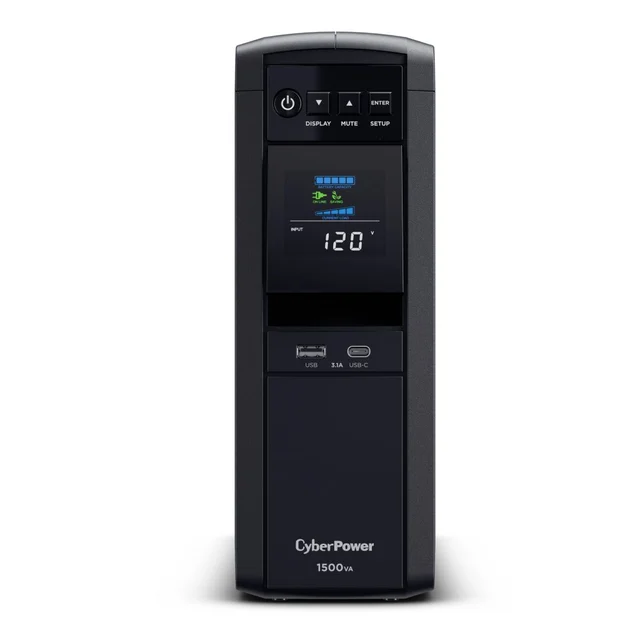
- CyberPower CP1500PFCLCD - Buy. The default home-office UPS: pure sine wave, real voltage regulation, twelve outlets, and a genuinely useful status display.
- APC Back-UPS Pro BR1500MS2 - Buy. The polished alternative: pure sine wave and AVR in a quieter, better-screened package, with a slightly lower watt ceiling.
- APC Back-UPS BE600M1 - It depends. A cheap, compact insurance policy for routers, modems, and modest gear - just don't ask it to carry a real desktop.
- CyberPower ST900U - Skip. Mid-range money for entry-level guts: standby topology, no voltage regulation, a stepped waveform, and a battery you can't swap yourself.
The verdict in 30 seconds
What mattered most
- Capacity (VA / watts)
- Output waveform
- Topology / voltage regulation
- Outlets (battery + surge-only)
- USB charging ports
- User-replaceable battery
A UPS battery backup is the difference between a power blip costing you three seconds and costing you an afternoon of unsaved work - or a corrupted drive. For home offices and desktop PCs, the field splits sharply between line-interactive pure sine wave units that genuinely protect modern computers and cheap standby boxes that mostly protect your router. We compared four current, widely available models: two are easy recommendations, one makes sense only for a narrow job, and one asks mid-range money for entry-level guts.
The default home-office UPS: pure sine wave, real voltage regulation, twelve outlets, and a genuinely useful status display.
Best for: Anyone protecting a desktop PC, monitors, and networking gear who wants the most capacity and outlets per dollar tier
- Pure sine wave output that plays nicely with active-PFC PC power supplies
- Highest watt rating of the group (1500 VA / 1000 W) with line-interactive AVR that corrects sags without draining the battery
- Twelve outlets, USB-A and USB-C charging, a multifunction LCD, and a user-replaceable battery
- Bulky and heavy for a desk setup - plan for floor placement
- Owners note the fan and relay clicks are audible in a silent room, and the LCD backlight logic takes some menu-diving to tame
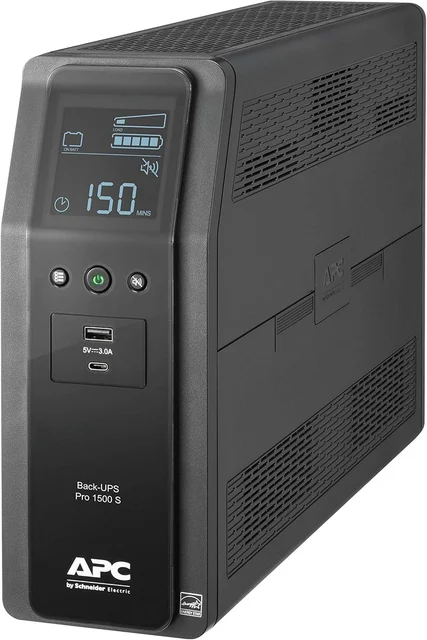
The polished alternative: pure sine wave and AVR in a quieter, better-screened package, with a slightly lower watt ceiling.
Best for: Home offices that value a quieter unit and clearer display over maximum wattage headroom
- Pure sine wave output and line-interactive AVR from the most established name in the category
- Bright, readable display with load and estimated-runtime readouts owners consistently praise
- USB-A plus USB-C charging ports and a user-replaceable battery cartridge
- 900 W ceiling is meaningfully lower than its direct rival at the same tier
- Ten outlets instead of twelve, and reviewers report the bundled software feels dated
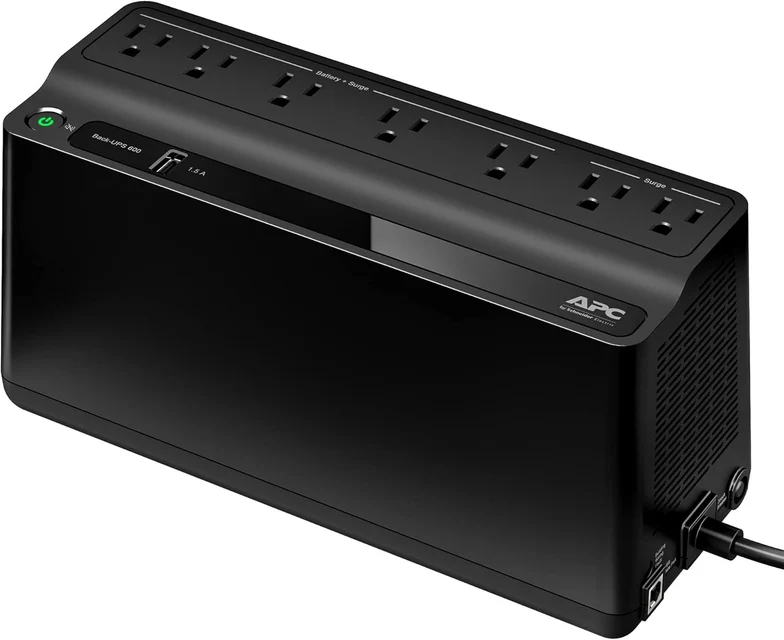
A cheap, compact insurance policy for routers, modems, and modest gear - just don't ask it to carry a real desktop.
Best for: Keeping internet gear, a NAS, smart-home hubs, or a mini PC alive - not a primary desktop tower
- Inexpensive, compact wedge shape that tucks onto a shelf or desk
- Long runtime on tiny loads - independent testing and owner reports agree it can keep a modem and router alive through extended outages
- USB data port for automatic safe shutdown, plus a USB-A charging port
- Stepped (simulated) sine wave output and no voltage regulation - a poor match for active-PFC desktop power supplies
- 330 W ceiling and only seven outlets; a gaming PC or multi-monitor rig will overload it or drain it in minutes
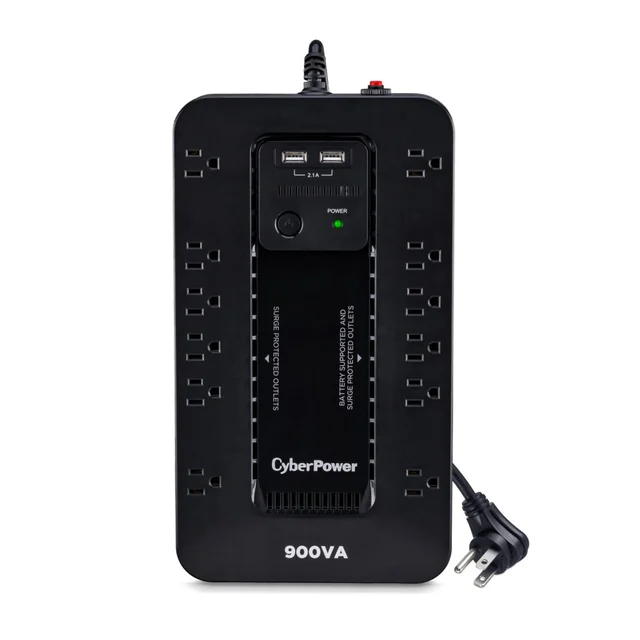
Mid-range money for entry-level guts: standby topology, no voltage regulation, a stepped waveform, and a battery you can't swap yourself.
Best for: Almost no one at this tier - spend slightly more for pure sine wave and AVR, or less for a basic router UPS
- Twelve outlets and two USB-A charging ports in a slim vertical footprint
- HID-compliant USB port works with shutdown software
- Standby topology with no AVR - every voltage sag becomes a battery event, which owners report chews through battery life
- Stepped approximated sine wave is the wrong output for the modern PC power supplies this class of unit gets bought for
- Battery is not user-replaceable - CyberPower specifies technician-only service, so a worn battery effectively totals the unit
| Criteria | CyberPower CP1500PFCLCD Top pick | APC Back-UPS Pro BR1500MS2 | APC Back-UPS BE600M1 | CyberPower ST900U |
|---|---|---|---|---|
| Verdict | Buy it | Buy it | It depends | Skip it |
| Best for | Anyone protecting a desktop PC, monitors, and networking gear who wants the most capacity and outlets per dollar tier | Home offices that value a quieter unit and clearer display over maximum wattage headroom | Keeping internet gear, a NAS, smart-home hubs, or a mini PC alive - not a primary desktop tower | Almost no one at this tier - spend slightly more for pure sine wave and AVR, or less for a basic router UPS |
| Price tier | $$$ · premium | $$$ · premium | $ · budget | $$ · mid-range |
| Capacity (VA / watts) | 1500 VA / 1000 W | 1500 VA / 900 W | 600 VA / 330 W | 900 VA / 500 W |
| Output waveform | Pure sine wave | Pure sine wave | Stepped approximation | Stepped approximation |
| Topology / voltage regulation | Line-interactive, AVR | Line-interactive, AVR | Standby, no AVR | Standby, no AVR |
| Outlets (battery + surge-only) | 12 (6 + 6) | 10 (6 + 4) | 7 (5 + 2) | 12 (6 + 6) |
| USB charging ports | USB-A + USB-C | USB-A + USB-C | 1× USB-A | 2× USB-A |
| User-replaceable battery | Yes | Yes | Yes | No - technician only |
| Status display | Multifunction LCD | Multifunction LCD | LED only | LED only |
| Price tier | $$$ · premium | $$$ · premium | $ · budget | $$ · mid-range |
Which one is right for you?
- Anyone protecting a desktop PC, monitors, and networking gear who wants the most capacity and outlets per dollar tier Buy it CyberPower CP1500PFCLCD
- Home offices that value a quieter unit and clearer display over maximum wattage headroom Buy it APC Back-UPS Pro BR1500MS2
- Keeping internet gear, a NAS, smart-home hubs, or a mini PC alive - not a primary desktop tower It depends APC Back-UPS BE600M1
- Almost no one at this tier - spend slightly more for pure sine wave and AVR, or less for a basic router UPS Skip it CyberPower ST900U
How we judged the field
We don’t run our own lab. Instead we synthesized independent testing of transfer behavior, waveform quality, and runtime with large volumes of owner reports covering the part labs can’t see: how these units behave two and three years in. For a home-office UPS, four things mattered most. First, output waveform - pure sine wave versus a stepped approximation - because modern PC power supplies with active power factor correction can misbehave on simulated waveforms at the exact moment the UPS is supposed to save you. Second, topology: line-interactive units with automatic voltage regulation (AVR) ride through brownouts and sags without touching the battery, while standby units treat every wobble as an outage. Third, honest capacity - the watt rating that determines what you can actually plug in and how long it lasts. Fourth, serviceability, because every UPS battery wears out, and whether you can swap it yourself decides if that’s a cheap fix or a landfill trip.
CyberPower CP1500PFCLCD - buy
The CP1500PFCLCD has been the default answer in this category for years, and the current version keeps the crown on merit. It pairs pure sine wave output with line-interactive AVR, so it handles both the dramatic failures (blackouts) and the boring ones (sags and brownouts) without drama. At 1500 VA / 1000 W it carries the highest watt rating in this comparison, which translates into real headroom for a tower, two monitors, and networking gear. You get twelve outlets - six on battery, six surge-only - widely spaced pairs for wall warts, USB-A and USB-C charging, a multifunction LCD that shows load and estimated runtime, and a USB data port for CyberPower’s PowerPanel software to shut your PC down cleanly when you’re not home. The battery is a standard user-replaceable pair of sealed lead-acid cells, so year-four maintenance is a swap, not a repurchase. The honest downsides: it’s a big, heavy floor unit; owners note relay clicks and fan noise are audible in a silent room; and the display’s backlight behavior takes some fiddling. None of that outweighs the fundamentals. For most home offices, this is the one.
APC Back-UPS Pro BR1500MS2 - buy
If the CyberPower is the value pick, the BR1500MS2 is the refined one. It matches the essentials - pure sine wave output, line-interactive AVR, 1500 VA rating, USB-A and USB-C charging, user-replaceable battery cartridge - and owners consistently praise its bright, legible display and comparatively quiet behavior. Independent testing gives its transfer performance the same clean bill of health as its rival. The trade-offs are concrete: 900 W versus 1000 W means a heavily loaded gaming rig has less margin, and ten outlets versus twelve means one fewer battery-backed spot for your gear. Reviewers also grumble that APC’s bundled PowerChute software feels dated, though it does the one job - safe automatic shutdown - reliably. Between the two top picks you’re choosing personality, not protection: the APC is the nicer object to live with, the CyberPower gives you more capacity for the same tier. Both are genuinely easy recommendations.
APC Back-UPS BE600M1 - it depends
The BE600M1 is a different tool wearing the same name. It’s a compact, wedge-shaped standby unit with a stepped approximated sine wave, no voltage regulation, a 330 W ceiling, and seven outlets. Judged as a desktop-PC UPS, that’s a failing grade - an active-PFC power supply may not tolerate the waveform, and 330 W leaves no headroom anyway. But that’s not what it’s for. Judged as cheap insurance for low-draw electronics, it’s excellent: owners report it keeps a modem, router, and mesh node alive through long outages because those loads sip power, and the USB data port still supports automatic shutdown for a NAS or mini PC. It’s small enough to hide on a shelf, the battery is user-replaceable, and it costs a fraction of the big units. Buy it to keep your internet up during an outage or to protect a NAS. Don’t buy it to back up the computer you actually work on.
CyberPower ST900U - skip
The ST900U is the trap in this lineup, and it’s worth spelling out why. It sits at a mid-range price but carries entry-level architecture: standby topology with no AVR, meaning every sag and brownout forces a switch to battery - behavior owners report accelerates battery wear - and a stepped approximated sine wave, which is the wrong output for the desktop PCs a 900 VA unit is inevitably bought to protect. There’s no status display, just LEDs, so you have no view of load or remaining runtime. Worst of all, CyberPower specifies the battery as not user-replaceable - technician service only - so when the battery fades in a few years, the practical outcome for most owners is binning an otherwise working unit. The twelve outlets and USB charging ports are genuinely convenient, and the shutdown software support works, but convenience features can’t rescue the core proposition. Spend a little more and get the CP1500PFCLCD’s pure sine wave and AVR, or spend less and get the BE600M1 for light duty. The middle path here serves nobody.
CyberPower CP1500PFCLCD vs APC Back-UPS Pro BR1500MS2: which should you buy?
This is a close, pleasant decision between two units that both do the important things right. Choose the CyberPower CP1500PFCLCD if you want maximum capability: 1000 W versus 900 W is a real difference for a gaming PC or a multi-monitor workstation, and twelve outlets versus ten means less triage about what gets battery protection. It’s also typically the better value at street pricing. Choose the APC BR1500MS2 if your UPS lives within earshot: owners describe it as the quieter unit, its display is the best in the class, and the USB-C plus USB-A charging bay is neatly executed. Both have pure sine wave output, line-interactive AVR, user-replaceable batteries, and shutdown software. Both are safe three-to-five-year companions. If you’re still stuck, buy the CyberPower - more watts and more outlets is the tiebreak that matters most often in practice.
What to look for
- Pure sine wave output - non-negotiable for desktops with active-PFC power supplies, which is essentially all of them now.
- Line-interactive topology with AVR - corrects voltage sags without cycling to battery, extending battery life and avoiding nuisance transfers.
- Watt rating over VA rating - size against your real load with comfortable headroom; the watt number is the one that limits you.
- User-replaceable battery - batteries last roughly three to five years; a swappable cartridge is the difference between cheap maintenance and e-waste.
- A data port plus shutdown software - so an outage while you’re away ends in a clean shutdown, not a hard crash.
- Enough battery-backed outlets - count your must-stay-alive devices; surge-only outlets don’t help them during an outage.
- Never plug in laser printers or heaters - high-draw spike loads belong on surge-only outlets or the wall.
Our final take
The UPS market rewards buyers who understand one distinction: units built to protect computers, and units built to look like they do. The CyberPower CP1500PFCLCD and APC BR1500MS2 are firmly in the first camp - pure sine wave, real voltage regulation, serviceable batteries - and either will quietly do its job for years. Pick the CyberPower for capacity and value, the APC for refinement. The BE600M1 earns its place only when the mission is small: keeping your internet and a NAS alive, cheaply. And the ST900U shows how the middle of the market can be the worst place to shop - mid-range money, entry-level protection, and a sealed battery that puts an expiration date on the whole box. Protect the machine you earn your living on accordingly.
Questions, answered
Do I really need pure sine wave output for a PC?
If your computer has a modern power supply with active power factor correction - which nearly all desktop PSUs from the last decade do - then yes, it's strongly recommended. On battery power, a stepped or simulated sine wave can cause active-PFC supplies to buzz, shut down, or stress components. Independent testing and owner reports both show pure sine wave units transferring cleanly where simulated units sometimes fail exactly when they're needed.
How big a UPS do I need for a home office?
Add up the wattage of everything on the battery outlets - tower, monitors, and networking gear - and buy a UPS whose watt rating (not VA rating) comfortably exceeds that with headroom to spare. A typical office desktop with two monitors is well served by the 900–1000 W class; a basic work-from-home setup around a laptop dock can get away with far less. Running near the limit shortens runtime dramatically and stresses the unit.
How long will a UPS actually run my computer?
Minutes, not hours. A consumer UPS is designed to bridge short outages and give you time to save work and shut down gracefully - a loaded desktop setup typically gets somewhere in the single digits to low tens of minutes on units this size. If you need hours of runtime for laptops and lights, that's a portable power station's job, which is a different product category we cover separately.
What should never be plugged into a UPS's battery outlets?
Laser printers are the classic mistake - their fusers draw huge spikes that can overload the inverter - and the same goes for space heaters, vacuums, and other high-draw motorized appliances. Manufacturers explicitly exclude them. Put printers and peripherals on the surge-only outlets, and reserve battery outlets for the computer, monitors, and network equipment.
How often do UPS batteries need replacing, and does it matter if I can do it myself?
Sealed lead-acid UPS batteries typically last around three to five years depending on heat, load, and how often they cycle. It matters a lot: on units with user-replaceable cartridges, like our two top picks and the BE600M1, a worn battery is an inexpensive swap. On sealed designs like the ST900U, which specifies technician-only battery service, a dead battery usually means replacing the whole unit.
Deciding between the top two? See our head-to-head: CyberPower CP1500PFCLCD vs APC Back-UPS Pro BR1500MS2.
More Tech & Gadgets reviews
 The Best USB-C Cables: 4 Compared (and One to Skip)
  The Best USB-C Hubs and Docks for Laptops in 2026
  The Best USB Flash Drives: 4 Compared (and One to Skip)
  The Best USB Power Meters: 4 Compared (and One to Skip)
  The Best Video Doorbells in 2026 (and the One to Skip)
  The Best VR Headsets: 4 Compared (and One to Skip)