Explained
UPS Battery Backups, Explained
After reading this, you'll be able to look at any UPS listing and know instantly whether it will actually protect your computer or just your router.
In this guide
A UPS (uninterruptible power supply) is a battery that sits between the wall and your electronics, bridging blackouts and smoothing out voltage wobbles so a power blip doesn't cost you unsaved work or a corrupted drive. The category looks simple - a box with outlets and a battery - but it hides one of the sharpest quality splits in consumer tech: units genuinely built to protect a modern computer, and cheaper units that only look like they are. The specs that separate them (waveform, topology, watt rating) are printed right on the listing; you just need to know how to read them.
The 30-second version
- Waveform is the make-or-break spec: modern desktop power supplies want pure sine wave output on battery - a stepped or 'simulated' sine wave can make them buzz, shut down, or fail at exactly the moment the UPS is supposed to save you.
- Topology decides how hard your battery works: line-interactive units with automatic voltage regulation (AVR) ride through sags and brownouts without touching the battery, while cheaper standby units treat every wobble as an outage and cycle the battery constantly.
- Size by watts, not VA: the watt rating is the number that actually limits what you can plug in - add up your real load and buy comfortable headroom above it.
- A UPS buys you minutes, not hours: it exists to bridge short outages and give you time to save and shut down cleanly; hours of runtime is a portable power station's job, a different product entirely.
- Every UPS battery wears out in a few years, so a user-replaceable battery is the difference between a cheap swap and throwing away the whole unit.
The products this guide is about
Our verdict on each, with the full reasoning on the companion review.
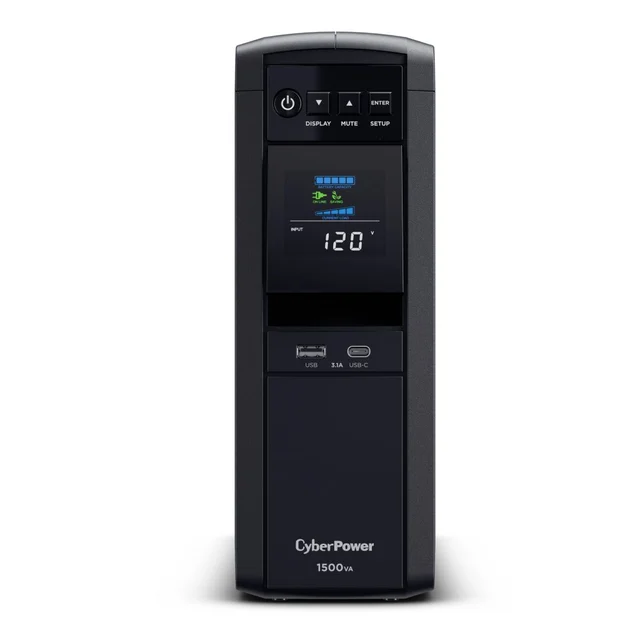
- Buy CyberPower CP1500PFCLCD The default home-office UPS: pure sine wave, real voltage regulation, twelve outlets, and a genuinely useful status display. Amazon
- Buy APC Back-UPS Pro BR1500MS2 The polished alternative: pure sine wave and AVR with an LCD readout, at a slightly lower watt ceiling. Amazon
- It depends APC Back-UPS BE600M1 A cheap, compact insurance policy for routers, modems, and modest gear - just don't ask it to carry a real desktop. Amazon
- Skip CyberPower ST900U Mid-range money for entry-level guts: standby topology, no voltage regulation, a stepped waveform, and a battery you can't swap yourself. Amazon
What actually matters
- Output waveform - pure sine wave versus a stepped approximation. Most modern desktop PC power supplies use active power factor correction (active PFC), and they can misbehave on stepped waveforms while on battery. If a computer is on the battery outlets, pure sine wave is effectively non-negotiable.
- Topology - line-interactive versus standby. Line-interactive units include AVR, which corrects voltage sags and swells electronically without switching to battery. Standby units have no such correction: every brownout becomes a battery event, which wears the battery faster and interrupts sensitive gear more often.
- Watt rating - the honest capacity number. Listings lead with the bigger VA figure, but the watt rating determines what you can actually run and for how long. Sizing tight to the limit slashes runtime and stresses the unit; generous headroom is the goal.
- Runtime at your load - battery capacity only means something relative to what you plug in. The same unit that dies in minutes under a gaming PC can keep a modem and router alive for a long stretch, because runtime scales steeply with load.
- Battery serviceability - sealed lead-acid batteries last roughly three to five years no matter the brand. Units with a user-accessible battery door or cartridge stay in service; sealed 'technician-only' designs effectively expire when the battery does.
- Outlet layout - only the battery-backed outlets keep gear alive in an outage; surge-only outlets do not. Count your must-stay-on devices against the battery outlet count, and check for spacing that accommodates bulky wall adapters.
- Shutdown data port and software - a USB data connection lets the UPS tell your computer or NAS to shut down cleanly when an outage happens while you're away. Without it, a long outage still ends in a hard crash.
The specs, in plain English
Green flags vs red flags
Green flags
- Pure sine wave output stated plainly in the specs - vague phrasing like 'sine wave compatible' is not the same thing
- Line-interactive topology with AVR listed by name
- A clearly stated watt rating (not just VA) that comfortably exceeds your measured load
- A user-replaceable battery with the replacement cartridge sold as a normal accessory
- A USB data port plus free shutdown software for your operating system and NAS
- An LCD status display showing current load and estimated runtime, so you can see your real headroom
Red flags
- Only the VA number advertised prominently, with the watt rating buried or missing
- 'Simulated sine wave' or 'stepped approximation' output on a unit sized and priced for desktop computers
- Standby topology with no AVR at a mid-range price - you're paying more without getting the protection that justifies it
- A battery described as not user-serviceable or 'technician replacement only', which puts an expiration date on the whole unit
- Runtime claims quoted only at trivially small loads, hiding how quickly it dies under a real computer
- Marketing that leans on outlet count and USB ports while staying silent on waveform and topology - convenience features can't rescue weak fundamentals
Who's who: the brands
- APC (by Schneider Electric) - A long-established UPS brand, spanning cheap router-class wedges to pure-sine-wave home-office units.
- CyberPower - APC's main rival. Its PFC Sinewave line targets home offices, while its budget standby models share the limits of any standby design.
- Tripp Lite (by Eaton) - A long-time backup-power and surge brand now under Eaton, with a broad range that includes line-interactive and pure-sine-wave options.
- Eaton - A major commercial and data-center power company that also sells smaller units for offices and small server rooms.
- Vertiv (Liebert) - Another enterprise power company whose smaller Liebert units suit small-server roles; less common on retail shelves.
How to read a listing without getting fooled
Start with the two numbers and one word that matter, in order. First, find the watt rating - not the VA figure the listing leads with - and check it against your real load with room to spare. Second, find the output waveform: the listing must say 'pure sine wave' explicitly; anything hedged ('simulated', 'stepped', 'modified') is the budget waveform regardless of price. Third, find the topology: 'line-interactive' with AVR is what you want for a computer; 'standby' or 'offline' means no voltage regulation, whatever the outlet count says. Then verify serviceability - search the listing for the replacement battery model; if you can't find one sold separately, assume the battery isn't user-replaceable. Be suspicious of listings that lead with outlet counts, USB charging ports, and slim styling: those are real conveniences, but they're also the classic distraction from entry-level guts. Finally, read runtime claims skeptically - the headline minutes are usually quoted at a tiny load, and your actual desktop will get far less.
How much should you spend?
What drives cost in this category is honest engineering, not size: pure sine wave inverters, AVR circuitry, and bigger batteries are the expensive parts, while outlets and USB ports are cheap. The value sweet spot for anyone protecting a desktop computer is the premium home-office class - line-interactive, pure sine wave, high watt rating, replaceable battery - because that's the cheapest tier where the protection is real, and units there can serve for years across a battery swap or two. Spending less is entirely rational when the mission is small: a budget standby unit is a perfectly good insurance policy for a modem, router, or NAS, where the stepped waveform and low watt ceiling don't matter. The tier to avoid is the middle - mid-range money for standby topology, a stepped waveform, and sometimes a sealed battery buys you the price of protection without the substance of it. Spending more than the home-office class only makes sense for heavy loads like servers or workstations that genuinely need more watts or longer runtime.
Questions, answered
Do I really need pure sine wave, or is that marketing?
It's real, with a specific technical cause. Most modern desktop power supplies use active power factor correction, and those circuits can buzz, stress components, or shut the computer down when fed a stepped waveform on battery - which means the failure happens at exactly the moment the UPS was supposed to help. If a desktop computer will be on the battery outlets, treat pure sine wave as mandatory. For a router, modem, or other simple adapter-powered gear, a stepped waveform is fine.
How do I figure out what size UPS to buy?
Add up the wattage of everything that will sit on the battery outlets - computer, monitors, network gear - and buy a unit whose watt rating (ignore the VA number) exceeds that total with comfortable headroom. Running a UPS near its limit shortens runtime dramatically and works the unit harder. A typical desktop-plus-two-monitors office lands comfortably in the upper home-office class; a laptop dock or router setup needs far less.
How long will a UPS actually keep my computer running?
Minutes - typically single digits to low tens of minutes under a real desktop load. That's by design: a consumer UPS bridges short outages and gives you (or its shutdown software) time to save work and power down cleanly. If you want hours of runtime for lights and laptops during long outages, you want a portable power station, which is a different product category.
What should I never plug into the battery outlets?
Laser printers are the classic mistake - their fusers pull huge power spikes that can overload the inverter - and the same applies to space heaters, vacuums, and other high-draw motorized appliances. Manufacturers typically exclude them from warranty coverage. Put printers and peripherals on the surge-only outlets, and reserve the battery outlets for the computer, monitors, and network equipment.
How long do UPS batteries last, and what happens when they die?
Sealed lead-acid batteries typically last around three to five years, less in hot rooms or on units that cycle to battery often (another reason AVR matters). On units with user-replaceable batteries, a worn battery is a quick, inexpensive cartridge swap. On sealed designs that specify technician-only service, a dead battery usually means replacing the entire unit - which is why serviceability belongs on your checklist, not in the fine print.
Is a standby UPS ever the right choice?
Yes - for the right job. A small standby unit is excellent cheap insurance for low-draw gear like a modem, router, mesh nodes, or a NAS: those loads sip power, so even a modest battery keeps your internet alive through long outages, and a USB data port can still trigger a clean NAS shutdown. The mistake is buying standby topology to protect a desktop computer, especially at mid-range prices where line-interactive pure-sine-wave units live.
Or jump to the head-to-head: CyberPower CP1500PFCLCD vs APC Back-UPS Pro BR1500MS2.