

Tech & Gadgets
The Best Ultrawide Monitors: 4 Compared (and One to Skip)
Four current 34-inch 21:9 ultrawides from LG, Dell, ASUS, and Samsung compared on panel quality, speed, connectivity, and everyday comfort.
The short version
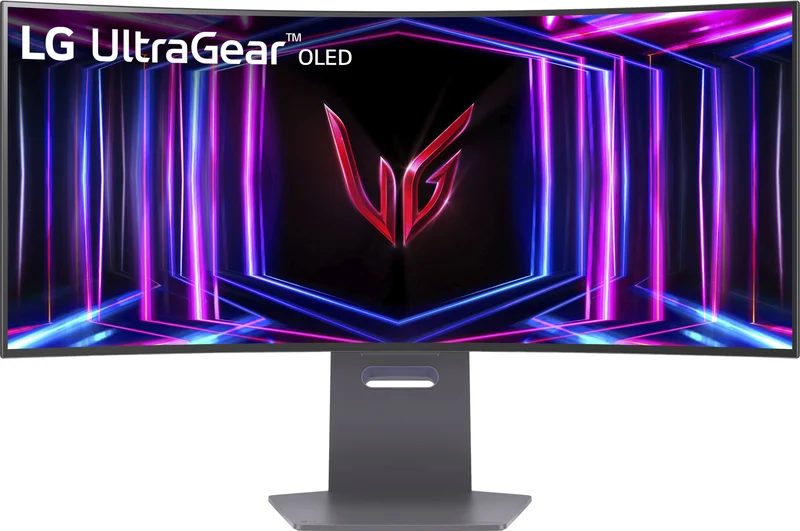
After comparing maker specifications across four current 34-inch ultrawides, the LG UltraGear 34GS95QE-B is our top pick: 240Hz OLED speed, deep-black immersion, and a price that often undercuts rival 240Hz OLEDs. The Dell UltraSharp U3425WE is the productivity counterpart - an IPS Black panel with Thunderbolt 4, KVM, and Ethernet that turns one cable into a full desk dock, with no OLED burn-in concern. The ASUS ROG Swift OLED PG34WCDM is the most refined OLED of the group, but it asks flagship money for gains many people may not notice over the LG. The Samsung Odyssey OLED G8 (G85SD) pairs a lovely QD-OLED panel with a slower 175Hz refresh and a built-in smart platform, and is the one to skip. Best for: gamers should buy the LG, docked-laptop workers the Dell, and money-no-object enthusiasts the ASUS.
Our picks at a glance
- LG UltraGear 34GS95QE-B - Buy. The 240Hz OLED ultrawide that delivers flagship-class gaming for noticeably less than its rivals.
- Dell UltraSharp U3425WE - Buy. A Thunderbolt-hub workhorse that turns one cable into an entire desk setup.
- ASUS ROG Swift OLED PG34WCDM - It depends. A polished 34-inch OLED with 90W USB-C, if you're willing to pay flagship money for it.
- Samsung Odyssey OLED G8 (G85SD) - Skip. A gorgeous QD-OLED held back by a slower refresh rate and smart-TV baggage its rivals don't carry.
The verdict in 30 seconds
What mattered most
- Panel type
- Max refresh rate
- HDR & contrast
- Connectivity & hub
- Productivity comfort
- Biggest drawback
A 34-inch 21:9 ultrawide is the sweet spot between a single cramped 16:9 screen and an unwieldy dual-monitor setup: wide enough for two full windows or an immersive game, small enough to fit a normal desk. We compared four current models from LG, Dell, ASUS, and Samsung - two OLEDs built for speed, one Thunderbolt-hub workhorse, and one smart-TV hybrid. Two earn a clear buy, one is a superb but pricey maybe, and one is easy to pass on in 2026.
The 240Hz OLED ultrawide that delivers flagship-class gaming for noticeably less than its rivals.
Best for: Gamers who want top-tier OLED speed and immersion without paying flagship money
- 240Hz OLED panel with fast pixel response and no LCD-style motion blur
- Deep 800R curve and true-black contrast make games and movies genuinely immersive
- Anti-glare finish handles normal room lighting well
- Often priced below rival 240Hz OLED ultrawides
- No USB-C input or KVM, so it is a weak hub for laptop users
- Full-screen brightness can dim in bright rooms, a common OLED trait
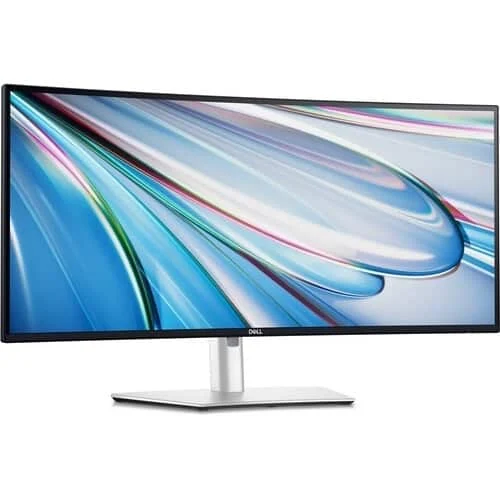
A Thunderbolt-hub workhorse that turns one cable into an entire desk setup.
Best for: Remote workers and docked-laptop users who want one cable, all-day text comfort, and no burn-in worries
- IPS Black panel offers higher contrast than typical IPS while keeping crisp text
- Thunderbolt 4 with laptop charging, 2.5GbE Ethernet, a built-in KVM, and a deep port selection
- 120Hz refresh keeps scrolling and casual gaming smooth, with no OLED burn-in concern for static work
- Color accuracy is a stated focus of the UltraSharp line
- HDR is basic - no real highlight punch compared with the OLEDs here
- 120Hz and slower pixel response can't match OLED motion clarity for serious gaming
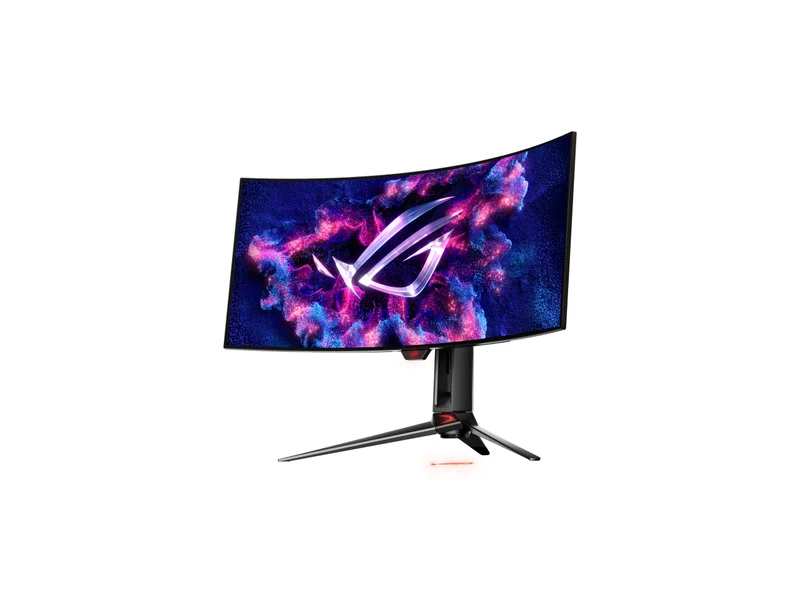
A polished 34-inch OLED with 90W USB-C, if you're willing to pay flagship money for it.
Best for: Enthusiasts who want the best 34-inch OLED available and don't mind paying a premium for refinement
- Same 240Hz OLED class as the LG, with ROG Smart KVM and a 90W USB-C input
- Custom heatsink and airflow design aimed at reducing burn-in risk
- USB-C input with 90W power delivery plus HDMI 2.1 and DisplayPort 1.4, a more flexible port mix than the LG
- Glossy ROG TrueBlack finish for richer contrast in dim rooms
- Sits a price tier above the LG for a similar core panel and refresh rate
- Glossy screen looks stunning in dim rooms but picks up reflections in bright ones
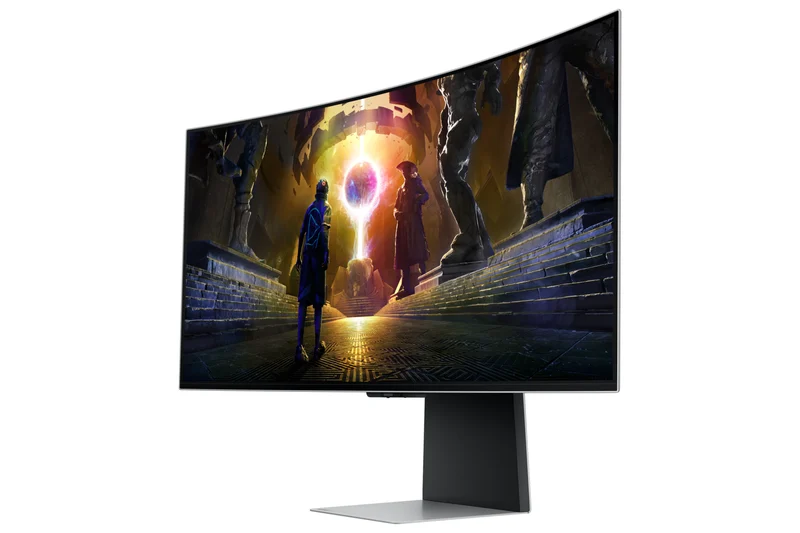
A gorgeous QD-OLED held back by a slower refresh rate and smart-TV baggage its rivals don't carry.
Best for: Only someone who specifically wants streaming apps built into the monitor itself
- QD-OLED panel with vivid color and a genuinely effective glare-free matte coating
- Strikingly slim metal design that looks premium on any desk
- 175Hz refresh trails the 240Hz LG and ASUS
- Built-in Gaming Hub smart platform adds a remote and more interface layers than a plain monitor
- Micro-sized video connectors instead of full-size ports
| Criteria | LG UltraGear 34GS95QE-B Top pick | Dell UltraSharp U3425WE | ASUS ROG Swift OLED PG34WCDM | Samsung Odyssey OLED G8 (G85SD) |
|---|---|---|---|---|
| Verdict | Buy it | Buy it | It depends | Skip it |
| Best for | Gamers who want top-tier OLED speed and immersion without paying flagship money | Remote workers and docked-laptop users who want one cable, all-day text comfort, and no burn-in worries | Enthusiasts who want the best 34-inch OLED available and don't mind paying a premium for refinement | Only someone who specifically wants streaming apps built into the monitor itself |
| Price tier | $$$ · premium | $$$ · premium | $$$$ · flagship | $$$ · premium |
| Panel type | OLED (matte) | IPS Black LCD | OLED (glossy) | QD-OLED (matte) |
| Max refresh rate | 240Hz | 120Hz | 240Hz | 175Hz |
| HDR & contrast | True blacks, DisplayHDR True Black 400 | Good contrast for LCD, basic HDR | True blacks, DisplayHDR True Black 400 | True blacks, vivid QD-OLED color |
| Connectivity & hub | HDMI 2.1 + DisplayPort, no USB-C | Thunderbolt 4, 2.5GbE, KVM - full docking hub | USB-C with charging, HDMI 2.1, DisplayPort | Micro-sized connectors, smart platform with remote |
| Productivity comfort | Good, though OLED text fringing can show up close | Best here - crisp text, no OLED burn-in concern | Good, same OLED text caveats | Good text via matte coat, but slower UI |
| Biggest drawback | No USB-C or KVM | Can't match OLED speed | Flagship price | 175Hz and smart-TV friction |
| Price tier | $$$ · premium | $$$ · premium | $$$$ · flagship | $$$ · premium |
Which one is right for you?
- Gamers who want top-tier OLED speed and immersion without paying flagship money Buy it LG UltraGear 34GS95QE-B
- Remote workers and docked-laptop users who want one cable, all-day text comfort, and no burn-in worries Buy it Dell UltraSharp U3425WE
- Enthusiasts who want the best 34-inch OLED available and don't mind paying a premium for refinement It depends ASUS ROG Swift OLED PG34WCDM
- Only someone who specifically wants streaming apps built into the monitor itself Skip it Samsung Odyssey OLED G8 (G85SD)
How we judged the field
We don’t run a lab. Instead, we compared what each maker publishes about response time, brightness, contrast, color accuracy and inputs, along with the practical points that matter at a desk such as text clarity, reflections and software. For a 34-inch 21:9 ultrawide that has to earn its desk space for both productivity and gaming, we weighted four things: motion performance, everyday text and viewing comfort, connectivity (especially for docked laptops), and whether the price asked is justified by what you get in 2026.
LG UltraGear 34GS95QE-B
Buy itLG’s 240Hz OLED ultrawide is the value anchor of the premium 34-inch class. OLED pixel response is near instant, so motion stays sharp in a way LCDs struggle to match, and LG lists DisplayHDR True Black 400 on an 800R curved panel. The matte anti-glare finish is a quiet advantage over glossier rivals in ordinary rooms. What seals the verdict is positioning: this monitor is priced below the flagship 240Hz OLED ultrawides while giving up little. The caveats are a spartan hub - no USB-C input, no KVM - and the usual OLED behavior of dimming full-screen white content, which shows most in bright rooms and spreadsheet-heavy work. If gaming is a meaningful part of your screen time, this is the smartest buy of the four.
Dell UltraSharp U3425WE
Buy itThe Dell is the opposite bet: it trades OLED theatrics for the best working experience here. Its IPS Black panel delivers higher contrast than conventional IPS while keeping the crisp text rendering OLEDs can struggle to match. The real story is the hub: Thunderbolt 4 that can charge a laptop, 2.5-gigabit Ethernet, a built-in KVM for switching between two computers, and a deep roster of USB ports. One cable in, entire desk connected. The 120Hz refresh - generous by productivity-monitor standards - keeps scrolling fluid and handles casual gaming fine. It won’t thrill an HDR enthusiast or a competitive gamer, but for eight-hour workdays with no OLED burn-in concern, it’s the clear pick.
ASUS ROG Swift OLED PG34WCDM
It dependsThis is the most feature-rich 34-inch OLED ultrawide here: the same 240Hz class as the LG, with a custom heatsink designed to reduce burn-in risk, ROG Smart KVM, and a more flexible port mix including USB-C with 90W laptop charging. So why not a straight buy? Price. It sits a full tier above the LG for a similar core experience, and its glossy screen - spectacular in a dim room - picks up reflections in bright ones. If budget is no object, or the USB-C input and KVM matter to you, it will not disappoint. For everyone else, the LG delivers most of this monitor for meaningfully less.
Samsung Odyssey OLED G8 (G85SD)
Skip itSamsung’s QD-OLED panel is genuinely lovely, and Samsung lists a glare-free finish on it. The problem is everything around it. At 175Hz it refreshes slower than the 240Hz LG and ASUS. Its settings and smart features lean on a bundled remote and Samsung’s Gaming Hub smart platform, which adds friction its rivals don’t have. Video inputs use micro-sized connectors rather than full-size ports. None of these flaws is fatal alone, but together they mean you pay premium money for the slowest-refreshing monitor of the group. Unless built-in streaming apps are the feature you’re buying, choose the LG or the ASUS instead.
LG UltraGear 34GS95QE-B vs Dell UltraSharp U3425WE: which should you buy?
This comes down to how your hours split. The LG is the performance choice: 240Hz OLED motion, true blacks and DisplayHDR True Black 400 make it better for games and films, and it’s entirely capable for everyday work too. The Dell is the workflow choice: sharper long-session text comfort, no OLED burn-in concern with static toolbars, and a Thunderbolt hub that replaces a docking station - one cable charges your laptop, drives the screen, and connects Ethernet, keyboard, and mouse. If you game most evenings, buy the LG and accept the barer connectivity. If your monitor is primarily an office tool that occasionally plays a game, the Dell will serve you better every single day. Households doing half and half should lean LG - its work compromises are smaller than the Dell’s gaming compromises.
What to look for
- Panel type sets the personality. OLED wins motion, contrast, and HDR; a quality LCD like IPS Black wins static-text comfort and eliminates burn-in concern.
- Refresh rate should match your use. 120Hz is plenty for work; fast-paced gamers benefit from 240Hz, especially on OLED.
- Check the hub, not just the panel. USB-C or Thunderbolt with laptop charging, KVM switching, and Ethernet can replace a dock - or be entirely absent.
- Matte vs glossy matters in bright rooms. Glossy looks richer in dim lighting; matte is more forgiving near windows.
- Mind the curve. Around 800R is immersive for gaming; gentler curves feel more natural for straight-line design work.
- Confirm warranty terms on OLED models, ideally with explicit burn-in coverage.
Our final take
The 34-inch ultrawide category in 2026 has matured into two clear lanes, and our two buys own one lane each. The LG UltraGear 34GS95QE-B is the best all-round pick - flagship OLED gaming performance at a more sensible price than the ASUS. The Dell UltraSharp U3425WE is the productivity equal: a superb panel wrapped around the most useful connectivity of any monitor here. The ASUS PG34WCDM is the better-than-it-needs-to-be option for buyers who want the finest 34-inch OLED regardless of cost, and the Samsung Odyssey OLED G8 is the one we’d pass on - a beautiful panel undermined by a slower refresh rate and software friction its price can’t justify. Pick your lane, and you’ll be happy for years.
Questions, answered
Is a 34-inch 21:9 ultrawide better than two separate monitors?
For most people, yes. You get roughly the workspace of two smaller screens with no bezel down the middle, one cable, and simpler window management. Dual monitors still win if you need to physically angle a second screen toward a colleague or camera, or if you want one screen in portrait orientation.
Should I worry about OLED burn-in if I use an ultrawide for work?
It's a real but manageable consideration. Modern OLED ultrawides ship with pixel-refresh routines and screen-move features, and some makers add burn-in warranty coverage. If your screen shows the same static toolbars eight hours a day, every day, an LCD like the Dell U3425WE removes the concern entirely.
Do I need a powerful graphics card for 3440x1440 gaming?
It helps. Ultrawide 3440x1440 pushes about 34 percent more pixels than standard 2560x1440, so hitting high frame rates in demanding games takes a mid-range to high-end modern GPU. Esports and older titles will run fast on much more modest hardware, and upscaling technologies close the gap in heavier games.
Is 120Hz enough, or should I insist on 240Hz?
For office work, browsing, and casual gaming, 120Hz looks and feels smooth - the Dell's 120Hz is a big step up from a standard 60Hz office monitor. Competitive and fast-paced gamers will notice the extra motion clarity of the 240Hz OLEDs from LG and ASUS, especially combined with OLED's near-instant pixel response.
Why skip the Samsung when its panel is so good?
The panel itself is excellent - that's not the issue. Against 240Hz rivals it refreshes at only 175Hz, its settings and inputs lean on a remote and a smart platform interface, and its micro-sized connectors are less convenient than full-size ports. Unless you specifically want built-in streaming apps, the LG or ASUS is the stronger buy.
Deciding between the top two? See our head-to-head: LG UltraGear 34GS95QE-B vs Dell UltraSharp U3425WE.
More Tech & Gadgets reviews
 The Best UPS Battery Backups: 4 Compared (and One to Skip)
  The Best USB-C Cables: 4 Compared (and One to Skip)
  The Best USB-C Hubs and Docks for Laptops in 2026
  The Best USB Flash Drives: 4 Compared (and One to Skip)
  The Best USB Power Meters: 4 Compared (and One to Skip)
  The Best Video Doorbells in 2026 (and the One to Skip)