

Tech & Gadgets
The Best 4K Gaming Monitors: 4 Compared (and One to Skip)
We compared four current 27–32-inch 4K gaming monitors on refresh, response, HDR, and panel tech to find the ones worth buying in 2026.
The short version
In 2026, affordable 4K OLED reshaped this category, and the honest advice is to buy OLED. The ASUS ROG Strix XG32UCWMG is our top pick, a 32-inch 4K glossy WOLED that runs 240Hz, switches to 480Hz at 1080p, and keeps its inky blacks in a lit room. The GIGABYTE MO27U2 is the value pick, offering 27-inch QD-OLED at 240Hz with a USB-C KVM for less money. Samsung's Odyssey OLED G8 (G81SF) is a stunning matte 32-inch QD-OLED but sits at a flagship price and lacks USB-C, so it only makes sense near its usual price or on sale. The LG UltraGear 27GR93U-B remains a capable 4K/144Hz IPS for work and console use, but its greyish blacks and bonus-tier HDR make it hard to recommend as a gaming showcase now that OLED costs only a little more. Best for: gamers who want the sharpest, fastest 4K image and are ready to embrace OLED, with a clear step-down IPS option only for bright-room, no-burn-in, mixed-use setups.
Our picks at a glance
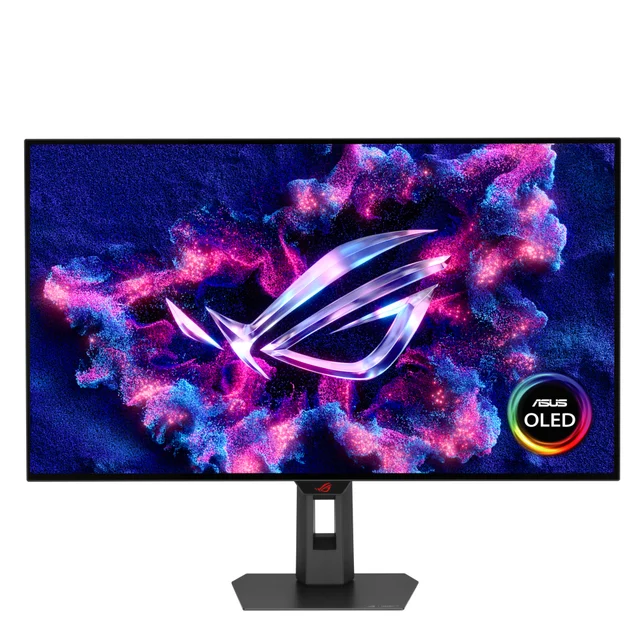
- ASUS ROG Strix XG32UCWMG - Buy. A 32-inch 4K glossy WOLED that runs 240Hz natively and flips to 480Hz at 1080p, and it holds its blacks in a bright room.
- GIGABYTE MO27U2 - Buy. A lower-cost way into 4K/240Hz QD-OLED, with a 27-inch panel and a USB-C KVM.
- Samsung Odyssey OLED G8 (G81SF) - It depends. A gorgeous 32-inch 4K QD-OLED with a glare-free matte finish, held back mainly by a flagship price and no USB-C.
- LG UltraGear 27GR93U-B - Skip. A solid 27-inch 4K/144Hz IPS that was a great deal a couple of years ago, but affordable OLED has passed it by.
The verdict in 30 seconds
What mattered most
- Panel technology
- Size & resolution
- Refresh rate
- Response time (GtG)
- HDR & contrast
- USB-C & connectivity
4K OLED went mainstream in 2026, and a 4K/240Hz panel that once cost a small fortune now sits within reach of most serious gaming builds. We lined up four current 27–32-inch contenders across the main panel technologies: a glossy WOLED, two QD-OLEDs, and a value IPS LCD. Two earn a clear buy, one is a superb-but-situational pick, and one is hard to justify now that OLED is affordable.
A 32-inch 4K glossy WOLED that runs 240Hz natively and flips to 480Hz at 1080p, and it holds its blacks in a bright room.
Best for: Players who want one 32-inch screen that does cinematic 4K and fast competitive modes, and who game in a normally lit room.
- 32-inch 4K WOLED at 240Hz with near-instant OLED pixel response
- Dual-mode switching to 1080p at 480Hz for competitive play without buying a second display
- TrueBlack glossy WOLED coating that reviewers report keeps blacks looking black under room lighting, unlike matte QD-OLED
- Full HDMI 2.1, DisplayPort 1.4 with DSC, USB-C, plus proximity sensor and burn-in safeguards
- USB-C power delivery is modest, so it may not charge a hungry laptop
- WOLED color volume is a touch narrower than QD-OLED at the extremes
- OLED HDR brightness impresses in highlights but full-field brightness is limited, as with current OLEDs generally
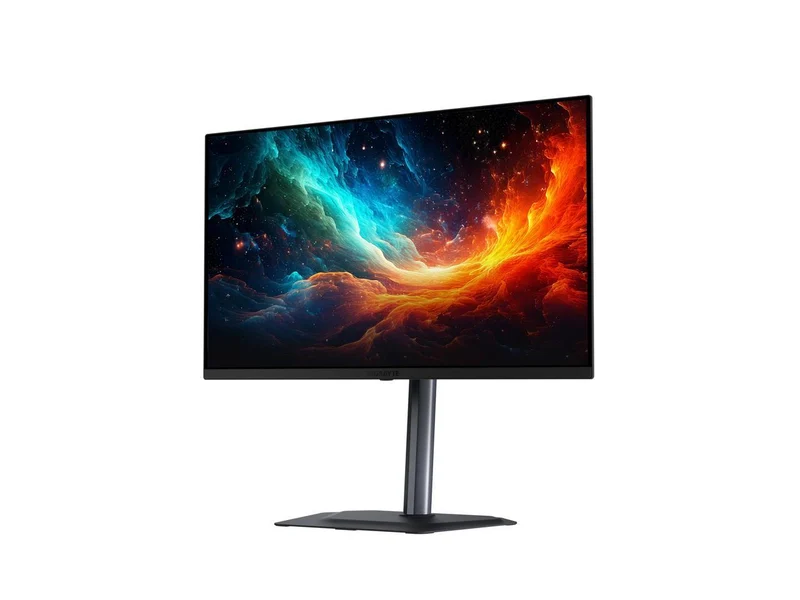
A lower-cost way into 4K/240Hz QD-OLED, with a 27-inch panel and a USB-C KVM.
Best for: Buyers who want genuine QD-OLED image quality and 240Hz for the lowest current outlay, especially at a desk.
- 27-inch 4K QD-OLED at 240Hz with near-instant response and a dense pixel count for sharp text and edges
- Latest-generation QD-OLED with wide DCI-P3 color coverage and per-pixel HDR contrast
- USB-C with power delivery plus an integrated KVM to drive two systems from one keyboard and mouse
- Warranty that the maker says covers burn-in (confirm the terms when you buy)
- Reviewers note the on-screen menu can be fiddly and some motion-clarity options were unavailable in testing
- 27 inches at 4K is very sharp but feels small to some after a 32-inch panel
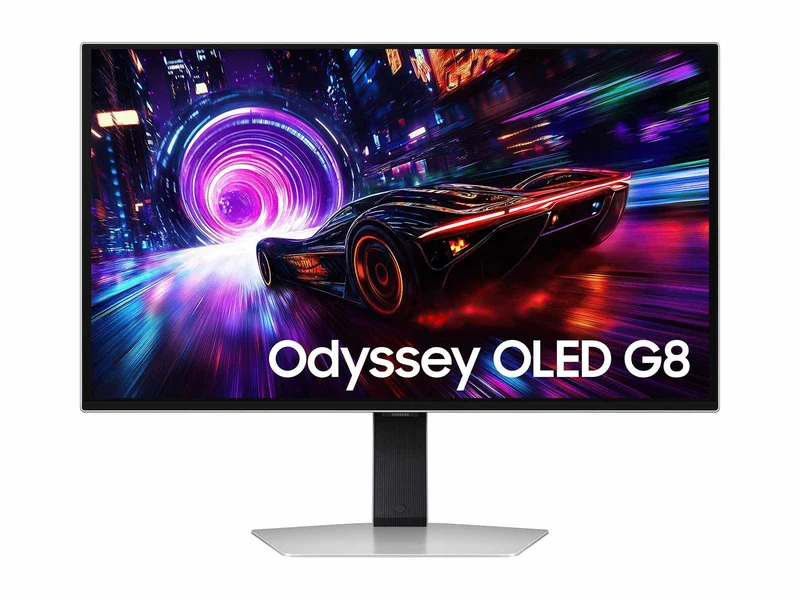
A gorgeous 32-inch 4K QD-OLED with a glare-free matte finish, held back mainly by a flagship price and no USB-C.
Best for: Owners who specifically want a matte 32-inch OLED for a bright room and can catch it near its usual price or on sale.
- 32-inch 4K QD-OLED at 240Hz with excellent motion clarity
- Matte, glare-free coating that diffuses reflections well in bright rooms
- High peak brightness for punchy specular highlights
- PC-focused on-screen menu
- Priced at the top of this group despite using QD-OLED technology similar to cheaper rivals
- No USB-C input, so single-cable laptop setups are off the table
- The matte coating that tames glare also slightly softens fine text versus glossy panels
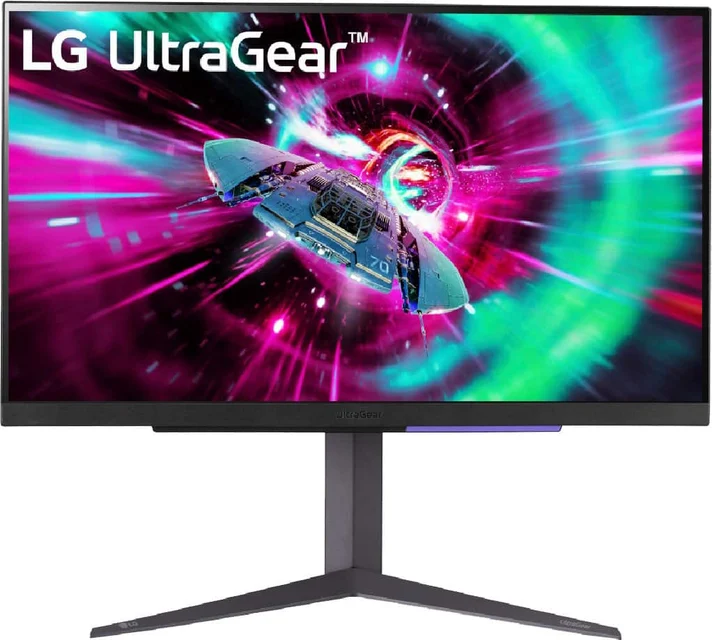
A solid 27-inch 4K/144Hz IPS that was a great deal a couple of years ago, but affordable OLED has passed it by.
Best for: Someone who needs a bright, no-burn-in, do-everything 4K screen for mixed work, console, and casual gaming rather than a showcase gaming display.
- 27-inch 4K IPS at 144Hz with wide viewing angles and 95% DCI-P3 coverage (typical)
- HDMI 2.1 makes it a capable 4K/120 display for a PlayStation 5 or Xbox Series X as well as PC
- G-Sync compatible and FreeSync Premium, with a fully adjustable tilt, height, and pivot stand
- IPS contrast with an LED backlight means greyish blacks and weak, bonus-tier HDR
- 1ms response and 144Hz trail the OLEDs here on motion clarity and refresh
- Costs only modestly less than the value QD-OLED that clearly outperforms it
| Criteria | ASUS ROG Strix XG32UCWMG Top pick | GIGABYTE MO27U2 | Samsung Odyssey OLED G8 (G81SF) | LG UltraGear 27GR93U-B |
|---|---|---|---|---|
| Verdict | Buy it | Buy it | It depends | Skip it |
| Best for | Players who want one 32-inch screen that does cinematic 4K and fast competitive modes, and who game in a normally lit room. | Buyers who want genuine QD-OLED image quality and 240Hz for the lowest current outlay, especially at a desk. | Owners who specifically want a matte 32-inch OLED for a bright room and can catch it near its usual price or on sale. | Someone who needs a bright, no-burn-in, do-everything 4K screen for mixed work, console, and casual gaming rather than a showcase gaming display. |
| Price tier | $$$ · premium | $$$ · premium | $$$$ · flagship | $$ · mid-range |
| Panel technology | Glossy WOLED | QD-OLED | Matte QD-OLED | IPS LCD |
| Size & resolution | 32-inch 4K UHD | 27-inch 4K UHD | 32-inch 4K UHD | 27-inch 4K UHD |
| Refresh rate | 240Hz (480Hz at 1080p dual-mode) | 240Hz | 240Hz | 144Hz |
| Response time (GtG) | Near-instant (OLED) | Near-instant (OLED) | Near-instant (OLED) | ~1ms |
| HDR & contrast | Per-pixel OLED HDR, bright WOLED highlights | Per-pixel OLED HDR | Per-pixel OLED HDR, high peak brightness | DisplayHDR 400, typical IPS contrast, bonus-tier |
| USB-C & connectivity | USB-C (modest PD), HDMI 2.1, DisplayPort | USB-C + KVM, HDMI 2.1, DisplayPort | No USB-C, HDMI 2.1, DisplayPort | No USB-C, HDMI 2.1 (x2), DisplayPort |
| Bright-room friendliness | Glossy WOLED, holds blacks well | Glossy | Matte, glare-free | Bright but lower contrast |
| Price tier | $$$ · premium | $$$ · premium | $$$$ · flagship | $$ · mid-range |
Which one is right for you?
- Players who want one 32-inch screen that does cinematic 4K and fast competitive modes, and who game in a normally lit room. Buy it ASUS ROG Strix XG32UCWMG
- Buyers who want genuine QD-OLED image quality and 240Hz for the lowest current outlay, especially at a desk. Buy it GIGABYTE MO27U2
- Owners who specifically want a matte 32-inch OLED for a bright room and can catch it near its usual price or on sale. It depends Samsung Odyssey OLED G8 (G81SF)
- Someone who needs a bright, no-burn-in, do-everything 4K screen for mixed work, console, and casual gaming rather than a showcase gaming display. Skip it LG UltraGear 27GR93U-B
How we judged the field
We do not run our own lab. Instead, we synthesize independent testing, hands-on expert reviews, and aggregated owner reports, then weight the things that actually change the experience of gaming at 4K. Four criteria mattered most.
- Panel technology and contrast. Per-pixel OLED contrast is a very large jump in image quality, so we separated true OLED (WOLED and QD-OLED) from edge-lit IPS, where blacks stay grey.
- Refresh and response. We looked at native refresh at full 4K, any dual-mode high-refresh options, and the gray-to-gray response that keeps motion crisp.
- HDR behavior. We favored panels with per-pixel light control and credible highlight brightness over a checkbox HDR badge.
- Practicality. Coating (glossy versus matte) for your lighting, connectivity such as HDMI 2.1 and USB-C, burn-in protection, and warranty all factor in.
Where reviewers disagreed, we noted it. Where owners flagged a recurring annoyance, we passed it along.
ASUS ROG Strix XG32UCWMG
Buy itThis is the most complete monitor in the group. It is a 32-inch 4K WOLED that runs 240Hz natively and, in dual mode, drops to 1080p at 480Hz for competitive play, so one screen covers cinematic and esports duty. OLED pixel response is near-instant, and reviewers single out the TrueBlack glossy coating: unlike matte QD-OLED, it is reported to keep blacks looking black even with the lights on. Connectivity is complete, with HDMI 2.1, DisplayPort 1.4 with DSC, and USB-C, plus a proximity sensor and the usual burn-in safeguards. The main caveats are modest USB-C power and OLED’s limit on full-field brightness.
GIGABYTE MO27U2
Buy itThe MO27U2 is the value story of 2026: real 27-inch 4K QD-OLED at 240Hz for the least money in this comparison. At 27 inches and 4K it is very sharp, and its QD-OLED panel offers wide color coverage. Gigabyte also includes a USB-C port with power delivery and a KVM, which is genuinely useful if you run a desktop and a laptop side by side, and the maker advertises burn-in coverage in its warranty (check the terms). Reviewers do note that the on-screen menu can be finicky and that some motion-clarity settings were unavailable during testing, and 27 inches can feel small after a 32-inch panel. Those are minor next to what you pay.
Samsung Odyssey OLED G8 (G81SF)
It dependsThe Odyssey OLED G8 is a beautiful 32-inch 4K QD-OLED with excellent motion clarity and a glare-free matte finish that handles bright rooms well, plus high peak brightness. It is arguably the most refined image here. The problem is context: it uses the same QD-OLED generation as cheaper rivals yet sits at the top of this group’s pricing, and it has no USB-C input, which rules out tidy single-cable laptop setups. The matte coating that beats glare also softens fine text a little compared with glossy panels. Buy it if you specifically want a matte 32-inch OLED and can get it near its usual price or on sale; otherwise the value is harder to defend.
LG UltraGear 27GR93U-B
Skip itThere is nothing wrong with the 27GR93U-B on its own terms. It is a 27-inch 4K IPS at 144Hz with wide viewing angles, 95% typical DCI-P3, HDMI 2.1 for 4K/120 on consoles, and a fully adjustable stand. A couple of years ago it was a smart buy. But it is edge-lit IPS, so blacks look grey, and HDR is a pleasant bonus rather than a feature. Because an affordable QD-OLED now costs only modestly more, the reasons to choose this over OLED have thinned out. It stays useful for bright-room, no-burn-in, mixed work-and-play setups, but as a gaming showcase in 2026 we would spend a little more on OLED.
ASUS ROG Strix XG32UCWMG vs GIGABYTE MO27U2: which should you buy?
These are our two picks, and the choice comes down to size and budget rather than quality. The ASUS is a 32-inch glossy WOLED with a dual-mode 480Hz option and, by most accounts, better bright-room performance, making it the better all-rounder and the better living-room-adjacent or larger-desk choice. The GIGABYTE is a 27-inch QD-OLED that delivers the same 240Hz and near-instant response at a noticeably lower price, adds a USB-C KVM, and is superbly sharp thanks to its high pixel density. If you have the desk space and want the most flexible single screen, take the ASUS. If you want the OLED experience for the least money, or you sit close and prefer 27 inches, the GIGABYTE is the smarter spend.
What to look for
- Prioritize panel type. For a gaming-first 4K display, OLED (WOLED or QD-OLED) beats edge-lit IPS on contrast and motion by a wide margin.
- Match the coating to your room. Glossy looks best in controlled light; a glossy WOLED or matte QD-OLED handles a bright room better than glossy QD-OLED.
- Check real refresh at 4K. Confirm 240Hz over your cable of choice, and see whether a dual-mode high-refresh option is offered.
- Look past the HDR badge. Per-pixel light control matters more than a certification number; treat IPS HDR as a bonus.
- Confirm the connections you need. HDMI 2.1 for consoles, and USB-C with power delivery plus a KVM if you want single-cable or multi-device convenience.
- Read the warranty. A multi-year policy that explicitly covers burn-in is the reassurance that makes OLED an easy recommendation.
Our final take
The headline for 2026 is simple: 4K OLED is finally affordable, so buy OLED. The ASUS ROG Strix XG32UCWMG is our top pick for its blend of a big 32-inch WOLED, dual-mode refresh, and bright-room-friendly glossy coating. The GIGABYTE MO27U2 is the value champion and the easiest OLED to recommend on price. Samsung’s Odyssey OLED G8 is a superb matte 32-inch alternative that only makes sense at the right price, and the LG UltraGear 27GR93U-B is a capable IPS that has simply been overtaken for gaming duty. Pick by size, room lighting, and budget, and any of the three OLEDs should serve you well.
Questions, answered
QD-OLED or WOLED: which is better for a 4K gaming monitor?
Both are excellent and share per-pixel contrast and near-instant response. QD-OLED, used by the GIGABYTE MO27U2 and Samsung Odyssey OLED G8, tends to produce slightly richer, more saturated color. WOLED, used by the ASUS ROG Strix XG32UCWMG, often looks a bit brighter and, in its glossy TrueBlack form, reviewers report it keeps blacks looking black under room lighting, whereas QD-OLED blacks can lift toward grey in a bright room. If your room has a lot of ambient light, a glossy WOLED or a matte QD-OLED is the safer choice.
Do I really need 240Hz at 4K, and can my PC even drive it?
240Hz at 4K is a meaningful upgrade for fast games if your graphics card can push the frames; for slower or single-player titles you may rarely reach it. The good news is these panels are flexible. The ASUS model can drop to 1080p at 480Hz for competitive shooters, and they scale down gracefully. Owners note you get most of the visual benefit of OLED even at lower frame rates thanks to the instant pixel response.
Should I worry about OLED burn-in on a gaming monitor?
It is a fair concern, but current panels ship with pixel-shifting, logo dimming, and automatic screen protection, and independent long-run testing suggests normal mixed use is generally fine. Just as important, check the warranty terms on any OLED you buy to see whether burn-in is covered. Vary your content, hide persistent taskbars where you can, and let the panel run its maintenance cycles.
Is the value IPS LCD still worth buying instead of OLED?
For a dedicated gaming showcase, we lean no. The LG UltraGear 27GR93U-B is a good, bright, durable 4K/144Hz screen with strong console support, but its edge-lit backlight gives it greyish blacks and only bonus-tier HDR. Because a value QD-OLED now costs only modestly more, most gaming buyers will be happier with OLED. The IPS still makes sense if you want zero burn-in risk, all-day desktop brightness, and a mix of work and casual play.
Which of these works best for both PC and a PlayStation 5 or Xbox Series X?
All four list HDMI 2.1, so they should accept 4K at up to 120Hz from a current console. The OLEDs give the best console HDR and motion. If you want a single-cable laptop or handheld connection as well, the GIGABYTE MO27U2 stands out because it adds USB-C with power delivery and a built-in KVM, while the Samsung and LG models rely on HDMI and DisplayPort only. This is general product information to help you compare, not a guarantee of compatibility with a specific system.
Deciding between the top two? See our head-to-head: ASUS ROG Strix XG32UCWMG vs GIGABYTE MO27U2.
More Tech & Gadgets reviews
 The Best 4K Streaming Devices in 2026 (and the One to Skip)
  The Best 4K TVs: 4 Compared (and One to Skip)
  The Best Action Cameras: 4 Compared (and One to Skip)
  The Best All-in-One Computers: 4 Compared (and One to Skip)
  The Best Anemometers: 4 Compared (and One to Skip)
  The Best USB Bluetooth Adapters: 4 Compared (and One to Skip)