Explained
Wireless Microphones, Explained
After reading, you'll understand which frequency bands are legal to use, why a 400 m range rating does not mean 400 m, and when internal recording and 32-bit float are worth paying for.
In this guide
Wireless microphone listings are unusually good at hiding the things that decide whether you will be happy. Two systems can both say 2.4 GHz and behave very differently in a busy hall, and two range figures measured under different conditions are not comparable at all. The bigger trap is second-hand UHF gear, where a bargain can turn out to tune only into spectrum that is no longer available to microphones. Once you know which four or five numbers matter, the category gets simple fast.
The 30-second version
- The band decides the rules, so a 2.4 GHz system needs no licence while a UHF one has to sit inside specific permitted ranges.
- Range figures are line of sight, measured in clear air with nothing in the way, which is not how any real interview is shot.
- Internal recording is the real safety net, because it survives a dropped link, a flat receiver and a mis-set camera input.
- 32-bit float only helps the stored file, so it is worthless on a system that does not record inside the transmitter.
- Outputs are a purchase decision, since camera, USB-C and Lightning connections are separate versions or separate adapters on most brands.
The products this guide is about
Our verdict on each, with the full reasoning on the companion review.
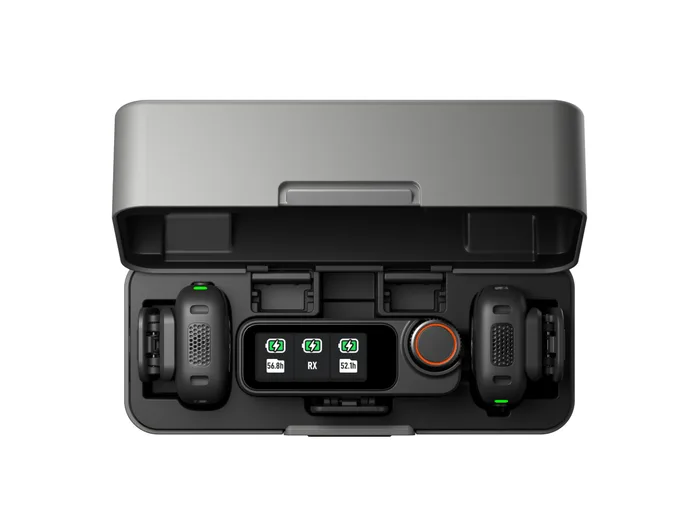
- Buy DJI Mic 3 The most complete clip-on kit on sale: 32-bit float recording inside the transmitters, LTC timecode, and a link that can use 5 GHz when 2.4 GHz is crowded. Amazon
- Buy Hollyland Lark M2 Nine-gram transmitters, about ten hours a charge and a 300 m line-of-sight rating for far less money than the premium kits. Amazon
- It depends Shure MoveMic Two Two 8 g lavaliers that pair straight to a phone with no receiver in the bag, which is either exactly what you want or exactly the problem. Amazon
- Skip RODE Wireless GO (Gen 3) A capable kit with 32-bit float on board, squeezed by heavier transmitters, the shortest battery life here and no timecode.
What actually matters
- Frequency band - This sets both the legal position and the interference you will face. In the US, 2.4 GHz systems operate under general unlicensed rules, while UHF microphones are limited to specific permitted ranges under 47 CFR 15.236 or a Part 74 licence.
- Transmission scheme - Analogue UHF, digital UHF, adaptive frequency hopping and Wi-Fi-based links all fail differently. Hopping and dual-band systems recover from congestion better, which is why the busiest venues punish the simplest designs.
- Published range - Every brand quotes a best-case line-of-sight distance. The useful brands also publish a figure with obstructions or interference, which is the number that predicts your day.
- Battery life on both ends - Your system runs for as long as its shortest-lived component. Check the receiver figure and whether a charging case is included, because those two details often decide a long shooting day.
- Internal recording - A transmitter that records its own copy makes radio dropouts a repair job instead of a loss. Capacity is usually quoted in hours and varies a lot with bit depth and whether it writes one file or two.
- Bit depth - 24-bit is the norm and is fine when levels are set properly. 32-bit float adds enough headroom that a badly set level can be rescued, but only on the file the transmitter itself stored.
- Output options - A 3.5 mm TRS lead covers cameras and recorders, while phones need USB-C or Lightning. Some brands ship adapters, some sell them separately, and some sell an entirely different receiver version.
The specs, in plain English
Green flags vs red flags
Green flags
- The maker publishes both a line-of-sight and an obstructed or high-interference range figure.
- The transmitter records internally, and the capacity is stated in hours for each bit depth.
- Battery life is quoted separately for transmitter, receiver and charging case.
- The spec sheet names the exact operating frequencies rather than just saying wireless.
- The receiver offers a 3.5 mm TRS output plus a digital output for phones and computers.
Red flags
- A UHF system whose tuning range sits inside 617 to 652 MHz or 663 to 698 MHz.
- A range claim with no stated test conditions, or one that is wildly out of step with similar hardware.
- Specs that are copied from a previous generation of the same product name, which is common in this category.
- No stated bit depth or sample rate anywhere in the listing.
- A charging case described in marketing but missing from the in-the-box list.
Who's who: the brands
- DJI - Known for feature-dense creator kits, and currently the brand pushing 32-bit float internal recording and timecode down into pocket-sized systems.
- RODE - The company that made the compact clip-on transmitter mainstream, with a deep accessory ecosystem and its RODE Central configuration software.
- Hollyland - Aggressive on price and battery life, usually delivering a strong 2.4 GHz link while leaving out the recording safety nets.
- Shure - A long-standing professional wireless maker whose MoveMic line takes the unusual route of pairing microphones straight to a phone.
- Sennheiser - Best known for licensed UHF systems used in broadcast and live production, where coordinated frequency planning is part of the job.
How to read a listing without getting fooled
Start at the bottom of the spec sheet rather than the top. Find the operating frequency first and confirm it is a band you may legally use, then find the range figure and the conditions printed underneath it, because the footnote is usually where the honesty lives. Next check whether battery life is given for the transmitter, the receiver and the case as three separate numbers, since a single headline figure often means the case total. Then look for bit depth, sample rate and internal recording capacity together, because a system that lists recording hours per bit depth is telling you it genuinely stores audio. Finally read the in-the-box list rather than the feature bullets, since adapters, cases and receivers that appear in photographs are frequently sold separately.
How much should you spend?
Budget systems get you a reliable 2.4 GHz link, two transmitters, roughly 10 hours of battery and a receiver matched to one type of device. What they leave out is internal recording, 32-bit float and any kind of timecode, so they reward people who set levels carefully. Mid-range systems add better receivers, more output options and sometimes on-board recording, and this is where a lot of previous-generation flagship kits now sit, which makes it the tier where you most need to check that you are buying the current model rather than its predecessor. Premium systems are where internal 32-bit float recording, timecode and dual-band operation appear together, and the jump is worth paying for when a shoot cannot be repeated. If your work is unrepeatable, spend up. If you can re-record a line, spend down and put the difference into lighting.
Questions, answered
Why did older UHF wireless microphones stop being usable?
After the broadcast incentive auction, the FCC reallocated 617 to 652 MHz and 663 to 698 MHz to the 600 MHz service under Part 27, and those ranges no longer appear among the frequencies assignable to low power auxiliary stations. A microphone built to tune only in that region has nowhere legal left to go. Systems with wider tuning ranges can often be set to permitted television channels below 608 MHz instead. If you are buying second hand, the tuning range printed on the receiver is the single most important thing to check.
How many people can one system cover?
Most consumer kits ship with two transmitters and one receiver, which covers a host and a guest. Some systems allow more transmitters to be linked to a receiver for four-way recording, though the supported recording mode and the compatible cameras vary. Adding transmitters usually costs range, because the radio is sharing the same airtime. Beyond about four people you are into professional territory where frequency coordination and separate receivers become the norm.
Do I still need a lavalier if the transmitter has a built-in mic?
Not usually. Modern clip-on transmitters have a capsule built in and are designed to be worn on a collar or lapel, which is why they are so small. A separate lavalier plugged into the transmitter is worth it when you need to hide the microphone completely, position it more precisely, or keep the transmitter in a pocket. Check whether your system's transmitter actually has a 3.5 mm input before assuming you have that option.
What ruins wireless microphone audio most often?
Levels and placement, not the radio. A gain setting chosen while someone speaks quietly will clip the moment they laugh, which is exactly the failure 32-bit float and safety tracks exist to catch. Placement matters almost as much, since a microphone under a scarf or rubbing against a jacket will sound bad no matter how good the system is. Wind is the third culprit, and the supplied foam or fur windscreen fixes far more of it than people expect.
Or jump to the head-to-head: DJI Mic 3 vs Hollyland Lark M2.