Explained
Audio Mixers, Explained
After reading this you will be able to look at any small mixer or interface and tell, in about a minute, whether it can record your voices separately, handle a remote guest, and drive your microphone cleanly.
In this guide
The box between your microphone and your computer is doing three jobs at once: making a very quiet mic signal loud enough to use, converting it to digital, and deciding how the pieces get combined. Most buying mistakes in this category come from not realising those are separate jobs, so people buy a cheap live-sound mixer for a podcast and discover months later that every voice is welded into one track. The vocabulary is the barrier, so this guide decodes it.
The 30-second version
- A mixer and an audio interface are not the same thing. An interface is a clean pipe that carries mic signals into your computer. A mixer combines and controls sources in real time. Podcast consoles are hybrids that do both, and knowing which one you actually need saves you the most money in this category.
- Multitrack is the single feature that separates fixable from ruined. If each microphone lands on its own track, you can rescue one quiet guest or cut one cough. If everything arrives glued into a stereo mix, every correction you make hits all voices at once, permanently.
- Cheap mixers usually fail on gain, not on features. The dynamic microphones most podcasters use put out a very weak signal and need a lot of quiet amplification. Budget preamps run out of clean headroom and add audible hiss before your voice ever gets loud enough.
- Mix-minus is the difference between a usable remote guest and an unusable one. It sends the caller everything except their own voice. Without it they hear themselves echoed back a fraction of a second late, which makes normal conversation almost impossible.
- Standalone recording is cheap insurance. A device that writes to its own memory card keeps going when your computer crashes or a USB cable gets nudged, which is the failure that costs people entire sessions.
The products this guide is about
Our verdict on each, with the full reasoning on the companion review.
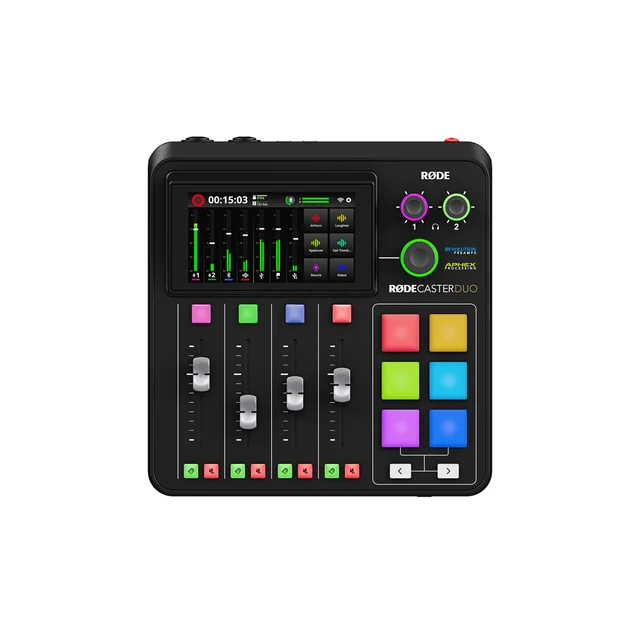
- Buy RODECaster Duo A complete two-host podcast studio in a desktop box, with the processing already dialled in before you ever open an editor. Amazon
- Buy Focusrite Scarlett 2i2 (4th Gen) The default two-input interface for a reason: quiet preamps, dependable drivers, and nothing you have to learn. Amazon
- It depends Zoom PodTrak P4next Four mic inputs, four headphone outs and AA battery power for the price of a two-input interface, with the build quality that implies. Amazon
- Skip Behringer Xenyx Q802USB A capable little analog PA mixer that gets bought for podcasting constantly and disappoints for the same reason every time.
What actually matters
- Clean preamp gain. Dynamic broadcast microphones typically need somewhere around 60dB or more of amplification, and they need it quiet. A preamp pushed near the top of its range adds hiss to every second of every episode. This is the specification that most obviously separates budget boxes from mid-range ones.
- Per-microphone multitrack recording. Check whether the device sends each input to the computer as its own channel, or only a combined stereo mix. Some units also record multitrack to a memory card independently. Anything that only outputs a stereo mix is a live-sound tool, not a recording tool.
- Input count and connector type. Count the actual XLR microphone inputs, not the total channel count, which often includes line and stereo channels you cannot plug a mic into. A four-person table needs four XLR inputs, and no amount of splitting gets around it.
- Remote guest handling. Look for automatic mix-minus over Bluetooth, a phone connection, or USB. Building mix-minus yourself with cables and aux sends is possible on a traditional mixer, but it is fiddly and easy to get wrong under pressure.
- Headphone outputs. One headphone jack means one volume for everyone, and someone always wants it louder. Multiple outputs with individual level controls matter as soon as more than two people sit down.
- Driver and connection reliability. The most common complaint across this whole category in owner reports is not missing features, it is dropouts, disconnects, and devices that vanish mid-session after an operating system update. Predictable behaviour beats a longer spec sheet.
- Onboard processing you can reach quickly. Compression, de-essing, and noise reduction genuinely help, but only if they are one button or one tap away. Processing buried four levels deep in a monochrome menu tends to go unused.
The specs, in plain English
Green flags vs red flags
Green flags
- The listing states a specific maximum gain figure in dB rather than just saying the preamps are high quality.
- Multitrack is described explicitly, either as separate USB channels or separate files on a memory card, not just as 'USB recording'.
- Mix-minus is named as automatic for phone, Bluetooth, or USB guests.
- There is a headphone output per person, each with its own volume control.
- The device can record to its own memory card without a computer attached.
- Owner reports over a year or more mention stable drivers across operating system updates rather than a rush of early praise and later disconnection complaints.
Red flags
- The USB output is described as a stereo mix, two channels, or 'sends the main mix to your computer'. That is one glued track for everyone in the room.
- The channel count in the product name is much larger than the number of XLR microphone inputs, which usually means most channels are line or stereo inputs.
- The page talks about EQ, effects, and reverb at length but never mentions gain range or noise performance.
- Marketing photos show a podcast setup but the product is described elsewhere as a PA or live-sound mixer.
- There is no mention of mix-minus anywhere, yet the listing promises easy remote guests.
- Recent owner reports cluster around dropouts, devices disappearing after updates, or noisy preamps when pushed with a dynamic microphone.
Who's who: the brands
- RODE - Built the modern podcast console category. Their desktop units bundle voice-tuned processing, sound pads, and automatic mix-minus, aimed at people who would rather publish than edit.
- Focusrite - The default name in small USB audio interfaces. Known for quiet preamps, reliable drivers on both platforms, and beginner safety features that stop you ruining a take.
- Zoom - Comes at it from portable field recording. Their podcast recorders lean toward battery power, higher input counts, and multiple headphone outs, in lighter bodies rather than premium desktop shells.
- Behringer - The budget analog mixer standard. Genuinely capable for small live sound and rehearsal rooms, and consistently the wrong tool when bought for multi-person podcasting on price alone.
- Yamaha - Long-standing live-sound and studio manufacturer. Their compact mixers are solid and well built, but many are still stereo-out designs aimed at rooms and bands rather than multitrack recording.
- PreSonus - Sits between interfaces and mixers, with digital consoles that can send channels individually to a computer. Worth a look if you want live mixing and multitrack capture from one box.
How to read a listing without getting fooled
Start at the back panel photo, not the feature list. Count the physical XLR sockets, because that is your true microphone capacity regardless of what the model name claims. Then find the sentence describing what goes over USB: if it says stereo, two-channel, or main mix, the device cannot give you separate voices, and no firmware update will change that. Next, hunt for a gain figure in dB. Manufacturers who are proud of their preamps publish the number; those who are not fill the space with EQ and effects talk instead. Search the page for the phrase mix-minus, and if it appears only in a forum thread rather than the official description, assume you will be wiring it yourself. Treat the word 'podcast' in marketing copy as a category the seller wants to reach, not a capability, and cross-check it against whether the product is sold elsewhere as a PA mixer. Finally, sort owner reports by newest rather than reading the top-rated ones. Preamp noise and driver instability show up months in, while the enthusiastic early reviews were written before anyone had recorded a long session.
How much should you spend?
Money in this category buys three things in a fairly clear order: clean gain first, then separate tracks, then convenience features. The cheapest tier is where the real trap sits, because a budget analog mixer looks like it does everything and quietly fails at the two jobs that matter for recording, so spending the absolute minimum tends to cost you a second purchase. The value sweet spot is the mid tier, where a simple two-input interface delivers preamps nearly as quiet as anything above it and drivers that stay put, with none of the console extras. If you already edit, or plan to learn, that is almost always the right place to stop, and the money saved buys a considerably better microphone, which moves the sound of your show further than console features do. Stepping up to a full production console is worth it when you are buying back time rather than sound quality: live voice processing, sound pads, faders, automatic remote guest handling, and recording that survives a computer crash. That premium pays off if you publish weekly and hate editing, and it is largely wasted on a solo host who is comfortable in an editor. Paying more for higher sample rates or channel counts you will not use is the most common way people overspend here.
Questions, answered
Do I actually need a mixer, or is an audio interface enough?
If you record one or two microphones into a computer and you are comfortable editing afterwards, a simple interface is enough and usually sounds better for the money, because all the cost went into preamps and converters instead of buttons. A mixer or production console earns its place when you need live level control during a show, sound effects on pads, remote guests routed with mix-minus, or recording that keeps running if the computer dies.
Why do people warn against cheap analog mixers for podcasting?
Two structural reasons, neither fixable. First, the USB output on most of them is a single stereo mix, so every voice arrives on the same pair of channels and can never be corrected individually. Second, they have no mix-minus, so any phone or remote guest hears their own voice echoed back and the conversation collapses. Add limited preamp gain for dynamic microphones and you get the audible hiss owners repeatedly report. They are fine mixers for a rehearsal room and the wrong tool for a recorded show.
How many microphone inputs do I really need?
Count the people who will regularly be in the room, then stop. Remote guests do not need a microphone input, they arrive over USB, Bluetooth, or a phone connection. Buying four inputs for a show that is almost always two people means paying for channels you never use, and the four-input units tend to trade away build quality and fader control to hit their price.
Will a mixer make a cheap microphone sound good?
No, and this is the most common misallocation of money in the category. A good preamp preserves what the microphone captured and a bad one degrades it, but neither adds quality that was never there. Room acoustics and microphone choice set the ceiling. If you have to choose, put the money into the microphone and a decent interface rather than a console with features you will not use.
What about recording video calls or remote interviews?
Two things make this work: mix-minus so your guest does not hear themselves, and loopback or a dedicated USB channel so the call audio is captured. Podcast consoles handle both automatically. With a plain interface you can still do it, but the routing lives in software on your computer, and you should test the whole chain before a real guest is waiting on the line.
Do I need phantom power?
Only if you use a condenser microphone, which needs that voltage to work at all. The popular broadcast dynamic microphones do not use phantom power, and leaving it on will not damage them on modern equipment. The more useful question for a dynamic microphone is whether the preamp has enough quiet gain, since that is where budget units actually fall short.
Or jump to the head-to-head: RODECaster Duo vs Focusrite Scarlett 2i2 (4th Gen).