

Audio & Headphones
The Best Small Audio Mixers for Podcasting: 4 Compared (and One to Skip)
We compared four small mixers and interfaces for podcast and stream audio on preamp quality, per-mic multitrack, mix-minus, and setup effort.
The short version
Four small mixers and interfaces, judged on preamp quality, per-mic multitrack recording, remote guest handling, and how much editing they save you. The RODECaster Duo is the pick for one or two hosts who want a finished sound straight off the device, and it doubles as a capable streaming console. The Focusrite Scarlett 2i2 (4th Gen) is the runner-up and the better value if you already edit: very quiet preamps, plus some of the most reliable drivers in owner reports. The Zoom PodTrak P4next earns a conditional yes for four-mic roundtables and battery-powered field interviews, though its light build and knob-based mixing feel a tier below the desktop consoles. Skip the Behringer Xenyx Q802USB for podcasting: its USB output is a single stereo mix, so you can never fix one voice without touching the other. Best for: solo and duo shows that want broadcast-ready audio with minimal editing, which is the RODECaster Duo.
Our picks at a glance
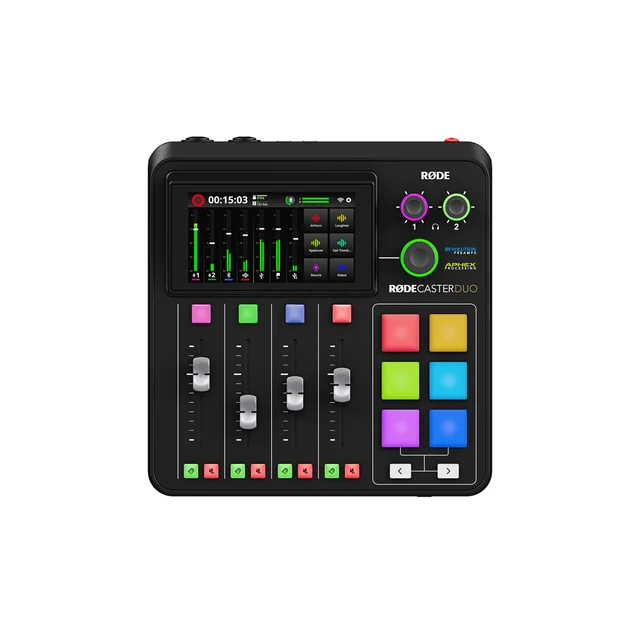
- RODECaster Duo - Buy. A complete two-host podcast studio in a desktop box, with the processing already dialled in before you ever open an editor.
- Focusrite Scarlett 2i2 (4th Gen) - Buy. The default two-input interface for a reason: quiet preamps, dependable drivers, and nothing you have to learn.
- Zoom PodTrak P4next - It depends. Four mic inputs, four headphone outs and AA battery power for the price of a two-input interface, with the build quality that implies.
- Behringer Xenyx Q802USB - Skip. A capable little analog PA mixer that gets bought for podcasting constantly and disappoints for the same reason every time.
The verdict in 30 seconds
What mattered most
- Mic inputs
- Per-mic multitrack
- Records without a computer
- Mix-minus for remote guests
- Onboard processing
- Power
The gear that sits between your microphone and your recording software decides more about your show's sound than most people expect. Two of these four are easy recommendations for different budgets, one is a great box that only makes sense if you record away from a desk, and one is the cheap analog mixer that podcasters keep buying and keep regretting. Here is how the field actually sorts out.
A complete two-host podcast studio in a desktop box, with the processing already dialled in before you ever open an editor.
Best for: Solo hosts and two-person shows that want finished-sounding audio without an editing pass, plus live streamers who need pads and faders under their hands.
- Two high-gain combo inputs drive dynamic podcast mics cleanly without an inline booster
- Built-in compression, de-essing and exciter processing means the recording is close to broadcast-ready as it lands
- Records every source to its own track on microSD, so a blown level on one mic does not ruin the episode
- Bluetooth, TRRS and dual USB-C bring in remote guests and phone callers with automatic mix-minus
- Six programmable sound pads and physical faders make live streaming genuinely one-person operable
- Costs several times what a plain two-input interface does, and much of that goes to features a solo host may never touch
- Only two mic inputs, so a four-person table needs the larger console instead
- Live processing shapes what lands on the card, so dial presets in before a session rather than counting on undoing them later
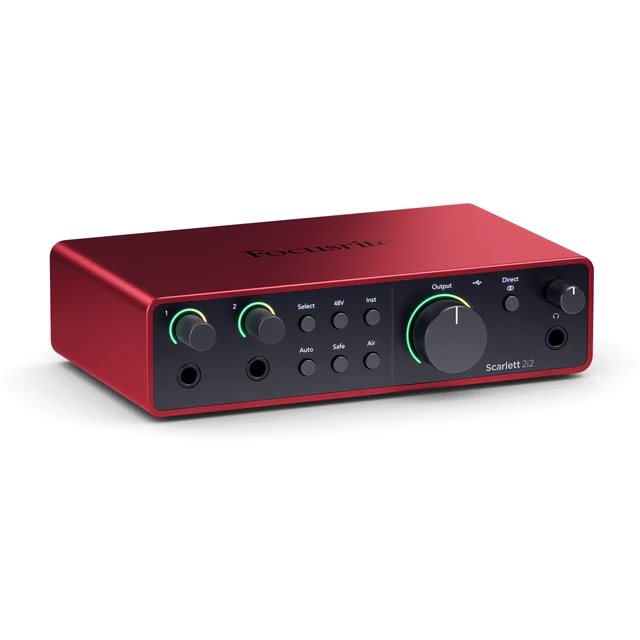
The default two-input interface for a reason: quiet preamps, dependable drivers, and nothing you have to learn.
Best for: Anyone recording one or two mics into a computer who wants clean audio and zero fuss, especially if music recording is also on the menu.
- Focusrite quotes 120dB of A/D dynamic range, near the top of this class
- Auto Gain sets a usable level in seconds, and Clip Safe rides the gain down instead of letting a peak distort
- Bus powered over USB-C, so it runs from a laptop with no wall adapter
- Driver stability on both Windows and macOS is the most consistent praise in owner reports
- Air mode adds presence to dull dynamic mics without reaching for an EQ plugin
- No standalone recording, no sound pads, no mix-minus: it is an interface, not a production console
- Two inputs is the ceiling, and both hosts land on separate tracks only if your software is set up for it
- Streamers who want per-app audio routing will still need software to do it
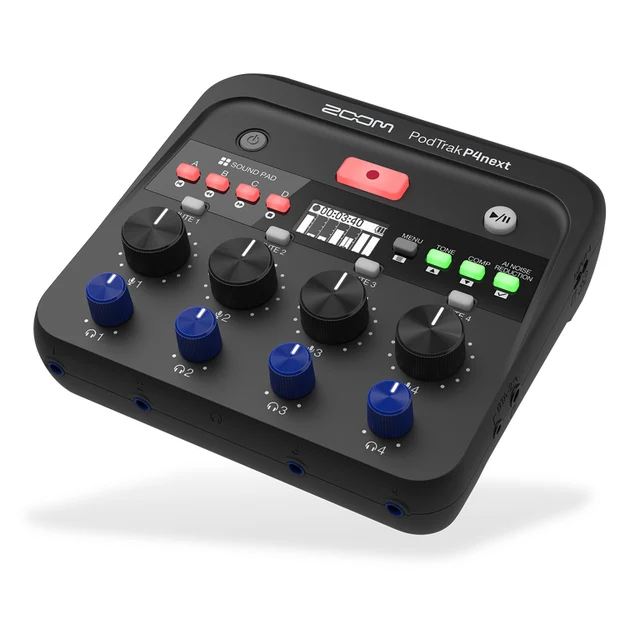
Four mic inputs, four headphone outs and AA battery power for the price of a two-input interface, with the build quality that implies.
Best for: Roundtable shows and mobile interviewers who need four mics and battery power more than they need a polished desktop console.
- Four XLR inputs with up to +70dB of gain and phantom power on every channel, enough for hungry dynamic mics
- Four headphone outputs with individual volume, which almost nothing else at this size offers
- Runs on two AA batteries or a USB power bank, so an in-person interview can happen anywhere
- Onboard AI noise reduction, tone shaping and compression clean up rooms that were never meant for recording
- Automatic mix-minus for phone and Bluetooth guests, plus four sound pads and multitrack microSD capture
- Light build and a small 128 x 64 OLED screen: owners report it feels closer to field gear than desk gear
- Volume knobs rather than faders make live level rides fiddly compared with a fader console
- Records at 48 kHz and 24-bit only, which is fine for podcast and video but limiting for music work
- Menu diving is required for the processing features that the bigger consoles put on a touchscreen
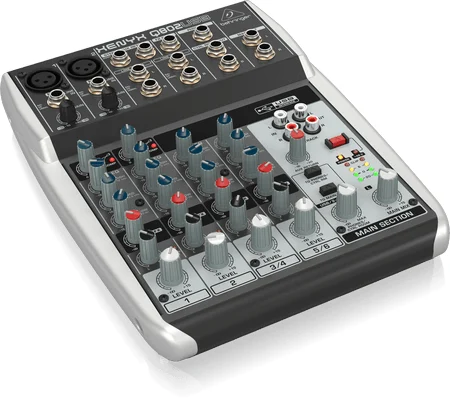
A capable little analog PA mixer that gets bought for podcasting constantly and disappoints for the same reason every time.
Best for: Small live sound and rehearsal use, not multi-person podcast recording. If you have already bought one for a show, treat it as a monitor mixer and record through something else.
- Costs less than almost anything else with two XLR preamps and a USB output
- One-knob compressors on both mono channels are genuinely handy for taming a loud guest live
- Sturdy build and simple analog controls that anyone can understand at a glance
- The USB output is a single stereo mix, so both hosts land glued onto the same track with no way to fix one voice afterwards
- No mix-minus, which means remote or phone guests hear themselves echoed back unless you build a workaround
- Preamp gain runs out before quiet dynamic podcast mics get to a usable level, and owners report audible hiss when pushed
- Nothing records without a computer, and there is no per-channel headphone monitoring
| Criteria | RODECaster Duo Top pick | Focusrite Scarlett 2i2 (4th Gen) | Zoom PodTrak P4next | Behringer Xenyx Q802USB |
|---|---|---|---|---|
| Verdict | Buy it | Buy it | It depends | Skip it |
| Best for | Solo hosts and two-person shows that want finished-sounding audio without an editing pass, plus live streamers who need pads and faders under their hands. | Anyone recording one or two mics into a computer who wants clean audio and zero fuss, especially if music recording is also on the menu. | Roundtable shows and mobile interviewers who need four mics and battery power more than they need a polished desktop console. | Small live sound and rehearsal use, not multi-person podcast recording. If you have already bought one for a show, treat it as a monitor mixer and record through something else. |
| Price tier | $$ · premium | $ · mid-range | $ · mid-range | $ · budget |
| Mic inputs | 2 combo XLR | 2 combo XLR | 4 XLR | 2 XLR |
| Per-mic multitrack | Yes, to microSD and USB | Yes, via your software | Yes, to microSD | No, stereo mix only |
| Records without a computer | Yes | No | Yes | No |
| Mix-minus for remote guests | Automatic | Not built in | Automatic | None |
| Onboard processing | Full DSP chain with presets | Air mode and Clip Safe | AI noise reduction, tone, compressor | Analog EQ and one-knob compressor |
| Power | Wall power | USB bus powered | AA batteries, USB or AC | AC adapter |
| Learning curve | Moderate, touchscreen driven | Minimal | Moderate, menu driven | Low, but you learn its limits fast |
| Price tier | $$ · premium | $ · mid-range | $ · mid-range | $ · budget |
Which one is right for you?
- Solo hosts and two-person shows that want finished-sounding audio without an editing pass, plus live streamers who need pads and faders under their hands. Buy it RODECaster Duo
- Anyone recording one or two mics into a computer who wants clean audio and zero fuss, especially if music recording is also on the menu. Buy it Focusrite Scarlett 2i2 (4th Gen)
- Roundtable shows and mobile interviewers who need four mics and battery power more than they need a polished desktop console. It depends Zoom PodTrak P4next
- Small live sound and rehearsal use, not multi-person podcast recording. If you have already bought one for a show, treat it as a monitor mixer and record through something else. Skip it Behringer Xenyx Q802USB
How we judged the field
We do not run a lab. What we do is read across independent testing, published measurements, and the pile of long-term owner reports that build up once a product has been in the wild for a couple of years, then weigh those against what podcast and stream audio actually demands.
Four things decided the ranking. First, preamp quality: podcast microphones are mostly low-output dynamics, and a preamp that runs out of clean gain adds hiss to every episode you will ever publish. Second, per-mic multitrack recording, because a show that lands as a single stereo file can never be fixed one voice at a time. Third, remote guest handling, specifically whether mix-minus is automatic or something you have to engineer yourself with cables. Fourth, how much work the box saves you after the recording stops, which for most creators matters more than any spec sheet number.
We also weighted reliability heavily. A device that drops out mid-recording costs you a whole session, and that failure mode shows up in owner reports far more clearly than in any review.
This is the box that makes a small show sound like a professional one on day one. Two combo inputs with high-gain preamps drive dynamic broadcast mics without an inline booster, and the onboard processing chain (compression, de-essing, high-pass filtering, and an exciter stage) is tuned specifically for voice rather than left as a set of generic plugins for you to figure out.
The practical win is what happens after you stop recording. Sources land on separate tracks on the microSD card and over USB, so a guest who leaned away from the mic can be rescued without touching your own voice. Remote guests come in over Bluetooth, a phone cable, or one of the two USB-C ports, and mix-minus is applied automatically so nobody hears themselves echoed. Reviewers consistently note that the second USB port is what makes it viable as a streaming console: one computer gets the show, the other gets whatever you want it to.
The real limits are input count and price. Two mic inputs means a four-person table needs the bigger console, and you are paying a premium for a feature set a solo host with editing skills may not need. Live processing also shapes what lands on the card, so set presets carefully before you record. For the target buyer, one or two hosts who would rather publish than edit, none of that outweighs what it delivers.
If the RODECaster is the studio, this is the wire done right. It is a two-input, two-output USB-C interface, and the reason it keeps winning value comparisons is that the fundamentals are excellent: Focusrite quotes 120dB of A/D dynamic range and a 69dB gain range, which is ample for the dynamic mics podcasters actually use.
The 4th generation additions are the ones beginners benefit from most. Auto Gain listens to you talk and sets a sensible level in seconds, which removes the most common cause of a ruined first episode. Clip Safe watches for peaks and pulls the gain back before the recording distorts, which is a safety net you notice only when it saves you. Air mode adds high-end presence for mics that sound dull without an EQ pass.
What you give up is everything a console does. No standalone recording, so a computer crash is a lost session. No sound pads, no faders, no built-in mix-minus, and no hardware routing for streamers who want game audio and chat on separate channels. Owner reports single out driver stability on both platforms as the standout virtue, and that combination of clean audio and predictable behaviour is why it stays the default recommendation for anyone who is comfortable editing.
On paper this is the best value in the group. Four XLR inputs with up to +70dB of gain and phantom power on all channels, four headphone outputs with individual volume controls, multitrack recording to microSD, four sound pads, automatic mix-minus, and it runs on two AA batteries or a USB power bank. Nothing else this size gives four people at a table their own headphone level.
The newer generation adds the processing that the original lacked: AI-driven noise reduction that learns and removes room hum and street noise, a tone stage that handles EQ and de-essing, and a compressor for guests who swing between whispering and shouting. Recording is 48 kHz and 24-bit WAV, which is the standard video work wants.
The caveats are physical. The build is light, the screen is a small 128 by 64 OLED, and mixing happens on knobs rather than faders, which makes live level rides more awkward than on a desktop console. Reaching the processing features means menu diving rather than tapping a touchscreen. Owners who bought it as a portable field recorder are consistently happy. Owners who expected a desk-quality console are the ones who sound let down, so buy it for what it is.
This mixer is not bad hardware. It is a decent, cheap analog PA mixer with two usable mic preamps and a one-knob compressor on each mono channel. The problem is that it gets bought for podcasting on price alone, and it fails at podcasting for structural reasons no firmware update can address.
The USB output is a single stereo mix. Both hosts, the music, and any callers arrive at your computer bonded together on one pair of channels. If one voice is too quiet or one person coughs, every correction you apply lands on everyone. That single fact rules it out for any show with more than one person in the room. There is no mix-minus either, so a phone or remote guest hears their own voice echoed back and the conversation falls apart within a minute.
Gain is the other issue. Podcast dynamic mics are power hungry, and owner reports repeatedly describe running these preamps near the top of their range and hearing hiss arrive before the voice gets loud enough. Add no standalone recording and no per-channel headphone monitoring and the picture is clear. It is a fine live sound mixer for a rehearsal room. It is the wrong tool for a podcast, and the money is better spent on the Scarlett.
RODECaster Duo vs Focusrite Scarlett 2i2 (4th Gen): which should you buy?
These two are aimed at the same person at different stages, and the deciding question is what you do after you hit stop.
If editing is a chore you want to minimise, the RODECaster Duo pays for itself in time. Voice processing is applied live, so what lands on the card is close to publishable. It records without a computer, which means a laptop crash costs you nothing. It brings in remote guests and phone callers with mix-minus handled for you. It gives you faders and pads for live shows. Every one of those saves an hour you would otherwise spend in an editor or a cable diagram.
If you already edit, or plan to learn, the Scarlett 2i2 is the better allocation of money. Its preamps are very quiet, its drivers are among the most trusted in owner reports, and the price difference between the two is enough to buy a considerably better microphone. Microphone quality moves the sound of a show further than console features do, so a great mic into a Scarlett usually beats a modest mic into a console.
There is a scale question too. The Duo is built for one or two voices in a room. If you regularly host three or four people in person, neither of these is the answer and the four-input recorder is where to look.
What to look for
- Per-mic multitrack recording. Every voice on its own track. This is the feature that decides whether a bad take is fixable or fatal.
- Enough clean gain. Dynamic podcast mics need roughly 60dB or more of quiet gain. A preamp running near its ceiling adds hiss to everything you publish.
- Automatic mix-minus if you will ever have a phone or remote guest. Building it yourself with cables is possible and nobody enjoys it.
- Standalone recording as insurance. A device that writes to its own SD card survives a computer crash that would otherwise cost you the entire session.
- Headphone outputs to match your guest count. A splitter works but leaves everyone stuck on one volume, and one person always wants it louder.
- Driver reliability over feature count. The most common complaint in owner reports across this whole category is dropouts and disconnects, not missing features.
- Onboard processing you can actually reach. Compression and de-essing help enormously, but only if they are one tap away rather than four menu levels deep.
Our final take
The RODECaster Duo is the pick because it solves the two problems that actually hold small shows back: audio that needs rescuing and editing time nobody has. For one or two hosts it turns recording into something you can finish the same day, and it handles live streaming as a bonus rather than an afterthought.
The Focusrite Scarlett 2i2 (4th Gen) is the smarter buy for anyone who edits anyway, and it is the one we would recommend to a first-time podcaster on a tighter budget, because the money saved buys a better microphone and that matters more. The Zoom PodTrak P4next is the right answer for a specific need, four mics and no wall power, and slightly the wrong answer for everything else. The Behringer Xenyx Q802USB is the trap: cheap, widely sold, and structurally unable to give you separate tracks or working remote guest audio. Buy it for a rehearsal room, not for a show.
Questions, answered
Do I need a mixer at all, or is an audio interface enough?
If you record one or two mics into a computer and you are comfortable editing, an interface like the Scarlett 2i2 is enough and usually sounds better for the money. A mixer or production console earns its place when you need live level control, sound effects, remote guests routed with mix-minus, or recording that continues if the computer crashes.
What is mix-minus and why does it keep coming up?
Mix-minus sends a remote or phone guest everything except their own voice. Without it, they hear themselves echoed back a fraction of a second late, which makes normal speech almost impossible. The RODECaster Duo and PodTrak P4next handle this automatically. Cheap analog mixers do not, which is the single biggest reason they fail as podcast gear.
Why does per-mic multitrack recording matter so much?
When each microphone lands on its own track, you can fix one person being too quiet, cut a cough, or gate out a noisy room for one host only. When everything is glued into a stereo mix, every fix you apply hits all voices at once. This is the difference that separates the three recommendations here from the one to skip.
Will these work for game streaming as well as podcasting?
The RODECaster Duo is the strongest of the four for streaming, with dual USB outputs, faders, and pads for stingers. The PodTrak P4next works as a plug-and-play USB interface and covers the basics. The Scarlett 2i2 sounds excellent but leaves all the routing of game, chat and music audio to software on your computer.
Do I need phantom power, and will these drive a dynamic podcast mic?
Phantom power is for condenser mics; the popular dynamic broadcast mics do not use it but do need a lot of clean gain. All three recommended units supply enough. The gap is at the budget end: independent testing and owner reports consistently flag cheap analog mixer preamps as running out of headroom and adding hiss before a dynamic mic reaches a usable level.
Deciding between the top two? See our head-to-head: RODECaster Duo vs Focusrite Scarlett 2i2 (4th Gen).
More Audio & Headphones reviews
 The Best AV Receivers: 4 Compared (and One to Skip)
  The Best Bluetooth Audio Transmitters: 4 Compared (and One to Skip)
  The Best Bone-Conduction & Open-Ear Headphones: 4 Compared (and One to Skip)
  The Best Bookshelf Speakers (Passive and Powered), Weighed Against the Hype
  Best Budget Noise-Cancelling Headphones: Three Picks
  Best Budget Soundbars: Real-World Picks for Bigger Sound Without the Splurge