Explained
AV Receivers, Explained
After reading this you'll understand the core specs on an AV receiver's spec sheet and know which ones actually affect how your home theater sounds and plays.
In this guide
An AV receiver is the hub of a home theater: it decodes surround sound, powers your speakers, and switches all your 4K and 8K sources through one box. First-time buyers usually get tripped up by the channel numbers (5.1.2, 7.2.4) and the alphabet soup of room-correction and HDMI features, and end up overpaying for watts while overlooking the things that really change how good it sounds.
The 30-second version
- Room correction matters most. the automatic system that measures and tunes your room affects real-world sound quality more than raw power, so weigh it heavily.
- Count your HDMI 2.1 (8K) inputs, because those are the ports that carry 4K/120 gaming, and cheaper models often include only two or three of them.
- Match channels to your speaker plan, not to the biggest number on the box; nine channels covers most living-room layouts without buying external amps.
- The watts-per-channel figure is power you'll rarely max out, so don't let a huge power rating pull you away from features that matter more.
- Two receivers from sister brands can share most of their engineering, so a premium badge sometimes buys refinement and looks more than extra capability.
The products this guide is about
Our verdict on each, with the full reasoning on the companion review.
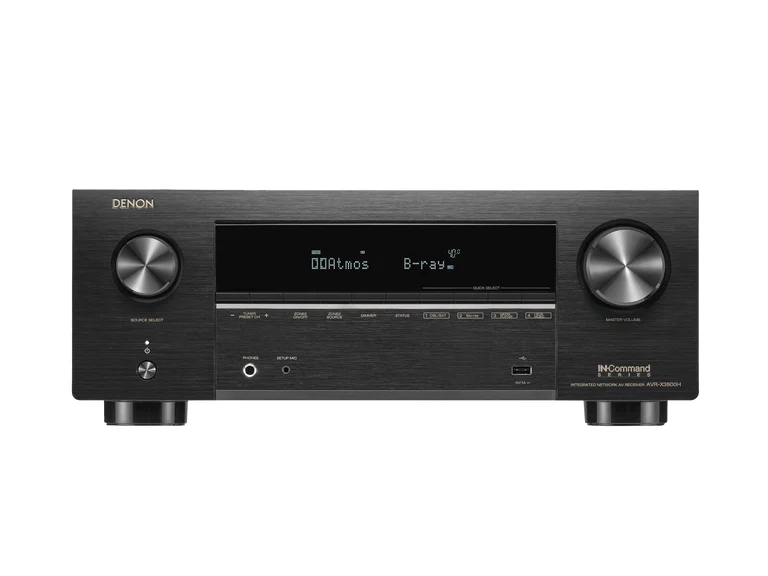
- Buy Denon AVR-X3900H The all-rounder that gets nearly everything right for the money. Amazon
- Buy Onkyo TX-RZ50 THX certification and Dirac Live room correction at a price that undercuts the competition. Amazon
- It depends Marantz Cinema 50 A more refined, better-built receiver for people who care as much about music and looks as movies. Amazon
- Skip Yamaha AVENTAGE RX-A8A A beautifully built flagship that is hard to justify once you see what cheaper rivals include. Amazon
What actually matters
- Room correction quality - this automatic calibration has more impact on how your system actually sounds than almost any other feature, and the best systems noticeably clean up bass and dialogue in a normal room.
- Channel count and layout - this determines how many speakers, including overhead height speakers, you can drive without adding external amplifiers; think about the layout you actually want before chasing a number.
- HDMI 2.1 / 8K input count - each modern console and 4K player wants its own port that supports 4K/120, so a receiver with too few of them can leave you swapping cables.
- Subwoofer outputs - multiple independent sub outputs make it far easier to get smooth, even bass across every seat rather than one boomy sweet spot.
- Gaming features (VRR, ALLM, 4K/120) - if you game, confirm these are supported on the specific inputs you'll use, since availability can vary port to port.
- Streaming and multiroom support - built-in platforms decide how easily you can play music to this and other rooms, so check it supports the services and ecosystem you already use.
- Sound character and build - warmer versus more neutral tuning and premium construction are real differences, but they matter less than correction and connectivity for most rooms.
The specs, in plain English
Green flags vs red flags
Green flags
- Supports strong room correction, either included or as a clear upgrade path
- Enough HDMI 2.1 (8K) inputs to cover every console and 4K source you own
- Channel count that matches your intended speaker layout with room to grow via pre-outs
- Multiple independent subwoofer outputs for even bass across seats
- Current-generation gaming features (4K/120, VRR, ALLM) on the inputs you'll use
- A streaming and multiroom platform that fits the ecosystem you already have
Red flags
- Only one or two HDMI 2.1 inputs when you have several modern sources
- A huge watts-per-channel figure used to distract from weaker features
- Room correction that is basic or missing with no upgrade path
- A single subwoofer output when you want smooth bass in a larger room
- A premium price for a badge or looks with little added capability over a sister model
- Older units with known HDMI board faults you can't confirm have been corrected
Who's who: the brands
- Denon - A mainstream home-theater staple known for feature-rich, well-connected all-rounders with the HEOS streaming platform.
- Marantz - Denon's premium sister brand, known for warmer, more refined sound, distinctive build, and its signature porthole display.
- Onkyo - A value-focused brand known for muscular, THX-style sound and packing higher-end features like Dirac Live into lower price tiers.
- Yamaha - A long-standing maker whose AVENTAGE line offers heavyweight, beautifully built flagships with Surround:AI processing and MusicCast streaming.
How to read a listing without getting fooled
When you scan an AV receiver listing, start with the channel notation rather than the price. A figure like 9.4 or 7.2.4 tells you how many main, subwoofer, and overhead speakers it can drive, so decide your layout first and match to it. Next, find how many HDMI inputs specifically support HDMI 2.1 or 8K, not just the total number of HDMI ports, because that smaller number is what limits how many consoles and 4K players you can connect. Check which room-correction system is named and whether it's included or a paid upgrade. Treat the big watts-per-channel number with skepticism; it's the spec most likely to be inflated and the least likely to change your experience. Finally, confirm gaming features and streaming support on the exact inputs and services you'll actually use.
How much should you spend?
Spending more on an AV receiver mainly buys you more channels, more 8K inputs, stronger room correction, and nicer build, roughly in that order of usefulness. The value sweet spot sits in the mid tier, where you can get serious room correction and enough connectivity for most home theaters without paying flagship money. Stepping up to a premium model is worth it if you genuinely need many 8K inputs, extra subwoofer outputs, or you split your time between movies and serious music and will notice a warmer, more refined tuning. It's usually not worth it to buy the most expensive flagship for its power rating or badge alone, especially if it omits the room correction that cheaper rivals include. Spend where the features map to how you'll actually use the receiver, and let the rest go.
Questions, answered
How many channels do I actually need?
For a typical living-room surround setup with a couple of overhead or height speakers, a nine-channel receiver handles common layouts like 5.1.4 or 7.1.2 with no extra amplifiers. You only need eleven channels, or external amps, if you're planning a large immersive system. Most rooms are well served by nine channels, so don't overbuy on channel count.
Is room correction really worth prioritizing over more power?
Yes. Room correction has an outsized effect on how good your system sounds because it adapts the output to your actual room, while extra watts mostly go unused. Independent testing generally rates Dirac Live above built-in systems like Audyssey and YPAO. If your room is acoustically tricky, choosing a receiver with strong correction is one of the best decisions you can make.
Will any modern receiver handle 4K/120 gaming from a PS5 or Xbox Series X?
Most current receivers support the necessary HDMI 2.1 features, including 4K/120, VRR, and ALLM, but only on their designated 8K inputs. The real difference is how many of those inputs each model has. If you plan to connect several consoles plus a 4K player, count the 8K ports before buying rather than assuming they're all capable.
Why do two receivers with similar specs cost so different?
Sometimes two models, often from sister brands, share much of their core engineering, so their feature sets are close. The pricier one may add a more refined sound tuning, a more premium build, and nicer looks. Whether that upgrade is worth it depends on how much you value music playback and aesthetics versus getting the same core capability for less.
Do I need to worry about older receivers and HDMI issues?
Some earlier HDMI 2.1 receivers shipped with a board fault that could cause black-screen problems with 4K/120 sources, which manufacturers addressed through board-replacement programs. Current stock is generally corrected, but if you're buying an older or open-box unit, confirm it has the updated HDMI board before finalizing the purchase.
Or jump to the head-to-head: Denon AVR-X3900H vs Onkyo TX-RZ50.