Explained
Bluetooth Audio Transmitters, Explained
After reading this you will know why a low-latency badge on the box means nothing without matching headphones, and which input your source actually needs.
In this guide
A Bluetooth transmitter turns a TV, a laptop or an old stereo into a wireless audio source so you can listen on headphones. The category looks simple and trips people up constantly, because two things decide whether it works and neither is printed in big letters on the box: the codec your headphones support, and whether your source has the physical output the transmitter needs. Get those two right and almost any competent unit does the job.
The 30-second version
- Low latency is a handshake, not a feature. A transmitter with aptX Low Latency only delivers low latency when the headphones support the same codec, so check the headphone spec before you buy anything.
- The input decides compatibility. Optical is the reliable choice for modern TVs, 3.5mm suits older gear and stereos, USB-C only works on computers and consoles, and HDMI ARC is the fallback when the optical port is missing or awkward.
- Dual link is a real differentiator. If two people will listen at once, the transmitter has to support two simultaneous connections, and independent volume per pair is better still when hearing differs.
- Most one-star complaints are a settings problem. Many transmitters accept PCM only over optical, so a TV left on Bitstream, Dolby or Auto produces silence or static until you change the digital output setting.
- Mains power beats a battery for anything that lives behind a TV. Battery-powered travel dongles are excellent on planes and treadmills and a nuisance as a permanent living-room fixture.
The products this guide is about
Our verdict on each, with the full reasoning on the companion review.
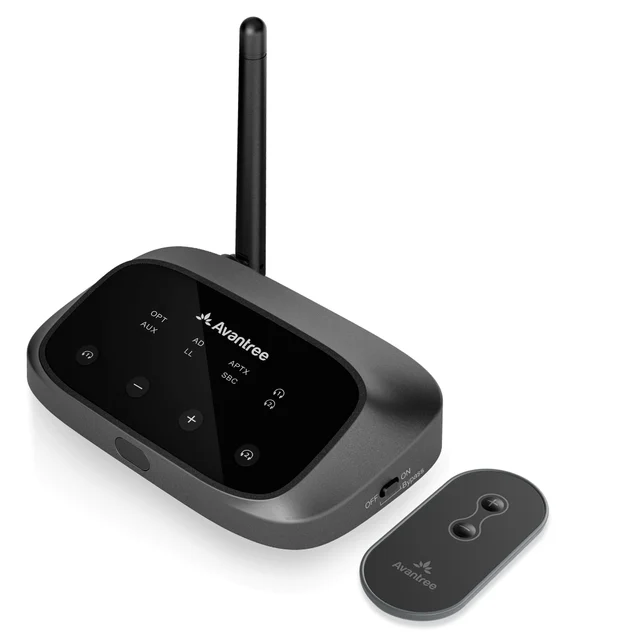
- Buy Avantree Oasis Plus 2 The default choice for TV audio: optical in, aptX Adaptive and aptX Low Latency out, two headphones, and a remote. Amazon
- Buy Avantree Orbit Pro The compatibility specialist: HDMI ARC, automatic 5.1 decoding and a screen that shows paired devices and link status. Amazon
- It depends Creative BT-W6 Superb USB-C transmitter for computers and consoles, and completely useless on a television. Amazon
- Skip Twelve South AirFly Pro 2 A genuinely good travel dongle that people keep buying for TV duty, where it is the wrong tool. Amazon
What actually matters
- Codec support on both ends. The transmitter and the headphones negotiate the fastest codec they share. If the headphones top out at SBC or AAC, the link quietly falls back and you keep the lip-sync delay you were trying to fix. Confirm the headphone specification first, then choose the transmitter.
- Input type. Optical (also called Toslink or S/PDIF) works on most current TVs. A 3.5mm analog jack covers older televisions, hi-fi separates and gym equipment. USB-C works only where the source exposes a USB audio output, which means computers and some consoles, not televisions. HDMI ARC solves the sets where optical is missing, buried or unreliable.
- Optical audio format. A transmitter that accepts PCM only will go silent when the TV is sending Dolby Digital or DTS. Either switch the TV output to PCM, or buy a unit that decodes surround formats automatically so there is no setting to find.
- Dual link. Two simultaneous headphone connections turn a solo device into a couch device. Some units drop to a slower codec or shorter range when both links are active, which is worth knowing before you count on it.
- Volume control. TV volume buttons often do nothing to a digital optical output, so the transmitter needs its own control. A remote is the difference between adjusting from the couch and standing up every time.
- Passthrough. A transmitter that passes audio onward to the soundbar lets both stay connected, so you are not unplugging cables every time someone wants to watch quietly.
- Power and range. Mains or USB power suits a permanent installation. Rated range assumes clear line of sight, and walls cut it substantially, so buy more headroom than the room appears to need.
The specs, in plain English
Green flags vs red flags
Green flags
- The listing names a specific low-latency codec, aptX Low Latency or aptX Adaptive, rather than a vague claim about being fast
- The input you actually have is listed, ideally with more than one option so the unit survives a TV upgrade
- Dual link is stated explicitly, with independent volume if two people with different hearing will share it
- A remote or clear onboard volume buttons, since the TV remote often cannot control a digital output
- Mains or USB power for a permanent install, and audio passthrough so a soundbar can stay wired
- A display or status indicator that shows the active input, pairing or codec, which turns troubleshooting into reading
Red flags
- Latency figures quoted with no mention of which codec produces them or what the headphones need to support
- Only aptX or SBC listed, with no low-latency variant, sold on a page full of TV imagery
- A 3.5mm-only travel dongle marketed for television use when most current sets have no usable headphone jack
- No mention of how the unit handles Dolby Digital or DTS over optical, which usually means PCM only
- Battery power on a device intended to live behind the TV permanently
- Vague phrases such as low-latency technology or HD audio with no named codec anywhere in the specification
Who's who: the brands
- Avantree - Specialists in TV audio transmitters, known for optical and HDMI ARC inputs, dual link, included remotes and passthrough.
- Creative - Long-running PC audio brand whose USB-C dongles target computers and consoles with the newest codecs and gaming-focused low latency.
- Twelve South - Accessory maker whose 3.5mm dongles are built for planes, gyms and older gear rather than living-room television duty.
- TaoTronics - Budget brand whose older transmitter and receiver combos still circulate through resellers; codec support varies, so check it line by line.
- 1Mii - Value-focused long-range transmitters that often lead on rated distance and aptX variants at accessible prices.
- Sennheiser and similar headphone brands - Not transmitter makers as such, but relevant because the headphone side determines whether any low-latency codec can engage at all.
How to read a listing without getting fooled
Start at the bottom of the listing, not the top. The headline usually shouts about low latency, so skip it and find the codec list in the specification table. If a low-latency codec is not named there, the product does not have one, whatever the marketing copy implies. Then check the input list against the ports on the back of your actual TV or stereo, because a transmitter with the wrong input is a paperweight. Look for a line about audio format on the optical input, which tells you whether you will be hunting through TV settings for PCM. Confirm whether the unit transmits, receives or both, since the product titles blur the two constantly. Finally, read the negative owner reports rather than the positive ones. In this category the recurring complaints are almost always the same two issues, a codec that never engaged and a TV set to the wrong digital output, and spotting them tells you which problem the unit does not protect you from.
How much should you spend?
Spending is mostly about compatibility rather than sound quality. The cheapest tier buys a basic transmitter that may only support SBC or plain aptX, which defeats the purpose if lip sync is the reason you are shopping. The mid tier is where the category makes sense: a named low-latency codec, an optical input, dual link, a remote and mains power, which covers the overwhelming majority of living rooms. Paying above that buys compatibility insurance rather than better audio, so it is worth it when your TV has no usable optical output, when you want HDMI ARC, when you need automatic surround decoding instead of a manual settings change, or when a display that shows link status would save you troubleshooting. It is not worth it if a mid-tier unit already matches your ports and your headphones. And no amount of spending on the transmitter compensates for headphones that lack a low-latency codec, so if the budget is tight, sort the headphones out first.
Questions, answered
Will an aptX Low Latency transmitter fix lip sync with any headphones?
No, and this is the most common disappointment in the category. Low-latency codecs are negotiated between the two devices. If your headphones only support SBC or AAC, the link falls back to the slower codec and you get the same delay as before, with no warning anywhere on screen. Check the headphone specification for aptX Low Latency or aptX Adaptive first. If it does not list one, either change headphones or accept the delay.
Optical, 3.5mm or USB: which input should I be looking for?
Optical is right for almost every modern TV, since headphone jacks are disappearing and TV volume controls frequently do not affect them anyway. Use 3.5mm for older televisions, hi-fi separates, turntable preamps and gym equipment. USB works only where the source can output USB audio, which covers computers and some consoles but excludes nearly all televisions. HDMI ARC is worth seeking out when the optical port is missing or unreliable.
My TV goes silent or crackles through the optical output. What is wrong?
Almost always the audio format. Many transmitters accept PCM only over optical while the TV is set to Bitstream, Dolby Digital or Auto by default. Go into the TV sound settings, find the digital audio output option and switch it to PCM. Owner reports suggest a large share of one-star reviews in this category are this setting rather than a faulty unit. Transmitters that decode surround automatically avoid the problem entirely.
Can two people listen on separate headphones at once?
Yes, if the transmitter supports dual link. Better units connect two pairs simultaneously, and some allow a different volume for each, which matters when two people have different hearing. Be aware that a dual connection can shorten range or force a lower codec on some models. USB dongles typically hold one classic Bluetooth connection at a time, so sharing there depends on LE Audio broadcast and headphones new enough to receive it.
Do these work with AirPods?
They will connect, since AirPods speak standard Bluetooth, but they cannot use aptX Low Latency or aptX Adaptive because Apple does not support those codecs. The link falls back to AAC or SBC and the delay stays. Volume is awkward too, since AirPods have no physical volume control, so a transmitter with its own buttons or a remote becomes close to essential. For watching video in sync, headphones that list a low-latency aptX codec are a better match.
How much range do I really need?
Rated range figures assume clear line of sight with nothing in the way, and real rooms are full of walls, furniture and bodies. A long-range unit is what lets you keep listening while walking to the kitchen. Buy more range than the room seems to require, and place the transmitter where it is not boxed inside a cabinet, which does more damage to the signal than distance does.
Or jump to the head-to-head: Avantree Oasis Plus 2 vs Avantree Orbit Pro.