

Audio & Headphones
The Best Bluetooth Audio Transmitters: 4 Compared (and One to Skip)
We compared four current Bluetooth audio transmitters on latency, codec handshakes, input compatibility, dual-headphone support and everyday controls.
The short version
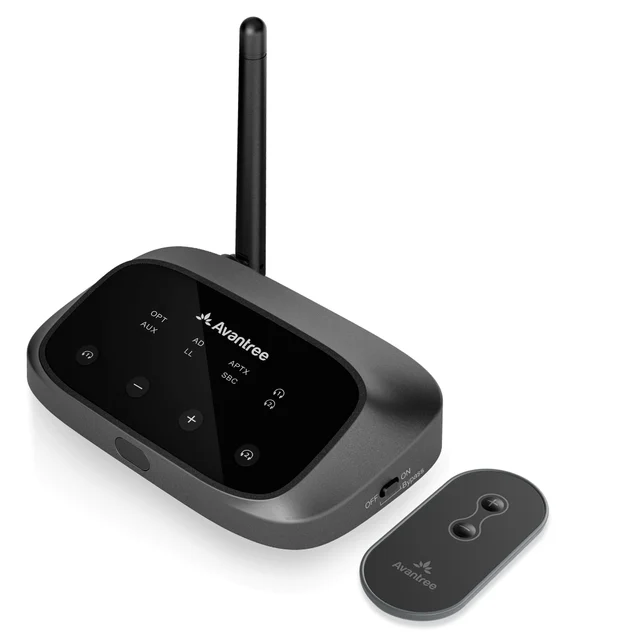
Buy the Avantree Oasis Plus 2 for most TVs: optical and 3.5mm inputs, aptX Adaptive and aptX Low Latency, dual link for two listeners, a remote and soundbar passthrough. Buy the Avantree Orbit Pro instead if your TV lacks a usable optical output or you want HDMI ARC, automatic 5.1 decoding and a display that shows paired devices and link status. The Creative BT-W6 is a first-rate USB-C transmitter for PCs, Macs and consoles, and it cannot connect to a television at all. Skip the Twelve South AirFly Pro 2 for TV duty: it is a strong travel dongle, but with no optical input and no low-latency codec listed, it does not solve the lip-sync problem. Above all, check that your headphones support the same low-latency codec, because the transmitter alone cannot deliver it. Best for: living rooms where one or two people want wireless TV audio that stays in sync, with the Orbit Pro as the fallback when the TV makes optical difficult.
Our picks at a glance
- Avantree Oasis Plus 2 - Buy. The default choice for TV audio: optical in, aptX Adaptive and aptX Low Latency out, two headphones, and a remote.
- Avantree Orbit Pro - Buy. The compatibility specialist: HDMI ARC, automatic 5.1 decoding and a screen that shows paired devices and link status.
- Creative BT-W6 - It depends. Superb USB-C transmitter for computers and consoles, and completely useless on a television.
- Twelve South AirFly Pro 2 - Skip. A genuinely good travel dongle that people keep buying for TV duty, where it is the wrong tool.
The verdict in 30 seconds
What mattered most
- Inputs
- Low-latency codecs
- Two headphones at once
- Rated range
- Also works as a receiver
- Volume control
A Bluetooth transmitter should make your TV or old stereo talk to wireless headphones without the sound arriving after the picture. Whether that happens depends less on the box than on two things: which low-latency codec your headphones actually support, and whether your source has the input the transmitter needs. Two units here get both right for most rooms, one is superb but only for computers and consoles, and one keeps getting bought for a job it was never designed to do.
The default choice for TV audio: optical in, aptX Adaptive and aptX Low Latency out, two headphones, and a remote.
Best for: Anyone with a TV that has a working optical output who wants low-latency headphone audio for one or two listeners.
- Optical and 3.5mm inputs with aptX Adaptive, aptX Low Latency, aptX and SBC, rated as low as 40ms when aptX Low Latency runs on both ends
- Dual link connects two headphones at once, with a remote so you can adjust volume from the couch
- Optical passthrough keeps a soundbar wired while headphones are in use, plus a boosted optical output for quiet TV audio
- Bluetooth 5.3 with a rated range around 164 feet, so it holds up through a wall or two
- Optical input accepts PCM only, so you have to switch the TV digital output away from Bitstream, Dolby or Auto
- Transmit only, so it cannot pull Bluetooth audio from a phone into a wired system
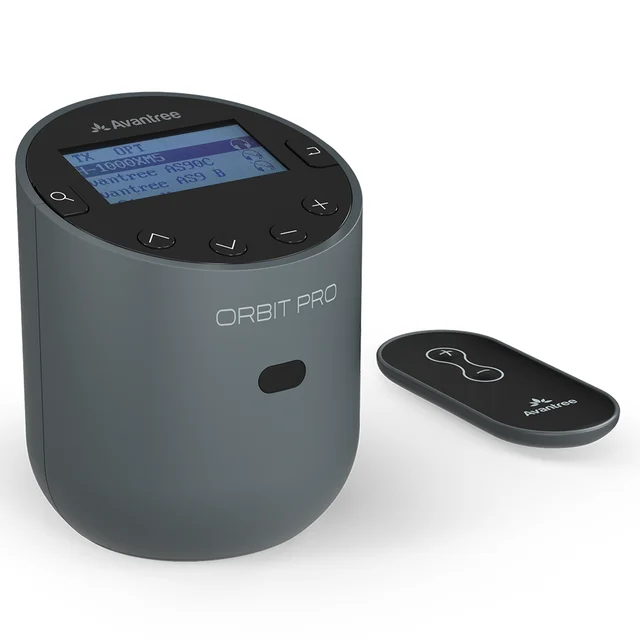
The compatibility specialist: HDMI ARC, automatic 5.1 decoding and a screen that shows paired devices and link status.
Best for: TVs with awkward or missing optical outputs, and households where two people listen on headphones at once.
- Accepts HDMI ARC as well as optical and 3.5mm, and decodes 5.1 automatically so there is no manual PCM switch to find
- LCD display shows nearby and paired devices and connection status, which turns troubleshooting into reading
- Dual link for two pairs of headphones, plus an included remote
- Works as a receiver too, so it can send phone audio into a wired amplifier or powered speakers
- Bluetooth 5.0 with aptX Low Latency, aptX, FastStream and SBC, but no aptX Adaptive
- A bulkier body that is harder to hide, and it sits at the top of what these devices cost
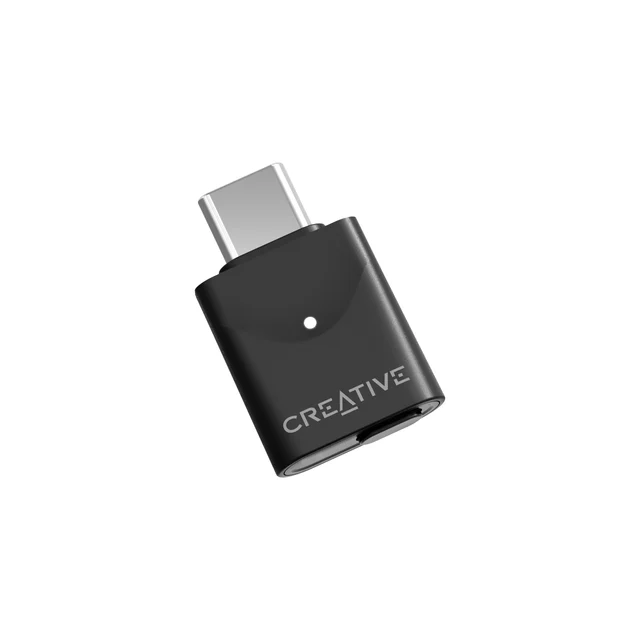
Superb USB-C transmitter for computers and consoles, and completely useless on a television.
Best for: PC, Mac and console players who want low-latency wireless audio and voice chat from one small dongle.
- Bluetooth 5.4 with both Classic and LE Audio, carrying aptX Lossless, aptX Adaptive, aptX HD and LC3
- Supports the gaming audio profile at roughly 20ms with a compatible receiver, and adds a microphone endpoint for voice chat
- Plug and play on Windows, Mac, PlayStation and Nintendo Switch 2 with no audio menus to configure
- Companion app lets you switch codecs and adjust EQ on Windows
- USB-C only, so it cannot connect to a TV without a usable USB audio output, which rules out most televisions
- Creative does not list two-device Classic pairing, so shared listening depends on broadcast mode and headphones new enough to support it
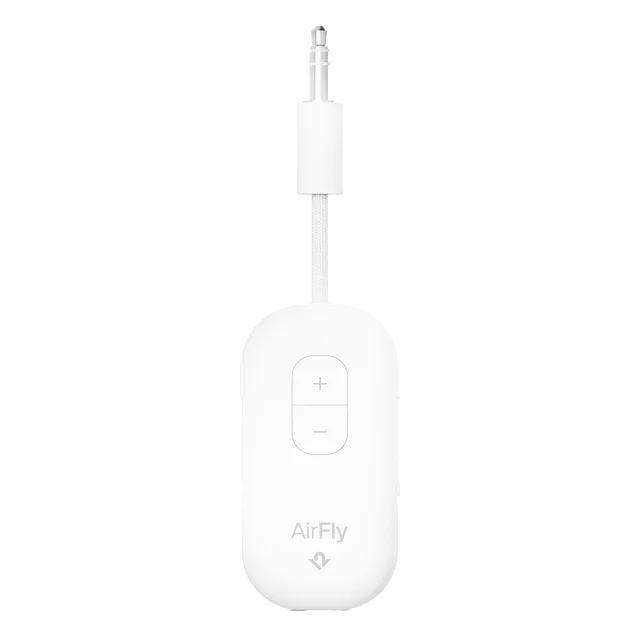
A genuinely good travel dongle that people keep buying for TV duty, where it is the wrong tool.
Best for: Frequent flyers and gym users who want wireless headphones on a wired seatback or cardio machine.
- Turns any 3.5mm jack into a Bluetooth source, which is the point on planes, treadmills and older stereos
- Past 25 hours of battery per charge, recharged over USB-C, with a clear battery indicator
- Dedicated Pair 1 and Pair 2 buttons connect two sets of headphones for shared listening
- Works as a receiver as well as a transmitter, with onboard volume and mute controls
- No optical or HDMI input, so on modern TVs there is often no jack to plug it into
- Listed with aptX rather than aptX Low Latency, so the lip-sync problem is exactly what it does not guarantee to fix
- Battery powered, which is a liability for a device meant to live behind a TV permanently
| Criteria | Avantree Oasis Plus 2 Top pick | Avantree Orbit Pro | Creative BT-W6 | Twelve South AirFly Pro 2 |
|---|---|---|---|---|
| Verdict | Buy it | Buy it | It depends | Skip it |
| Best for | Anyone with a TV that has a working optical output who wants low-latency headphone audio for one or two listeners. | TVs with awkward or missing optical outputs, and households where two people listen on headphones at once. | PC, Mac and console players who want low-latency wireless audio and voice chat from one small dongle. | Frequent flyers and gym users who want wireless headphones on a wired seatback or cardio machine. |
| Price tier | $ · mid-range | $$ · premium | $ · budget | $ · mid-range |
| Inputs | Optical, 3.5mm | HDMI ARC, optical, 3.5mm | USB-C only | 3.5mm only |
| Low-latency codecs | aptX Adaptive, aptX Low Latency, aptX, SBC | aptX Low Latency, aptX, FastStream, SBC | aptX Lossless, aptX Adaptive, aptX HD, LC3, gaming profile | aptX (no Low Latency listed) |
| Two headphones at once | Yes, dual link | Yes, dual link | Broadcast mode only, on supported LE Audio devices | Yes, Pair 1 and Pair 2 |
| Rated range | About 164 feet | About 164 feet | Typical dongle range, no long-range claim | Typical dongle range, no long-range claim |
| Also works as a receiver | No, transmit only | Yes | No, transmit only | Yes |
| Volume control | Remote plus onboard buttons, boosted optical output | Remote plus onboard buttons and LCD readout | Handled by the host device and app | Onboard volume and mute buttons |
| Power | USB-C mains power | USB-C mains power | Powered by the USB port | Internal battery, over 25 hours |
| Price tier | $ · mid-range | $$ · premium | $ · budget | $ · mid-range |
Which one is right for you?
- Anyone with a TV that has a working optical output who wants low-latency headphone audio for one or two listeners. Buy it Avantree Oasis Plus 2
- TVs with awkward or missing optical outputs, and households where two people listen on headphones at once. Buy it Avantree Orbit Pro
- PC, Mac and console players who want low-latency wireless audio and voice chat from one small dongle. It depends Creative BT-W6
- Frequent flyers and gym users who want wireless headphones on a wired seatback or cardio machine. Skip it Twelve South AirFly Pro 2
How we judged the field
Bluetooth transmitters are a category where the marketing copy and the lived experience diverge badly, so we built this comparison from three things: manufacturer specifications for inputs, codecs and rated range, independent testing that measures actual audio delay rather than repeating the box claim, and the pattern of complaints in owner reports once a unit has been in a living room for a few months. We do not run a lab. What we do is weigh the claims against what buyers consistently report going wrong.
Four criteria did most of the sorting. First, latency, because a transmitter that is half a second behind the picture is unusable for anything with faces in it. Second, input type, because optical, 3.5mm analog and USB-C are not interchangeable and the wrong one means the box never makes a sound. Third, dual-link support, since watching with a partner is one of the main reasons people buy these at all. Fourth, whether the unit gives you any way to control volume without walking to it.
The latency point deserves a warning before you read anything else. Low-latency codecs are a handshake, not a feature. aptX Low Latency only engages when the transmitter and the headphones both support it. Pair an aptX Low Latency transmitter with headphones that top out at SBC or AAC, and the link silently falls back to the slow codec. You paid for a badge and got nothing. Check your headphones first, then buy the transmitter, not the other way around.
This is the transmitter to buy if you want the fewest ways to be disappointed. It takes optical or 3.5mm analog in, supports aptX Adaptive, aptX Low Latency, aptX and SBC, and Avantree rates it as low as 40ms of delay when aptX Low Latency is running on both ends. It is rated to roughly 164 feet, which in practice means it keeps working from the kitchen.
The features that matter day to day are the unglamorous ones. Dual link lets two headphones connect at once. A small remote handles volume from the couch, which sounds trivial until you own a transmitter without one. Optical passthrough means you can keep your soundbar wired and still send audio to headphones, instead of unplugging cables every time someone wants to watch quietly. There is a boosted optical output for headphones that run quiet on TV audio.
The limitation is worth stating plainly: the optical input accepts PCM only, not Dolby Digital or DTS. On most TVs that means going into the audio settings and switching the digital output from Auto or Bitstream to PCM. Owners who skip that step report silence or static and blame the transmitter. It is a two-minute fix, but nobody tells you about it before you buy.
The Orbit Pro is the answer when the Oasis Plus 2 cannot connect to your setup. It adds HDMI ARC alongside optical and 3.5mm, and it decodes 5.1 audio automatically, which removes the PCM settings dance that trips people up on optical-only units. If your TV buries its optical output, or refuses to output PCM, this is the one that works.
It also does things the Oasis Plus 2 does not. An LCD screen shows nearby and paired devices and the connection status, so when the sound is wrong you can see more of why instead of guessing. It works as a receiver as well as a transmitter, so it can pull Bluetooth audio from a phone into a wired stereo. Dual link is supported for two pairs of headphones. A remote is included and the rated range matches the Oasis Plus 2.
The compromises: it runs Bluetooth 5.0 rather than 5.3, its codec list is aptX Low Latency, aptX, FastStream and SBC with no aptX Adaptive, and it is a bulkier unit than the flat Oasis Plus 2. It also sits at the top of what these things cost. You are paying for compatibility and visibility, not for the newest radio.
The BT-W6 solves a different problem, and whether it solves yours depends entirely on what you are plugging it into. It is a USB-C dongle. The source device sees it as a USB audio output, which means it works on PCs, Macs, PlayStation and Nintendo Switch 2 without touching any audio menus, and it does not work on a TV that has no usable USB audio output. Most TVs do not. Read that line twice before buying.
Where it fits, it is excellent. Bluetooth 5.4 with both Classic and LE Audio, aptX Lossless, aptX Adaptive and aptX HD on the Classic side, LC3 on the LE Audio side, and support for the gaming audio profile that Creative rates at roughly 20ms with a compatible receiver. There is a broadcast mode for sending to multiple LE Audio devices, and a microphone endpoint so voice chat works on the same dongle. A companion app on Windows lets you switch codecs and adjust EQ.
The catch beyond input type: Creative does not list two-device Classic pairing, so it is not a shared-listening device the way the Avantree units are. Owner comments repeatedly ask for two-device Classic pairing and note that broadcast mode only helps if your headphones are new enough to support it, which many current headphones are not.
For its actual job, the AirFly Pro 2 is a good product. It is a 3.5mm dongle that turns an airline seatback screen, a gym treadmill or an old stereo into a Bluetooth source, it runs past 25 hours on a charge, it pairs two headphones with dedicated Pair 1 and Pair 2 buttons, and it works as a receiver too. If you fly often, it earns its place in the bag.
As a TV transmitter it is the wrong tool, which is why it lands here as a skip. There is no optical input, so on modern TVs you are stuck with a headphone jack that many sets no longer have, or one that is muted the moment you change the audio output setting. Its codec support is listed as aptX, not aptX Low Latency, so the lip-sync problem it is supposed to fix is exactly the one it does not guarantee to fix. And it runs on a battery, which is a liability for something meant to sit behind a TV permanently.
Buy it for travel if travel is the problem. Do not buy it because it was the cheapest thing in the Bluetooth transmitter search results.
Avantree Oasis Plus 2 vs Avantree Orbit Pro: which should you buy?
These two overlap on the things most buyers care about. Both do dual link, both include a remote, both are rated to about 164 feet, both pass audio through to a soundbar. The decision comes down to compatibility and codec.
Buy the Oasis Plus 2 if your TV has a working optical output and you are willing to set it to PCM. It is the smaller, cheaper, newer-radio option, it carries aptX Adaptive as well as aptX Low Latency, and it does the core job with less on the desk. For the large majority of living rooms, this is the right purchase.
Buy the Orbit Pro if any of these apply: your TV has no optical output or an awkward one, you want HDMI ARC, you want automatic 5.1 handling instead of a manual PCM switch, you want a display that shows pairing and connection status, or you also want to receive Bluetooth into a wired amplifier.
If your headphones only support SBC or AAC, neither unit will give you tight lip sync, and the choice between them stops mattering. Sort the headphones out first.
What to look for
- Codec support on both ends. aptX Low Latency on the transmitter does nothing unless your headphones also list it. Same for aptX Adaptive. Confirm the headphone spec before you spend anything.
- Input type. Optical is the reliable choice for TVs. 3.5mm is fine for older gear and stereos. USB-C only works on computers and consoles that expose a USB audio output. Match this to your source or nothing else matters.
- Optical audio format. Many transmitters accept PCM only. If your TV is set to Bitstream, Dolby or Auto, expect silence or noise until you change it.
- Dual link. If two people will listen, the transmitter has to support two simultaneous connections. Independent volume per connection is better still.
- Volume control. A remote, or at least buttons you can reach, saves a lot of standing up. Some units also boost a quiet optical signal.
- Passthrough. Lets the soundbar stay wired while headphones are in use, so you are not swapping cables every evening.
- Power. Mains or USB power beats a battery for anything living behind a TV.
- Range. Rated figures assume clear line of sight. Walls cut them down, so buy more range than the room seems to need.
Our final take
Most of the frustration in this category comes from two mismatches: the codec that never engaged because the headphones did not support it, and the input that was never going to work with that particular TV. Solve those two and almost any competent transmitter will do the job.
The Avantree Oasis Plus 2 is our pick because it covers the common case well and cheaply enough: optical in, aptX Adaptive and aptX Low Latency out, two headphones, a remote, and passthrough so the soundbar stays connected. The Avantree Orbit Pro is the one to reach for when compatibility is the obstacle, with HDMI ARC, automatic 5.1 decoding and a screen that shows pairing and link status. The Creative BT-W6 is a strong buy for computers and consoles and a non-starter for televisions. The Twelve South AirFly Pro 2 is a fine travel accessory that keeps getting bought for a TV job it was never built to do.
Questions, answered
Will an aptX Low Latency transmitter fix lip sync with any headphones?
No, and this is the single most common disappointment in the category. Low-latency codecs are negotiated between the transmitter and the headphones. If your headphones only support SBC or AAC, the link falls back to that slower codec and you get the same delay you had before, with no warning on screen. Check the headphone specification for aptX Low Latency or aptX Adaptive before you buy the transmitter. If the headphones do not list one, either replace them or accept the delay.
Optical, 3.5mm or USB: which input should I be looking for?
Optical is the right answer for almost every modern TV, because the headphone jack is disappearing and TV volume controls often do not affect it anyway. Use 3.5mm for older televisions, hi-fi separates, turntable preamps and gym equipment. USB-C only works when the source can output USB audio, which covers computers, PlayStation and Nintendo Switch 2 but excludes nearly all TVs. HDMI ARC is worth seeking out when the optical port is missing or misbehaving.
My TV goes silent or crackles through the optical output. What is wrong?
Almost always the audio format. Many transmitters accept PCM only over optical, while the TV is set to Bitstream, Dolby Digital or Auto by default. Go into the TV sound settings, find the digital audio output option and set it to PCM. Owner reports show a large share of one-star reviews in this category are this setting rather than a faulty unit. Transmitters that decode 5.1 automatically, such as the Orbit Pro, avoid the problem entirely.
Can two people listen on separate headphones at the same time?
Yes, if the transmitter supports dual link. The Avantree Oasis Plus 2 and Orbit Pro both connect two pairs at once. The AirFly Pro 2 pairs two sets as well. Creative does not list two-device Classic pairing for the BT-W6, so sharing there depends on LE Audio broadcast and headphones new enough to receive it. Note that a dual-link connection can cut range or force a lower codec on some units.
Do these work with AirPods?
They will connect, because AirPods speak standard Bluetooth, but they cannot use aptX Low Latency or aptX Adaptive since Apple does not support those codecs. That means the connection falls back to AAC or SBC and you keep the delay. Volume is also awkward, since AirPods have no physical volume control, so a transmitter with its own volume buttons or remote is close to essential. For TV watching in sync, headphones that list a low-latency aptX codec are a better match.
Deciding between the top two? See our head-to-head: Avantree Oasis Plus 2 vs Avantree Orbit Pro.
More Audio & Headphones reviews
 The Best Bone-Conduction & Open-Ear Headphones: 4 Compared (and One to Skip)
  The Best Bookshelf Speakers (Passive and Powered), Weighed Against the Hype
  Best Budget Noise-Cancelling Headphones: Three Picks
  Best Budget Soundbars: Real-World Picks for Bigger Sound Without the Splurge
  The Best Cajons: 4 Compared (and One to Skip)
  The Best Car Speakers: 4 Compared (and One to Skip)