Explained
CD Players, Explained
After reading this you'll know which type of CD player fits how you actually listen, and how to decode a spec sheet so you pay for the right things.
In this guide
Buying a CD player in 2026 is no longer one decision, because the category has split into three very different shapes: bare hi-fi components that only play discs, one-box systems that also stream and power speakers, and pocket-or-desk portables. The thing that trips people up is assuming a 'CD player' is a finished product you plug into a wall and hear music from. Most of them need other gear, so the first question is never sound quality, it's what else the box does and doesn't include.
The 30-second version
- Decide component or all-in-one first. A bare player needs an amplifier and speakers; a one-box system needs only speakers, and that single choice shapes everything else about your setup and budget.
- A CD player is often just a source. Many dedicated decks output a signal but make no sound on their own, so check what you already own before you fall for the sound-quality pitch.
- The DAC and transport matter more than the badge. A quiet, well-damped disc mechanism and a good digital-to-analogue converter are what separate a player that ages well from a throwaway.
- 'Portable' usually means desk, not walk-around. Modern portables are chunky and light on skip protection compared with the old Discman, so treat them as desktop devices unless proven otherwise.
- Match outputs to the gear you have. Analogue RCA, a headphone jack, or a digital output each unlock a different setup, and buying the wrong one means an adapter hunt or a return.
The products this guide is about
Our verdict on each, with the full reasoning on the companion review.
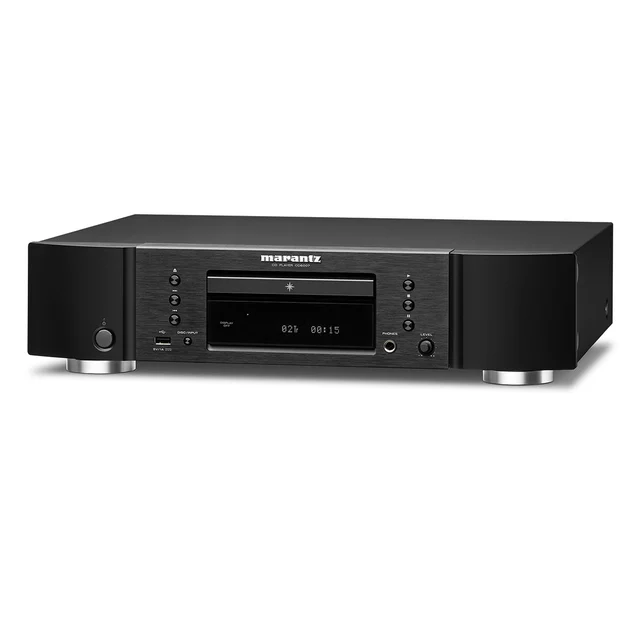
- Buy Marantz CD6007 The default 'proper' CD player: musical, well-built, and priced where a serious hi-fi disc spinner should sit. Amazon
- Buy Denon RCD-N12 (CEOL N12) A tidy all-in-one that plays CDs, streams, and powers a pair of bookshelf speakers from a single small box. Amazon
- It depends FiiO DM13 Portable Stereo CD Player A modern desk-and-go CD player with real DAC hardware, headphone outputs, and Bluetooth - great in the right hands. Amazon
- Skip Moondrop DISCDREAM 2 Portable CD Player A gorgeous transparent-lid gadget that sells the CD aesthetic far better than it sells everyday CD listening. Amazon
What actually matters
- Player type (component, all-in-one, or portable) decides how much extra gear you need and where your money goes, so it's the criterion to settle before any other.
- Whether it has a built-in amplifier tells you if you can drive speakers directly or still need a separate amp, which is the single most common surprise for first-time buyers.
- Transport quality - how quietly and steadily the disc mechanism spins - affects reliability and how the player feels over years of daily use, not just day one.
- The onboard DAC (the chip that turns the disc's digital data into analogue sound) is a big part of what you actually hear, especially on players that feed headphones or a hi-fi directly.
- Output selection determines what you can connect to: RCA for a hi-fi, a headphone jack for private listening, or optical/coaxial digital if you want to use a better external DAC.
- Connectivity and streaming (Wi-Fi, Bluetooth, internet radio, USB) can turn one box into a whole system, but you pay for features you may never touch.
- Build and everyday usability - chassis material, remote, display clarity, disc-loading feel - quietly decides whether the player is a pleasure or a chore to live with.
The specs, in plain English
Green flags vs red flags
Green flags
- A metal chassis and a quiet, smooth disc drawer or slot, which tend to signal a mechanism built to last.
- Clearly listed outputs that match your gear (RCA for a hi-fi, a powered headphone jack, or a digital out for future upgrades).
- A headphone output with its own volume control, showing the maker took private listening seriously.
- Honest positioning about what the box does and doesn't include, especially whether it has a built-in amp.
- A current model from a maker with a track record in audio, so parts, firmware, and remotes are still supported.
Red flags
- A listing that hypes 'audiophile sound' but hides the fact that you still need an amp and speakers to hear anything.
- A 'portable' pitch paired with tiny battery life and little or no skip protection, which makes it useless on the move.
- Style-first designs (transparent lids, oversized branding) where you're clearly paying a premium for looks over playback.
- Vague or missing output details, so you can't tell how it will actually connect to your system.
- Lightweight plastic construction and a rattly, slow-loading mechanism, the usual signs of a deck that won't age well.
Who's who: the brands
- Marantz - Long-standing hi-fi maker known for smooth, musical, slightly warm-sounding dedicated CD components.
- Denon - Mainstream audio brand strong in one-box systems that combine CD, streaming, and a built-in amp.
- FiiO - Newer audio specialist making feature-rich, DAC-equipped portable and desktop players aimed at headphone listeners.
- Moondrop - Design-led audio brand whose CD players lean heavily on striking, photogenic looks.
- Cambridge Audio - British hi-fi maker respected for clean, well-built dedicated CD players and transports in the separates world.
How to read a listing without getting fooled
Start at the top of the listing and answer one question before anything else: does this box have a built-in amplifier, or is it a source component that needs an amp and speakers? That single fact reframes the whole spec sheet. Next, scan the outputs and match them to what you own, because 'great sound' is meaningless if you can't connect it. Treat the word 'portable' with suspicion and look for real battery life and skip-protection figures rather than the label. Read DAC and transport mentions as clues to sound and durability, but don't be dazzled by chip model numbers, since implementation matters more than the part name. Finally, separate features you'll use from features you're merely paying for: Bluetooth, Wi-Fi, and internet radio are genuinely useful to some buyers and dead weight to others.
How much should you spend?
Think in tiers rather than figures. The value sweet spot for most people is a solidly built dedicated component or a well-reviewed one-box system, where you're paying for a reliable transport, a competent DAC, and a chassis that lasts, rather than for a logo. Spending more is worth it when you're feeding a real hi-fi and want the last measure of refinement and long-term upgradeability. Spending more is not worth it when the premium buys looks, novelty transparency, or streaming features you won't use, since a plainer player often delivers more usable music for the same outlay. At the bottom end, be wary: the cheapest players cut corners on the mechanism and skip protection, which is exactly where a disc player earns or loses your trust over time.
Questions, answered
Do I need anything else to actually play music?
It depends on the type. A bare CD component is a source only and needs a separate amplifier and speakers. A one-box system has a built-in amp, so you just add speakers. Portables and many desktop players can drive headphones directly or feed a separate amp or DAC. Always check this before you buy, because it's the most common surprise.
Component, all-in-one, or portable - which is right for me?
Choose a dedicated component if sound quality per dollar is your priority and you already run, or want to build, a system with a separate amp and speakers. Choose a one-box system if you want CDs plus streaming in a single tidy unit and only want to add speakers. Choose a portable or desktop player if headphones and a desk are your main way of listening.
Is a portable CD player as good as a home deck?
For desk convenience and driving headphones, a modern portable can be impressive and flexible. But for the quietest, most reliable transport and the easiest integration into speakers, a home component still has the edge. Many 'portables' are really desk devices with limited skip protection, so don't expect a walk-around Discman experience.
Can these play burned CD-Rs or rip discs to files?
Most modern players handle standard audio CDs and many read burned CD-R/CD-RW discs, though results vary with disc quality. Ripping to files usually isn't a core feature (a few newer portables can rip to USB storage); some players can output digital audio to a computer or DAC, but a dedicated ripping drive is better if archiving is your goal. Check a specific model's spec sheet if this matters to you.
Does the DAC really change what I hear?
It can, especially on players that feed headphones or a hi-fi directly, since the DAC is what turns the disc's data into the sound you actually hear. That said, the overall implementation, transport, and output stage matter as much as the chip's name, so treat a fancy DAC model number as one clue rather than a guarantee of great sound.
Should I pay extra for a good-looking player?
Only if you value the look for its own sake and the playback still holds up. A striking design is nice on a shelf, but value comes from a reliable mechanism and the right outputs. If a big chunk of the price is clearly buying transparency or novelty rather than better sound and build, a plainer player usually gives you more music for the money.
Or jump to the head-to-head: Marantz CD6007 vs Denon RCD-N12 (CEOL N12).