Explained
Computer Speakers, Explained
After reading, you will understand how desktop speakers differ, what the specs actually mean, and how to match a set to your desk and your source.
In this guide
Computer speakers span a huge range, from tiny plastic balls that plug into one cable to hand-built wood cabinets that cost as much as a monitor. The confusing part is that many of the best-sounding options are really small-room hi-fi or studio gear that behaves very differently up close on a desk. This guide decodes the terms and the trade-offs so you can tell a genuine desktop upgrade from an expensive mismatch.
The 30-second version
- Powered is the default. Almost every desktop speaker set you want is "powered" (active), meaning the amplifier is built in, so you plug straight into your PC or Mac with no separate receiver.
- You listen up close, so nearfield performance matters more than raw volume. At desk distance, clarity, imaging, and how the speaker fires toward your ears matter far more than how loud it can get.
- Match the connection to your source, not the other way around. USB-C is the cleanest simple path from a modern computer; analog and balanced inputs need a good source or interface; Bluetooth is for convenience, not critical listening.
- Small speakers roll off in the bass. Compact cabinets trade deep low end for size, so if you want real bass, look for a subwoofer output rather than expecting it from the speakers alone.
- Bigger is not always better on a desk. Large room speakers can crowd the desk and fire past your ears at close range, so a purpose-built desktop set often beats a superior room speaker in practice.
The products this guide is about
Our verdict on each, with the full reasoning on the companion review.
- Buy Creative Pebble Pro The little USB-C ball that punches absurdly above its price and price tier. Amazon
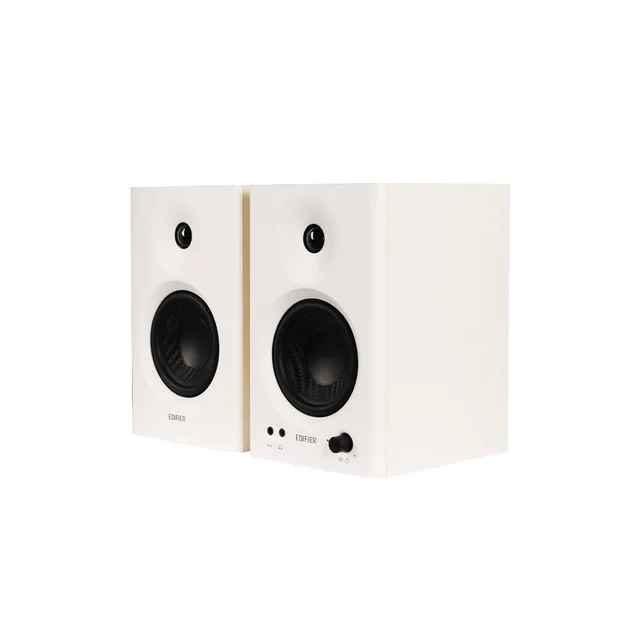
- Buy Edifier MR4 Real powered studio monitors at a price that feels like a mistake in your favor. Amazon
- It depends Kanto ORA4 A purpose-built desktop reference speaker that trades excitement for honesty and pays a premium for it. Amazon
- Skip Audioengine A5+ Wireless Superb speakers that are simply too big, and too room-focused, to make sense on a desk. Amazon
What actually matters
- Nearfield sound quality - at arm's length you hear detail and stereo imaging more than volume, so a clear, well-balanced sound up close beats a set that only shines across a room.
- Connectivity that fits a computer - a clean USB or digital path, useful analog inputs, and sensible wireless all reduce daily friction; a mismatch here annoys you more than any small sonic flaw.
- Desk footprint and placement - the cabinets must physically fit and ideally aim their tweeters toward ear level, because a speaker firing past your ears loses no matter how it measures.
- Bass and whether you can add a subwoofer - decide up front how much low end you need, and if it is a lot, prioritize a set with a subwoofer output.
- Tuning to taste - neutral, monitor-style sound is revealing but less flashy, while a warmer voicing is more forgiving for casual listening; neither is "better," they suit different uses.
- Value within its tier - ask whether a set earns its price against the one a step below it, since the jump in real-world quality does not always match the jump in price.
The specs, in plain English
Green flags vs red flags
Green flags
- A clean digital connection such as USB-C that your computer recognizes with no special drivers
- Reviewers and owners describing clear, well-balanced sound at close range, not just when turned up loud
- A cabinet size that genuinely fits your desk, ideally with stands or an angle that aims the tweeters toward ear level
- A subwoofer output if you think you will ever want more bass
- Inputs that match what you already own, whether that is a USB port, a headphone jack, or an audio interface
Red flags
- Room-sized cabinets marketed for a desk that will crowd your space and fire past your ears up close
- Only Bluetooth for a setup where you want reliable, lag-free critical listening
- Vague or inflated wattage claims with no independent testing to back up the loudness or clarity
- No subwoofer output on a compact set if deep bass is a priority for you
- A high-end model that quietly drops a feature its cheaper sibling has, such as an on-board USB converter
Who's who: the brands
- Edifier - Known for strong price-to-performance powered speakers and affordable studio monitors that punch above their cost.
- Kanto - Focuses on purpose-built desktop speakers with modern connectivity, on-board processing, and thoughtful placement accessories.
- Creative - A long-time computer audio maker best known for tidy, affordable USB and Bluetooth desktop sets.
- Audioengine - Makes well-regarded compact powered speakers that lean toward small-room hi-fi as much as desktop use.
How to read a listing without getting fooled
Start by ignoring the headline wattage, which is often measured generously and tells you little about how a speaker sounds up close. Instead, check three things in order. First, the inputs: confirm there is a connection that matches your computer and source, and be wary if the only option is Bluetooth. Second, the size and placement: read the actual dimensions against your desk, and look for stands or an angled design so the tweeters reach ear level. Third, the bass story: note whether there is a subwoofer output, because a compact set without one will not suddenly produce deep bass no matter what the listing implies. When a description leans on words like "room-filling" or "powerful," remember that room speakers and desktop speakers are different jobs, and a superb room speaker can be the wrong tool a few feet from your face.
How much should you spend?
Spending is best thought of in tiers rather than figures. At the entry level you are paying for a tidy, one-cable upgrade over built-in laptop or monitor speakers, and a good budget set delivers clear dialog and modest bass that is plenty for videos, calls, and casual music. The mid-range is where value peaks for most people: this is where honest, full-bodied sound and serious wired connectivity become affordable, often in the form of real powered monitors. Stepping up to premium buys purpose-built desktop engineering, such as clean digital input, room correction, correct placement, and a subwoofer output, which is worth it if you sit close all day and value accuracy. The flagship tier usually buys room-filling performance you cannot fully use on a desk, so paying more there often means paying for the wrong strengths. Match the tier to how and where you actually listen, and do not pay for headroom or room-scale bass you will never reach at desk distance.
Questions, answered
Do I need studio monitors, or are regular computer speakers enough?
It depends on how you listen. For clean, tidy sound during videos, calls, and casual music, ordinary powered desktop speakers are plenty and far simpler. Studio monitors aim for a flatter, more revealing sound that helps with editing or critical listening, but they reward good placement and a proper source, so they are overkill if you just want easy everyday audio.
Should I connect over USB, Bluetooth, or an analog cable?
A USB-C connection usually gives the cleanest and simplest result on a PC or Mac because it keeps the signal digital with no extra box. Bluetooth is convenient but adds a little lag and compression. Analog or balanced inputs are excellent when paired with a good source or audio interface, but they require that extra piece of gear.
Will compact desktop speakers give me deep bass without a subwoofer?
Not really. Small cabinets trade low-end depth for size, and independent testing and owner reports agree on this. Some larger desktop sets reach a bit lower, but if you want genuine deep bass, plan to add a subwoofer to a model that includes a subwoofer output.
Are premium computer speakers always better than budget ones?
No. Value tends to peak in the mid-range, where honest sound and good connectivity become affordable. Premium sets add desktop-specific engineering that is worth it if you listen closely all day, but the most expensive flagship room speakers can actually be the wrong tool on a desk because they are too large and fire past your ears at close range.
Do these work with both Windows PCs and Macs?
Yes. Standard powered speakers work with either platform over their normal inputs, and USB-C models are typically recognized as generic audio devices with no special drivers. On a Mac, a USB-C or analog connection avoids Bluetooth codec quirks and is the most reliable path.
Or jump to the head-to-head: Edifier MR4 vs Kanto ORA4.