Explained
Desktop DAC/Amps, Explained
After reading this you'll understand what a desktop DAC/amp actually does, which specs matter for your headphones, and how to avoid paying for features you won't use.
In this guide
A desktop DAC/amp is a single box that sits on your desk and turns the weak, sometimes noisy headphone output of a laptop or PC into a clean, powerful signal for good headphones. The category is crowded and most modern units sound excellent, so the hard part isn't finding a 'good' one - it's matching power, sound character, and connectivity to your actual setup. First-time buyers usually get tripped up by spec-sheet numbers and marketing features that sound impressive but make little audible difference.
The 30-second version
- A DAC and an amp are two jobs in one box. The DAC converts digital audio into an analog signal, and the amp makes that signal strong enough to properly drive your headphones - you need both done well.
- Amp power matters more than the DAC chip. Most modern DACs are effectively transparent, so the amp stage and how much it can drive your specific headphones is what actually changes your experience.
- Sound signature is a taste choice, not a quality ranking. Neutral units get out of the way; warmer units add a pleasant color - pick the one you'll enjoy rather than assuming pricier means better.
- Extras like Bluetooth, remotes, and EQ are bonuses. They add convenience but shouldn't outrank amp quality and reliability, and you shouldn't pay a premium for features you'll leave switched off.
- Wired USB is still the best-sounding connection. Bluetooth and other conveniences are fine to have, but for critical listening you'll almost always come back to a plain USB cable.
The products this guide is about
Our verdict on each, with the full reasoning on the companion review.
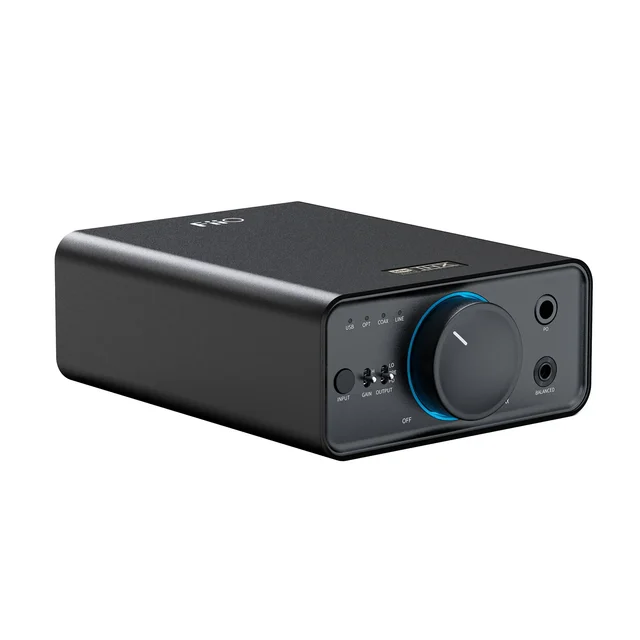
- Buy FiiO K7 A fully balanced dual-DAC, dual-THX box that quietly drives almost any headphone for a mid-range price. Amazon
- Buy iFi ZEN DAC 3 A warm, characterful DAC/amp with a proper analog bass switch, for people who don't want clinical neutrality. Amazon
- It depends Topping DX5 II A reference-clean, fully loaded desktop hub that's worth the premium only if you'll use its extras. Amazon
- Skip Creative Sound Blaster X5 A gaming-flavored DAC/amp whose DSP tricks and fussy software don't justify the price for music-first buyers.
What actually matters
- Headphone drive (amp power) - the single biggest reason to buy a desktop unit over using a laptop jack. High-impedance and planar magnetic headphones need real power to sound their best; efficient headphones barely need any.
- Sound signature - whether the amp stage is described as strictly neutral, warm and musical, or clinically analytical. This is the character you'll live with, so choose the coloration you actually want.
- Balanced output - a connection type (usually 4.4mm or 4-pin XLR) that on some designs delivers more power and a slightly lower noise floor. Useful, but not mandatory for every headphone.
- Inputs and outputs - USB is standard, but optical or coax lets you connect a TV or console, and a line-out or pre-out lets you also feed powered speakers.
- Gain control - a switch that steps output up or down so the unit suits both sensitive in-ears and hungry over-ear headphones without noise or distortion.
- Build and footprint - a desktop box lives on your desk permanently, so size, weight, and whether it needs an external power supply all matter in practice.
- Reliability and software - units whose headline features depend on a companion app are more prone to driver quirks and stability complaints from owners.
The specs, in plain English
Green flags vs red flags
Green flags
- Independent testing and owner reports agree it comfortably drives the kind of headphones you own, with power to spare
- A gain switch and both balanced and single-ended jacks, so it adapts to different headphones
- Clearly described sound character (neutral, warm, or analytical) that matches what you're after
- The inputs and outputs you actually need - USB plus optical/coax or a pre-out if your setup calls for them
- A solid metal build and, ideally, headline features that work without depending on flaky software
Red flags
- Its main selling points are DSP tricks or spatial-audio processing rather than clean amp power and fidelity
- Owners repeatedly flag finicky companion software or unstable drivers
- It costs noticeably more than proven rivals for broadly similar real-world listening
- Marketing leans on impressive-sounding spec numbers with no mention of how it drives real headphones
- It needs an external power supply for full performance but that supply is an extra you have to source or pay for separately
Who's who: the brands
- FiiO - Popular for well-powered, fairly priced all-rounders that are often treated as the default desktop recommendation.
- iFi - Known for warm, characterful sound and hands-on analog features like a physical bass boost and gain matching.
- Topping - Focuses on reference-grade, measurement-topping transparency and fully loaded, feature-rich hubs.
- Creative (Sound Blaster) - Leans toward gaming-oriented units with spatial DSP and EQ software rather than pure music fidelity.
- Schiit - A US brand known for stackable, no-frills DAC and amp components with a straightforward, function-first approach.
How to read a listing without getting fooled
When you read a desktop DAC/amp listing, start by ignoring the DAC chip name - impressive-sounding part numbers rarely translate into audible differences, because almost all modern DACs are effectively transparent. Instead, look for how the unit drives real headphones: mentions of gain settings, power output, and whether reviewers and owners say it handles demanding planar or high-impedance cans. Next, find the sound-character words - 'neutral', 'warm', 'analytical' - and decide which one you want, rather than assuming a pricier or busier unit is better. Then check that the physical inputs and outputs match your setup: USB is a given, but you only need optical or coax if you'll connect a TV or console, and a line-out or pre-out only if you'll also run powered speakers. Finally, treat Bluetooth, remotes, color displays, and EQ as convenience bonuses, and scan owner reports for complaints about companion apps and drivers, which are the most common real-world headaches.
How much should you spend?
You don't need to spend near the top of the range to get excellent sound - the value sweet spot sits in the middle, where a well-regarded all-rounder gives you clean power, a neutral or pleasantly warm tuning, and the inputs most people use. What drives cost above that point is usually features rather than fidelity: Bluetooth, remotes, displays, pre-amp outputs, and top-tier measured transparency. Those are worth paying for only if your setup genuinely calls for them and you'll actually use them; otherwise you're funding capability you'll leave switched off. Spending more makes sense when you own especially demanding headphones that need serious amp headroom, or when the unit will double as the hub for a powered-speaker setup. It rarely makes sense to pay a premium for gaming DSP or spatial-audio processing if your priority is music, since cheaper units often sound as good or better for pure listening.
Questions, answered
Do I actually need a desktop DAC/amp?
If you use hard-to-drive headphones, or your laptop or PC output sounds weak, noisy, or hissy, a desktop DAC/amp is a clear upgrade in power and cleanliness. If you mainly use efficient in-ear monitors or easy-to-drive headphones from a decent laptop, the improvement is smaller and you may not need one.
What's the difference between the DAC and the amp?
The DAC converts the digital audio from your computer into an analog signal, and the amp boosts that signal so it can properly drive your headphones. A desktop box combines both. In practice the amp stage matters more for how things sound, because most modern DACs are already effectively transparent.
Is a balanced headphone output worth it?
Balanced output mostly buys you more power and, on some designs, a slightly lower noise floor. Whether that's audible depends on your headphones. It's a nice feature to have, but a good single-ended connection is perfectly fine for many headphones, so don't treat balanced as mandatory.
How is a desktop DAC/amp different from a portable amp or an AV receiver?
Desktop units are mains- or USB-powered, sit on your desk, and are optimized for driving headphones from a computer. Portable amps run on a battery for use on the go and trade some power for size. AV receivers are built to drive loudspeakers for home theater across many channels, not to be a compact headphone source at a desk.
Do I need Bluetooth on a desktop DAC/amp?
Only if you want to stream wirelessly from a phone or tablet at the desk. It's a convenience feature, not a deciding factor - for the best quality you'll use a wired USB connection regardless. Don't pay a big premium just to get Bluetooth.
Will one of these power planar magnetic headphones?
Often yes, but it depends on the unit. Planars are frequently power-hungry, so look for a model that independent testing and owners agree has plenty of amp headroom, ideally through its balanced output. If you own demanding planars, prioritize drive power over extra features.
Or jump to the head-to-head: FiiO K7 vs iFi ZEN DAC 3.