

Audio & Headphones
The Best Computer Speakers: 4 Compared (and One to Skip)
We compared four desktop speaker sets from budget to flagship on sound, connectivity, desk footprint, and value for a PC or Mac.
The short version
For most people the Edifier MR4 is the pick: genuine powered studio monitors with a clear, detailed sound that independent testing calls a price-performance standout, held back only by the lack of wireless or USB input. The Kanto ORA4 is the premium upgrade, purpose-built for the desk with USB-C, DSP-tuned bi-amplification, Bluetooth, and a subwoofer output, though its neutral tuning is more honest than exciting. The Creative Pebble Pro is the budget hero, adding one-cable USB-C, Bluetooth, and clear dialog for very little money. Skip the Audioengine A5+ Wireless for desktop duty: it sounds wonderful but is too large and too room-focused, and it lacks the USB DAC input its smaller sibling offers. Best for: buyers who want the most honest desktop sound per dollar, with clear step-up and budget options on either side.
Our picks at a glance
- Creative Pebble Pro - Buy. The little USB-C ball that punches absurdly above its price and price tier.
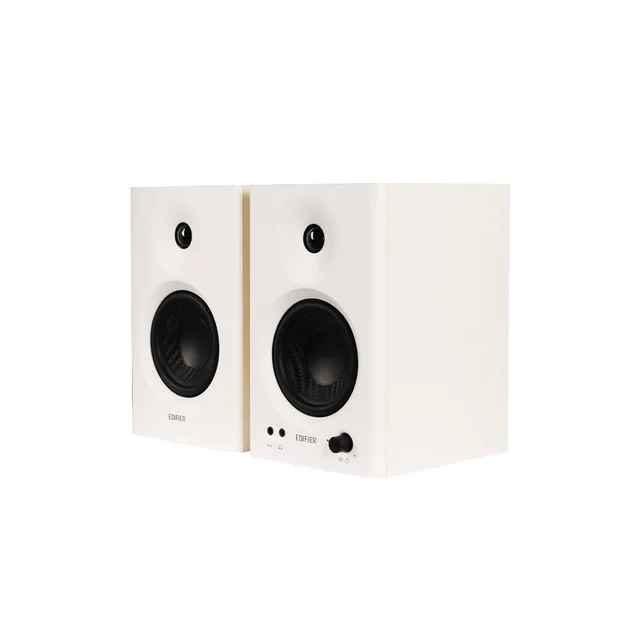
- Edifier MR4 - Buy. Real powered studio monitors at a price that feels like a mistake in your favor.
- Kanto ORA4 - It depends. A purpose-built desktop reference speaker that trades excitement for honesty and pays a premium for it.
- Audioengine A5+ Wireless - Skip. Superb speakers that are simply too big, and too room-focused, to make sense on a desk.
The verdict in 30 seconds
What mattered most
- Sound signature
- Connectivity
- Desktop footprint
- Power & headroom
- Bass without a sub
- Best use case
Desktop speakers span a huge range, from cheap plastic balls to hand-built wood cabinets that cost as much as a monitor. We synthesized independent testing and a large body of owner reports to sort four current 2026 models across that spread. Two are easy recommendations, one is a strong pick with real caveats, and one superb set is simply the wrong tool for a desk.
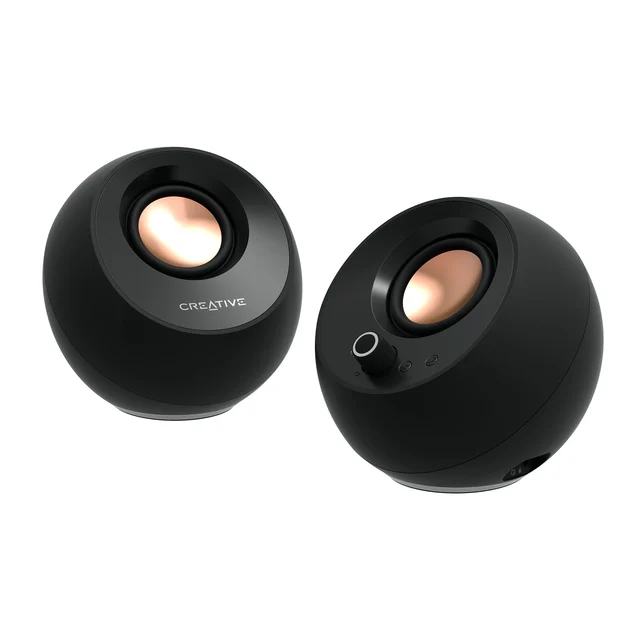
The little USB-C ball that punches absurdly above its price and price tier.
Best for: Anyone wanting a tidy, one-cable upgrade over laptop or monitor speakers without spending much.
- Single USB-C cable carries audio and power, so setup is genuinely plug-and-play on PC or Mac
- Adds Bluetooth 5.3 and a headset/mic passthrough port that most budget rivals omit
- Reviewers consistently note clean, clear dialog and more low end than the tiny cabinets suggest
- Rated output is modest, and owners report it needs the optional higher-wattage USB-PD adapter to get truly loud
- No real deep bass and no subwoofer output, so movies and bass-heavy music stay polite
Real powered studio monitors at a price that feels like a mistake in your favor.
Best for: Budget-conscious creators and listeners who want honest, full-bodied sound over convenience features.
- Independent testing repeatedly calls it a price-to-performance standout, with a clear, detailed midrange
- Proper monitor connectivity: RCA, balanced TRS for an audio interface, and a front-panel aux jack
- Switchable monitor and music voicing modes let you flatten or warm the sound for the task
- No Bluetooth, optical, or USB input, so wireless and single-cable users must add a separate DAC or interface
- No subwoofer output, and owners note the low end runs out before bass fans would like
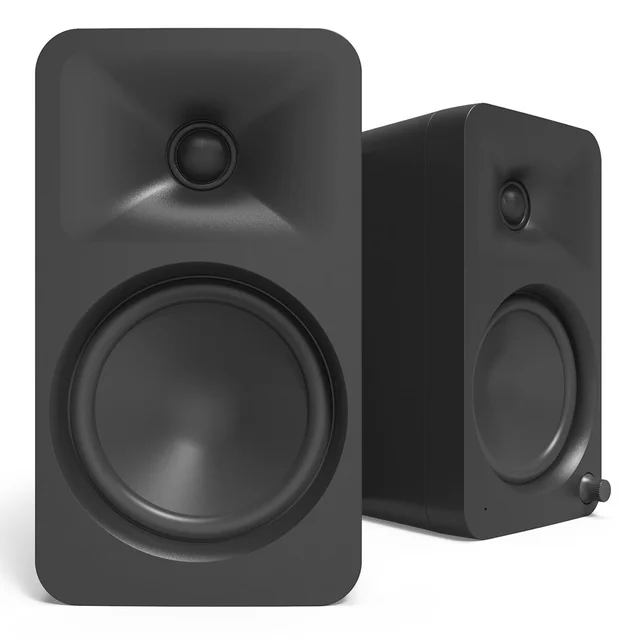
A purpose-built desktop reference speaker that trades excitement for honesty and pays a premium for it.
Best for: Listeners who sit close all day and prioritize accuracy, clean connectivity, and correct placement over drama.
- Designed for the desk, with USB-C carrying 24-bit/96 kHz audio
- DSP-tuned bi-amplification with a flat reference voicing, plus Bluetooth 5.0 and RCA inputs
- Threaded mounting holes suit optional angled stands, and a subwoofer output with an automatic 80 Hz crossover adds room to grow
- Reviewers describe the tuning as neutral and less immediately impressive than warmer rivals
- You pay a clear premium over the MR4 for that desktop-specific engineering
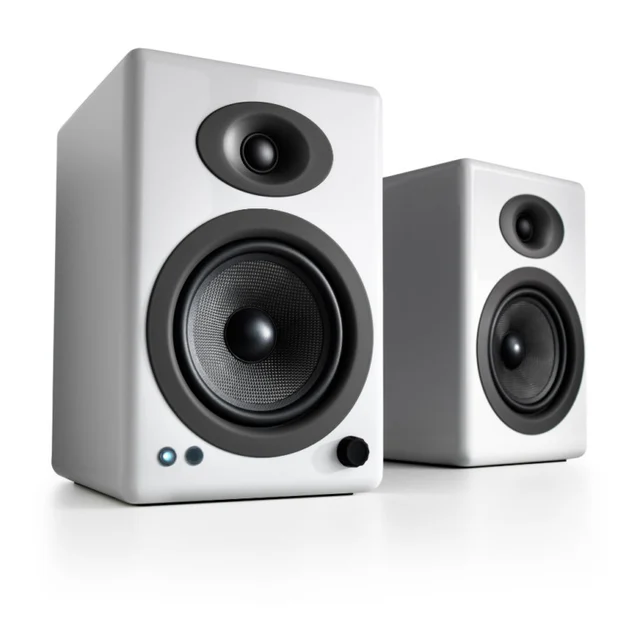
Superb speakers that are simply too big, and too room-focused, to make sense on a desk.
Best for: People furnishing a small room or turntable system, not a monitor-side desktop setup.
- Hand-finished cabinets and a larger woofer deliver the room-filling, full-bodied sound owners rave about
- Generous amplification plus Bluetooth and analog inputs make it a fine small hi-fi system
- A subwoofer output and a remote add flexibility a true desktop speaker often lacks
- The cabinets are large enough to crowd a normal desk and fire in a straight line that misses the ears up close
- Unlike the smaller A2+, this model is built around analog and Bluetooth inputs rather than a USB DAC, so a PC may need a separate converter for a clean digital feed
- It is priced and voiced as room speakers, making it overkill for nearfield desktop use
| Criteria | Creative Pebble Pro | Edifier MR4 Top pick | Kanto ORA4 | Audioengine A5+ Wireless |
|---|---|---|---|---|
| Verdict | Buy it | Buy it | It depends | Skip it |
| Best for | Anyone wanting a tidy, one-cable upgrade over laptop or monitor speakers without spending much. | Budget-conscious creators and listeners who want honest, full-bodied sound over convenience features. | Listeners who sit close all day and prioritize accuracy, clean connectivity, and correct placement over drama. | People furnishing a small room or turntable system, not a monitor-side desktop setup. |
| Price tier | $ · budget | $$ · mid-range | $$$ · premium | $$$$ · flagship |
| Sound signature | Clear, dialog-forward, light bass | Detailed, fairly neutral midrange | Neutral and accurate reference tuning | Warm, full, room-filling |
| Connectivity | USB-C, Bluetooth 5.3, aux, headset port | RCA, balanced TRS, aux (no wireless/USB) | USB-C 24-bit/96 kHz, Bluetooth 5.0, RCA, sub out | Bluetooth, analog in, sub out (no USB DAC input) |
| Desktop footprint | Tiny, fits any desk | Compact bookshelf, easy fit | Compact, built for the desk; stands optional | Large, crowds a normal desk |
| Power & headroom | Modest; louder with a USB-PD adapter | Comfortable for nearfield listening | Bi-amped, 70 W RMS | High output, made to fill a room |
| Bass without a sub | Limited, no sub output | Decent but rolls off early, no sub output | Extended for the size, sub output available | Strong, with a sub output available |
| Best use case | Cheap tidy everyday upgrade | Budget creator and music listening | Accuracy-first all-day desktop | Small-room hi-fi, not a desk |
| Price tier | $ · budget | $$ · mid-range | $$$ · premium | $$$$ · flagship |
Which one is right for you?
- Anyone wanting a tidy, one-cable upgrade over laptop or monitor speakers without spending much. Buy it Creative Pebble Pro
- Budget-conscious creators and listeners who want honest, full-bodied sound over convenience features. Buy it Edifier MR4
- Listeners who sit close all day and prioritize accuracy, clean connectivity, and correct placement over drama. It depends Kanto ORA4
- People furnishing a small room or turntable system, not a monitor-side desktop setup. Skip it Audioengine A5+ Wireless
How we judged the field
We do not run our own lab. Instead we synthesize independent bench testing, expert reviews, and a large volume of owner reports, then weigh them against what actually matters on a desk rather than in a showroom. Four things did most of the sorting.
- Nearfield sound quality. At desk distance you hear detail and imaging more than raw volume, so we favored speakers that reviewers describe as clear and well-balanced up close.
- Connectivity that fits a computer. A clean USB or digital path, useful analog inputs, and sensible wireless all count; a mismatch here causes more daily friction than any sonic flaw.
- Footprint and placement. A speaker that crowds the desk or fires past your ears loses in practice no matter how it measures.
- Value within its tier. We asked whether each model earns its price against the one a step below it.
Creative Pebble Pro
Buy itThe Pebble Pro is the easy budget answer. A single USB-C cable carries both audio and power, so it is genuinely plug-and-play on a PC or Mac, and Creative added Bluetooth 5.3 plus a headset and microphone passthrough that rivals at this price usually skip. Reviewers repeatedly note clear dialog and more low end than the small spherical cabinets have any right to produce. The honest limits are volume and bass: owners report you need the optional higher-wattage USB-PD adapter to get truly loud, and there is no subwoofer output for real depth. For a tidy, inexpensive upgrade over built-in speakers, none of that is disqualifying.
Edifier MR4
Buy itThe MR4 is the value standout of the group and our overall pick. These are proper powered studio monitors, with a one-inch silk tweeter and a four-inch woofer in a compact bookshelf cabinet, and independent testing keeps calling them a price-to-performance surprise. The midrange is clear and detailed, the connectivity is serious for the money with RCA, a balanced TRS input for an audio interface, and a front aux jack, and a switch flips between a flatter monitor voicing and a warmer music mode. The catches are the absence of Bluetooth, optical, or USB, and no subwoofer output, so wireless users and bass lovers will feel the gaps. For most desks, the sound more than makes up for it.
Kanto ORA4
It dependsThe ORA4 is the thinking listener’s upgrade. Kanto designed it as a desktop speaker: USB-C carries 24-bit/96 kHz audio with no separate DAC needed, DSP-tuned bi-amplification delivers a flat reference voicing, and threaded mounting holes let you add Kanto’s optional angled stands to bring the tweeters toward ear level. A subwoofer output leaves room to grow. The reason it lands at “it depends” is twofold. Reviewers describe its tuning as neutral and honest rather than immediately exciting, which some listeners read as less fun, and it commands a clear premium over the MR4. If accuracy, correct placement, and clean connectivity matter to you across long sessions, that premium is well spent; if you just want the most sound per dollar, it is harder to justify.
Audioengine A5+ Wireless
Skip itTo be clear, the A5+ is a lovely speaker. Hand-finished cabinets, a larger woofer, generous amplification, and Bluetooth earn the room-filling praise owners give it. The problem is context: this is a small-room hi-fi system, not a desktop speaker. The cabinets are large enough to crowd a normal desk, they fire in a straight line that misses your ears at close range, and, unlike the smaller A2+, this model is built around analog and Bluetooth inputs rather than a USB DAC, so a computer may need a separate converter for a clean digital feed. Bought for a shelf, a turntable, or a small room, it is excellent. Bought as computer speakers, it is the wrong tool, so we skip it here.
Edifier MR4 vs Kanto ORA4: which should you buy?
These two are the heart of the decision. Both aim for honest, revealing sound, but they solve different problems. The MR4 gives you genuine monitor performance and flexible wired inputs for a mid-range price, and it simply sounds bigger and clearer than its cost suggests; what it does not give you is any wireless, USB, or subwoofer connectivity, so you supply the source. The ORA4 answers exactly those gaps, adding USB-C, Bluetooth, DSP tuning, optional angled stands, and a subwoofer output, all engineered specifically for desktop distance. If your budget is the priority and you already have a source, the MR4 wins on value. If you want a single, purpose-built desktop package with modern connectivity and are willing to pay the premium, the ORA4 is the more complete answer.
What to look for
- A connection that matches your source. USB-C is the cleanest path from a modern PC or Mac; balanced inputs need an interface; Bluetooth is for convenience, not critical listening.
- A footprint that fits your desk. Measure before you buy, and prefer speakers whose tweeters can reach ear level.
- A subwoofer output if you think you will ever want real bass, since most compact desktop speakers roll off early.
- Honest volume expectations. Small speakers and USB-only power often need an optional adapter to get loud.
- Tuning that suits you. Neutral, monitor-style sound is revealing but less flashy; a warmer voicing is more forgiving for casual listening.
Our final take
Most people should buy the Edifier MR4: it delivers the most honest, full sound per dollar here and asks only that you bring a source. Step up to the Kanto ORA4 if you want a purpose-built desktop package with USB-C, Bluetooth, and a subwoofer output, and you can pay for it. Spend less on the Creative Pebble Pro if you want a clean, one-cable upgrade over built-in speakers without fuss. And leave the Audioengine A5+ Wireless for the room it was designed to fill, not the desk it was never meant to sit on.
Questions, answered
Do I need studio monitors, or are regular computer speakers enough?
It depends on how you listen. If you mostly want clean, tidy sound for videos, calls, and casual music, powered desktop speakers like the Creative Pebble Pro are plenty and far simpler. Studio monitors such as the Edifier MR4 aim for a flatter, more revealing sound that helps with editing or critical listening, but they reward good placement and a proper source.
Should I connect over USB, Bluetooth, or an analog cable?
A USB-C connection, as on the Creative Pebble Pro and Kanto ORA4, keeps the signal digital and usually gives the cleanest, simplest result on a PC or Mac. Bluetooth is convenient but can add latency and compression. Analog or balanced inputs, as on the Edifier MR4, are excellent when paired with a good source or audio interface but require that extra piece.
Will any of these give me deep bass without a subwoofer?
Not really. Owner reports and independent testing agree that compact desktop speakers trade low-end depth for size. The Kanto ORA4 and Audioengine A5+ reach lower than the smaller sets, but if you want genuine deep bass, plan to add a subwoofer to a model that provides a subwoofer output.
Why is a great-sounding speaker like the Audioengine A5+ a skip here?
This is a computer-speaker comparison, and the A5+ is really a small-room hi-fi system. Its cabinets are large for a desk, it fires in a straight line that can miss your ears at close range, and unlike the smaller A2+ it is not built around a USB DAC input. It is an excellent speaker used for its intended purpose, which is not a monitor-side desktop.
Are these compatible with both Windows PCs and Macs?
Yes. All four work with either platform over their standard inputs, and the USB-C models are recognized as generic audio devices with no special drivers. On a Mac, a USB-C or analog connection avoids Bluetooth codec quirks and is the most reliable path.
Deciding between the top two? See our head-to-head: Edifier MR4 vs Kanto ORA4.
More Audio & Headphones reviews
 The Best Desktop DAC/Amps: 4 Compared (and One to Skip)
  The Best Digital Pianos: 4 Compared (and One to Skip)
  The Best DJ Headphones: 4 Compared (and One to Skip)
  The Best Premium Dolby Atmos Soundbars: 4 Compared (and One to Skip)
  The Best Replacement Earbud Tips: 4 Compared (and One to Skip)
  The Best Electronic Drum Kits: 4 Compared (and One to Skip)