

Audio
The Best Wireless Microphones: 4 Compared (and One to Skip)
We compared four clip-on wireless systems on transmission band, rated range, battery life, whether the transmitter records a backup copy, and which devices the receiver can actually plug into.
The short version
The DJI Mic 3 is the one to buy if you want the lot: 32-bit float recording inside the transmitters, real LTC timecode, and a link that can move between 2.4 GHz and 5 GHz. The Hollyland Lark M2 is the value pick, with 9 g transmitters, roughly 10 hours a charge and a 300 m line-of-sight rating, as long as you accept that nothing is recorded inside the mic as a safety net. The Shure MoveMic Two is the phone-first option: the lavaliers pair straight to an iPhone or Android through Shure's MOTIV apps with no receiver in the bag, which is excellent for mobile journalism and awkward for camera work until you add the separate receiver. We would skip the RODE Wireless GO (Gen 3): it does record 32-bit float on board, but its 35 g transmitters are the heaviest here, it runs up to 7 hours a charge, it is rated at 260 m, and it lists no timecode, so the DJI covers everything it does and more. If you are tempted by a cheap used UHF system instead, check its tuning range first, because 617 to 652 MHz and 663 to 698 MHz are no longer assignable to wireless microphones in the US. Best for: creators, interviewers and presenters who want one clip-on kit that works on a camera and a phone without needing a licence.
Our picks at a glance
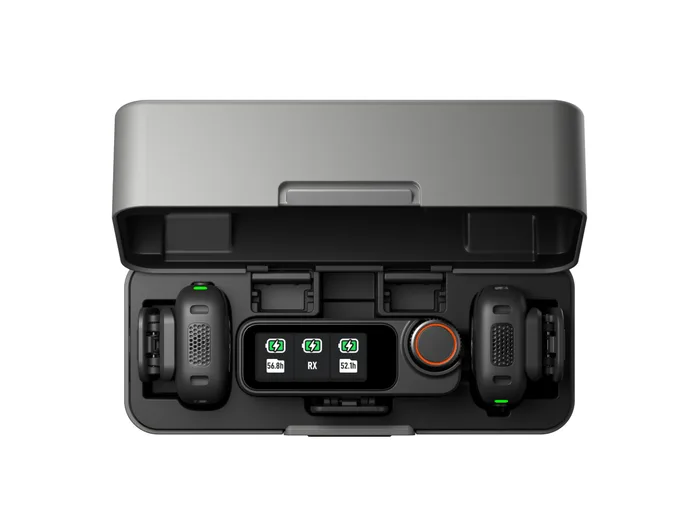
- DJI Mic 3 - Buy. The most complete clip-on kit on sale: 32-bit float recording inside the transmitters, LTC timecode, and a link that can use 5 GHz when 2.4 GHz is crowded.
- Hollyland Lark M2 - Buy. Nine-gram transmitters, about ten hours a charge and a 300 m line-of-sight rating for far less money than the premium kits.
- Shure MoveMic Two - It depends. Two 8 g lavaliers that pair straight to a phone with no receiver in the bag, which is either exactly what you want or exactly the problem.
- RODE Wireless GO (Gen 3) - Skip. A capable kit with 32-bit float on board, squeezed by heavier transmitters, the shortest battery life here and no timecode.
The verdict in 30 seconds
What mattered most
- Band and technology
- Rated range, line of sight
- Transmitter battery
- Receiver battery
- Internal recording
- 32-bit float
A clip-on wireless system is the cheapest big upgrade most video gets, and the field has split hard between phone-first kits and camera-first kits. We checked every number here against the manufacturer's own spec sheet or user guide, and we did not carry a single figure over from a previous generation. We also read the FCC rules directly, because the 600 MHz band that older UHF microphones used was reallocated and is no longer available to wireless mics. All four systems below run in the 2.4 GHz band, which sidesteps that problem, but they trade range, recording backup and outputs in very different ways.
The most complete clip-on kit on sale: 32-bit float recording inside the transmitters, LTC timecode, and a link that can use 5 GHz when 2.4 GHz is crowded.
Best for: Anyone cutting interview or multicam footage who wants a recoverable backup in the file and timecode in the edit.
- Records internally in 32-bit float or 24-bit, rated at 43 hours of 32-bit float as a single file or 21.5 hours as dual files.
- Works on both 2.4 GHz and 5 GHz, rated at 400 m in the open and 80 m in DJI's lab-simulated high-interference test with no packet loss.
- Generates and passes LTC timecode over 3.5 mm TRS or USB-C, which none of the other three do.
- 8 hours on a transmitter trails the cheaper Lark M2's roughly 10 hours.
- A full charging case refills two transmitters and a receiver only about 2.4 times.
- The Lightning phone adapter is a separate purchase.
- Transmitters and receivers are not cross-compatible with DJI Mic, Mic 2 or Mic Mini parts.
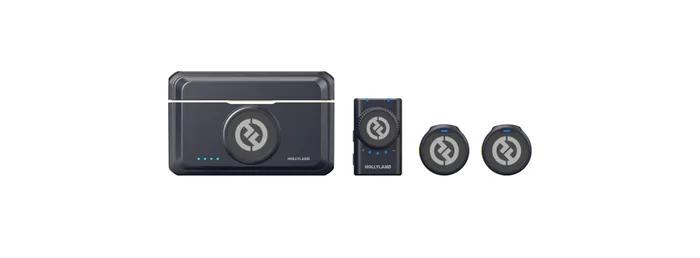
Nine-gram transmitters, about ten hours a charge and a 300 m line-of-sight rating for far less money than the premium kits.
Best for: Solo creators and interviewers who need two clean channels cheaply and are willing to watch levels as they record.
- About 10 hours per transmitter and 9 hours on the camera receiver, with the camera charging case rated at 40 hours in total.
- Transmitters weigh roughly 9 g and measure about 26 mm across, small enough to disappear on a collar.
- Sold in camera, USB-C and Lightning versions so the receiver matches the device you actually shoot on.
- Hollyland lists no internal recording, so a dropout or a clipped take is simply lost.
- 24-bit only, with no 32-bit float safety margin.
- 2.4 GHz only, and the non-line-of-sight rating drops to 40 m on the camera version and 60 m on the mobile version.
- Each output version is a separate product rather than one receiver with swappable adapters.
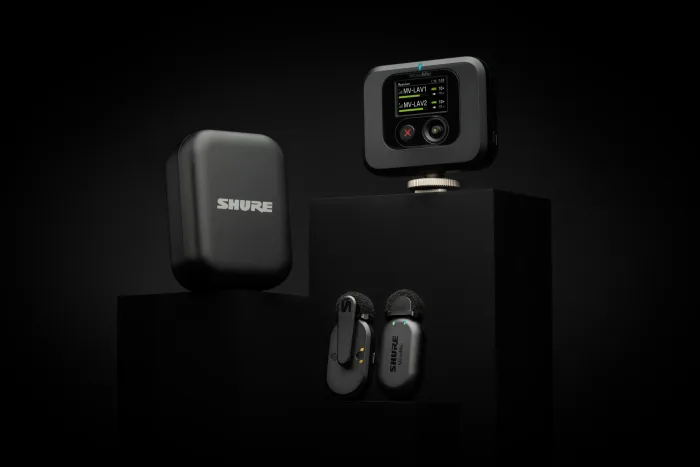
Two 8 g lavaliers that pair straight to a phone with no receiver in the bag, which is either exactly what you want or exactly the problem.
Best for: Mobile journalists and phone-first creators who work close to their subject and are happy inside the MOTIV app.
- Pairs directly to iOS or Android through the Shure MOTIV apps, so there is no receiver to mount, power or lose.
- Up to 8 hours in each microphone plus two further charges in the case, which Shure puts at 24 hours of recording.
- Rated IPX4 against rain and splashes, and each microphone weighs 8.2 g without a windscreen.
- Rated at up to 30 m line of sight, far shorter than every other system here.
- Cameras and third-party apps need the MoveMic Receiver, which is a separate purchase and charges separately.
- 24-bit with no internal recording, so whatever the phone captured is the only copy.
- Direct-to-phone recording runs through Shure's own MOTIV apps; other apps need the receiver.
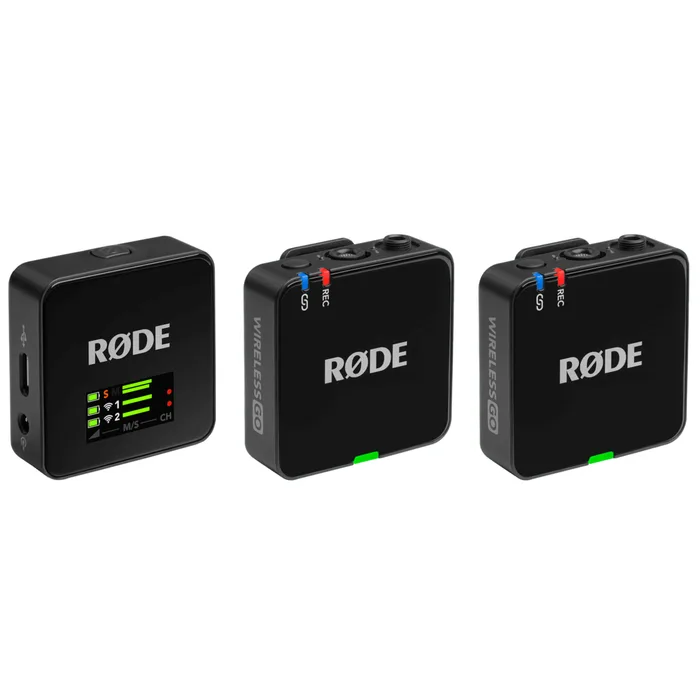
A capable kit with 32-bit float on board, squeezed by heavier transmitters, the shortest battery life here and no timecode.
Best for: Someone already invested in RODE Series IV gear who wants 32-bit float without moving up to the Wireless PRO.
- 32-bit float on-board recording in each transmitter, plus GainAssist, output gain control and a safety channel.
- Series IV 2.4 GHz transmission with 128-bit encryption, rated at 260 m line of sight.
- The receiver has a 3.5 mm TRRS analogue output and USB-C, and the box includes a charging hub and a USB-C to Lightning cable.
- Each transmitter weighs a stated 35 g, around four times the Lark M2's or the MoveMic's.
- Up to 7 hours per charge, the shortest of the four.
- Rated at 260 m line of sight, short of the DJI's 400 m and the Lark M2's 300 m.
- No timecode is listed; RODE keeps timecode for its Wireless PRO, and the box has a charging hub rather than a charging case.
| Criteria | Mic 3 Top pick | Lark M2 | MoveMic Two | Wireless GO (Gen 3) |
|---|---|---|---|---|
| Verdict | Buy it | Buy it | It depends | Skip it |
| Best for | Anyone cutting interview or multicam footage who wants a recoverable backup in the file and timecode in the edit. | Solo creators and interviewers who need two clean channels cheaply and are willing to watch levels as they record. | Mobile journalists and phone-first creators who work close to their subject and are happy inside the MOTIV app. | Someone already invested in RODE Series IV gear who wants 32-bit float without moving up to the Wireless PRO. |
| Price tier | $$$ · premium | $ · budget | $$ · mid-range | $$ · mid-range |
| Band and technology | 2.4 GHz and 5 GHz, Wi-Fi plus SDR modes | 2.4 GHz, adaptive frequency hopping | 2400 to 2483.5 MHz, Bluetooth Low Energy plus proprietary | 2.4 GHz Series IV digital, 128-bit encryption |
| Rated range, line of sight | 400 m | 300 m | 30 m | 260 m |
| Transmitter battery | 8 hours | About 10 hours | Up to 8 hours | Up to 7 hours |
| Receiver battery | 10 hours | About 9 hours, camera version | Up to 8 hours, optional MoveMic Receiver | Up to 7 hours |
| Internal recording | Yes, up to 57.3 hours at 24-bit | Not listed | No, records to the phone | Yes, 32-bit float on board |
| 32-bit float | Yes, switchable with 24-bit | No, 24-bit | No, 24-bit | Yes |
| Outputs | 3.5 mm TRS and USB-C, Lightning adapter sold separately | 3.5 mm TRS, or USB-C or Lightning depending on version | Straight to phone; 3.5 mm TRS and USB-C through the receiver | 3.5 mm TRRS and USB-C |
| Timecode | Yes, LTC in and out | Not listed | Not listed | Not listed |
Which one is right for you?
- Anyone cutting interview or multicam footage who wants a recoverable backup in the file and timecode in the edit. Buy it DJI Mic 3
- Solo creators and interviewers who need two clean channels cheaply and are willing to watch levels as they record. Buy it Hollyland Lark M2
- Mobile journalists and phone-first creators who work close to their subject and are happy inside the MOTIV app. It depends Shure MoveMic Two
- Someone already invested in RODE Series IV gear who wants 32-bit float without moving up to the Wireless PRO. Skip it RODE Wireless GO (Gen 3)
How we judged the field
Five things decide whether a clip-on system is worth owning. First, the band and the transmission scheme, because that determines whether you need a licence, how the system behaves in a crowded venue, and whether a second-hand bargain is even legal. Second, the published range, which is always a line-of-sight number measured in clear air and should be read as a ceiling rather than a promise. Third, battery life on both ends, since a transmitter that outlasts your receiver is only half a solution. Fourth, whether the transmitter records its own copy, which is the difference between a dropout costing you five minutes and costing you the interview. Fifth, what the receiver can plug into, because a 3.5 mm TRS lead, a USB-C port and a Lightning port are three different purchases on some systems.
The field splits cleanly. At the top are camera-first kits with internal recording and, increasingly, 32-bit float and timecode, which is where the DJI Mic 3 sits. Below that are value kits that do the radio part well and drop the safety net, which is the Hollyland Lark M2. Off to one side are phone-first systems with no receiver at all, represented by the Shure MoveMic Two. And alongside the DJI sits the best-known compact kit of all, the RODE Wireless GO, now in its third generation with 32-bit float, which is here to show what you give up by choosing it over the DJI. We picked one from each group so the comparison shows the actual choice rather than four versions of the same idea.
DJI Mic 3
Buy itThe DJI Mic 3 is the kit that stopped making you choose. Its transmitters record internally in 32-bit float or 24-bit, and DJI rates the memory at 43 hours of 32-bit float as a single file or 21.5 hours as dual files, so a take that clipped at the camera is still recoverable from the mic itself. It carries real LTC timecode in and out over 3.5 mm TRS or USB-C, which matters the moment a second camera joins the shoot. The radio is the other reason to pick it: it can work in 2.4 GHz or 5 GHz, and DJI publishes 400 m in an open, interference-free environment alongside a much more honest 80 m in a lab-simulated high-interference test with no packet loss. The trade-offs are runtime and outlay. Eight hours on a transmitter and ten on the receiver is respectable rather than class-leading, and a full case refills the set only about 2.4 times. Buy it if the footage has to survive an edit, not just a post.
Hollyland Lark M2
Buy itThe Hollyland Lark M2 wins on the numbers that people actually feel day to day. Each transmitter weighs about 9 g and is roughly 26 mm across, which is genuinely small enough to sit under a collar without printing through, and Hollyland rates it at about 10 hours per charge with the camera receiver at about 9 hours. The 2.4 GHz link uses adaptive frequency hopping and is rated at 300 m line of sight, dropping to 40 m without line of sight on the camera version and 60 m on the mobile version, which is a more useful pair of numbers than most brands publish. What you give up is the safety net: Hollyland lists no internal recording and no 32-bit float, so audio is 24-bit and whatever the camera or phone captured is all you get. You also choose a version up front, since the camera, USB-C and Lightning receivers are separate products. For a solo creator who watches levels, that is an easy trade.
Shure MoveMic Two
It dependsThe Shure MoveMic Two answers a different question. Both lavaliers pair straight to an iPhone or Android handset through Shure’s MOTIV apps with no receiver in the bag at all, running Bluetooth Low Energy plus a proprietary layer in the 2400 to 2483.5 MHz band. Each mic is 8.2 g without a windscreen, rated IPX4, and good for up to 8 hours with two more charges waiting in the case for 24 hours total. The catch is range: Shure publishes up to 30 m line of sight, which is fine for a seated interview and marginal for anything else. The other catch is scope. Cameras, computers and third-party phone apps need the MoveMic Receiver, a separate purchase with its own battery and its own 3.5 mm TRS and USB-C outputs, and the direct-to-phone mode runs through Shure’s own MOTIV apps. Audio is 24-bit with nothing stored in the mic. It suits a phone-first reporter, not a camera owner.
RODE Wireless GO (Gen 3)
Skip itThe RODE Wireless GO (Gen 3) is not a bad product, which is exactly why it is worth naming as the one to skip. It does the fundamentals and more: Series IV 2.4 GHz transmission with 128-bit encryption rated at 260 m line of sight, 32-bit float on-board recording for recovering clipped or quiet takes, GainAssist, output gain control and a safety channel, with a 3.5 mm TRRS output and USB-C on the receiver. The problem is what it costs you physically and what it leaves out. Each transmitter weighs a stated 35 g, around four times a Lark M2 or MoveMic transmitter, so it sits heavier on a collar. RODE rates it at up to 7 hours, the shortest of the four. It lists no timecode, which RODE keeps for its Wireless PRO, and the box carries a charging hub rather than a charging case. The DJI Mic 3 records 32-bit float too and adds timecode, 5 GHz and a longer range, while the Lark M2 is far lighter and runs longer for less. If you already own RODE Series IV gear and want 32-bit float in that ecosystem, it makes sense. Otherwise one of the others fits better.
Sources
Specs in this review come from these pages.
- RODE - Wireless GO (Gen 3) (rode.com)
- 47 CFR 15.236, Operation of wireless microphones (eCFR) (ecfr.gov)
- 47 CFR 74.802, Frequency assignment for low power auxiliary stations (eCFR) (ecfr.gov)
- 47 CFR 74.832, Licensing requirements and procedures (eCFR) (ecfr.gov)
- DJI Mic 3 specifications (dji.com)
- Hollyland Lark M2 specifications (hollyland.com)
- Shure MoveMic user guide (pubs.shure.com)
DJI Mic 3 vs Hollyland Lark M2: which should you buy?
The DJI Mic 3 and the Hollyland Lark M2 are not really competing on sound, they are competing on consequences. The Mic 3 records inside the transmitter in 32-bit float, so a level set for a quiet speaker who then laughs into the capsule is a fixable problem, and its timecode means a two-camera edit lines up without clapping. It also has somewhere to run when the venue Wi-Fi is saturated, because it can move to 5 GHz. The Lark M2 has none of that. It transmits 24-bit over 2.4 GHz with adaptive frequency hopping, it is rated at 300 m line of sight against the Mic 3’s 400 m, and if the link drops behind a pillar there is no stored copy waiting for you.
So the choice comes down to how repeatable your shoot is. If you are filming events, paid interviews, weddings or anything where the subject will not say it again, the Mic 3’s internal recording alone justifies the gap, and the timecode pays for itself on the second camera. If you are shooting talking-head videos, podcasts, lessons or social clips where you can simply re-record a line, the Lark M2 gives you longer transmitter battery, lighter transmitters, and receiver versions matched to a camera, a USB-C phone or a Lightning phone. Buy the Mic 3 for insurance. Buy the Lark M2 because most of the time you do not need to claim.
What to look for
- Check the band before anything else: a 2.4 GHz system needs no licence, while a used UHF system may tune into 617 to 652 MHz or 663 to 698 MHz, which are no longer assignable to wireless microphones in the US.
- Read range figures as a ceiling: the headline number is measured line of sight in clear air, so look for a second figure quoted under interference or without line of sight, as Hollyland and DJI both publish.
- Insist on internal recording if the moment is unrepeatable: a transmitter that keeps recording through a dropout turns a lost answer into a short repair in the edit.
- Treat 32-bit float as clipping insurance, not a sound upgrade: it only helps if the transmitter is also recording, and the capsule’s maximum SPL still sets the real limit.
- Match the output to your actual gear: 3.5 mm TRS covers cameras, but USB-C and Lightning are separate versions or separate adapters depending on the brand.
- Compare both batteries, not just the transmitter: a 10 hour transmitter paired with a 7 hour receiver gives you a 7 hour system, and only some kits include a charging case.
Our final take
Most people should buy the DJI Mic 3 and stop thinking about it. Internal 32-bit float recording, LTC timecode, and the ability to move between 2.4 GHz and 5 GHz cover the three ways audio usually goes wrong, and nothing else here does all three. If the budget is the constraint, the Hollyland Lark M2 is a genuinely good radio link with tiny transmitters and longer transmitter battery life, and the only real cost is that you have to get levels right the first time. Choose the Shure MoveMic Two only if you shoot on a phone, close to your subject, inside Shure’s apps. And pass on the RODE Wireless GO (Gen 3) unless you are already inside RODE’s Series IV ecosystem.
Questions, answered
Is it legal to use an older UHF wireless microphone in the US?
It depends entirely on where it tunes. The FCC reallocated 617 to 652 MHz and 663 to 698 MHz to the 600 MHz service under Part 27, and those ranges no longer appear in the list of frequencies assignable to low power auxiliary stations in 47 CFR 74.802. In the UHF television range the assignable bands stop at 608 MHz and do not pick up again until 653 to 657 MHz. Unlicensed users under 47 CFR 15.236 are narrower still: television channels, the 614 to 616 MHz segment of the guard band, and the 657 to 663 MHz segment of the duplex gap. So a second-hand system that only tunes inside 617 to 698 MHz has nowhere legal to sit, and a system with a wide tuning range needs to be set outside those ranges.
Do I need an FCC licence to use a wireless microphone?
Most people do not, because 47 CFR 15.236 allows unlicensed operation in the permitted bands. That freedom comes with limits: 50 mW EIRP in the television bands, 20 mW EIRP in the 600 MHz guard band and duplex gap segments, an operating bandwidth of no more than 200 kHz for a microphone, and a requirement to stay at least four kilometres outside the protected contour of a co-channel TV station. A Part 74 low power auxiliary licence unlocks more spectrum and up to 250 mW conducted power in 470 to 608 MHz, but 47 CFR 74.832 restricts eligibility to broadcasters, broadcast networks, cable operators, motion picture and television programme producers, certain Broadband Radio Service licensees, professional sound companies, and large venue owners who routinely use 50 or more devices. A 2.4 GHz digital system avoids the whole question.
Is 2.4 GHz good enough, or should I hold out for UHF?
For one or two people on a camera or a phone, 2.4 GHz is usually the better answer now. It needs no licence and no frequency coordination, the current systems hop channels automatically, and the published line-of-sight ratings run from 200 m to 400 m, which is far more than any interview needs. Its weakness is congestion, because it shares the band with Wi-Fi, Bluetooth and everything else in a crowded venue. That is why the DJI Mic 3 also offers 5 GHz and quotes a separate 80 m figure for a high-interference environment. UHF still wins for large casts, long stage distances and heavy RF planning, but that is a licensed, coordinated world rather than a plug-and-play one.
What does 32-bit float actually do for me?
A 32-bit float file has enough headroom that a signal recorded far too hot or far too quiet can be pulled back to a usable level afterwards without the digital clipping you would get from a fixed 24-bit recording. It is not magic, because the microphone capsule and preamp still have real limits, and DJI publishes a maximum SPL of 126 dB at 1 percent THD for the Mic 3 regardless of bit depth. What it removes is the most common way an interview gets ruined, which is a level set for a quiet speaker who then laughs or shouts. On the systems here it is only useful in combination with internal recording, because it protects the copy stored in the transmitter rather than what your camera hears.
Do I really need on-board recording in the transmitter?
If the shoot cannot be repeated, yes. The transmitter keeps recording even when the radio link drops behind a wall or the receiver runs flat, so a dropout becomes a small repair job in the edit rather than a lost answer. The DJI Mic 3 and the RODE Wireless GO (Gen 3) both do this, and both can record 32-bit float; DJI rates the Mic 3 at 57.3 hours of 24-bit. The Hollyland Lark M2 and the Shure MoveMic Two do not, so what the camera or phone captured is the only copy you will ever have. For casual talking-head videos that is a fair trade for the lower price and lighter transmitters.
Deciding between the top two? See our head-to-head: DJI Mic 3 vs Hollyland Lark M2.
More Audio reviews
 The Best XLR Microphone Cables: 4 Compared (and One to Skip)
  The Best XLR Microphones: 4 Compared (and One to Skip)
  The Best Speaker Stands: 4 Compared (and One to Skip)
  The Best Acoustic Guitars for Beginners: 4 Compared (and One to Skip)
  The Best Acoustic Panels: 4 Compared (and One to Skip)
  The Best USB Audio Interfaces for Home Recording: 4 Compared (and One to Skip)