

Audio & Headphones
The Best USB Audio Interfaces for Home Recording: 4 Compared (and One to Skip)
We compared four popular USB audio interfaces on preamp quality, latency, drivers, and monitoring to find the best home-recording hub.
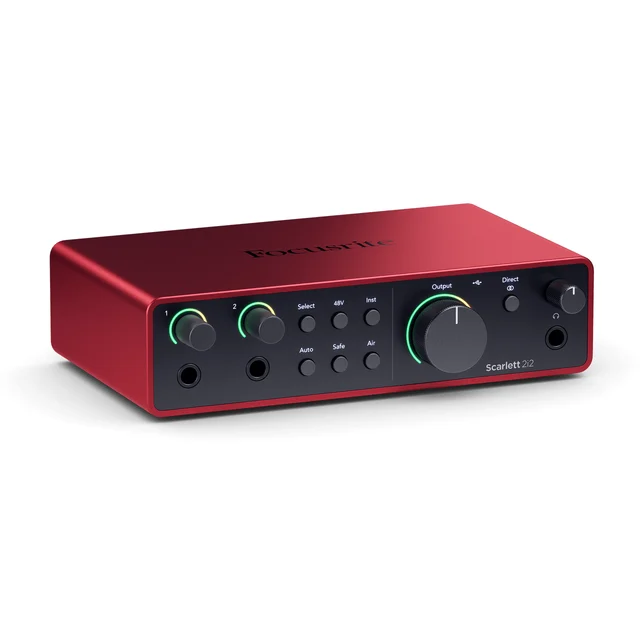
The short version
For most home recordists the Focusrite Scarlett 2i2 (4th Gen) is the interface to buy: two clean, high-gain preamps, Auto Gain and Clip Safe to protect your takes, and the most beginner-proof workflow in its class. The MOTU M2 is the runner-up and the audio purist's choice: its conversion and driver latency are widely rated among the best at its price, and it adds MIDI and a color LCD meter. The Audient iD4 MkII has arguably the best-sounding preamp of the four, but with a single XLR input and no MIDI it only makes sense if you record one source at a time. Skip the Behringer U-Phoria UM2: owners consistently report hiss, a low-resolution recording ceiling, and driver workarounds that make it a false economy even at its tempting price. Best for: the Scarlett 2i2 for all-round home recording; the M2 for sound-quality obsessives and MIDI users; the iD4 MkII for solo vocal and guitar tracking.
Our picks at a glance
- Focusrite Scarlett 2i2 (4th Gen) - Buy. The most frustration-free two-input interface you can buy, with enough clean gain for almost any microphone.
- MOTU M2 - Buy. The audio-quality pick: converter and driver performance from a much higher price class, plus real metering.
- Audient iD4 MkII - It depends. A genuine console-grade preamp in a desktop box - if you can live with a single mic input.
- Behringer U-Phoria UM2 - Skip. The bestselling bargain that costs you more in hiss, headaches, and re-records than it saves up front.
The verdict in 30 seconds
What mattered most
- Mic inputs
- Preamp character
- Recording resolution
- Metering
- Drivers & latency
- MIDI & loopback
A USB audio interface is the hub of a home studio: it turns your XLR microphone and instruments into clean digital audio and drives your headphones and monitors. The entry and mid tiers are dominated by a handful of names, and independent testing shows the gap between the best and the cheapest is bigger than the spec sheets suggest. We compared four of the most-bought models: two are easy recommendations, one is superb but only for a specific kind of user, and one bestseller we think most people should skip.
The most frustration-free two-input interface you can buy, with enough clean gain for almost any microphone.
Best for: Singer-songwriters, podcasters, and first-time home recordists who want great results without fiddling with gain staging
- Auto Gain and Clip Safe set levels for you and rescue takes that would otherwise clip
- A 69dB mic gain range, enough clean gain for many gain-hungry dynamic mics without an inline booster
- High-resolution converters with a wide dynamic range and a switchable Air mode for brighter vocals
- Two full combo inputs plus a strong bundled-software package for beginners
- No MIDI ports, so keyboard players need a separate USB connection
- Deeper features like loopback require the companion control software
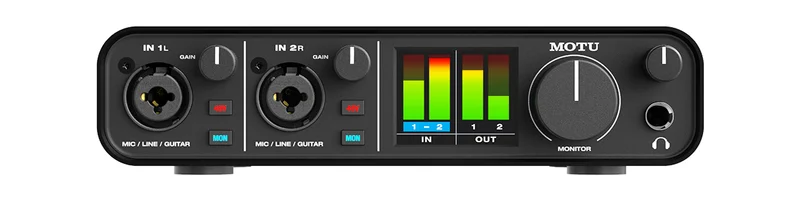
The audio-quality pick: converter and driver performance from a much higher price class, plus real metering.
Best for: Producers and mixers who prioritize transparent sound quality, accurate metering, and MIDI connectivity
- ESS Sabre32 Ultra DAC on the outputs and headphones, with output quality widely rated above same-price rivals
- Full-color LCD level meters for all inputs and outputs, rare at this price
- Excellent low-latency drivers and rock-solid stability reported by owners on both Windows and Mac
- MIDI in/out plus driver-level loopback for streaming
- No auto-gain or clip-protection conveniences - you set levels the old-fashioned way
- Stock can be patchy, and the bundled software is thinner than Focusrite's
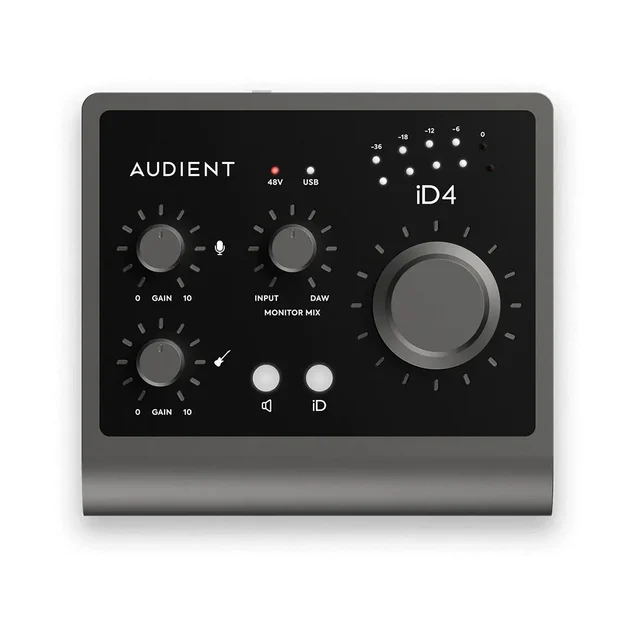
A genuine console-grade preamp in a desktop box - if you can live with a single mic input.
Best for: Solo vocalists, voice-over artists, and guitarists who record one source at a time and want the best possible preamp
- All-discrete Audient Console Mic Preamp, widely rated among the best-sounding preamps in this tier
- Solid all-metal build with a big monitor knob and clever ScrollControl DAW function
- JFET instrument input flatters DI'd guitar, and there are two headphone outputs
- Only one XLR input, so you can't record two mics or a stereo pair
- Caps out at a lower sample rate than rivals and has no MIDI
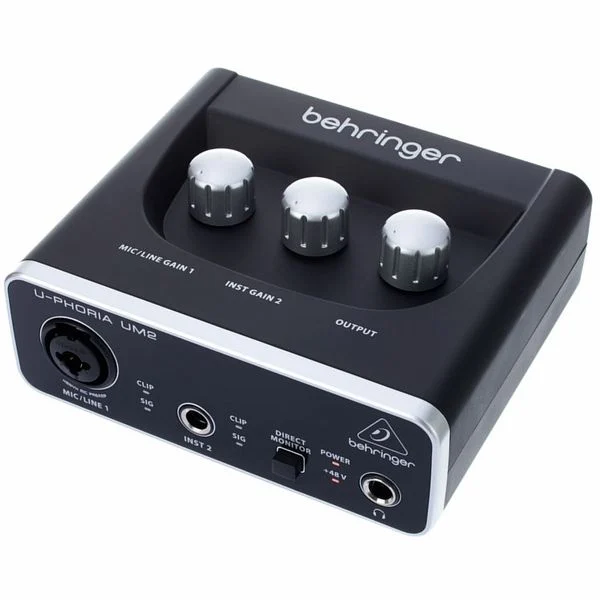
The bestselling bargain that costs you more in hiss, headaches, and re-records than it saves up front.
Best for: Almost no one - modest savings buy a much worse recording chain than any interface one step up
- Extremely cheap and provides 48V phantom power for condenser mics
- Genuinely tiny and bus-powered, fine as an emergency spare
- Owners widely report an audible noise floor, with hiss ramping up quickly as you add gain for dynamic mics
- Limited to a lower recording resolution than rivals, and owners report driver workarounds for low latency on Windows
- Recurring owner reports of crackling connections, dropouts, and inputs failing over time
Amazon had no buyable listing for this when we last checked. The link still works if it returns.
See our pick instead Find it on Amazon anyway Read our detailed assessment| Criteria | Focusrite Scarlett 2i2 (4th Gen) Top pick Buy it Buy | MOTU M2 Buy it Buy | Audient iD4 MkII It depends Buy | Behringer U-Phoria UM2 Skip it |
|---|---|---|---|---|
| Best for | Singer-songwriters, podcasters, and first-time home recordists who want great results without fiddling with gain staging | Producers and mixers who prioritize transparent sound quality, accurate metering, and MIDI connectivity | Solo vocalists, voice-over artists, and guitarists who record one source at a time and want the best possible preamp | Almost no one - modest savings buy a much worse recording chain than any interface one step up |
| Price tier | $$ · mid-range | $$ · mid-range | $$ · mid-range | $ · budget |
| Mic inputs | 2 combo XLR/line | 2 combo XLR/line | 1 XLR + 1 JFET DI | 1 XLR/line + 1 instrument |
| Preamp character | Clean with huge gain, switchable Air mode | Clean and transparent, generous gain | Discrete console preamp, warm and detailed | Basic XENYX preamp, noisy at higher gain |
| Recording resolution | Up to 24-bit/192kHz | Up to 24-bit/192kHz | Up to 24-bit/96kHz | Lower than rivals |
| Metering | LED level indicators | Full-color LCD level meters | Basic LED indicators | Single clip/signal LEDs |
| Drivers & latency | Mature native drivers, low latency | Class-leading low-latency drivers | Stable native drivers, low latency | Owners report Windows driver workarounds |
| MIDI & loopback | No MIDI; software loopback | MIDI in/out; loopback | No MIDI; software loopback | Neither |
| Standout convenience | Auto Gain + Clip Safe | LCD metering + driver stability | ScrollControl + dual headphone outs | Rock-bottom cost |
| Price tier | $$ · mid-range | $$ · mid-range | $$ · mid-range | $ · budget |
Which one is right for you?
- Singer-songwriters, podcasters, and first-time home recordists who want great results without fiddling with gain staging Buy it Focusrite Scarlett 2i2 (4th Gen)
- Producers and mixers who prioritize transparent sound quality, accurate metering, and MIDI connectivity Buy it MOTU M2
- Solo vocalists, voice-over artists, and guitarists who record one source at a time and want the best possible preamp It depends Audient iD4 MkII
- Almost no one - modest savings buy a much worse recording chain than any interface one step up Skip it Behringer U-Phoria UM2
How we judged the field
We don’t run a lab. Instead we synthesized independent testing of converter and preamp performance, latency measurements, and long-term owner reports across the four most-bought USB interfaces for home recording. The criteria that actually separate these boxes: preamp quality and usable clean gain, converter transparency, driver stability and round-trip latency, monitoring and metering, connectivity (MIDI, loopback, headphone outs), and how hard each one makes it to ruin a take. We weighted real-world reliability heavily - an interface that crackles or drops out is worthless regardless of its specs.
Focusrite Scarlett 2i2 (4th Gen)
Buy itThe fourth-generation 2i2 is the default recommendation for a reason. Focusrite moved the line to remote-controlled preamps with a 69dB gain range, enough clean gain for many gain-hungry dynamic broadcast mics without an inline booster. The headline features are Auto Gain, which listens to your source and sets levels for you, and Clip Safe, which quietly pulls gain down in real time if a take threatens to distort. For beginners those two features eliminate the single most common way home recordings get ruined. Conversion quality took a real step up in this generation, with a wide dynamic range and the switchable Air mode adding a pleasant lift to vocals. The gaps are minor: no MIDI ports, and loopback for streaming lives in the companion software rather than on the hardware. Neither changes the verdict - this is the best all-round two-input interface for home recording.
MOTU M2
Buy itThe M2 is what happens when a company known for high-end studio hardware builds an affordable desktop box without gutting the engineering. Its ESS Sabre32 Ultra DAC delivers output quality widely rated above most rivals at its price, and MOTU quotes 2.5 ms round-trip latency at 96 kHz with a 32-sample buffer, with owner reports on stability to match. The full-color LCD metering is rare at this price and genuinely useful: you see precise input and output levels instead of guessing from a blinking ring. You also get MIDI in and out, which the Scarlett lacks, plus loopback. What you give up is hand-holding: there’s no auto-gain, no clip protection, and the software bundle is leaner. If you know how to set a level - or want to learn - the M2 arguably records and plays back better than the 2i2. It’s our runner-up only because most home recordists benefit more from the Scarlett’s safety net.
Audient iD4 MkII
It dependsOn pure sound for the money the iD4 MkII might beat both picks: its all-discrete Audient Console Mic Preamp is widely rated among the best-sounding preamps in this tier. The all-metal build feels a class above, the JFET instrument input flatters DI’d guitar, and touches like dual headphone outputs and the ScrollControl virtual-scroll-wheel show real workflow thought. So why not a straight buy? One XLR input. You cannot record two microphones, a podcast guest, or a stereo pair - ever. It also tops out at a lower sample rate than the competition and omits MIDI. If you’re a solo vocalist, voice-over artist, or singer-songwriter who tracks one source at a time, the iD4 MkII is arguably the best-sounding choice on this page. If there’s any chance you’ll need a second input, buy the Scarlett or the MOTU instead.
Behringer U-Phoria UM2
Skip itThe UM2 is one of the bestselling interfaces ever made, and we still think most people should skip it. The price is genuinely tiny, phantom power is included, and for capturing a usable scratch take it functions. But the compromises stack up fast. Owners widely report an audible noise floor that gets worse exactly when you need gain most - with a dynamic mic, usable level and hiss arrive together. Recording tops out at a dated low resolution, and owners report relying on driver workarounds for low latency on Windows. Long-term owner reports add crackling jacks, random disconnects, and inputs dying outright. The savings versus a proper entry-level interface amount to a couple of takeout meals, and the step up buys cleaner preamps, modern converters, real drivers, and hardware that lasts. A false economy - skip it.
Focusrite Scarlett 2i2 (4th Gen) vs MOTU M2: which should you buy?
This is the real decision for most buyers, and it comes down to convenience versus purity. The Scarlett 2i2 is the better first interface: Auto Gain and Clip Safe mean your first sessions come out usable, its preamps have more clean gain for difficult microphones, and the bundled software gets a beginner from zero to recording. The M2 counters with measurably superior playback conversion, lower-latency and famously stable drivers, precise LCD metering, and MIDI I/O the Scarlett simply doesn’t have. Producers who spend more time mixing than tracking - or who own hardware synths - will get more from the M2. Vocalists, podcasters, and anyone allergic to gain-staging fiddliness will get more from the Scarlett. Sound quality alone won’t decide it; both are excellent, and the differences show up in workflow, not in whether your recordings sound professional.
What to look for
- Count your simultaneous sources. One mic at a time makes single-input units viable; two people or mic-plus-guitar demands two full preamps.
- Check usable clean gain, not just max gain. Gain-hungry dynamic mics expose weak preamps - this is where budget interfaces fall apart.
- Insist on proper native drivers. A dedicated low-latency driver on Windows is non-negotiable for monitoring through your computer.
- Match resolution to reality. Modern 24-bit converters matter; sample rates beyond 96kHz mostly don’t for home recording.
- Think about monitoring. Direct-monitor controls, meter visibility, and headphone output power affect every single session.
- MIDI and loopback are tiebreakers. Hardware-synth owners and streamers should check for them before buying.
Our final take
The home-recording interface market has a clear shape in 2026: the Focusrite Scarlett 2i2 (4th Gen) is the best choice for most people, pairing genuinely good audio with features that actively prevent ruined takes. The MOTU M2 is the connoisseur’s alternative - better conversion, better metering, MIDI, and superb drivers, with none of the hand-holding. The Audient iD4 MkII offers the best preamp of the group but only fits recordists who will never need a second input. And the Behringer UM2’s rock-bottom price buys you a noise floor, a driver workaround, and reliability roulette - the one case where spending almost nothing is the expensive choice.
Questions, answered
Do I need an audio interface if I already have a USB microphone?
No - a USB microphone has its own built-in interface, so plugging it through one of these boxes isn't possible or necessary. An audio interface matters when you move to XLR microphones, want to record instruments, or need to drive studio monitors properly. If you're happy with a good USB mic for voice work, you can skip the interface entirely; see our USB microphone comparison for that route.
How many inputs do I actually need?
Be honest about how you record. If you only ever track one voice or one guitar at a time, a single-input unit like the Audient iD4 MkII is enough. If you might record a mic and a guitar together, two people on a podcast, or a stereo pair, you need two proper inputs - which is exactly where the Scarlett 2i2 and MOTU M2 sit, and why they're the safest buys.
Is the Behringer UM2 really that bad for the price?
It works, and for the cost of a takeout meal it's hard to call it a ripoff. But owner reports are consistent: audible hiss once you add gain for a dynamic mic, a dated low-resolution recording ceiling, Windows driver workarounds for low latency, and reliability complaints over time. Since the step up to any interface in the next tier fixes all of that at once, we think the UM2 is a false economy for anyone serious about recording.
Will these interfaces power a condenser microphone and drive an SM7B-style dynamic mic?
All four supply 48V phantom power for condenser microphones. Gain-hungry dynamic broadcast mics are a different story: the Scarlett 2i2 4th Gen has enough clean gain to drive them directly, and the MOTU M2 and iD4 MkII get there or very close with clean results. The UM2 runs out of clean gain well before that - the noise floor rises audibly, which is one of the main reasons we rate it a skip.
Do I need MIDI ports on my interface?
Only if you own hardware synths, keyboards, or drum machines with traditional 5-pin MIDI connections. Of this group only the MOTU M2 includes MIDI in and out, which is a genuine tiebreaker for electronic musicians. Most modern controllers connect over USB directly to your computer, so plenty of home recordists never miss the ports on the Scarlett or Audient.
Deciding between the top two? See our head-to-head: Focusrite Scarlett 2i2 (4th Gen) vs MOTU M2.
More in Audio & Headphones
USB Audio Interfaces, Explained Plain-English guide → Focusrite Scarlett 2i2 (4th Gen) vs MOTU M2 Head-to-head →  The Best Small Audio Mixers for Podcasting: 4 Compared (and One to Skip)
  The Best AV Receivers: 4 Compared (and One to Skip)
  The Best Bluetooth Audio Transmitters: 4 Compared (and One to Skip)
  The Best Bone-Conduction Headphones: 4 Compared (and One to Skip)