Explained
USB Audio Interfaces, Explained
After reading this, you'll be able to read any audio interface spec sheet, know which numbers actually affect your recordings, and pick the right box for how you actually record.
In this guide
A USB audio interface is the box that sits between your microphone or instrument and your computer: it turns analog sound into clean digital audio and drives your headphones and studio monitors. First-time buyers get tripped up by spec-sheet numbers that sound impressive but barely matter - like sky-high sample rates - while the things that genuinely separate good interfaces from bad ones, like preamp noise and driver quality, hide in fine print or don't appear on the box at all.
The 30-second version
- Count your inputs first. The single most important decision is how many things you record at once - one mic means a single-input unit works, but a podcast guest or mic-plus-guitar setup demands two full preamps.
- Preamp quality beats sample rate. Clean, quiet gain is what makes recordings sound professional; a 192kHz badge on a noisy interface is marketing, not quality.
- Drivers are invisible until they ruin your session. A dedicated low-latency driver (especially on Windows) is the difference between smooth monitoring and unusable echo - budget boxes often skip it.
- The cheapest tier is a false economy. Rock-bottom interfaces save little up front but cost you in hiss, dropouts, and re-records; one step up fixes all of it at once.
- Convenience features are for real. Auto-gain and clip protection aren't gimmicks - they eliminate the most common way beginners ruin takes.
The products this guide is about
Our verdict on each, with the full reasoning on the companion review.
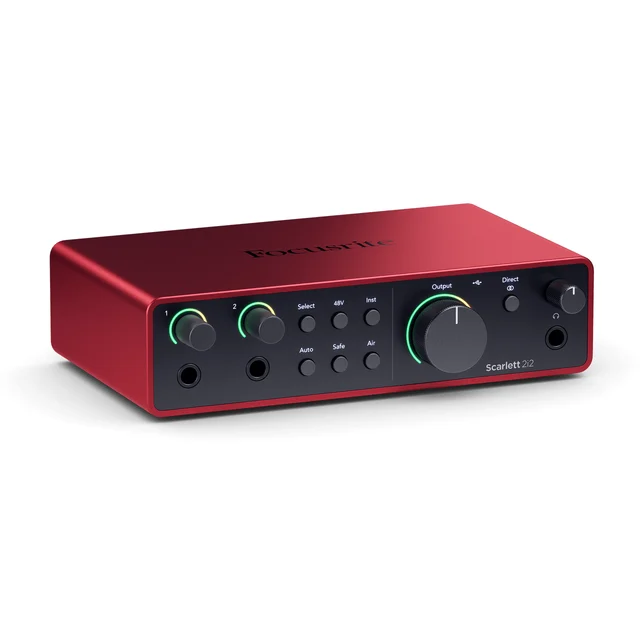
- Buy Focusrite Scarlett 2i2 (4th Gen) The most frustration-free two-input interface you can buy, with enough clean gain for almost any microphone. Amazon
- Buy MOTU M2 The audio-quality pick: converter and driver performance from a much higher price class, plus real metering. Amazon
- It depends Audient iD4 MkII A genuine console-grade preamp in a desktop box - if you can live with a single mic input. Amazon
- Skip Behringer U-Phoria UM2 The bestselling bargain that costs you more in hiss, headaches, and re-records than it saves up front.
What actually matters
- Input count and type - combo XLR/line jacks accept microphones, instruments, and line sources; be honest about whether you'll ever record two sources simultaneously, because you can't add inputs later.
- Preamp quality and usable clean gain - the preamp amplifies your mic's tiny signal, and weak ones add hiss exactly when you turn them up; gain-hungry dynamic mics are where cheap preamps fall apart.
- Driver stability and latency - the software that connects the interface to your computer determines whether you can monitor yourself without a distracting echo and whether sessions survive without crackles or dropouts.
- Converter quality - the chips that translate analog to digital (and back) set a ceiling on how transparent your recordings and playback sound; modern 24-bit conversion matters far more than extreme sample rates.
- Monitoring and metering - direct-monitor switches, visible level meters, and a headphone output with enough power affect every single session you'll ever run.
- Phantom power (48V) - required for condenser microphones; nearly every interface has it, but confirm it's there if a condenser is in your plans.
- MIDI and loopback - tiebreakers, not essentials: MIDI ports matter only if you own 5-pin hardware synths or keyboards, and loopback matters mainly for streamers who need to route computer audio into a broadcast.
The specs, in plain English
Green flags vs red flags
Green flags
- 24-bit conversion with a manufacturer-published dynamic range - a maker confident enough to state real numbers usually has hardware to back it up
- A dedicated low-latency driver for Windows and regular firmware/driver updates
- Enough clean gain to drive gain-hungry dynamic mics without an inline booster, confirmed by independent testing or consistent owner reports
- Visible input metering - ring LEDs or a proper meter - so you can set levels without guessing
- Take-saving conveniences like auto-gain or clip protection if you're a beginner
- Solid metal build and a maker with a track record in studio hardware
Red flags
- A 16-bit or 48kHz recording ceiling - a sign the core hardware is dated
- No dedicated Windows driver, with the manufacturer pointing you to a generic third-party workaround
- Consistent owner reports of hiss when adding gain for a dynamic microphone
- Recurring complaints of crackling jacks, dropouts, or inputs failing over time
- Spec sheets that shout a huge maximum sample rate but never mention preamp noise or dynamic range
- A single input dressed up in marketing that implies you can record two sources at once
Who's who: the brands
- Focusrite - The category's default name - its Scarlett range dominates entry and mid-tier home recording with beginner-friendly features and mature drivers.
- MOTU - A longtime pro studio hardware maker whose affordable desktop interfaces are known for standout converter quality and famously stable low-latency drivers.
- Audient - A British console manufacturer that puts genuine studio-console preamp designs into small desktop boxes - a sound-quality favorite among solo recordists.
- Behringer - The volume budget brand - extremely cheap and widely sold, but its entry interfaces draw consistent owner complaints about noise, drivers, and reliability.
- Universal Audio - A premium studio name whose Volt series brings vintage-flavored preamp modes and strong build to the desktop tier.
- PreSonus - A solid mid-market maker whose interfaces bundle its own recording software, making them a common all-in-one starter route.
How to read a listing without getting fooled
Start by ignoring the biggest number on the box: the maximum sample rate. Almost every interface advertises 192kHz because it's cheap to print, but it tells you nothing about recording quality. Instead, look for bit depth (24-bit is the modern floor), whether the maker publishes preamp gain range and dynamic range figures, and - critically - what the driver situation is on your operating system. Count the real inputs: a 'combo' jack is one input that accepts either XLR or a quarter-inch plug, not two, and marketing photos can make one-input boxes look more capable than they are. Then step off the spec sheet entirely and check long-term owner reports for the words 'hiss', 'crackle', and 'dropout' - reliability problems never appear in specifications, and they're the most common reason people regret a budget purchase.
How much should you spend?
What drives cost in an interface is mostly invisible: preamp circuit quality, converter chips, driver development, and build. The bottom tier gets you a working box but usually pairs it with audible hiss, dated resolution, and driver workarounds - a false economy, because the step up to the established mid-range fixes all of those at once for roughly the cost of a few takeout meals extra. That mid-range is the value sweet spot for home recording: it's where you get clean high-gain preamps, modern 24-bit conversion, proper native drivers, and features like auto-gain or real metering. Spending beyond that buys more inputs, more polished preamp character, and monitoring conveniences - worth it if you record bands or run a serious studio, but for one or two sources at a time the mid-tier is genuinely all most people ever need.
Questions, answered
Do I need an audio interface at all if I have a USB microphone?
No. A USB mic has its own tiny interface built in, so it plugs straight into your computer and can't route through an interface anyway. You need an interface when you move to XLR microphones, want to record guitars or synths, or need to drive proper studio monitors. If a good USB mic covers your voice work, skip the interface entirely.
How many inputs do I actually need?
Count the sources you'll record at the same time, not the gear you own. One voice or one guitar at a time means a single-input interface is enough. A mic plus a guitar together, two podcast voices, or a stereo pair of mics requires two full preamp inputs - and since you can't add inputs later, two-input models are the safest default.
Does a higher sample rate mean better sound?
Not in any way you'll hear. Rates from 44.1kHz up already capture the full range of human hearing, and home recordings gain nothing audible beyond 96kHz. Bit depth is the number that matters - 24-bit gives you real headroom for setting levels safely. Judge interfaces on preamp quality and drivers, not the sample-rate badge.
What is latency and why do people obsess over it?
Latency is the round-trip delay between singing into the mic and hearing yourself in your headphones through the computer. When it's high, monitoring feels like an echo and throws off your timing. Good manufacturer drivers keep it imperceptibly low; interfaces without a dedicated low-latency driver - common at the budget end - can make computer monitoring unusable. Direct monitoring sidesteps the problem by routing the mic straight to your headphones in hardware.
Can a small interface power a condenser mic and handle a quiet dynamic broadcast mic?
Phantom power for condensers is near-universal, so that part is easy. Gain-hungry dynamic broadcast mics are the real test: they need a lot of clean amplification, and weaker preamps run out of quiet gain before the mic gets loud enough, forcing an inline booster. If that style of mic is in your plans, check independent testing and owner reports for how much clean gain an interface actually delivers.
Do I need MIDI ports on my interface?
Only if you own hardware synths, keyboards, or drum machines that use traditional 5-pin MIDI cables. Most modern controllers connect to your computer over USB directly, so plenty of home recordists never miss the ports. Treat MIDI as a tiebreaker between two otherwise-equal interfaces, not a requirement.
Or jump to the head-to-head: Focusrite Scarlett 2i2 (4th Gen) vs MOTU M2.