Explained
Wireless CarPlay Adapters, Explained
After reading, you'll understand whether your car can use a wireless CarPlay adapter, which phone requirements apply, and how to compare update methods, cables and warranties.
In this guide
Wireless CarPlay adapters are simple to install but easy to buy wrong. The most common mistake is assuming one will add CarPlay to a car that does not have it; these only convert an existing wired connection. The second is ignoring phone requirements and multi-phone behaviour until the adapter is already in the car. Knowing a few terms makes the product pages much easier to read.
The 30-second version
- An adapter only converts wired to wireless, so your car or head unit must already run CarPlay over a cable.
- Cars with built-in wireless CarPlay do not need one, and several makers state their adapters will not work in them.
- Android Auto support varies, so households with both phone types need a dual-system adapter.
- The update method matters over time, because firmware fixes keep adapters working as phones and car software change.
- Your phone stops charging from that port, so plan a wireless charging mount or separate charger.
The products this guide is about
Our verdict on each, with the full reasoning on the companion review.
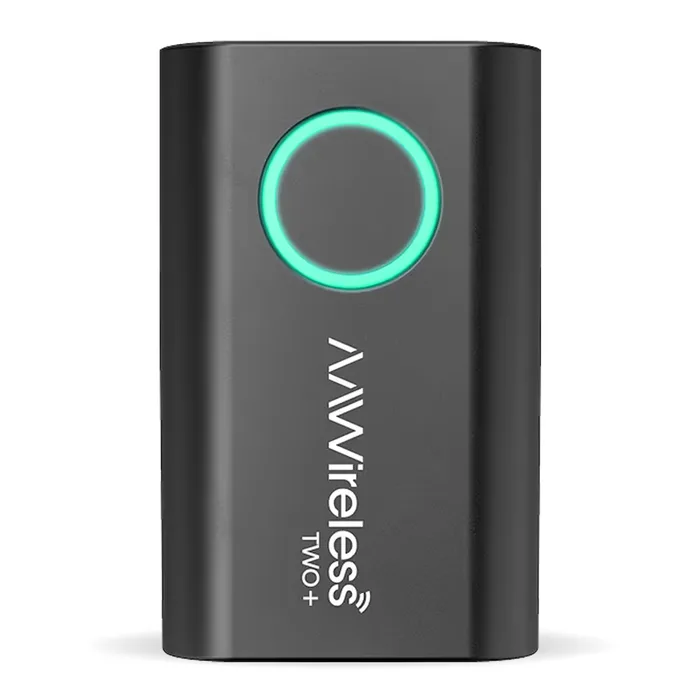
- Buy AAWireless TWO+ A CarPlay and Android Auto adapter with a pairing and switching button, a companion app and a two-year warranty.
- Buy Ottocast U2AIR Pro Wireless CarPlay Adapter A low-cost, iPhone-only wireless CarPlay adapter that reconnects automatically and updates over the air.
- It depends CRUX ACP-WLX Wireless CarPlay and Android Auto Dongle A CarPlay and Android Auto dongle from a US car interface maker, sold through dealers and installers.
- Skip Carlinkit 5.0 (2air) CPC200-2air A widely sold dual-system dongle that its own maker has since surrounded with newer models.
What actually matters
- Wired CarPlay support - The adapter talks to your car exactly as a cabled phone would. If plugging your phone in does not start CarPlay, no adapter will fix that.
- Phone requirements - Makers set minimum iPhone and Android versions for the wireless link. Check them against every phone that will use the car.
- Android Auto - Some adapters are CarPlay only. If anyone uses an Android phone, you need one that lists wireless Android Auto.
- Reconnection - The adapter should bring up CarPlay on its own when you start the car. Makers usually describe whether it reconnects to the last phone used.
- Phone switching - Shared cars need a way to move between phones. A button or app is far easier than disconnecting the other phone each time.
- Firmware updates - Updates fix compatibility issues as phone and car software changes. An app or over-the-air updates are easier than browsing to a local IP address.
- Cables and port type - The adapter needs a data cable to the CarPlay port. Check that the right USB-A or USB-C cable is included.
The specs, in plain English
Green flags vs red flags
Green flags
- A clear statement that wired CarPlay is required, with a simple compatibility check
- Published minimum iPhone and Android versions
- An app or over-the-air firmware updates
- A button or app option for switching phones
- A stated warranty term on the maker's own page
Red flags
- Claims that the adapter adds CarPlay to any car
- No stated phone requirements
- Updates only through a browser address and default Wi-Fi password
- No warranty term, only a contact or inquiry form
- An older model that the maker's own catalog has replaced
Who's who: the brands
- AAWireless - A company based in Groningen, the Netherlands, whose lineup pairs an Android Auto adapter with the dual-system TWO+ and a companion app.
- Ottocast - Sells wireless CarPlay and Android Auto adapters plus Android-based AI boxes for car screens.
- Carlinkit - A maker of CarPlay adapters and Android boxes whose catalog spans several generations of dongles.
- CRUX - A US car interface company selling integration products through dealers and installers.
How to read a listing without getting fooled
Start with the compatibility section, not the features list. Confirm the adapter needs only wired CarPlay or Android Auto, check the minimum phone versions, and look for any listed incompatible head units or car brands. Then check how it updates, how it handles more than one phone, and which cables are in the box for your car's port. Finally, find the warranty term on the maker's own page. Marketing claims about connection speed are hard to compare, so weight published requirements and support more heavily.
How much should you spend?
Budget adapters usually handle CarPlay only or come from earlier product generations, and some rely on browser-based updates. Mid-range adapters tend to add Android Auto, phone-switching controls, an app and longer warranties. Installer-channel products are priced through dealers and make most sense when bought as part of a head unit installation with local support.
Questions, answered
Does a wireless adapter add lag?
Any wireless link adds a step between phone and car, and makers compete on how quickly their adapters connect and respond. Results vary by car, phone and firmware. Keeping firmware current is the most reliable way to fix connection issues.
Can I move an adapter between cars?
Usually yes, as long as both cars support wired CarPlay. Ottocast says you may need to re-pair or redo first-time setup in the new car. Check that each car's CarPlay port matches your cable.
Will steering wheel controls still work?
Adapters pass CarPlay through the car's own interface, so the car's controls usually keep working. Carlinkit lists continued steering-wheel and button control for the 2air. Check the maker's page for your specific model.
Why does my adapter connect to the wrong phone?
Many adapters reconnect to the last phone used when several paired phones are in the car. Ottocast describes this behaviour for its adapters. Turning off Bluetooth on the other phone, or using a switch button where available, solves it.
Or jump to the head-to-head: AAWireless TWO+ vs Ottocast U2AIR Pro Wireless CarPlay Adapter.