

Automotive
The Best Wireless CarPlay Adapters: 4 Compared (and One to Skip)
Four plug-in adapters that make wired CarPlay wireless, compared on phone support, Android Auto, phone switching, update method, included cables and warranty, using each maker's published specs.
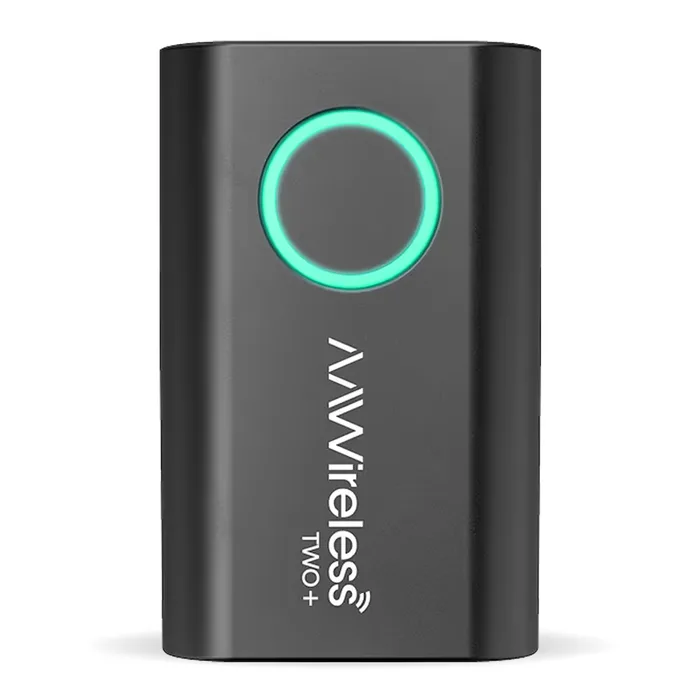
The short version
The AAWireless TWO+ is the best overall: it handles both CarPlay and Android Auto, has a button to pair and switch phones, a companion app for setup and firmware updates, and a two-year warranty. The Ottocast U2AIR Pro is the value pick for iPhone-only households, with automatic reconnection, over-the-air updates and USB-A and USB-C cables shown in the box. The CRUX ACP-WLX suits buyers getting a head unit installed by a car audio shop that carries CRUX, since it covers CarPlay and Android Auto and comes from a US interface maker with phone support, but its browser-based update process is clunky for DIY owners. Skip the Carlinkit 5.0 (2air): Carlinkit's own catalog lists newer dongles above it, its spec sheet shows Bluetooth 4.1, updates run through a browser address rather than an app, and the product page states no warranty term. Best for: AAWireless for mixed iPhone and Android households, Ottocast for a single iPhone driver.
Our picks at a glance
- AAWireless TWO+ - Buy. A CarPlay and Android Auto adapter with a pairing and switching button, a companion app and a two-year warranty.
- Ottocast U2AIR Pro Wireless CarPlay Adapter - Buy. A low-cost, iPhone-only wireless CarPlay adapter that reconnects automatically and updates over the air.
- CRUX ACP-WLX Wireless CarPlay and Android Auto Dongle - It depends. A CarPlay and Android Auto dongle from a US car interface maker, sold through dealers and installers.
- Carlinkit 5.0 (2air) CPC200-2air - Skip. A widely sold dual-system dongle that its own maker has since surrounded with newer models.
The verdict in 30 seconds
What mattered most
- Wireless CarPlay
- Wireless Android Auto
- iPhone requirement
- Switching phones
- Updates
- Cables included
If your car or head unit has wired CarPlay, a small adapter in the CarPlay USB port can make it wireless, so the phone stays in your pocket or on a mount. These adapters do not add CarPlay to a car that lacks it, and they are not needed if your car already has wireless CarPlay. What separates them is phone support, whether they also handle Android Auto, how you switch between phones and how they get updated. We picked a dual-system adapter with an app and a button, an iPhone-only budget adapter, an installer-channel dongle and a widely sold older model.
A CarPlay and Android Auto adapter with a pairing and switching button, a companion app and a two-year warranty.
Best for: Households that share a car between iPhone and Android users or switch drivers often.
- Handles wireless CarPlay and wireless Android Auto, so one adapter covers an iPhone and an Android phone in the same car.
- A multifunctional button pairs a new phone, switches to the next phone or puts the adapter in standby, and AAWireless says it can pair an unlimited number of phones.
- The AAWireless app handles setup, firmware updates, button configuration and troubleshooting, and the adapter carries a two-year warranty.
- Wireless CarPlay needs an iPhone X or newer, and wireless Android Auto needs Android 11 or higher.
- The box lists only a USB-C to USB-A cable, so a car with a USB-C CarPlay port needs a separate cable.
- It costs more than the Ottocast if you only ever use an iPhone.
- Like every adapter here, it does not work in cars that already have built-in wireless CarPlay or Android Auto.
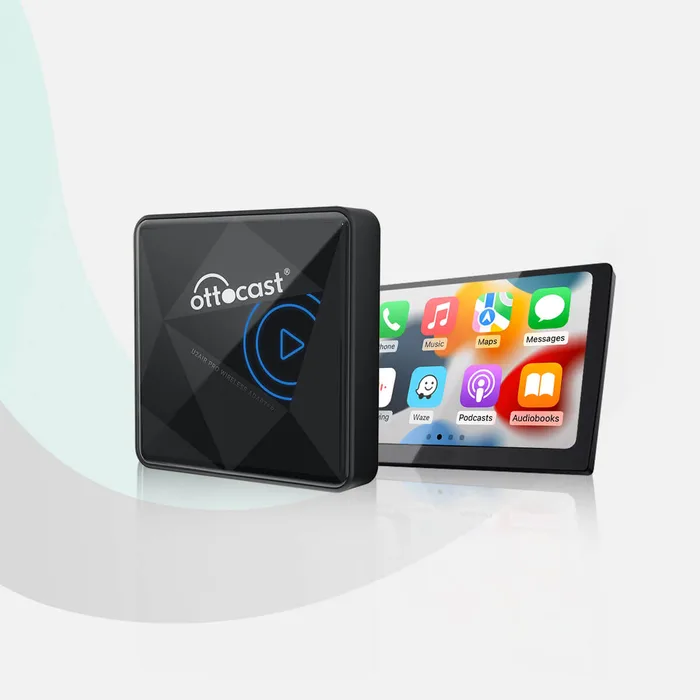
A low-cost, iPhone-only wireless CarPlay adapter that reconnects automatically and updates over the air.
Best for: A single iPhone driver who wants wireless CarPlay for as little as possible.
- Ottocast says it remembers your iPhone and reconnects automatically when you start the car.
- Firmware updates install over the air, and setup needs no app.
- Ottocast's package graphic shows both USB-C to USB-A and USB-C to USB-C cables, plus a sticky pad for mounting.
- iPhone and CarPlay only, with no Android Auto support.
- Switching phones means disconnecting CarPlay on the current phone or turning off its Bluetooth or Wi-Fi.
- Ottocast lists Sony aftermarket head units as not compatible and asks Mitsubishi owners to check before ordering.
- The warranty is one year, half of AAWireless's.
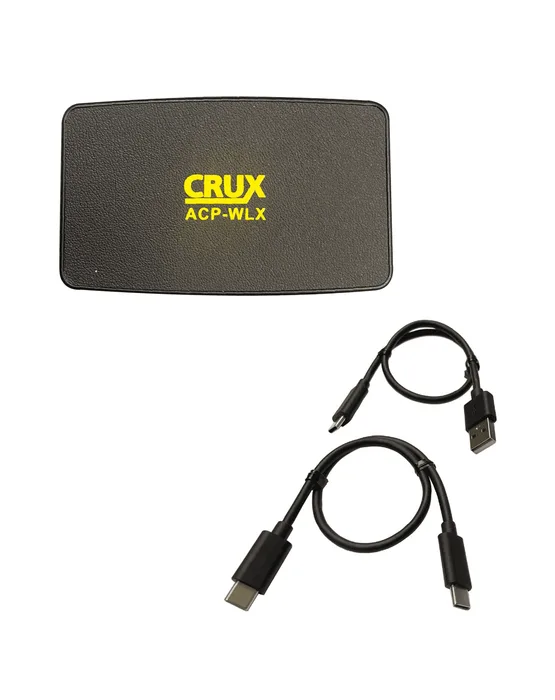
A CarPlay and Android Auto dongle from a US car interface maker, sold through dealers and installers.
Best for: Buyers having a CarPlay or Android Auto head unit installed by a shop that stocks and supports CRUX.
- Converts both wired CarPlay and wired Android Auto to wireless on select factory and aftermarket radios.
- Comes with both USB-C to USB-A and USB-C to USB-C cables, and a double-tap switches between CarPlay and Android Auto modes.
- CRUX is a car interface company in Chatsworth, California, with published phone support hours and a dealer network.
- Firmware updates run through a phone browser at 192.168.1.101, sometimes after joining the adapter's Wi-Fi with the default password printed in the manual.
- The manual says firmware updating is not recommended when everything works, and there is no companion app.
- Before pairing a new phone, the manual says to disconnect the current one from Wi-Fi and Bluetooth.
- Six Sony XAV head units are listed as not compatible.
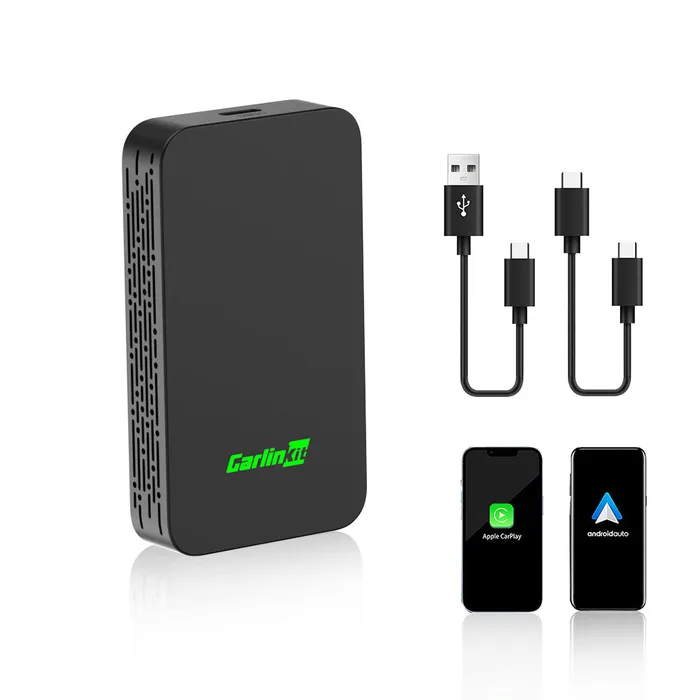
A widely sold dual-system dongle that its own maker has since surrounded with newer models.
Best for: Nobody choosing fresh; the AAWireless or Ottocast is the better buy.
- Supports wireless CarPlay and wireless Android Auto, and keeps steering-wheel and button controls working.
- Works with older iPhones, from iPhone 6 and iOS 10 up, a wider range than the AAWireless.
- Includes USB-A to USB-C and USB-C to USB-C cables.
- Carlinkit's own product catalog lists newer adapters, including the Mini Ultra series and CP2A Pro, ahead of the 2air.
- Its spec sheet lists Bluetooth 4.1 and an Atmel AT91SAM9260 processor, older parts than you would choose today.
- Updates and settings run by typing 192.168.50.2 into a phone browser rather than through an app.
- The product page states no warranty term, only a warranty inquiry link.
| Criteria | AAWireless TWO+ Top pick | Ottocast U2AIR Pro Wireless CarPlay Adapter | CRUX ACP-WLX Wireless CarPlay and Android Auto Dongle | Carlinkit 5.0 (2air) CPC200-2air |
|---|---|---|---|---|
| Verdict | Buy it | Buy it | It depends | Skip it |
| Best for | Households that share a car between iPhone and Android users or switch drivers often. | A single iPhone driver who wants wireless CarPlay for as little as possible. | Buyers having a CarPlay or Android Auto head unit installed by a shop that stocks and supports CRUX. | Nobody choosing fresh; the AAWireless or Ottocast is the better buy. |
| Price tier | $$ · mid-range | $ · budget | $$ · mid-range | $ · budget |
| Wireless CarPlay | Yes | Yes | Yes | Yes |
| Wireless Android Auto | Yes (Android 11+) | No | Yes (Android 11+, 5GHz Wi-Fi) | Yes (Android 11+) |
| iPhone requirement | iPhone X or newer | iPhone (model not stated) | Not stated | iPhone 6 or newer, iOS 10+ |
| Switching phones | Button press | Disconnect current phone | Disconnect current phone | Not described |
| Updates | Companion app | Over the air | Phone browser, 192.168.1.101 | Phone browser, 192.168.50.2 |
| Cables included | USB-C to USB-A | USB-C to USB-A and USB-C to USB-C | USB-C to USB-A and USB-C to USB-C | USB-A to USB-C and USB-C to USB-C |
| Size and weight | 5.5 x 3.5 x 1.5 cm, 18 g | Not listed on page | Not listed | 76 x 43 x 12.3 mm, 29 g |
| Warranty | 2 years | 1 year | Not stated on page | Not stated on page |
Which one is right for you?
- Households that share a car between iPhone and Android users or switch drivers often. Buy it AAWireless TWO+
- A single iPhone driver who wants wireless CarPlay for as little as possible. Buy it Ottocast U2AIR Pro Wireless CarPlay Adapter
- Buyers having a CarPlay or Android Auto head unit installed by a shop that stocks and supports CRUX. It depends CRUX ACP-WLX Wireless CarPlay and Android Auto Dongle
- Nobody choosing fresh; the AAWireless or Ottocast is the better buy. Skip it Carlinkit 5.0 (2air) CPC200-2air
How we judged the field
Five things decide whether a wireless CarPlay adapter is a quiet convenience or a daily annoyance. Compatibility comes first: the car must have wired CarPlay, and the adapter must support your phone model and, if you need it, Android Auto. Reconnection behaviour matters next, because you want CarPlay to come up on its own when you start the car. Multi-phone handling decides how painful it is to share a car. The update method matters because these adapters depend on firmware fixes as phones and car systems change. Finally, cables and warranty decide whether it works out of the box in your port and what happens if it fails.
The field splits into CarPlay-only adapters, dual CarPlay and Android Auto adapters, and installer-channel products sold through car audio dealers. We picked the AAWireless TWO+ as the most complete dual-system option, the Ottocast U2AIR Pro as a budget iPhone-only choice, the CRUX ACP-WLX for buyers working with an installer, and the Carlinkit 2air because it is widely sold yet has been overtaken by its own maker’s newer models.
The AAWireless TWO+ is the adapter to buy if anyone in your car uses Android, or if you share the car often. It handles both wireless CarPlay and wireless Android Auto, and its multifunctional button pairs a new phone, jumps to the next paired phone or puts the adapter in standby. AAWireless says you can pair an unlimited number of phones. The companion app is the other big difference: it walks you through setup, delivers firmware updates, lets you configure the button and includes a troubleshooter. The hardware is small at 5.5 x 3.5 x 1.5 cm and 18 g, with a USB-C port, and it carries a two-year warranty. There are limits. Wireless CarPlay needs an iPhone X or newer, wireless Android Auto needs Android 11 or higher, and the box lists only a USB-C to USB-A cable, so a USB-C car port needs another cable. It suits mixed-phone households and anyone who wants app-based control.
The Ottocast U2AIR Pro is the value pick, and it keeps things simple. It is a wireless CarPlay adapter for iPhone only, built for cars with factory wired CarPlay; Ottocast says it is for 2016 or newer vehicles. Ottocast says it remembers your phone and reconnects automatically when you start the car, needs no app, and updates its firmware over the air. Its package graphic shows both USB-C to USB-A and USB-C to USB-C cables plus a sticky pad, so most cars are covered without buying extra parts. The trade-offs come from that focus. There is no Android Auto, switching phones means disconnecting CarPlay on the current phone, Sony aftermarket head units are listed as not compatible, and Mitsubishi owners are asked to check before ordering. The warranty is one year. For a single iPhone driver in a compatible car, it does the core job at the lowest cost here.
The CRUX ACP-WLX makes sense in a specific situation. CRUX is a car interface company in Chatsworth, California, that sells through dealers and installers, and this dongle converts wired CarPlay and wired Android Auto to wireless on select factory and aftermarket radios. It ships with USB-C to USB-A and USB-C to USB-C cables, and a double-tap switches between CarPlay and Android Auto modes. If a shop is fitting a new head unit and supports CRUX products, that local backup is worth something. For a DIY buyer, the manual tells a less polished story. Updates run through a phone browser at 192.168.1.101, sometimes after joining the adapter’s Wi-Fi with a default password printed in the manual, and CRUX advises against updating when everything works. You disconnect the current phone before pairing another, and six Sony XAV head units are listed as incompatible. Choose it through an installer, not as a self-install upgrade.
The Carlinkit 5.0, sold as the 2air, is one of the most widely available wireless CarPlay dongles, which is why it is here. On paper it covers a lot: wireless CarPlay and Android Auto, iPhone 6 and iOS 10 or newer, steering-wheel and button controls, and both USB-A to USB-C and USB-C to USB-C cables. The problem is age and support. Carlinkit’s own catalog now lists newer adapters, including several Mini Ultra models and the CP2A Pro, ahead of it. The 2air’s spec sheet lists Bluetooth 4.1 and an Atmel AT91SAM9260 processor. Updates and settings run by typing 192.168.50.2 into a phone browser, with no app, and there is no button for switching phones. The product page shows a warranty inquiry link but states no warranty term. Its one real edge is support for older iPhones. For most buyers, the AAWireless or Ottocast is a better way to spend the money.
AAWireless TWO+ vs Ottocast U2AIR Pro Wireless CarPlay Adapter: which should you buy?
The AAWireless TWO+ and Ottocast U2AIR Pro solve the same core problem differently. The AAWireless is the more capable adapter: CarPlay and Android Auto, a physical button to switch between phones, an app for updates and troubleshooting, and a two-year warranty. The Ottocast is narrower and cheaper: iPhone and CarPlay only, automatic reconnection to the last phone, over-the-air updates without an app, and both USB-A and USB-C cables shown in the box.
Choose the AAWireless if anyone who drives the car uses Android, if two or more people swap drivers regularly, or if you like having an app to manage firmware and settings. Choose the Ottocast if one iPhone owner drives the car and you want the simplest, lowest-cost route to wireless CarPlay. Check your car’s port first: with a USB-C CarPlay port, the Ottocast’s included cables cover you, while the AAWireless needs an extra cable.
What to look for
- Wired CarPlay already in the car: plug your phone in with a cable first; if CarPlay starts, an adapter can make it wireless.
- Phone support: check the minimum iPhone model and whether you also need Android Auto.
- Phone switching: a button or app makes sharing the car easy, while disconnect-to-switch gets old quickly.
- Update method: an app or over-the-air updates beat typing an IP address into a browser.
- Cables for your port: make sure the box includes the right cable for a USB-A or USB-C CarPlay port.
- Stated warranty: look for a clear warranty term on the maker’s page, not just a contact form.
Our final take
For most drivers, the AAWireless TWO+ is the adapter to get: it covers CarPlay and Android Auto, switches phones with a button, updates through an app and carries a two-year warranty. If you are the only driver and you use an iPhone, the Ottocast U2AIR Pro does the core job for less, reconnecting automatically and updating over the air. The CRUX ACP-WLX is worth it when a car audio shop is installing and supporting it. Skip the Carlinkit 2air, which its maker has moved past and which relies on browser-based updates. Remember the phone no longer charges from the CarPlay port.
Questions, answered
Will a wireless CarPlay adapter work in my car?
Only if your car or head unit already supports wired CarPlay, or wired Android Auto for the dual-system adapters. The quick check every maker here describes is to plug your phone in with a cable: if CarPlay or Android Auto starts, the adapter should work. Plug the adapter into the USB port that runs CarPlay, not a charge-only port. If your car has no CarPlay at all, an adapter cannot add it.
Do I need one if my car already has wireless CarPlay?
No. AAWireless states that cars with built-in wireless CarPlay or Android Auto are not compatible, and Ottocast says wireless-only CarPlay vehicles are not supported by the U2AIR Pro. These adapters exist to bridge wired-only systems. If your car is already wireless, your phone connects directly.
Will my phone still charge?
Not from the CarPlay port, because the adapter is now plugged into it instead of your phone. On long drives with navigation and streaming, that matters. Many drivers pair an adapter with a wireless charging phone mount, which our car phone mounts comparison covers, or use a separate USB charger. Plan for this before you go wireless.
Can two people share one adapter?
Yes, but the experience differs. The AAWireless TWO+ has a button that switches to the next paired phone, and it handles both iPhone and Android. The Ottocast reconnects to the last phone used, and to switch you disconnect CarPlay on that phone first. The CRUX manual also asks you to disconnect the current phone before pairing another.
Does it matter whether my car's port is USB-A or USB-C?
It matters for the cable. The adapters here use a USB-C port on the dongle. The Ottocast, CRUX and Carlinkit list both USB-C to USB-A and USB-C to USB-C cables. AAWireless lists only a USB-C to USB-A cable in the box, so a car with a USB-C CarPlay port needs a short USB-C to USB-C data cable.
Deciding between the top two? See our head-to-head: AAWireless TWO+ vs Ottocast U2AIR Pro Wireless CarPlay Adapter.
More Automotive reviews
 The Best Car Wax: 4 Compared (and One to Skip)
  The Best Dual Action Polishers: 4 Compared (and One to Skip)
  The Best Microfiber Towels for Car Detailing: 4 Compared (and One to Skip)
  The Best Windshield Wiper Blades: 4 Compared (and One to Skip)
  The Best All Purpose Cleaners: 4 Compared (and One to Skip)
  The Best Applicator Pads: 4 Compared (and One to Skip)