Explained
Borescopes, Explained
After reading, you'll understand which resolution number on a borescope listing describes what you will actually see, what an IP rating does and does not protect, and how to choose between fixed, semi-rigid, and articulating probes.
In this guide
The first thing that trips people up is that a borescope listing usually quotes three different resolutions and labels none of them clearly. There is the screen, the saved file, and the sensor at the tip of the probe, and only the third one determines how much detail exists. The second thing is the IP rating, which is written as though it applies to the whole tool but is defined per enclosure and almost always describes the probe. Get those two right and the rest of the category is mostly about physical fit.
The 30-second version
- Three resolutions, one that matters, and it is the sensor at the probe tip, not the screen or the saved file.
- A 1080p file can come from a 720p sensor, which is exactly what one major maker's own probe table shows.
- IP ratings are per enclosure, so a probe rated IP67 can hang off a handset rated only IP45.
- Probe diameter decides the job, because a beautiful image from a probe that will not fit is worth nothing.
- Semi-rigid beats articulating for most people, since holding a bend you set by hand solves more real problems than aiming the tip does.
The products this guide is about
Our verdict on each, with the full reasoning on the companion review.
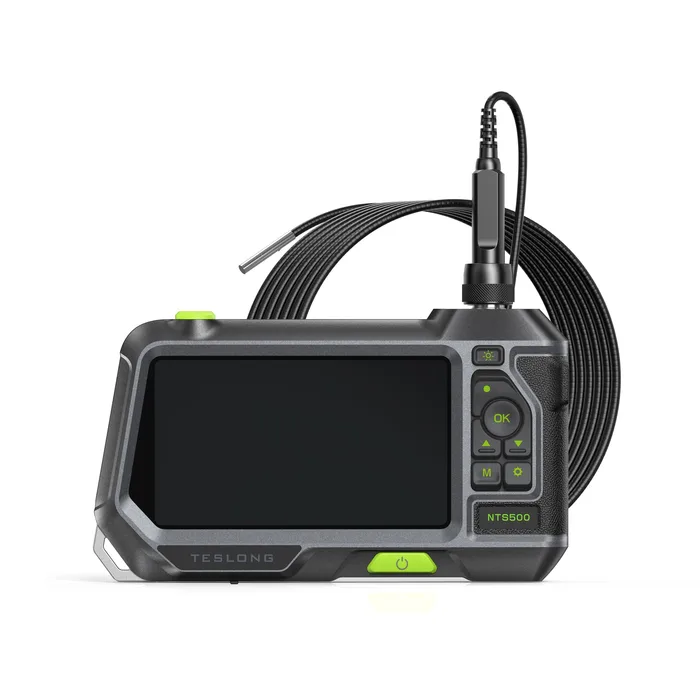
- Buy Teslong NTS500 Inspection Camera with 5-inch Screen The best-documented borescope here, and the documentation is what makes it the safest buy. Amazon
- Buy DEPSTECH DS300 Industrial Endoscope A 5.5 mm semi-rigid probe and a 4.3-inch screen for budget money, which is most of what a homeowner needs. Amazon
- It depends RIDGID micro CA-350 Inspection Camera Buy it for the ecosystem and the warranty, not for the picture. Amazon
- Skip General Tools DCS1600 Recording Video Inspection Camera / Borescope A QVGA probe feeding a QVGA display, sold at the top of the price range. Amazon
What actually matters
- Sensor resolution - the pixel count of the imaging chip inside the probe tip, and the only number that sets how much detail can exist. Everything downstream can be resampled larger or smaller without adding information.
- Probe diameter - the outside diameter of the camera head, which decides whether the tool fits a spark plug hole, a drilled inspection hole, or only a drain. Smaller heads trade away lens size and light output.
- Cable construction - flexible cable follows a pipe, semi-rigid cable holds a shape you bend into it, and an articulating cable lets you steer the tip from the handle. Each solves a different access problem.
- Depth of field and focal range - the distance band in which the fixed-focus lens is sharp, often only a couple of inches. If you cannot get the tip that close to the subject, the picture will be soft no matter what the sensor is.
- Illumination - LED count and, more importantly, adjustable brightness, because reflective metal inside a cylinder blows out at full power and dark drain walls need everything the LEDs have.
- IP rating scope - which enclosure the rating applies to. Under IEC 60529 the code is assigned to a specific enclosure, so the probe and the handset can and often do carry different ratings.
- Probe interchangeability - whether the probe threads off the monitor. If it does, one screen can serve several diameters and lengths and a crushed cable is a spare part rather than a dead tool.
The specs, in plain English
Green flags vs red flags
Green flags
- The spec sheet lists sensor resolution, capture resolution, and screen resolution as three separate lines.
- The IP rating is stated per part, for example a rating for the monitor and a different one for the probe.
- A stated depth of field or focal range in inches or millimetres rather than a vague claim about clarity.
- The probe threads off the monitor and the maker sells other diameters and lengths for the same body.
- A published field of view in degrees that is clearly labelled as the lens rather than the screen.
Red flags
- A resolution that is not a standard format, such as a product titled with a pixel height that does not exist, while the body copy on the same page says something different.
- A megapixel figure quoted with no statement of what the sensor is, on a probe only a few millimetres across.
- A single unqualified IP badge for the whole tool with no mention of which enclosure it applies to.
- A wide angle in degrees quoted near the screen description, which usually means the display's viewing angle rather than the lens.
- A premium price with a display resolution of 320 by 240, which caps what you can see regardless of the probe.
Who's who: the brands
- Teslong - Publishes per-probe camera resolution, capture resolution, screen resolution, and a split monitor and probe IP rating, which makes its claims unusually easy to verify.
- DEPSTECH - Volume consumer brand with a wide range of screen, dual-lens, and articulating models; publishes a CMOS sensor figure on some products and only a marketing resolution on others.
- RIDGID - Trade plumbing brand whose inspection cameras are built around 12V batteries, replaceable imager heads, SeeSnake reel compatibility, and a Full Lifetime Warranty rather than image quality.
- General Tools - Modular industrial systems where the console and probes are bought separately, with probe resolutions labelled openly as QVGA or VGA.
- Milwaukee - Sells inspection cameras on the M12 battery platform. Check each kit's page for screen size, camera resolution and head diameter.
How to read a listing without getting fooled
Start at the bottom of the listing, not the top. The headline will quote the largest number the maker can justify, which is almost always the saved-file resolution or the screen. Scroll to the specification table and look for a line that names the camera or the probe specifically; if it exists, that is your sensor resolution and the rest is context. Then check the IP rating and see whether it names a part. If it just says IP67 with nothing after it, assume it describes the probe and treat the handset as splash-resistant at best. Next, find the probe diameter and the focal or depth-of-field range in real units, and ask whether you can physically get the tip that close to what you need to see. Finally, look for whether the probe detaches. A maker that lists interchangeable probes with their own separate specifications is a maker that expects you to compare, and that is usually a good sign.
How much should you spend?
Budget units get you a single fixed probe, a small screen, and a marketing resolution with no sensor figure behind it. That is a fair trade for occasional use, and the physical fundamentals at this tier, a 5.5 mm head and a semi-rigid cable, are the same ones the expensive tools use. Mid-range is where the category makes the most sense: a larger high-resolution screen, published sensor specifications, and probes that thread off so one monitor serves several jobs. Premium in this category rarely buys a better picture. It buys ecosystem and durability, such as reel compatibility, shared tool batteries, replaceable imager heads, and long warranties, which are worth a great deal to a working tradesperson and very little to a homeowner. Be especially careful at the top of the range, because at least one premium system here ships a QVGA probe, so price is not a proxy for resolution.
Questions, answered
Is a phone-tethered borescope worse than one with its own screen?
Not inherently, and the sensor is often the same class of part. The differences are practical: a tethered scope has no battery or memory of its own and relies on your phone, and USB models generally do not work with iPhones and iPads because those devices do not have a USB host port, so Apple users typically need a Wi-Fi model or a standalone unit. A standalone screen also means you are not holding a phone over an engine bay. If you already own a suitable Android phone and inspect rarely, tethered is a reasonable saving.
Why does my borescope image look blurry even though the specs say 1080p?
The most likely cause is focus rather than resolution. Most of these lenses are fixed-focus with a stated sharp band of only a couple of inches, so a subject at six inches will be soft no matter what the sensor is. The second likely cause is that the 1080p figure describes the file rather than the sensor. The third is lighting: LEDs at full brightness against reflective metal wash out detail, so turn them down before you assume the tool is bad.
What is the difference between a borescope and an endoscope?
In everyday tool listings the two words are used interchangeably, and the same product is often sold under both names. Strictly, borescope is the industrial term for inspecting bores and cavities in machinery, while endoscope comes from medicine. If you are shopping for tools rather than clinical equipment, do not read anything into which word a seller chose; read the specifications instead.
Can I use one monitor with different probes?
Only if the maker designed it that way. Some mid-range and professional systems use a threaded connector so probes of different diameters and lengths swap onto the same monitor, and the maker publishes each probe's specifications separately. Sealed budget units have the cable permanently attached, which means a crushed or kinked probe ends the tool. If you expect to inspect more than one kind of thing, the swappable design is worth paying for.
Or jump to the head-to-head: Teslong NTS500 Inspection Camera with 5-inch Screen vs DEPSTECH DS300 Industrial Endoscope.