Explained
Smart Garage Door Openers, Explained
After reading this you'll understand how a smart garage controller actually works and which specs decide whether it's a good buy for your home.
In this guide
Almost nobody replaces a working garage door opener to make it smart. Instead you add a small controller that wires into your opener's existing wall-button terminals and adds a sensor that tells your phone whether the door is open or closed. What trips people up is that the hardware is rarely the problem; the ecosystem, the sensor type, and whether the thing still works when the internet is down matter far more than the box's looks or price.
The 30-second version
- You retrofit, you don't replace. These are controllers that piggyback on the opener you already own, so any standard residential opener can usually be made smart cheaply.
- The ecosystem is the real product. Whether the device works with the smart-home platform you use, and keeps working after the maker changes its business terms, matters more than the hardware.
- A wired sensor beats a battery one. A hardwired reed or contact sensor reports door position more reliably and never needs a battery swap.
- Watch for subscriptions and lock-in. Some devices gate voice control and third-party access behind a paid license, so 'free today' should mean 'free tomorrow.'
- Compatibility is not universal. Very new high-security openers can be unsupported, so you always check your opener's brand, model, and age against the maker's list first.
The products this guide is about
Our verdict on each, with the full reasoning on the companion review.
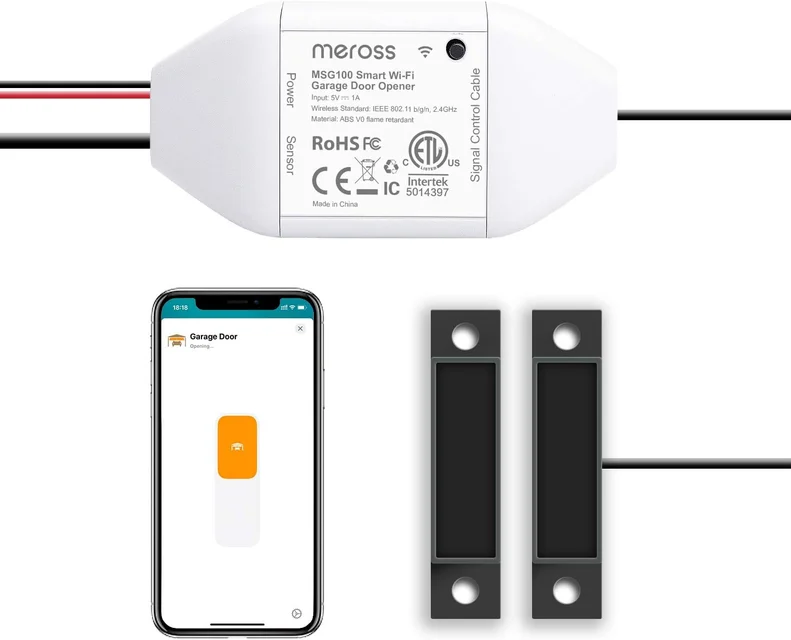
- Buy Meross Smart Wi-Fi Garage Door Opener (MSG100) The cheap, no-subscription retrofit that works with the major smart-home platforms, including Apple Home. Amazon
- Buy Konnected Smart Garage Door Opener (GDOv2) A local-first, subscription-free controller that talks straight to Home Assistant over your own network. Amazon
- It depends Tailwind iQ3 2.0 Smart Garage Door Controller The integrator's favorite: works with most opener brands and nearly every platform, if you can handle the install.
- Skip Chamberlain myQ Smart Garage Control (MYQ-G0401) Cheap, easy hardware trapped inside a locked-down ecosystem. Amazon
What actually matters
- Ecosystem support - the controller must speak to the platform you already use (Apple Home, Google Home, Alexa, SmartThings, or Home Assistant), ideally without a separate proprietary hub.
- Cloud dependence - a device that keeps working on your local network when the internet or the vendor's servers go down is more reliable and more future-proof.
- Sensor type - a hardwired reed/contact sensor is more accurate and maintenance-free than a battery-powered tilt sensor stuck to the door.
- Subscriptions and lock-in - check whether the core features you care about, especially voice control, are free permanently or gated behind a paid license.
- Opener compatibility - confirm the controller supports your opener's brand and vintage, paying special attention to the newest high-security models.
- Install effort - a stick-on wireless sensor is far easier to mount than a wired one, which is a real trade-off against reliability.
- Matter and standards support - a device that speaks Matter is more likely to keep working across platforms as the smart-home world consolidates.
The specs, in plain English
Green flags vs red flags
Green flags
- Works with your existing platform natively, no proprietary hub required
- Uses a hardwired door sensor for accurate, battery-free status
- Offers local or offline control so the door works when the internet is down
- No required subscription for core features like remote and voice control
- Supports Matter or an open, well-documented local API
- Publishes a clear opener compatibility list you can check before buying
Red flags
- Cloud-only operation with no local fallback
- Voice-assistant or third-party access gated behind a paid license
- Battery tilt sensor as the only option for door status
- A history of the maker removing features owners relied on
- Ads inserted into the companion app
- Vague or missing compatibility information for your opener's brand and age
Who's who: the brands
- Meross - Value-focused smart-home maker known for cheap, subscription-free retrofit controllers with broad platform and Apple Home support.
- Konnected - Enthusiast-oriented brand whose ESPHome-based controller integrates locally with Home Assistant and Hubitat, with Alexa and SmartThings via its free cloud service.
- Tailwind - Broad opener and platform compatibility plus a local control API.
- Chamberlain / LiftMaster - A major opener maker; its myQ controllers sit in a closed ecosystem that moved some integrations behind a paid license.
How to read a listing without getting fooled
When you read a product listing, look past the marketing and answer four questions in order. First, does it support the specific platform you use, and does it say 'native' or does it quietly require a bridge or hub? Second, does it work locally or only through the maker's cloud, because 'smart' is worthless when the door won't open during an outage. Third, what kind of sensor ships in the box, since a wired reed sensor is a quiet sign of quality and a battery tilt sensor is a compromise. Fourth, scan the fine print for the words 'subscription,' 'license,' or 'premium' next to voice control or third-party integration, and treat those as a cost even if the box is cheap. Finally, find the maker's compatibility list and match it against your opener's brand, model, and year before you trust any 'works with most openers' claim.
How much should you spend?
You do not need to spend much to get an excellent smart garage controller. The value sweet spot sits at the budget end, where a subscription-free retrofit with a wired sensor and wide platform support covers what almost everyone needs. Paying more buys you either deep enthusiast independence (fully local, no cloud, tied into a self-hosted hub) or maximum compatibility and automation depth aimed at power users and installers, and those upgrades are only worth it if you'll actually use them. Where you should be most price-conscious is the hidden cost: a cheap device that later paywalls voice control or third-party access can end up costing more over time than a slightly pricier one that keeps everything free. Judge value over the life of the device, not just the sticker.
Questions, answered
Do I have to replace my whole garage door opener to make it smart?
No. These products are controllers that wire into your existing opener's wall-button terminals and add a door-position sensor. As long as your opener is a standard residential unit, you keep it and just add the smart controller, which is far cheaper and easier than a full replacement.
Why does it matter whether the device works without the cloud?
If a controller only works through the maker's servers, the door won't respond to your phone during an internet outage, and the maker can change or remove features later. A device that also works locally on your own network is more reliable day to day and more future-proof.
Which type of door sensor is better, wired or battery?
A hardwired reed or contact sensor is generally better. It reports whether the door is open or closed more accurately, rarely gives false readings, and never needs a battery change. A battery tilt sensor is easier to install but less accurate and needs occasional maintenance.
How do I know if a controller will work with my opener?
Check the maker's published compatibility list against your opener's brand, model, and age before buying. Pay special attention if your opener is very new, since the latest high-security protocols can break compatibility with controllers that work fine on older units.
What is a subscription lock-in and how do I avoid it?
Some ecosystems make basic control free but charge a recurring license to restore voice-assistant or third-party integrations. To avoid it, favor devices that state their core smart features carry no required subscription, and be wary of any brand with a track record of moving free features behind a paywall.
Or jump to the head-to-head: Meross Smart Wi-Fi Garage Door Opener (MSG100) vs Konnected Smart Garage Door Opener (GDOv2).