Explained
Smart Plugs, Explained
After reading this you will understand the handful of specs that separate a smart plug worth keeping from a near-identical box that feels dated the day you buy it.
In this guide
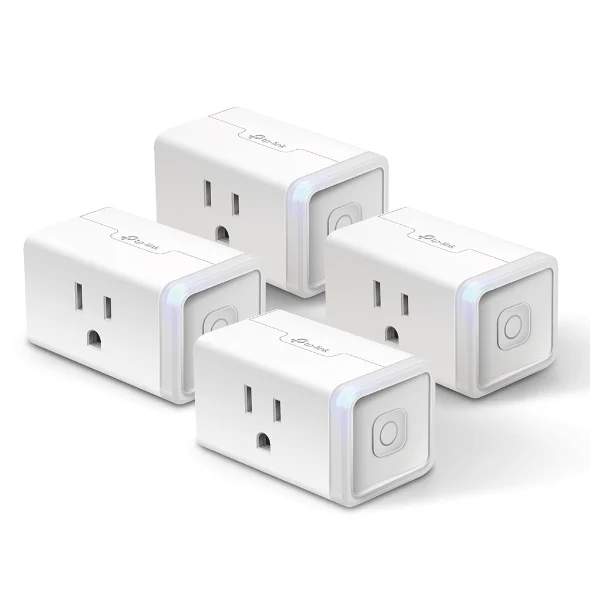
A smart plug sits between a wall outlet and whatever you plug into it, turning a dumb lamp, fan, or heater into something you can schedule or control by voice. The market is flooded with near-identical white boxes, so the choice is not about looks. What trips people up is that the differences that matter are invisible in a photo: which voice assistants a plug works with, whether it tracks energy, and whether it keeps working when your internet drops.
The 30-second version
- The three real decisions are which ecosystems the plug supports, whether it monitors energy, and whether it works without the internet.
- Matter is the future-proofing spec because a Matter-certified plug pairs with Apple Home, Alexa, Google Home, and SmartThings without a proprietary bridge, so it outlives whichever assistant you use today.
- Cloud-only control is a real limitation not a footnote: a plug that needs a company server to turn on a lamp freezes when your connection drops.
- Energy monitoring is only worth paying for if you will actually act on the data, and it is best when the plug measures locally rather than logging your usage to a cloud.
- Radio type shapes your network since every Wi-Fi plug takes a slot on your 2.4GHz band, while Thread plugs join a low-power mesh and stay out of the way.
The products this guide is about
Our verdict on each, with the full reasoning on the companion review.
- Buy TP-Link (Kasa) Kasa Smart Wi-Fi Plug Slim EP25 Accurate local energy monitoring in a slim body that works with every major assistant.
- Buy TP-Link (Tapo) Tapo P125M Mini Smart Wi-Fi Plug The cheapest honest way into Matter, minus any energy data. Amazon
- It depends Eve Energy (Matter) A private, Thread-based plug with native power data, priced for Apple households. Amazon
- Skip Wyze Plug Cheap and compact, but cloud-only control and no Matter make it feel dated fast.
What actually matters
- Ecosystem support - the list of voice assistants and apps a plug works with (Apple Home, Alexa, Google Home, SmartThings). Pick a plug that follows you if you ever switch, rather than one locked to a single assistant.
- Matter certification - the cross-industry standard that guarantees native pairing across all four major ecosystems. It is the single spec that most decides how long a plug stays useful.
- Local control - whether the plug can be switched by your hub or app without reaching a company server. Local control keeps schedules and voice commands alive during an internet outage.
- Energy monitoring - whether the plug measures the power a device draws. Useful for hunting standby loads or a failing appliance, pointless if you only want lights on a timer.
- Connection type - Wi-Fi, Thread, or Matter over either. This affects outage behavior, response speed, and how much strain many plugs put on your router.
- Physical size - a slim or mini body lets you keep the second outlet on a duplex usable or stack two units, while a bulky plug blocks its neighbor.
- Electrical rating - the maximum current and wattage the plug can safely pass, which decides whether it can handle a high-draw appliance like a space heater.
The specs, in plain English
Green flags vs red flags
Green flags
- Matter certification stated on the box or listing, ideally confirmed rather than implied
- Explicit local control, so the plug keeps working through an internet outage
- Local energy monitoring if you want power data, keeping usage off a cloud
- A slim or mini body that stacks or leaves the second outlet usable
- A clear current and wattage rating plus a recognized safety mark like UL
- An active track record of firmware updates and a maker still supporting the model
Red flags
- Cloud-only control with no local fallback, common on the cheapest plugs
- No Matter support on a plug you expect to keep for years
- Energy monitoring advertised but only readable through the maker's cloud
- A bulky housing that blocks the adjacent outlet on a duplex
- Vague or missing electrical ratings and no safety certification
- A maker with a history of data-exposure incidents wanting a permanent line to its servers
Who's who: the brands
- TP-Link (Kasa) - TP-Link's established smart-home line, known for reliable Wi-Fi plugs and strong local energy monitoring.
- TP-Link (Tapo) - TP-Link's value-focused sub-brand, often the cheapest honest route into Matter-certified plugs.
- Eve - A premium, privacy-minded maker built around Thread and Apple Home, keeping data on-device with no account required.
- Wyze - A budget smart-home brand with very low prices, but a lean on cloud control and a past data-exposure incident that colors trust.
- Amazon - Makes its own basic smart plugs tuned tightly to Alexa, convenient inside that ecosystem but less flexible outside it.
How to read a listing without getting fooled
Read a smart-plug listing from the network outward, not from the price inward. First find the ecosystem line: if it says Matter, the plug will pair with any major assistant, so trust that over vague phrases like works with Alexa and Google that often mean cloud-only. Next check for the words local control; if the listing only talks about an app and a cloud account, assume the plug stops responding during an outage. Then look at how energy monitoring is described: real-time watts plus history is genuinely useful, but only if the listing says the data is available without routing through the maker's servers. Finally, confirm the electrical rating and a safety mark, and read the size description as a warning about whether the plug will block its neighbor. Box art and star counts tell you almost nothing here; the certifications and the word local do the real work.
How much should you spend?
Smart plugs are close to a commodity, so spending more buys specific capabilities rather than general quality. The budget tier gets you a compact, reliable plug, and the cheapest honest ones now include Matter, which is the feature most worth having. Step up to the mid tier mainly for local energy monitoring, and only if you will act on the data. The premium tier is justified in one situation: a Thread-based plug in a home that already has a border router and wants native power data with strong privacy. The value sweet spot for most people is a Matter-certified plug at the low end, then adding one energy-monitoring plug only in the spots where you actually want to measure consumption. Paying up for a cloud-only plug with no Matter is the one choice to avoid at any tier, because you are buying a short-term device sold as a long-term one.
Questions, answered
Do smart plugs work without Wi-Fi or the internet?
It depends on the plug. Matter models, whether over Thread or Wi-Fi, keep local control during an outage through your hub. Cloud-only plugs freeze in their last state until service returns. If offline reliability matters, buy a Matter-certified plug and confirm the certification rather than trusting the packaging.
Is energy monitoring worth paying extra for?
Only if you will use the data. Monitoring helps you find standby loads, estimate a home-office bill, or spot a failing appliance. If you only want lights on a schedule, skip it and save money. When you do want it, prefer a plug that measures locally so your usage is not logged to a cloud.
What is Matter, and why does it matter for a plug?
Matter is a cross-industry standard that lets one plug pair natively with Apple Home, Alexa, Google Home, and SmartThings without a proprietary bridge. For a plug it means the device outlives whichever ecosystem you use now, so you are not re-buying hardware when you switch assistants.
Can I plug a space heater or air conditioner into a smart plug?
Check the rating first. Many plugs handle up to 15A / 1800W, which covers most space heaters but leaves little headroom. Never daisy-chain plugs or exceed the stated load, and prefer a plug that is UL certified for high-draw appliances.
Will lots of smart plugs slow down my Wi-Fi?
Wi-Fi plugs each take a slot on your 2.4GHz network, so a dozen of them can crowd an older router. Thread-based plugs avoid this by joining a low-power mesh instead. For large deployments, mix in Thread plugs or add a stronger access point.
Do I still need the maker's app if a plug supports Matter?
Often yes, at least once. Even Matter plugs usually require you to create an account and run initial setup in the maker's app before handing control to your chosen ecosystem. After that, day-to-day control can live entirely in Apple Home, Alexa, Google Home, or SmartThings.
Or jump to the head-to-head: TP-Link (Kasa) Kasa Smart Wi-Fi Plug Slim EP25 vs TP-Link (Tapo) Tapo P125M Mini Smart Wi-Fi Plug.