Explained
Outdoor Security Cameras, Explained
After reading, you will understand every spec on an outdoor camera box and know which ones actually protect your home versus which ones just sell you a monthly plan.
In this guide
An outdoor security camera looks simple until you compare two boxes and find one lists '4K ColorX F1.0' and the other '2K HDR IP65', with no hint which keeps you safer. The specs that matter most are rarely the ones printed largest, and the biggest hidden cost is usually the storage plan, not the camera itself. This guide decodes the terms so you can judge coverage, night vision and true ownership cost at a glance.
The 30-second version
- The real cost is storage, not the camera. A cheap camera that paywalls recording behind a monthly plan often costs more over two years than a pricier one that records locally for free.
- Night vision quality is the whole point. A camera that only sees in grainy infrared may capture that 'someone was here', but not who they were; full-color low-light sensors keep faces and clothing identifiable.
- Weather ratings are not interchangeable. An IP54 camera is only splash-resistant and needs a covered eave, while IP65 and up can face an exposed, rain-beaten wall.
- Field of view decides how many cameras you buy. A wide panorama or a pan-tilt head can cover a space that would otherwise need two or three fixed cameras.
- Free smart detection is worth paying attention to. On-device person, vehicle and animal detection at no charge separates useful alerts from a phone that buzzes at every passing cat and swaying branch.
The products this guide is about
Our verdict on each, with the full reasoning on the companion review.
- Buy Reolink Argus 4 Pro The widest and sharpest no-subscription camera, provided you feed it enough storage and signal.
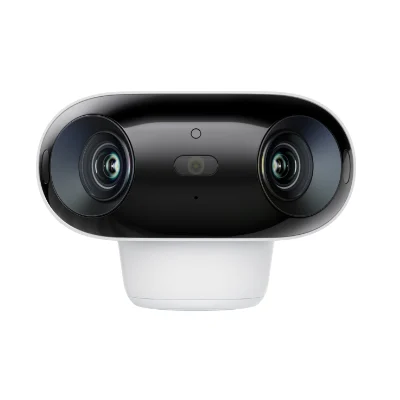
- Buy eufy SoloCam S340 A dual-lens pan-tilt watcher that follows and zooms, with onboard storage and no fees. Amazon
- It depends Google Nest Cam (battery) Strong free basics and a clean app, held back by weak weatherproofing and a walled garden. Amazon
- Skip Arlo Pro 5S 2K Capable hardware undercut by a subscription you must keep paying just to record anything. Amazon
What actually matters
- Storage and subscription model - decide up front whether footage lands on a local card or hub you own, or in a cloud that charges monthly; this single choice drives long-term cost more than any spec.
- Night vision type - most break-ins and deliveries happen in low light, so whether a camera resolves a recognizable face or just a pale blur is often the difference between useful evidence and none.
- Resolution and field of view - higher resolution lets you crop in on a plate or face, and a wider or motorized view covers more ground per unit, reducing how many cameras you need.
- Weather rating (IP code) - the camera lives outside year-round, so its ingress-protection rating must match how exposed the mounting spot is.
- Power and installation - battery, solar and wired options trade convenience against reliability; a self-charging solar battery camera is easy to mount but leans on Wi-Fi and daylight.
- Smart detection cost - person, vehicle, animal and package filtering cuts false alerts dramatically, but check whether it is free on-device or locked behind a plan.
- Ecosystem fit - a camera that plugs into speakers, displays and apps you already own is pleasant daily, but tight integration usually means less freedom to mix brands later.
The specs, in plain English
Green flags vs red flags
Green flags
- Records to local storage (card or hub) with smart detection included at no monthly cost
- Full-color or high-sensitivity night vision, ideally with a low F-number, so faces stay identifiable after dark
- A weather rating of IP65 or higher if the mounting spot is fully exposed
- On-device person, vehicle and animal detection to cut down false alerts
- Solar or long battery life clearly stated, or a wired option, so you are not recharging constantly
Red flags
- Core features like recording, activity zones or detection locked behind a subscription, with no local storage fallback
- Only an IP54 rating advertised for a camera you intend to mount on an open wall
- Vague 'night vision' claims with no mention of color, infrared or aperture
- A closed ecosystem that will not work with anything you already own and no export option for clips
- A very low sticker price paired with a mandatory plan, which signals the recurring bill is where the real cost hides
Who's who: the brands
- Reolink - Known for feature-rich cameras with generous local storage and no mandatory subscription; strong on wide-angle and color night vision.
- eufy - Anker's home-security line, favored for on-device processing, fee-free local storage and self-charging solar options.
- Google Nest - Polished app and tight Google Home integration with a generous free tier, though deeper history needs a paid plan and hardware runs premium.
- Arlo - Capable, rugged hardware, but heavily oriented around its paid Arlo Secure cloud plan, without built-in local storage as a fallback.
- Ring - Amazon-owned and widely recognized for doorbells and easy setup, though most useful recording features sit behind a subscription.
- Wyze - Budget-focused brand offering low-cost cameras with optional local recording; a common entry point for first-time buyers.
How to read a listing without getting fooled
Read a camera listing back to front. Start with the storage and subscription line, because a stunning 4K sensor is worthless if you cannot keep the footage without an open-ended monthly bill; look for the words 'local storage', 'microSD', 'no subscription' or, as a warning, 'plan required'. Next, translate the night-vision claim: 'color night vision' and a low F-number are strong, while a bare 'night vision' usually means grey infrared. Check the second digit of the IP rating against how exposed your wall is. Treat resolution and field-of-view numbers as a pair, since a huge angle at low resolution spreads detail too thin to identify anyone. Finally, notice which smart-detection features are described as 'free' or 'on-device' versus 'with subscription', as that phrasing is where marketing quietly moves the real cost.
How much should you spend?
Spend based on total cost of ownership, not the sticker. The cheapest camera on the shelf is frequently the most expensive over a couple of years once a mandatory recording plan is added, so a mid-range camera with free local storage often wins on value. The sweet spot for most homes is a mid-range model with a decent resolution, color or high-sensitivity night vision, a solid weather rating and fee-free local recording. Paying up to premium is justified when you genuinely need the widest coverage from a single unit, the sharpest night color or the largest storage capacity. Paying more is not worth it when the extra money mainly buys ecosystem polish or hardware whose best features are still gated behind a subscription. Budget separately for a large memory card or a hub, since that up-front cost is what buys you freedom from monthly fees later.
Questions, answered
Do I really need a monthly subscription for an outdoor camera?
No. Many cameras record to a local card or a home hub with smart detection included at no charge. Subscriptions are one storage model, not a requirement, and the presence of free local storage is one of the clearest signs of good long-term value. Always confirm what the camera can and cannot do with no plan attached.
What is the difference between color night vision and infrared?
Infrared lets a camera see in complete darkness but only in grey monochrome, so you may capture that someone was present without being able to tell who. Color night vision uses a very light-sensitive sensor, sometimes helped by a spotlight, to keep real color at night, which keeps faces and clothing identifiable. For security, that identification is often the whole point.
How weatherproof does an outdoor camera need to be?
It depends on where you mount it. A camera under a covered porch or eave can get away with a lower rating like IP54, which is only splash-resistant. A camera on a fully exposed wall that takes direct rain should be IP65 or higher. Matching the IP rating to the spot prevents early water damage.
Are battery and solar cameras reliable enough for security?
Yes, with realistic expectations. Battery models commonly last months per charge, and solar panels can keep them topped up indefinitely in sunny spots. The trade-offs are dependence on Wi-Fi strength and a very brief wake-from-idle delay compared with an always-on wired camera. For most homes those are acceptable in exchange for easy, wire-free installation.
Is local storage safer than cloud storage?
Each has a weakness. Local storage keeps footage on a card or hub in your possession, out of reach of cloud breaches, data requests and lapsed subscriptions, but a stolen camera can take its card with it. Cloud storage survives theft of the camera but depends on a company and often a paid plan. Mounting local-storage cameras high, or backing clips up off-device, gets you the best of both.
How many cameras do I need to cover my property?
Fewer than you might think if you choose the field of view carefully. A single wide-angle or panoramic camera can cover an entire yard corner, and a pan-tilt camera can sweep a driveway or long approach that a fixed lens would miss. Map your key entry points first, then match a wide fixed view to open areas and a motorized view to single paths you want to track.
Or jump to the head-to-head: Reolink Argus 4 Pro vs eufy SoloCam S340.