Explained
Smart Light Bulbs, Explained
After this guide you'll be able to read any smart bulb listing, know which specs actually predict how it will look and behave in your home, and pick between a cheap Wi-Fi bulb and a full lighting system with confidence.
In this guide
A smart light bulb is a regular LED bulb with a radio and a tiny computer inside, so you can control it from an app, a voice assistant, or a schedule instead of just a wall switch. The category looks simple until you hit the jargon - lumens, Kelvin, Matter, Zigbee, hubs, 2.4 GHz - and discover that two bulbs with identical-sounding boxes can behave completely differently once they're in a socket. Most buyer regret comes from two traps: brightness numbers that only apply in white mode, and connection tech that doesn't fit how many bulbs you'll eventually own.
The 30-second version
- The lumen number on the box is a white-mode number. In saturated colors like red or blue, output can drop by half or more - and this gap is the single biggest real-world difference between premium and budget color bulbs.
- Your real choice is Wi-Fi versus a hub system. Hub-free Wi-Fi bulbs are cheap and easy for a few sockets; a hub-based system like Zigbee costs more upfront but stays reliable as you scale to a whole home.
- Matter certification is the mixed-household fix. A Matter bulb joins Apple Home, Google Home, Alexa, or SmartThings directly, so one bulb works with whatever assistant your family already uses.
- Smart bulbs and old-school wall dimmers don't mix. A traditional dimmer starves the bulb's electronics and causes flicker and early failure - smart bulbs belong on plain on/off switches and dim through the app instead.
- App quality and reliability outlast specs. Owner reports about pairing failures, dropped connections, and sluggish apps after month three predict your experience better than any spec sheet.
The products this guide is about
Our verdict on each, with the full reasoning on the companion review.
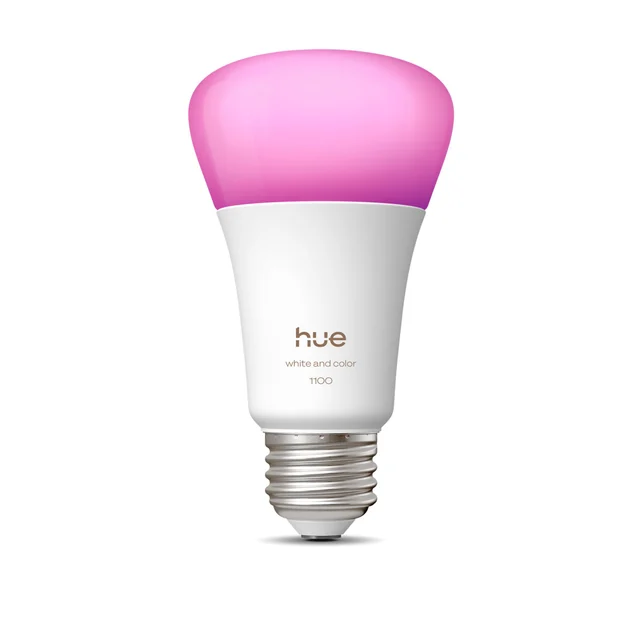
- Buy Philips Hue White and Color Ambiance A19 (75W) Still the gold standard: the brightest, most accurate, most reliable color bulb you can screw into a lamp. Amazon
- Buy TP-Link Tapo L535E Matter Multicolor Smart Bulb The value knockout: Matter support, no hub, and respectable color for pocket change. Amazon
- It depends WiZ 60W A19 Color Smart Bulb Signify's hubless budget line is genuinely good - but it sits awkwardly between the bargain and the flagship. Amazon
- Skip Nanoleaf Matter Wi-Fi A19 Smart Bulb Dim output and owner reports of shaky software outweigh the Matter support. Amazon
What actually matters
- Brightness in color modes, not just the headline white-mode lumens - good bulbs stay vivid in saturated reds and blues, while weak ones collapse to a dim glow.
- Radio type - plain 2.4 GHz Wi-Fi means no hub to buy but more devices crowding your router; Zigbee or Thread mesh needs a hub or border router but tends to scale well in large installs.
- Matter support if your home mixes assistants - it lets one bulb be set up once and controlled from Apple, Google, Amazon, or Samsung ecosystems without brand-specific workarounds.
- Color accuracy and white quality - whites should look natural rather than blue-ish or green-ish, and colors should look like the color you asked for; reviewer comparisons often separate the field here.
- Local control - the best systems keep working from the app when your internet is down; cloud-dependent bulbs can leave you opening a ticket to turn on a lamp.
- Ecosystem accessories - physical dimmer switches, motion sensors, and light strips from the same brand matter more than they sound, because nobody wants to open an app for the hallway light.
- Long-term software reputation - firmware updates, app redesigns, and server changes affect a smart bulb for years after purchase, so a brand's track record is part of the product.
The specs, in plain English
Green flags vs red flags
Green flags
- Matter certification, so the bulb works with whichever voice assistant your home already uses - no brand lock-in
- Reviewers praising brightness in saturated colors, not just the white-mode lumen number
- Owner reports describing the app as fast and bulbs staying connected months after setup
- Basic control that keeps working when the internet is out (local control)
- A real accessory ecosystem - physical dimmers, motion sensors - from the same brand
- Multipack pricing from an established brand, which is how good budget bulbs are meant to be bought
Red flags
- Only a white-mode lumen figure with no mention of color-mode brightness - expect dim, washed-out colors
- A pattern of owner complaints about pairing failures, bulbs dropping offline, or laggy app control
- Features that all depend on the maker's cloud servers, with no local fallback
- A no-name brand whose app has few reviews or hasn't been updated recently - the app is half the product
- Marketing that leads with looks or gimmicks while staying vague about brightness and color accuracy
- A mid-range price without a clear advantage over the best budget bulbs - the awkward middle is where regret lives
Who's who: the brands
- Philips Hue - The category's reference point - a premium Zigbee hub system known for strong color accuracy, a strong reliability reputation, and a deep accessory ecosystem.
- TP-Link (Tapo/Kasa) - The budget value leader - cheap Matter Wi-Fi bulbs with an unusually polished app, sold in multipacks; the default first smart bulb for many homes.
- WiZ - Signify's hubless budget line (same parent as Hue) - good light and a scene-rich app, but positioned awkwardly between the cheapest bulbs and the flagship.
- Nanoleaf - Best known for decorative wall panels; its standard bulbs have distinctive looks but owner reports of connectivity and app trouble.
- GE (Cync) - A familiar name in US home lighting with a broad hubless smart range - widely available in hardware stores rather than a specialist favorite.
- Govee - A fast-moving budget brand strongest in light strips and ambient effects; its app is feature-packed, with quality that varies more across the lineup.
How to read a listing without getting fooled
Start with the shape and base - A19/E26 for a normal US lamp - then find the lumen figure and mentally label it 'white mode only'; if the listing never mentions color-mode brightness, assume saturated colors will be noticeably dim. Check the radio: '2.4 GHz Wi-Fi' means hub-free but router-hungry, 'requires bridge/hub' means extra upfront cost but better scaling. Look for the Matter logo if your home mixes Apple, Google, and Amazon. Treat phrases like '16 million colors' as filler - every color bulb tends to claim it, and it says nothing about accuracy or brightness. 'Works with Alexa/Google' is table stakes, not a feature. The most honest signal in a listing is often what's missing: no CRI figure, no color-brightness claim, and no mention of local control usually means the maker would rather you didn't ask. Finally, skim recent owner reports for the words 'offline', 'pairing', and 'app' - that's where the real long-term experience shows up.
How much should you spend?
Smart bulb cost is driven mostly by the radio system and the brand's software investment, not the light itself. At the budget end, established-brand Wi-Fi bulbs sold in multipacks are the value sweet spot - you get genuine color, schedules, and full voice control, accepting slightly cooler whites and dimmer saturated colors. The premium tier buys three concrete things: brightness that holds up in color modes, whites accurate enough to notice every evening, and a hub-based system that stays dependable across dozens of bulbs. Spending more is worth it when lighting becomes infrastructure - a whole home, accessories like dimmers and sensors, and years of expected service. It isn't worth it for one lamp or a first experiment, where a cheap Matter bulb delivers most of the everyday experience. The place to be wary is the middle: mid-priced bulbs that neither undercut the budget leaders nor match the flagship's quality are the category's most common source of regret.
Questions, answered
Do I need a hub to use smart bulbs?
Usually not. Most current bulbs connect straight to your 2.4 GHz Wi-Fi and work with voice assistants immediately. Hubs enter the picture with systems like Philips Hue, where the bridge unlocks the full experience - better reliability, accessories, and control that survives internet outages. A good rule: a few bulbs, no hub needed; a whole home, a hub system starts to earn its cost.
What is Matter, and should I care?
Matter is the shared smart-home standard backed by Apple, Google, Amazon, and Samsung. A Matter-certified bulb can be added directly to Apple Home, Google Home, Alexa, or SmartThings without a brand-specific hub. If everyone in your house uses one assistant, it's a nice-to-have; if your household mixes ecosystems, it's the difference between one clean setup and three workarounds.
Why does my color bulb look so dim when it's red or blue?
The brightness number on the box is measured in white mode, where all the bulb's LEDs work together. In a saturated color, only some LEDs light up, so output drops - often by more than half. Premium bulbs are engineered to hold their brightness in color modes; budget bulbs fall off much harder. This is the biggest quality gap in the category and it's rarely on the box.
Can I put a smart bulb in a fixture with a wall dimmer?
No. Traditional wall dimmers work by chopping the power going to the bulb, which starves the smart bulb's electronics and causes flicker, random disconnects, and early failure. Smart bulbs belong on plain on/off switches and do their dimming digitally through the app or voice control. If you want a physical dimmer, some hub systems offer smart dimmer accessories designed for the job.
Will my smart bulbs still work if the internet goes down?
Partially, and it varies by system. The wall switch normally still works for basic on/off. Hub-based systems typically keep app control working locally even without internet. Hubless Wi-Fi bulbs vary: basic control often survives if your router is up, but remote access, some scenes, and voice control usually pause until the connection returns. If outage behavior matters to you, look for 'local control' in the product's documentation.
What happens when someone flips the wall switch off?
The bulb loses power entirely and goes 'unreachable' in the app until the switch is flipped back on - a top source of household friction with smart bulbs. Fixes range from tape and polite requests to smart switch covers and brand-matched remote dimmers that replace or sit over the wall switch. Plan for this before filling shared rooms with smart bulbs.
Or jump to the head-to-head: Philips Hue White and Color Ambiance A19 (75W) vs TP-Link Tapo L535E Matter Multicolor Smart Bulb.