Explained
Smart Locks, Explained
After reading, you'll know exactly which smart lock features matter for your door, your phone, and whether you own or rent.
In this guide
Smart locks look simple on the shelf but hide a lot of decisions: do you replace the whole deadbolt or clamp a gadget onto the one you have, and how does the thing actually let you in? The two biggest traps are buying a lock that doesn't fit your door or your smart-home apps, and assuming features like phone-tap unlocking or remote control work out of the box when they often need an extra hub. This guide decodes the terms so you can match a lock to how you really live.
The 30-second version
- Deadbolt replacement vs retrofit is the first fork. A full replacement swaps your exterior hardware and usually adds a keypad or fingerprint reader, while a retrofit keeps your existing key and only changes the inside of the door.
- "Smart" doesn't always mean "remote." Many locks need a separate hub or bridge before you can control them from away, so check whether Wi-Fi is built in or an add-on.
- Entry methods decide daily happiness. A keypad or fingerprint reader matters most if guests, kids, or cleaners need to get in without your phone or a physical key.
- Ecosystem fit beats spec-sheet bragging. Confirm the lock supports the exact platform you use, whether that's Apple Home Key, Alexa, Google Home, or Matter, before you fall for a feature list.
- A smart lock usually still opens without the internet. Keypads, fingerprints, and physical keys keep working locally when Wi-Fi or power drops; you only lose remote phone control until it comes back.
The products this guide is about
Our verdict on each, with the full reasoning on the companion review.
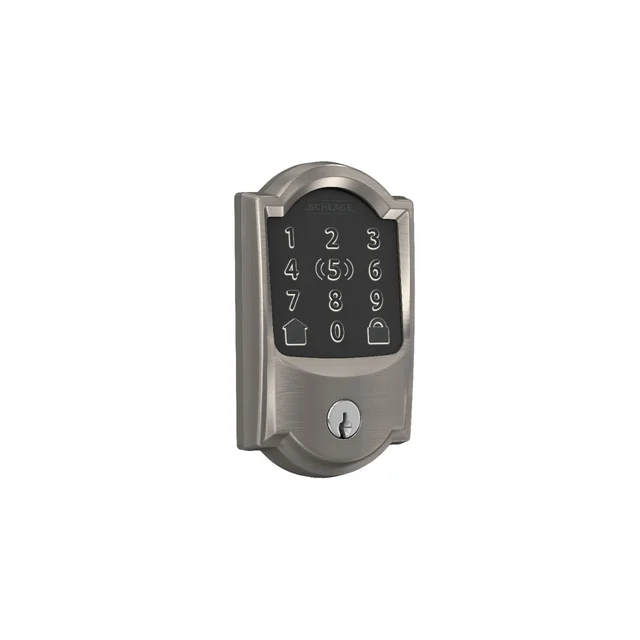
- Buy Schlage Encode Plus Smart WiFi Deadbolt The most secure of the group, with hub-free Wi-Fi and Apple Home Key baked in. Amazon
- Buy Aqara Smart Lock U200 The value pick: fingerprint, keypad, NFC, and Matter over Thread without a premium price.
- It depends August Wi-Fi Smart Lock (4th Gen) A renter-friendly retrofit that keeps your key and hardware but skips a built-in keypad. Amazon
- Skip Wyze Lock Bolt v2 A low-cost fingerprint deadbolt with built-in Wi-Fi, but its own page lists only BHMA Grade 2 and no Apple Home Key or Matter. Amazon
What actually matters
- Security grade is the factor that matters most for a main entry. Look for commercial or heavy-duty ratings, since a smart lock is only as good as the physical bolt behind the electronics.
- Entry methods determine how you and your household actually get in. Decide whether phone and key are enough, or whether you need a keypad or fingerprint reader for guests.
- Connectivity type (Wi-Fi, Thread, or Bluetooth) controls how the lock talks to your phone and whether you need extra hardware for remote access.
- Hub or no hub is a hidden cost and complexity trap. Built-in Wi-Fi is the simplest; Thread and Bluetooth locks often need a hub or bridge to do everything the box promises.
- Install type narrows the field fast. Retrofits keep your key and suit renters; full replacements let you add keypads and fresh finishes but change your exterior hardware.
- Power source affects convenience and upkeep. Rechargeable packs skip the battery drawer, while replaceable cells are easy to swap in a pinch, so check that the app warns you early either way.
- Smart-home ecosystem support has to match the apps you already run. Matter is the emerging common language, but confirm the specific voice assistant or phone feature you want is truly supported.
The specs, in plain English
Green flags vs red flags
Green flags
- A commercial-grade or heavy-duty security rating on a lock guarding a main entry door
- Built-in Wi-Fi with no separate hub required for remote control
- Multiple entry methods (keypad, fingerprint, NFC, or a physical key) so no one is stranded outside
- Clear, current support for the exact platform you use, ideally including Matter for future-proofing
- A low-battery warning in the app well before the lock actually dies
Red flags
- Wi-Fi, a keypad, or remote features sold as separate add-ons that aren't obvious until checkout
- A retrofit that doesn't clearly fit your existing deadbolt brand and model
- Owner reports of finicky app setup, dropped connections, or unreliable auto-unlock
- No physical key or backup entry method if the electronics fail
- Vague or missing security ratings on a lock meant for a front door
Who's who: the brands
- Schlage - A long-established lock maker known for BHMA-certified deadbolts and hub-free Wi-Fi models.
- Aqara - A value-focused smart-home brand offering feature-packed locks with fingerprint, keypad, and broad Matter support.
- August - The retrofit specialist, best known for locks that clamp onto your existing deadbolt and keep your key.
- Wyze - A budget smart-home brand whose Lock Bolt v2 adds fingerprint entry and Wi-Fi to a deadbolt, with a BHMA Grade 2 rating listed on its page.
How to read a listing without getting fooled
When you scan a smart lock listing, separate what the lock does on its own from what needs extra gear. First check whether it's a full deadbolt replacement or a retrofit, because that decides if your exterior hardware and key change. Next, read the connectivity line carefully: "built-in Wi-Fi" means no extra box, while "Thread" or "Bluetooth" usually means you'll need a hub or bridge for remote access and sometimes for phone-tap unlocking. Treat phrases like "works with Apple Home" and "supports Apple Home Key" as different things, since the first just means basic app control and the second means tap-to-unlock. Confirm which entry methods are truly built in versus sold separately, watch for a real security rating, and match the platform list against the apps you already use rather than the longest feature list.
How much should you spend?
What you pay for a smart lock mostly tracks three things: physical security, the number of built-in entry methods, and whether connectivity is included or bolted on. The value sweet spot sits with a lock that has built-in Wi-Fi and at least one keyless entry method out of the box, so you aren't nickel-and-dimed on hubs and keypad accessories later. Spending more is worth it when the lock guards a main entry and you want commercial-grade toughness, or when you genuinely need several entry methods like fingerprint plus keypad plus phone tap. Spending more is not worth it when the premium mainly buys looks, such as an invisible design, while leaving Wi-Fi and a keypad as separate purchases and offering weaker physical security. Cheaper retrofits can be the best value of all for renters who only need app control and want to keep their existing key.
Questions, answered
Do smart locks still work if the Wi-Fi or power goes out?
Generally yes. Smart locks keep working locally when the internet drops; you just lose remote control from your phone until it returns. Keypads, fingerprint readers, phone taps, and physical keys typically still function. Because the locks run on their own batteries, a household power outage doesn't lock you out either.
Which type of smart lock is best for renters?
A retrofit lock is usually the right call. It mounts on the inside of your existing deadbolt, so the exterior hardware and your landlord's keys stay exactly as they were, and it's easy to remove when you move out. The trade-off is that many retrofits skip a built-in keypad, so budget for a separate keypad accessory if you want code entry.
What is Apple Home Key and do I need an iPhone for it?
Home Key stores a digital key in your iPhone or Apple Watch so you tap the phone to the lock to unlock, much like Apple Pay. It only works on Apple devices, and not every lock supports it natively; some also require the lock's own hub to enable the feature. If you're on Android, look instead for a keypad, fingerprint, or NFC entry.
Do I need a separate hub or bridge?
It depends on the lock's connectivity. Locks with built-in Wi-Fi need no hub for remote access. Locks that use Thread generally need a compatible hub or border router, and Bluetooth-first locks need an add-on bridge to reach the internet. Always check this before buying, because a hub is an extra device, an extra setup step, and sometimes an extra cost.
How long do smart lock batteries last?
Owner reports generally put most smart locks in the several-months-per-charge range under normal use, though heavy keypad and auto-unlock activity shortens it. Rechargeable packs are the most convenient to top up, while replaceable cells are easy to swap in a pinch. Check that the app warns you before the battery runs low.
Or jump to the head-to-head: Schlage Encode Plus Smart WiFi Deadbolt vs Aqara Smart Lock U200.